TSML UI & Data Feed
The TSML UI front-end, JSON feed, third-party integration.
110 questions — sourced from GitHub discussions & issues.
Edits not updating/syncing in the Meeting Guide App
Show question & answer
Question
Hello,
I have edited an address for an existing meeting and the meeting has now disappeared from the Meeting Guide app. It is showing up fine in the website plug in. I have updated twice and it has been a few days without syncing to the app. Please advise. Does the region impact this at all? It is right on the county line but I would think that would be google maps issue and not the app. Any help. Thanks for your service.
Answer by @brianw-area24
I think you'll need to contact the Meeting Guide support for this. It sounds like they might have to change the boundaries for where they accept meeting listings from your site. The support page is at https://meetingguide.aa.org/ When you contact them, be sure to include the URL of your site, and the name and address of the meeting that's not appearing in the app.
Brian
Address & Map Issues when entering meetings into Meeting Guide
Show question & answer
Question
Hi - I have never worked on webpages before so am very green at this. Our District webpage is AADistrict23WI.org. We are using GoDaddy as our host and I'm using Managed Workpress for the website. I have two main issues right now that I'm requesting your help with:
- I am using Google Maps and when I enter the meeting location’s address into Wordpress, the proper map pops up for a split second and then disappears and is replaced by an error message that reads “Oops! Something went wrong! This page didn't load Google Maps correctly. See the JavaScript console for technical details.” I have no idea where or what the JavaScript console is. And then, even stranger, the map feature usually works fine for users using the Meeting Guide app. Why is this showing up on my Wordpress version?
- My second issue may or may not be connected: The addresses for some meetings that I enter will not “take” or allow me to publish them if the system ‘thinks’ they’re wrong. For instance, if there’s a Stout Street in both Rice Lake and Chetek, it keeps reverting my Chetek entry to Rice Lake - even though it has a different zip code and Region. Also, if there is more than one Bethany Lutheran Church (for instance) but in two different towns, the systems reverts my entry back to the first one I entered. Have you heard of this happening? I have several entries to the Meeting Guide that I can’t publish correctly because of this. I’ve also had problems with the system changing the “Region” to what it thinks it should be – even though I’ve manually entered it as some other region. Any help that anyone can provide would be GREATLY appreciated!! Also, please let me know if you need any additional information that I haven't yet provided. Thank you!! P.S. I would provide some screen shots but the copy/paste function doesn't seem to work in this box. https://aadistrict23wi.org/meetings/sunday-big-book/?tsml-day=any
Answer by @brianw-area24
With your first issue, what the "Javascript Console" would tell you is > Google Maps JavaScript API error: ApiNotActivatedMapError > https://developers.google.com/maps/documentation/javascript/error-messages#api-not-activated-map-error
What this is saying is that your Google API key doesn't have the correct settings to be able to display the map. You have a couple of options to address this
- Log into the Google console, and activate the "Maps JavaScript API".
- Login to https://www.mapbox.com and create an access token, and put this token into the "Import & Settings" page of the TSML plugin. This will allow your site to use Mapbox maps. Personally, I find the interface of the Google console confusing, too many options. Therefore, unless you need to use Google maps, I'd probably recommend Mapbox for your site.
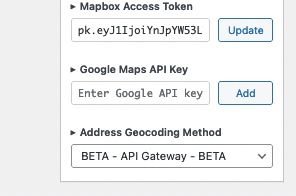
Next, also on the Import & Settings page, I would suggest you select "BETA - API Gateway - BETA" for the Address Geocoding Method. This may help with your second issue.
Here is an image of the bottom right-hand corner of the Import & Settings page of my test site.
A couple of TSML UI questions
Show question & answer
Question
I'm configuring this and really like the new UI, I have two questions that have come up --
With the new front end, our online meetings say both "Online" and "Online Meeting" but on the old front end they only say "Online"
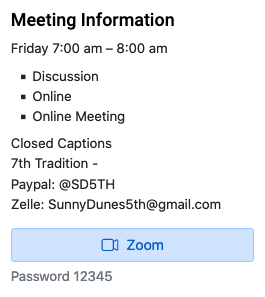
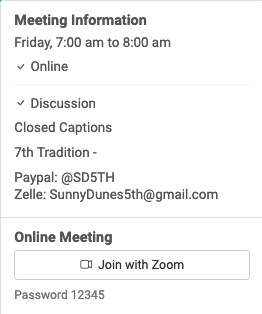
I'd like to remove "Online Meeting" from showing up...
It also shows up in the Type search:
<img width="210" alt="Screen Shot 2022-02-04 at 7 41 27 AM" src="https://user-images.githubusercontent.com/8978087/152558156-01b18024-a3d8-43fc-82bf-865101047c71.png">
Also, on the in-person meetings is there a way to not show the list of other meetings at the same location, and instead just the count, as the old legacy TSML did?
<img width="324" alt="Screen Shot 2022-02-04 at 7 42 55 AM" src="https://user-images.githubusercontent.com/8978087/152558433-438048d3-489a-4d1a-beaa-75c2df3474f4.png">
Thank you!
Answer by @joshreisner
hi @toddjsaunders , i've created an issue to fix the extra "Online Meeting" issue: https://github.com/code4recovery/12-step-meeting-list/issues/670
regarding the meeting list, TSML (the WP plugin) does say the number of meetings on the meeting detail page, but that links you to another page for that location where you can see links to all the meetings that are held there. TSML UI on the other hand doesn't have that view, and we needed a place to put that list. it is important for some users to see that, for example users with limited mobility.
what's the reason for wanting to hide it? for example is it that the meetings might not all be affiliated, or is it more of a visual preference?
Why is this online meeting not published in the Meeting Guide App
Show question & answer
Question
I have an online only meeting that is not showing up in the Meeting Guide App: https://ncsandiegoaa.org/meetings/7am-zoom-3rd-tradition-belly-up?tsml-day=any&tsml-query=belly
A live meeting with a specific address in the same city does show up in the Meeting Guide App: https://ncsandiegoaa.org/meetings/3rd-tradition-belly-up-6?tsml-day=any&tsml-query=belly
Both of these meetings publish on our website using TMSL WP plugin.
Even though both of these meetings are in the same city, I suspect the Meeting Guide App is filtering the zoom meeting out of our region since it is on the border of our area.
Answer by @joshreisner
@mikec-ncsd it looks like the meeting is entered correctly, my guess it’s an issue with an overlap with another area.
we don’t manage the app, please reach out to appsupport@aa.org and include that url
Temporarily Inactive
Show question & answer
Question
Hello Team,
I’m Hiro from Tokyo. I’m building Japan Online Meeting Website.
In Japan, some of online meetings are using online meeting platform which exist just in Japan, so can not validate with meeting guide TSML Wordpress plug-in. These meetings show up as ‘Temporarily Inactive’ on our website. Any way to replace with green ‘Online’?
I think probably replacing with ‘Online’ in CSS feed could be temporarily solution but it’s not fundamental solution.
If you can support about it, it would be helpful.
https://aajapan-online-intergroup.org/
This website is not open yet so meeting list is not public yet. It will open on March 1st.
Answer by @joshreisner
Hi @Hiro-Tokyo !
Could you tell us more about the online meeting platform? Perhaps we need to add it to the list of authorized meeting providers.
- What's it called?
- Are you putting links to the online meeting platform in your meeting listings?
- What does an example URL look like? eg
https://japan.online.meeting.jp/join/12356789?pwd=12378
Meetings not showing on App
Show question & answer
Question
I added approximately 20 new meetings to our website aayaig.org for an adjacent area. They show one our website, but only 3 are showing on the meeting guide app. Any ideas or help would be appreciated.
Answer by @brianw-area24
As a way to help prevent duplicates, Meeting Guide does not automatically take all the meeting from a feed. Instead, it uses the geolocation information (longitude and latitude) to determine if a meeting is inside the geographic boundaries for your feed, and if not, it doesn't include that meeting in the App.
To get these boundaries changed, you can contact the Meeting Guide App support, and ask that they make adjustments. I think the place you'd start is at https://meetingguide.helpdocs.io/
Brian W.
TSML-UI: Change Text "Location Temporarily Closed"
Show question & answer
Question
What is the status of this request? See #40
Would it be possible to change Location Temporarily Closed to “Not Meeting at Physical Location” or “Meeting Online Only” or something like that? This has nothing to do with suspended meetings. It only affects meetings that are marked as "tc" that are meeting online.
Answer by @joshreisner
we're waiting to get alignment with GSO to make a global change. i'll make sure it's on the agenda to discuss at our next meeting.
i think you should be able to make this change locally with
if (function_exists('tsml_custom_types')) \{
    tsml_custom_types(array(
        'TC' => 'Not Meeting at Physical Location',
    ));
\}
Inactive Meetings and the Meeting Guide
Show question & answer
Question
We have quite a few Location Temporarily Closed / Inactive meetings waiting to reopen. On our website, we filter those out by adding "?type=active" in the URL of the meeting list page.
Is there anyway that we can not feed those up to the Meeting Guide app? We use the TSML
Is there anyway that we can not feed those up to the Meeting Guide app? We use the TSML UI to man UI to manage our meetings (as opposed to feeding a file of meetings up).
Our feeling is that showing the inactive meetings isn't doing anything for the person seeking a meeting - and just takes up space on the display in the Meeting Guide app.
Answer by @joshreisner
Hi Mike, I agree. Leaving the meetings listed is a service to groups but does not help members.
I manage the list in San Jose, CA and we decided in September 2021 to remove inactive meetings from the schedule. Just this past Sunday I ran into my first person to say that he "wishes we had contacted the group" about the change, because they were intending to come back, but in my mind I still think we did the right thing. His group is on the schedule again now that it is meeting, I don't see what harm was done, if any, by taking it down for a few months.
So my recommendation would be to take these meetings down in WordPress, either by saving as Draft or Moving to Trash. They're not hard to re-instate when needed.
Other idea: request GSO stop displaying inactive meetings. I'm not sure if this is something they want to do.
I don't know of a technical way currently to handle this in TSML. It is possible to adjust your feed URL to display meetings by type, but we don't currently have a way to filter by active meetings.
Only shows "Open" meetings:
https://mywebsite.org/wp-admin?admin-ajax.php?action=meetings&key=abc123&type=0
If we did have a way, or if we added that, then you'd be able to provide GSO with that URL instead of the current one to use for importing.
Public Feed URL is there a way to customize the output on the fly
Show question & answer
Question
I am asking if there is a way to customize the feed url to get it to show a certain subset of meetings. example I want to offer a feed link to another site but would need it filtered by City or District or Location, is that possible at all? I have tried searching for an answer but have come up empty. our feed https://racinecentraloffice.org/wp-admin/admin-ajax.php?action=meetings are there any other things or switches that could be appended to the end of this that would give me the results I am hoping for? Example, pull all meetings from the feed for districtX.
Answer by @joshreisner
hi @Wenzelranch yes this should be possible actually!
https://racinecentraloffice.org/wp-admin/admin-ajax.php?action=meetings&district=foo
where "foo" is the "slug" of the district, which you can find on the Districts page
TSML-UI top scrolling issues
Show question & answer
Question
Related to #780 is what I’ve not only observed on my sites, but others in similar ways.
I ended up taking the suggestion to adjust via CSS, the scroll so it doesn’t cut off the meeting title, but is still cuts off the top widget title that I’d like displayed.
My preference would have been the way it worked for the legacy plugin. Have Meeting Top widget only, but not have that also apply to the meeting detail.
You can see how it looks using legacy on our live site. https://sussexaa.org/meetings/
Fiddling with the CSS for scroll has no effect. It either will start from the title Meetings on the list page, or the name of the meeting on the detail.
Answer by @joshreisner
im struggling to understand the hostile tone.
theres a lot to say about the differences between fixed headers and static “widget” content and how css can alleviate the first on a case by case basis but the second is a design choice, but it already sounds like you don’t want to hear it.
i’m also struggling to understand why i would choose to log into this site in the mornings before work - i think i should take a little time off from this community. ❤️
TSML UI - Update Meeting Info button opens customized form?
Show question & answer
Question
Is it possible to have the Update Meeting Info link located on the bottom left of a meeting open a form instead? I would do the form. It would just have to direct to a URL rather than trigger the default email.
Answer by @97eighty
@Grateful-Viv Yes, Only a single line. The docs have several examples of the types of supported variables.
Our Gravity Form contains a hidden field named "Meeting ID". This field type is hidden from view to the user. The field accepts a parameter named "meeting". When the "meeting" parameter is passed to the form the value is stored in the hidden field. In your example the value of "blf-womens-hour-of-power" is inserted into the "Meeting ID" field. When a user submits the form the "Meeting ID" field is submitted along with the other forms.
To see this without out hidden fields you can try this link. https://aasantacruz.org/test/?meeting=blf-hour-of-power&ID=999
Several of the other popular form plugins support parameters too.
Hope this helps, Mark
TSML UI District?
Show question & answer
Question
I don't believe I've seen this before. Where is it supposed to pull the data from?
We have several meetings with group information that includes districts, yet as it's displayed on the meeting grid, it's blank.
I am using v3.14.4
Switching to Legacy does not have a column for district.
Answer by @joshreisner
TSML UI displays the district when present on the meeting detail page but not in the list. Here is some history:
- https://github.com/code4recovery/tsml-ui/issues/125
- https://github.com/code4recovery/tsml-ui/issues/106
- https://github.com/code4recovery/12-step-meeting-list/discussions/762#discussioncomment-2568747
Meeting address correct in the plugin, incorrect in the meeting guide app
Show question & answer
Question
Greetings -
We created a meeting recently, the "What a Concept Group, for Northern Michigan Central Office (nmcentraloffice.org), at our office which address is 3291 Racquet Club Drive, Suite B, Traverse City, MI 49684. It shows up correctly in the 12 step meeting list, but in the Meeting Guide app, it is showing "3287 Racquet Club Drive."
I happen to know that "3287" is the address that Google interprets as the location, unfortunately. Is this a new issue or a known issue? We have had other meetings at the Central Office and I don't recall having the issue before.
Should the Meeting Guide app take the geolocation and infer the address, or take the address string from the stated address and place the marker from the geolocation separately? (Seems like the latter).
Thanks - any guidance will be helpful!
Jodie/NMCO
Answer by @tim-rohrer
Hi Jodie--
The short answer is that you'll probably need to contact appsupport@aa.org to fix this.
When I entered 3291 Racquet Club Drive, Suite B, Traverse City, MI 49684, at maps.google.com, "3291" was returned, which probably explains why things are correct on your website (unless you've also overridden the address in your local functions.php.
However, Meeting Guide also geocodes addresses a second time, and while it is rare, we occasionally see a different result.
If you contact GSO/Meeting Guide, they should be able to override or otherwise help get this showing correctly in the app.
tsml_front_page home page meeting search, not river of news
Show question & answer
Question
I'd like my sites home page to be the meeting list (search) page.
This site is currently in development so the URL is https://dev.blueridgeareaintergroup.org
I've changed the home page using
// Make the meeting guide the home page.
// @ee https://wordpress.org/plugins/12-step-meeting-list/
add_action('pre_get_posts', 'tsml_front_page');
But it shows a "River of News", that is, it shows my two meetings listed one after the other.
I'd like it to instead be https://dev.blueridgeareaintergroup.org/meetings/
Answer by @joshreisner
hm, it doesn't appear this technique works anymore, we should probably create an issue to remove it.
try this: if you don't have a child theme already create one, and add a page called front-page.php and add this to it:
<?php

$file = !empty($tsml_user_interface) && $tsml_user_interface === 'tsml_ui' ? 'tsml-ui' : 'meetings';

$file = WP_PLUGIN_DIR . '/12-step-meeting-list/templates/archive-' . $file . '.php';

if (file_exists($file)) \{
    include($file);
\}
CSS Enhancements TSML-UI
Show question & answer
Question
Decided to take the leap and enabled TSML UI on the site. It's got such a prettier front end and I love it that the meetings listed are from whatever day/time it is instead of the earliest meeting of the current day.
I wanted to make men or women after the meeting name stand out more prominently like it did a while back with TSML Legacy. I added the following to my global CSS. Not sure if this was the right place or even the right syntax.
/*UI add slash before men or women  */
#tsml-ui .text-muted::before \{content: '/ ';
color: #878787!important;
font-weight: normal;
\}

/*UI change color to green for men or women  */
#tsml-ui .text-muted \{
    --bs-text-opacity: 1;
    color: #3D8B37!important;
    font-weight: 600;
\}
But now all "TC" type meetings seem to inherit this by displaying crossed out addresses as green and bold in the meeting detail.
Is there any way to separate these two? Some of our online meetings still intend to have the status be temporarily closed.
And if that is the case, when I make the change from Location/Group to just Location on the meeting list, is there a way I can have those lines crossed out like it did in the legacy version from a while back? This would be the same version where it had a forward slash followed by men or women?
Answer by @joshreisner
rather than using #tsml-ui .text-muted as your selector, try #tsml-ui .name small.text-muted - this should disambiguate it from the inside page.
FYI these custom selector names could change in the future, we might want to someday change it to .tsml-name or .tsml-meeting-name for example. (no current plans to do so however)
TSML 3.14.6
Show question & answer
Question
Seems this update adds Location Temporarily Closed on the list and detail pages to all meetings that are online and still have a street address. Was this done to encourage admins to clean up their meetings considering that 2-1/2 years into this that the meeting may never return to the location it once met at?
We discussed this on the TIAA forum. See https://discourse.tiaa-forum.org/t/meeting-guide-app-update-summer-2022/7821/3
Answer by @joshreisner
no, this is actually a side effect of your request to have local "flag" settings propagate to TSML UI
by default, TSML has long had "Location Temporarily Closed" as one of its flagged types, but this was not propagating before to TSML UI.
at any rate, that code snippet should now work for you
Address Not Recognized on a couple of meetings
Show question & answer
Question
I have recently run into an issue in updating meeting addresses.
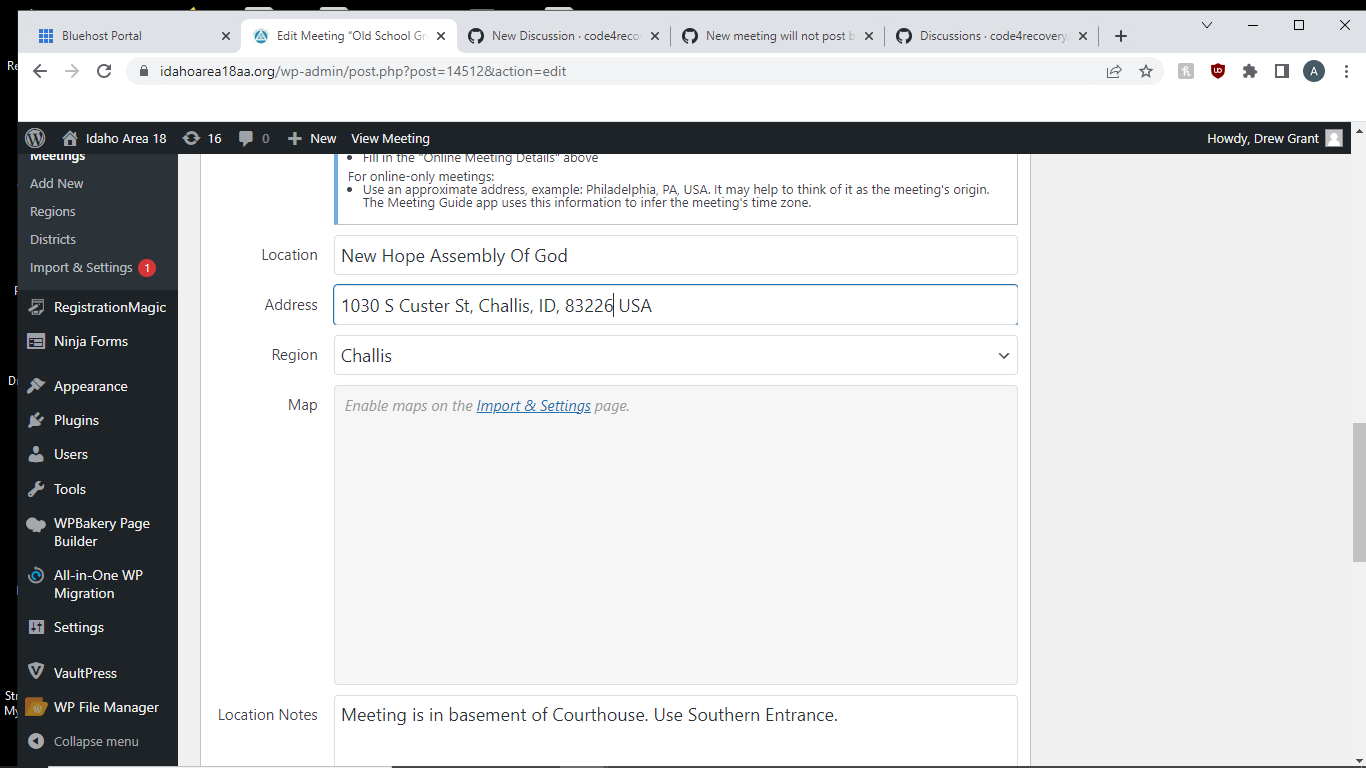
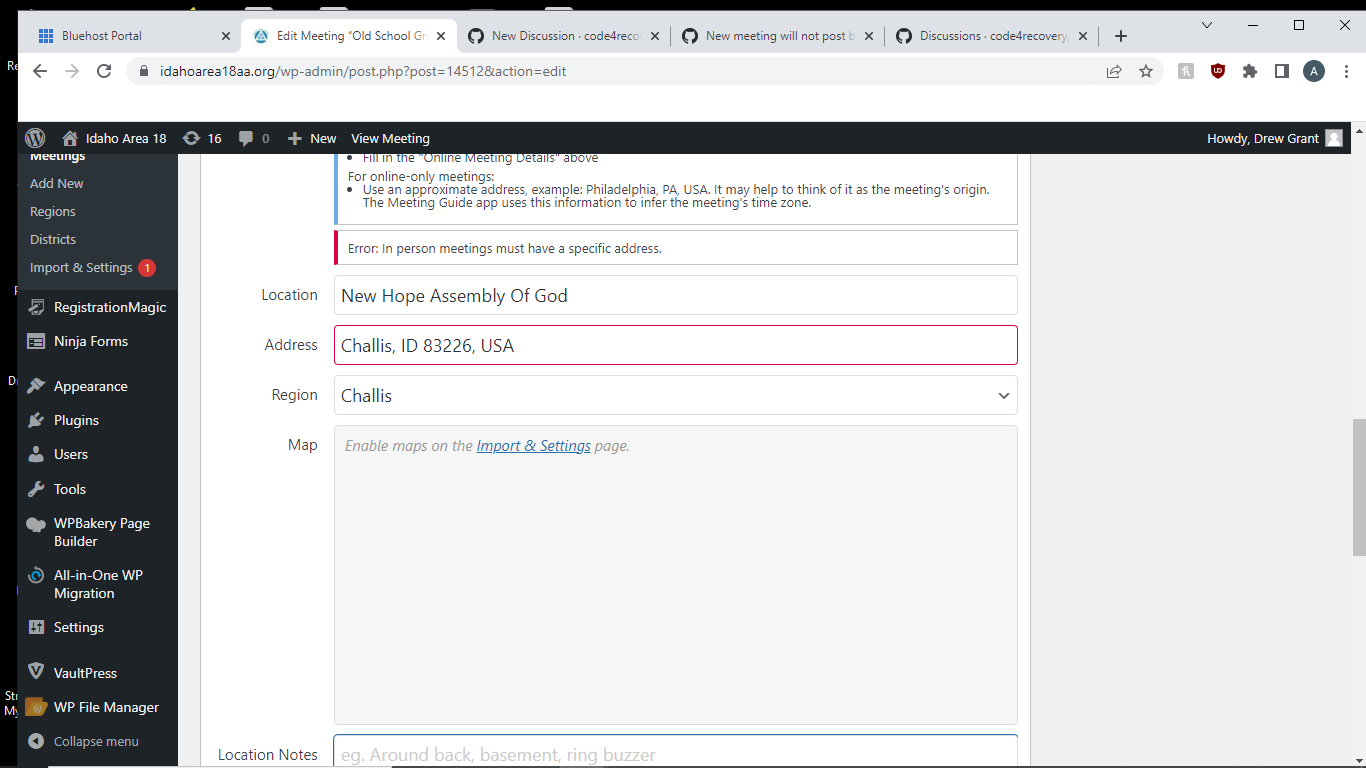
I go type in the new location and address but whenever I tab out, it reverts back to displaying just the town, state and zip code, and gives me the message "Meetings must have specific address".
It is doing this with only the meetings at 2 separate addresses. All other updates are running smoothly. I have verified the addresses and locations on the web, and am not sure what to do.
An example of one of the addresses: New Hope Assembly of God 1030 S Custer St Challis, ID 83226
I have tried inputting every variation of the address I can think of. I also saw some similar postings, but did not see a solution that worked for me. Please help! Our meeting guide is our best tool, and I hate telling the requesters that I am working on the issue and not coming up with anything.
Answer by @joshreisner
hi @Area18Webservant - you didn't do anything wrong, google maps just hasn't added this address yet. google search knows about it, and maps seems to know the church, but not the address.
in these cases, adding an address override is the best course.
try adding this code to your theme's functions.php file:
if (function_exists('tsml_custom_addresses')) \{
    tsml_custom_addresses(array(
        '1030 S Custer St, Challis, ID 83226, USA' => array(
            'formatted_address' => '1030 S Custer St, Challis, ID 83226, USA',
            'city' => 'Challis',
            'latitude' => 44.497533,
            'longitude' => -114.222882,
            'approximate' => 'no',
        ),
    ));
\}
you might want to confirm the latitude and longitude values. my typical go-to in these cases, https://www.latlong.net/, also seems to be a little hazy on this address.
TypeError: Failed to fetch
Show question & answer
Question
Hi,
I've been using this plugin across several sites and for the most part, it's working very well. But on some I'm getting an error - "TypeError: Failed to fetch" - whenever I enable the TSML UI. And when I am using the Legacy UI, the table that displays the meetings is not responsive. Is there something wrong with my site configuration that is preventing these from working properly?
This is an example of one of the domains that isn't working: https://recoverymeetingsnearme.com/
Any help would be greatly appreciated.
-B
Answer by @joshreisner
Ok so basically what is happening is that GoDaddy is serving your website assets through a CDN which has a different domain from your website, which might be fine except it's also disallowing cross-domain data-loading.
I don't think we have a good workaround for this. I will create a ticket to adjust these lines to specify a data URL that does not include the domain. But for now you should probably use the legacy UI
Inactive Meetings Not Showing Up when day is selected
Show question & answer
Question
I changed status to inactive for a meeting that is going on hiatus for a couple of months.
In TSML-UI the meeting does not appear on the list if I select Any Type and the day it met. If I let it default to Any Type and Any Day and then scroll down until I hit Monday (which was the day it met), it will be on this list. If I select Inactive, but not limit the day, it will show up. The issue is when selecting the day.
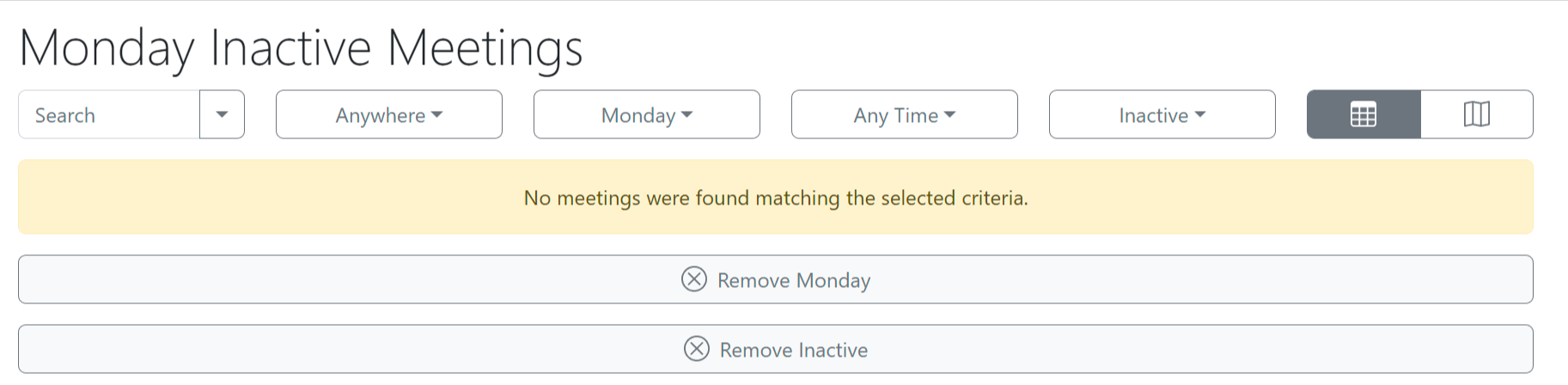
When I remove Monday in the above example, the inactive meeting is displayed.

Answer by @joshreisner
Hi Viv, that's right, inactive meetings are specifically excluded from dropdown filtering. This is so that if, say, there is only one LGBTQ meeting and it is inactive, then that type does not show in the Types menu with a [1] next to it, disappointing users.
The exception, of course, is the Inactive type.
Roles to admin meeting guide
Show question & answer
Question
Looks like one must have master WP admin credentials to manage the Meeting Guide? I tried assigning someone as Editor and access to things like plugins are disabled. I want to have a backup person administer meetings but assigning master privileges just to do this is not ideal. Comments?
Answer by @kiyote33
Hi @DCO84770, I've found the Editor role to be just perfect for administering the 12 Step Meeting List. Users in that role can do CRUD operations on the Meeting List but not a lot else. If that doesn't work for you, I believe there's a few plugins available for creating custom roles where you can tailor a role to suit your needs. You might try googling for one of them. Hope this helps...
Personalities Over Principals: The St. Cloud Intergroup Meeting Guide App Feed Has Been Now Been Suspended for One Full Year
Show question & answer
Question
Greetings!
The St. Cloud Intergroup Meeting Guide App Feed has now been suspended for one full year, despite numerous appeals made to the App Support Team, Group Services and other leadership at the General Service Office in New York. We even codified a new Meeting Directory Listing Policy on 1/7 of this year that we have also shared with the leadership at the GSO.
We received some high level platitudes about some re-structuring of the technology policies by the General Service Board. All requests for follow-up and timeframes for change have gone unanswered. @joshreisner - I know this is not normally in your wheelhouse as the application support provider, but given how influential you are - it might help break the log jam if you followed up with App Support about what specific conditions need to be met by the St. Cloud Intergroup for our Meeting Guide App feed to be re-instated? Is it a time based requirement (ex: SCI needs to wait 18 months for reinstatement)? Is it an action we need to take (ex: we show up at the next General Service Board meeting and beg forgiveness or demonstrate some sort of remediation)? Is it a personality based requirement (ex: We are waiting for a Trustee Emeriti to give his blessing for the SCI Meeting Guide App feed to be turned back on)? Is it really a permanent termination of the SCI Meeting Guide App feed but we are calling it a suspension to soften the blow?
Thanks in advance for your consideration on my appeal!
In Service,
Alan
Answer by @joshreisner
hi @MinnesotaSwanny thanks for the update. it's a tricky issue. we will talk about it internally at Code for Recovery and i will see if i can get more context from GSO on their thinking - they may very well be in discussions about these policies, and knowing AA, discussions like that can take some time!
at Code for Recovery i believe the question will be more of a technical one - is there some service we can provide or refine to help in situations like this?
in my earlier comment i wondered if you might leverage your proximity to nearby groups:
> Have you been in touch with Minneapolis Intergroup or the Area? Could they possibly import these listings from you?
this could have the benefits of resolving discrepancies on that website as well as on the app - have you considered that approach or had any luck there?
Map not showing in meeting list from Meeting Guide plugin
Show question & answer
Question
I am Belinda T, office manager for Lansing Central AA. The meetings listed through the Meeting Guide Plugin are not showing the maps. aalansingmi.org/meetings
I am not a coder. I have rebuilt the site in Wordpress by myself and with the help from folks in the TIAA forum. Today I pointed the url from where it had been on Squarespace to the new host, Siteground. (About 2 hours ago) The plugin had been operating fine in the staging site under the temporary url. At first the plugin wasn't working at all, but with the help of one of the admins in TIAA forum, we got the meetings to list at least. But when you click on a meeting the map doesn't upload.
Can someone help me get the maps to appear?
Deep gratitude, Belinda T.
Answer by @joshreisner
hi @lansingcentraloffice looks like your google maps key is not activated, it says:
Google Maps JavaScript API error: ApiNotActivatedMapError
https://developers.google.com/maps/documentation/javascript/error-messages#api-not-activated-map-error
rather than activating it though I recommend you switch to Mapbox at Mapbox.com and get a free Mapbox Access Token - this will allow you to switch back to TSML UI. this will address your comment that:
> Previously it would have said how many meetings are going on right now and show the list from the current time through the rest of the day.
SEO meeting URL's for TSML UI?
Show question & answer
Question
I really like TSML_UI, but I also like the slugs being part of the rewrite_URL so we can promote the many (international) meetings we list in search results.
TSML_UI: https://SITE/meetings/?meeting=meeting-slug LEGACY: https://SITE/meetings/meeting-slug/
Do I have this right, that TSML_UI cannot do the rewrite slugs? Anyone have ideas for work-arounds?
Answer by @joshreisner
that's true, but i think we can probably manage it using the same technique we used for online intergroup with their meeting finder
created an issue: https://github.com/code4recovery/tsml-ui/issues/357
Wrong TSML listings showing up in Meeting Guide: District website not in sync with the larger Area web presence
Show question & answer
Question
Our local District22 maintains its own website and updates to local meetings using TSML at harrisonburgaa.org going on five years now. Occasionally a conflict arises between newer, correct Meeting information and older, incorrect info on the Area website (aavirginia.org which also uses TSML).
Anyway, in the past TSML would prefer local over larger regional, I think, but somehow this got broke again and it shows up The Meeting Guide app with one of our local meetings listing the Area's version instead of the source of truth.
Again, the problem is that The Meeting Guide app is showing the incorrect details from the area website and not listing our correct version at all.
PS - Our local meetings/groups submit Meeting updates/changes to our District webmaster, currently me, to post to harrisonburgaa.org and things seems to be hopelessly always out of sync with the larger Area web presence...hope that makes sense
Answer by @joshreisner
i'm sorry to hear that the area site is out of date. perhaps they could start importing data from your district site?
at any rate, you can let the General Service Office know the specific listings and they can switch their importer to import from your site instead of from the Area. perhaps they know why the listings changed. we don't have that information
[Bug]: SyntaxError: JSON.parse: unterminated string at line 1 column 12725 of the JSON data
Show question & answer
Question
Contact Details
Website With Issue
What happened?
Using TSML UI causes the following error message and prevents any front end functionality to work SyntaxError: JSON.parse: unterminated string at line 1 column 12725 of the JSON data
Using Legacy UI restores complete functionality of the plugin
I have been experiencing this intermittent issue over several months through several plugin updates. Sometimes I can make it work by activating and deactivating certain meetings in the list and then turning the TSML UI back on.
I am available to help fix this bug as required. Thank you for your service! Jason D in Vienna
What browsers are you seeing the problem on?
No response
Relevant log output/errors
No response
Answer by @joshreisner
thanks @Oclair in the latest JSON you sent i can clearly see it ends prematurely, in the middle of the final meeting.
bizarre that the same file works for me when i load it https://www.aavienna.com/wp-content/tsml-cache-18114522da.json?1710075206 - and the page works for me fine in firefox
i can see that the only data your version is missing is the final ,"last_contact":"2024-02-01","attendance_option":"online"\}]
i see from your screenshot that it is cached, i wonder if you reload it will it become complete?
also you mentioned that it only happens when you are logged in - if you try firefox in incognito mode would it still show the error?
How to remove two columns from 12 Step Meeting List
Show question & answer
Question
We want to remove two columns, Anywhere, and Region from the 12 Step Plugin (using TSML UI) in our site <https://aarichmond2stg.wpenginepowered.com/meetings/> because we are only one region so the choice is meaningless. I don’t see this issue in the forums. WP version 6.5.4 All plugins, themes, and site are updated to latest versions. Thanks in advance for your help.
Answer by @joshreisner
hm, i'd like to understand this problem a little more.
usually we think of "region" as being a city. i see that google wouldnt consider the city of every meeting in this list to be "richmond, va" for example these meetings are in "south hill, va" https://aarichmond2stg.wpenginepowered.com/meetings/?meeting=5th-tradition-3
adding a region for south hill could be useful for people trying to find a meeting if they were in south hill, for example.
did i at one point work with you on a google sheet? are you still importing from it? i think it would be ideal to try to get the cities populated to help people filter the list.
Single meeting duplicates in meeting guide app
Show question & answer
Question
Our URL: aa-cedarrapids.org I have entered the information for a meeting called Marion Midweek AA and it comes up fine in the meeting guide both on the website and the app. There is another entry for a similar group, however, called Marion Mid-Week Group that appears in the meeting guide app, but does NOT appear in the database or on the website. How do I find and eliminate this non-existent Marion Mid-Week Group? Thanks!
Answer by @joshreisner
it's very common for multiple overlapping service entities to list the same meeting. meeting guide filters out duplicates in these situations by using addresses.
in this case the you are representing district 8: https://www.aa-cedarrapids.org/meetings/marion-midweek-aa/
also the area is listing this meeting twice. once at the same address as you, this is being blocked because it uses the same address as you: https://www.aa-iowa.org/meetings/marion-midweek-aa/
also they are listing this meeting at 13th St & 7th Ave: https://www.aa-iowa.org/meetings/marion-mid-week-group/
i would ask the area to drop this listing and the problem should resolve itself
Detect if TSML_UI has loaded ?
Show question & answer
Question
Hi,
I've received feedback some browsers(potentially linked to the machines configuration) don't see TSML - rendering.
There is a "widget" block above which renders, but the end users machine (mac, running chrome) doesn't see TSML UI at all.
Rare I imagine, I was wondering is there anyway to detect:
- TSML_UI meeting list
- TSML_UI individual meeting page
has / hasn't completed ?
Its not my machine / and I cant replicate - thinking if I can detect when rendering has finished on both page types - (or not) I can nudge the user to try another browser / device. The information I have is they use a macOS 10.11.6, and Google Chrome: OS X 10.11
Any thoughts welcome, for the meeting page, I did try to detect when animation to switch between list view had stopped/started (via animationend) . But I wasn't 100% sure which DOM objects to monitor.
Web page: https://codauk.org/meetings/?tsml-day=any
Does anyone not see the meetings list render? Come across this ? Thinking its peculiar - dont believe Ive seen this arise on the discussion forum - despite the huge number of sites running TSML.
Answer by @gkovats
We could dispatch a custom DOM event on div#tsml-ui on full load, so listeners on the page can track it, but that's really only half an answer. Otherwise, if you're good with chalking this up to a dated device, we'll close this issue. No doubt IE11 and old Opera versions exist in the wild with the same issues.
Troubleshooting new Data Source feed for TSML
Show question & answer
Question
Hello there, I am working with a developer to create a new JSON feed to support our meeting listings on our Area website.
The feed we have for the Meeting Guide was missing some of the fields, so we are creating a new one just for the WordPress plugin data source.
Here is the current test feed with one meeting listing: https://www.areafellowship.com/api/feed/P2U_fgXSot~IpY9PK.F4kdPg-thzPJ6H/8QR_HCsofi~763fsG.PVtEdk-dakxwfg
Here is a link to our staging site where we are testing: https://nhaastg.wpenginepowered.com/meetings/?tsml-day=any
The remaining issues I have identified include:
- Time is not displaying (showing as appointment)
- Secondary fields are not porting over, like "Conference URL Notes"
- Districts are not being created in the TSML district section
We're so close, please help!
Answer by @joshreisner
oh wow you're right, you can in fact enter types as a comma-separated string - this is new, i think this is a welcome side-benefit of some import refactoring that @gkovats did. i would advise using the same feed that you use for Meeting Guide though, so you avoid having inconsistencies between the meeting lists. matching on the long name of the type is generally more fragile than using the code because those long names are liable to change every so often. for example "Step Meeting" was changed to "Step Study" but the code remained the same
and yes the district key is only checked when there's a group present. if you want to disambiguate groups you might include the netsuite group number, maybe concatenate it at the end of the name?
[Bug]: Drop downs for location, day, time, etc do not open on front end
Show question & answer
Question
Contact Details
Website With Issue
https://www.pdxaa.org/meetings/
What happened?
Front end users on website are unable to open drop down pick lists for location, day, time and meeting type. They work fine for logged in admin but not for someone with no login. I checked settings, didn't see any that look helpful. We're using TSML Version 3.16.18, with TSML UI selected, on WordPress 6.8.1 running Blocksy theme. Meeting Guide on smartphones is unaffected so we're not totally SOL for users.
Testing front end access using Firefox and Vivaldi.
Now, to further compound the problem, I cleared the hosting service's cache (it's worked before for some issues) and the list on the front end has disappeared completely.
What browsers are you seeing the problem on?
Firefox
Relevant log output/errors
Answer by @Spsrky
That's ugly but it wasn't the source of the problem. I deactivated several plugins that had updated in the past two days and that eliminated the problem. Turning them back on one at a time showed that it was a Jetpack update that was at fault. WooCommerce seemed to want Jetpack installed (we hadn't been using it previously) but deactivating doesn't seem to have broken anything in the online store, so I'm just leaving it off. Let's call this one closed unless you have something to add.
Meeting Guide App Searching
Show question & answer
Question
Hey y'all, Cincy has found an anomaly in the meeting guide app. When use the search and put the distance to 5 mi we are only able to see meetings from the main screen that are up to 5 miles away. However, when we extend it to 50 mi away we are not getting anything more than 11 miles from the office.
We can search the meeting by name and it appears but that's not what is issue is. Members are trying to find their meetings from the main page and are unable to. It seems that the app is limiting to 15 miles and the below meeting is 17 miles away.
EX: attached
Answer by @SIA-WEBSUP
@ATLCOTech , sorry to hear the meeting guide app is not showing you the results you might expect. I've also experienced unexpected outcomes on the 'default' screen.
This repo and discussion board is for the plugin ( which is how most AA entities connect to the app ), but not for the app itself. I would address this question directly with the meeting guide app support team at appsupport@aa.org.
It may be that the app only shows the X nearest meetings, and the meeting you're looking for is within the 50 miles, but further away than the X nearest meetings. At least, that's what I suspect. According to the app support docs, that X is 500, but in my experience, that number X falls below 500. I wish I knew exactly why. ( the docs say 60km which is significantly less than 50 miles )
If you get a good response to your issue from the app support team, please report back here so others can benefit from your experience.
Meeting Guide app in IOS opening emails in Apple Mail instead of default mail client (e.g., Outlook)
Show question & answer
Question
Clicking either the "Email" button to share the meeting or the meeting source's email button to provide feedback, the Meeting Guide app for IOS opens Apple Mail to send the message. I have the Outlook app and it's my default mail client, and websites and other apps are using it as expected to send email.
The problem is that the only email account associated with my Apple Mail app is iCloud, and I don't use it to send/receive email or check its Inbox. So, even though I could send a message from your app, I wouldn't see a response.
I Googled this and received this response: If an app is specifically coded to open Apple Mail directly (using private APIs or direct calls to the Mail app), it could bypass your default setting. This is rare and generally discouraged by Apple, as it goes against user preferences and App Store guidelines.
Answer by @anchovie91471
Unfortunately, this is the support forum for the 12 Step Meeting List Wordpress plugin, which is completely separate from Meeting Guide.
You might try emailing appsupport@aa.org and suggesting the feature.
Meeting Guide App - meeting page email button and email address under the entity name
Show question & answer
Question
The meeting page looks great from the public meeting page (i.e. browser), but the meeting page from the mobile apps has 2 problems:
- the email button prefills an email notice but doesn't prefill the email address
- the email address shown under the entity is incorrect. In our case (AAYuma.com), the email address displayed on the meeting page is yumaaawebsite@outlook.com. I can't see anywhere where the address could be showing on the app (not in the settings or the JSON). I've emailed this address and no-one's home.
Has anyone else seen this problem?
Answer by @SIA-WEBSUP
@plleonard54,
There are two related products here, but they are maintained and supported by different organizations.
TSML (12-step-meeting-list) is the WordPress plugin discussed in this GitHub repo and supported by Code for Recovery.
Meeting Guide App, on the other hand, is owned and supported by the AA General Service Office (GSO).
When an AA entity registers its feed with Meeting Guide App, it is asked to provide information such as:
- entity name
- website URL
- location
- public email
- public phone
See: Meeting Guide App Support Site – Connection Form
Based on your description, I suspect the incorrect email address you’re seeing in the app may not be coming from TSML or from your JSON feed directly, but instead from the information that was submitted to Meeting Guide when the feed was registered.
If that information needs to be updated, you would likely need to contact Meeting Guide support or submit the connection form again with the corrected details.
If you’re able to post a screenshot of what you’re seeing in the app, that may help confirm whether that’s the source of the issue.
New update
Show question & answer
Question
After update, Now my 12 step meeting list doesn’t work on the website but it still works on the meeting guide app. Any suggestions on how to fix it?
Answer by @brianw-area24
My guess is this can be solved by going to the WordPress dashboard, select Settings -> Permalinks, and click on the Save Changes button. You don't need to change anything on the permalinks page, just "Save Changes"
If this doesn't work, go edit any meeting listing, and click Update. This should rebuild an internal cache used by the 12-step-meeting-list (TSML) plugin.
If neither of these suggestions work, please let us know, and we'll investigate farther.
Functionality isn't working with TSML UI/WP 6.0.2/Mapbox combination
Show question & answer
Question
I'm not sure what's going on here. When I enable TSML UI I do not get a "Request to change this listing" button that opens a new form. Instead I get a button that links directly to create an e-mail.
Answer by @kiyote33
Hi @mik3h0 Mike, The Feedback Enhancement add-on functionality is only available for our Legacy UI interface. The Feedback Enhancement feature is currently a work in progress for the TSML UI interface. Please be patient, as it is a feature that is coming down the road. If you want to review the enhanced feedback form, simply toggle the User Interface Display on our Meetings/Import & Settings/Settings page.
As this is an issue that comes up quite often, I will attempt to transfer it to the Discussion page instead of closing.
Hmmm. get "Unable to convert this issue to a discussion. Category is not accessible to the actor"...
Meeting Guide is not updating
Show question & answer
Question
My updates are not showing in the meeting guide. I ran the meeting guide validator and I got JSON error: Syntax error. Please help me fix this.
Answer by @joshreisner
hi carolyn, i think your feed starts with https://aainlandempire.org/wp-admin/admin-ajax.php?action=meetings&key=… is that right? i'm seeing it's ok when i put it in the validator. i recommend skipping right to emailing appsupport@aa.org with the name of the meeting that is not updating in the app and they can help you!!
Change order of filters of Meetings list?
Show question & answer
Question
Is there some code available that would change the order of the filters? We would like Search, Day, Time, Region, Type, List/Map (i.e., move Region)
Answer by @gkovats
tsml_react_config accepts a filters array property to customize filters:
var tsml_react_config = \{
...
filters: ['weekday', 'time', 'region', 'distance', 'type'],
...
Using the WordPress plugin, you can update your theme's functions.php file and add an entry like this:
$tsml_ui_config = [
    'filters' => ['weekday', 'time', 'region', 'distance', 'type']
];
wp-admin access denied
Show question & answer
Question
After upgrading the 12SML plugin in Wordpress, access to the admin features is denied: results in the "white screen of death" (as I've heard it referenced). Disabling the plugin via Cpanel solved the access issue, but even rolling back the plugin produces no results for the Meeting Guide/List/plugin. Any thoughts? Or better yet, directions on how to correct the issue? They're a small group without a lot of technical experience and I'm trying to help them out, but I too am stumped. Thank you.
Answer by @brianw-area24
I'm guessing this is another case where the web site is running php 8. If that's the case, then the latest version of the plugin, 3.12.2 should fix this issue.
New Meeting Does Not Display in TSML UI (v.3.14.2.)
Show question & answer
Question
I hate to duplicate issues since this is related to #779 and #773, but in this instance, it's not just happening as the as the Admin, I also don't see changes on TSML UI on iOS Safari or other Windows-based PCs using Firefox.
This is with TSML v.3.14.2.
I added a new meeting directly in WordPress. I was currently using the Legacy UI. I checked it and it is there. Then I switched to TSML UI and the meeting does not show up. It's there in the backend, but not the front.
I then went to my staging site and made sure TSML UI was the default. I added the same meeting in the backend and got this error:
Warning: array_merge(): Expected parameter 2 to be an array, bool given in /public_html/wp-content/plugins/12-step-meeting-list/includes/functions.php on line 967
Warning: Invalid argument supplied for foreach() in/public_html/wp-content/plugins/12-step-meeting-list/includes/functions.php on line 990
This may or may not be related. I tried to enter again and same result. So I trashed the meeting. Purged cache just in case. Switched to Legacy UI. Successfully added meeting. Saw it was there and displayed fine in Legacy UI. Switched to TMSL UI and it's not showing. I checked on my phone (safari) and checked on laptop -- not there for either.
Answer by @97eighty
@Grateful-Viv Which versions of PHP are you using on your Production and Staging sites?
Meetings where there is a specific name for the adress
Show question & answer
Question
I'm having a problem with certain meetings. We have many meetings held within a park or beach and the geocoding of the address sometimes doesn't show where the meeting is exactly.
For some of these meetings, people have developed a pin that appears to be registered with Google Maps, Waze, etc. And that pin shows exactly where the meeting is (I don't know who did that but somebody did it).
The problem comes in the feed between TSML and the Meeting Guide app. When I enter the specific pin name in TSML under WordPress - all is good, and the pin is dropped onto the exact spot and displays correctly on our website. However when it feeds over to the Meeting Guide app, I think what is happening is the specific pin is being lost, a generic geocoding occurs - and in our cases that address is actually quite far from the meeting spot - and then Meeting Guide is showing that "not great" geocoded address.
I don't know who exactly is responsible for what here. Is that more of a Meeting Guide issue and they need to allow these pin names through? or is that a TSML issue and it's dropping the pin name and doing the geocode and then feeding that along.
Answer by @joshreisner
hi mike, how many of these are there? could you show us an example or two?
How do I update our Intergroup contact information?
Show question & answer
Question
I've looked through the plugin settings and can't seem to figure out how to update the contact information that appears on the meeting guide mobile app. the website is https://aavictoria.ca and our phone number appear on the app as 250-980-3826, but it should be 250-383-0415. Can anyone tel me where I update this information?
Answer by @Grateful-Viv
You should contact GSO for this. You can reach them by email appsupport@aa.org
Filter selections overlap with browser window ~990px or less
Show question & answer
Question
Trying to implement the TSML UI on the webpage wp.nwpi.net/meetings. On wider browser windows the filter selection boxes behave as expected (except the list/map selection is missing.) However on smaller widths (seems to be around 990px) the last filter box overlaps (see attached screenshot.)
I have searched for similar issues in discussions but did not find anything relevant. Forgive me if I missed something.
Here are some details: Wordpress version 6.0.2; TSML version 3.14.6; php version 7.4.10. The site also uses the Elementor and Elementor Pro plugins versions 3.7.6 (both.)
Currently I have switched back to the Legacy UI as the new UI doesn't present well on mobile devices.
Any suggestions on a solution will be greatly appreciated. I think the new UI is an improvement and I would like to be able to use it.
Thanks for your service,
John
<img width="990" alt="Screenshot 2022-09-18 at 18 15 23" src="https://user-images.githubusercontent.com/113863608/190932933-d186b24a-030d-4c44-b6dc-5893872f525e.png">
Answer by @joshreisner
Ah ok @ljread here is some CSS to add to your theme:
#tsml-ui .dropdown-toggle \{
  position: static;
\}
Need help translating meeting finder interface into Japanese
Show question & answer
Question
Hello team!
We, Japan GSB and Japan GSB technology committee are working with US/Canada GSO to translate Meeting Guide App user interface into Japanese. Also we would like to have Japanese user interface of 12 Step Meeting List plug-in into Japanese.
Is there any better way to translate meeting finder interface into Japanese?
Would you help/support us?
Hiroyuki K. - Japan GSB technology committee
Answer by @joshreisner
hi Hiro! we'll be pleased to help. do you have a demo website set up yet?
if not, we can help set one up
Location page using TSML UI
Show question & answer
Question
Using the legacy UI I have a menu item pointing to a location page to show all of the meetings at a club as follows: https://aadaytononline.org/locations/alco-aides/
Is there a way to do this using the new TSML UI?
Answer by @joshreisner
no, in TSML UI individual meeting screens display all the meetings at a location, so location screens are not needed
Adding Sub Region Column to TSML UI list view
Show question & answer
Question
Hello,
I am in the process of implementing this plugin to display international meetings. It would be really helpful to use countries as regions and cities as sub-regions and be able to display both on the list view. Can you help?
Answer by @joshreisner
what that would mean for you: your meetings would have region column values like Germany > Berlin or USA > Illinois > Chicago
TSML UI is displaying "Meetings within mi" by default in the <h1> section
Show question & answer
Question
I'm seeing this behavior here:
But not here:
Therefore, I'm not sure if this is solely a TSML-UI issue or some interaction with a recent release of TSML and the current TSML-UI.
Answer by @joshreisner
3.19.5 fixed it - the shortcode and the meetings page rely on the same function
Can I ignore type codes in a TSML JSON feed?
Show question & answer
Question
We would like to take a TSML feed from a source that often adds meeting types that we didn't know were coming. Some of these types we want to add to our customization so they are understood, and some we want to ignore (i.e. not display at all).
The behavior I see now is that types that aren't understood are added as unadorned codes at the bottom of the Notes field. I am wondering about the following:
- Is it possible to configure the plugin to ignore unknown codes rather than display them?
- Is it possible to customize a code so that it doesn't get displayed at all?
Thanks for any help!
P.S. I just realized that, with the recent addition of the ability to "undefine a code" (thanks for that!), just being able to have the plugin ignore unknown codes take care of number (2).
Answer by @SIA-WEBSUP
@brotskydotcom, we removed the behavior you asked about in point 1 (see https://github.com/code4recovery/12-step-meeting-list/pull/1813) which will be released in v3.19.7
tsml_front_page function not working
Show question & answer
Question
We should either fix the tsml_front_page function or remove it and update the documentation.
There is a DIY solution below, alternatively we could potentially create a setting for this.
Discussed in https://github.com/code4recovery/12-step-meeting-list/discussions/832
<div type='discussions-op-text'>
<sup>Originally posted by douggreen June 18, 2022</sup> I'd like my sites home page to be the meeting list (search) page.
This site is currently in development so the URL is https://dev.blueridgeareaintergroup.org
I've changed the home page using
// Make the meeting guide the home page.
// @ee https://wordpress.org/plugins/12-step-meeting-list/
add_action('pre_get_posts', 'tsml_front_page');
But it shows a "River of News", that is, it shows my two meetings listed one after the other.
I'd like it to instead be https://dev.blueridgeareaintergroup.org/meetings/</div>
Answer by @joshreisner
following the directions i added
add_action('pre_get_posts', 'tsml_front_page');
and it worked fine 👍
closing issues
Meeting not showing in the app
Show question & answer
Question
We are having a problem loading one meeting into the meeting guide app. The meeting is listed on the website but not on the app.
Answer by @joshreisner
hi @niagaraintergroup the thing to do is to email appsupport@aa.org - they can help figure out what's going on
Portuguese Translation
Show question & answer
Question
Hi all, i am thinking of translating the plugin to Portuguese, I already translated the old UI for our needs using and hard coding approach. I Would like to translate both the TSML UI and the Legacy UI officially. Can you point me on the right direction?
Answer by @joshreisner
great!
if you could translate the quoted strings that are not surrounded by % in this file: https://github.com/code4recovery/tsml-ui/blob/main/src/i18n/en.ts
also add pt strings in this file: https://github.com/code4recovery/spec/blob/main/src/types.php
EDIT for the future - the files in this folder: https://github.com/code4recovery/spec/tree/main/data
if you want to just upload them to this discussion i can handle the rest, thanks!
Displaying the types in a column in the meeting list view.
Show question & answer
Question
I am trying to get the types to show up as a column in my meeting list view. I am using the TSML UI. Is there a way to go about doing that? Thanks!
Answer by @joshreisner
the region column should already be displaying the sub-region, if present. (it shows the bottom-most region in the stack)
but these are the only columns we support at the moment
Group ID to show on TSML UI template
Show question & answer
Question
Hi, Is there a way to get the contents of the 'Group' field to display in the single meeting view with the TSML UI template? It displays in the Legacy template...
Answer by @SIA-WEBSUP
Fix has been deployed. Please confirm if you would.
<img width="728" height="771" alt="image" src="https://github.com/user-attachments/assets/5df7b895-cb2d-45db-8922-1dad783e8601" />
3.1.4 TSML UI Meeting Feedback
Show question & answer
Question
Piggybacking on #762, the meeting feedback email is definitely a work in progress. It is going to cause confusion for people submitting meeting changes to see Public URL: https://domain-name/?meeting=name-of-meeting Edit URL: row xxx
Is there any way to at least remove the Edit URL line?
Is there any way to offer admin option to opt out entirely? Is that still User Feedback Emails?
Is there a way to have admin create a link to customized form?
Answer by @joshreisner
Hi @Grateful-Viv
I've created an issue to get rid of row XX and reopened an issue to get an actual WordPress edit URL in the email message instead
Admins can opt out entirely the same way they would in TSML, which is to remove the User Feedback Emails
There is a way to link to a customized form! from the readme:
$tsml_feedback_url = "https://domain.com?meeting=\{\{slug\}\}";
$tsml_feedback_url = "https://domain.com?meeting=\{\{id\}\}";
$tsml_feedback_url = "mailto:office@domain.com?subject=\{\{slug\}\}";
it's perhaps missing the instruction that you can define a $tsml_feedback_url variable in your theme's functions.php with a link, and use \{\{id\}\} and \{\{slug\}\} as "variables" in the url. but if you wanted to link them to a page called /feedback it would be as simple as adding the line:
$tsml_feedback_url = "/feedback";
Meeting Address Changes
Show question & answer
Question
Hi I'm very new to this and rookie. Using Wordpress for our website egbdaa.org. I have 2 issues 1. I can't get it to accept the correct meeting postal code. When I type in L9M 1H1 click update it changes to L9M 1P2 everything else stays as it should be. 2. When I go to the "Meeting Guide" the address has changed to 95 Robert Street West it should be East as it is in the website. The complete correct address "Monday Night Serenity Group, Covenant Christian Community Chruch, 95 Robert Street East Penetanguishene Ontario L9M 1H1 We are part of Eastern Georgian Bay District 7, Western Ontario General Service Area 86 Canada HELP P.S. I have sent a report to Google Maps as well with no responce. Thanks Andy
Answer by @joshreisner
yep sorry, this is an odd one! what's happening is we use google to geocode addresses. if you give the google geocoding api
95 Robert St E, Penetanguishene, ON L9M 1H1, Canada it comes back with
95 Robert St E, Penetanguishene, ON L9M 1P2, Canada which is what you see on your website. (at least the pin is in the right place!)
but then when it goes to the app
95 Robert St E, Penetanguishene, ON L9M 1P2, Canada gets geocoded and comes back with
95 Robert St W, Penetanguishene, ON L9M 1P2, Canada which is wrong 😞
do you have access to your theme's functions.php? we recommend adding:
if (function_exists('tsml_custom_addresses')) \{
    tsml_custom_addresses(array(
        '95 Robert St E, Penetanguishene, ON L9M 1H1, Canada' => array(
            'formatted_address' => '95 Robert St E, Penetanguishene, ON L9M 1H1, Canada',
            'city' => 'Penetanguishene',
            'latitude' => 44.7744902,
            'longitude' => -79.9223015,
            'approximate' => 'no',
        ),
    ));
\}
HELP! Trying to Link Meeting Guide Data between Orange County Central Offices
Show question & answer
Question
We are using version 3.14.12; TMSL IU
The Orange County central offices share a meeting database. Rather than pointing the www.aanoc.org to the meeting page at www.oc-aa.org, I am trying to link the data with the "Link Meeting Guide" option in the program.
Orange County Central Office - https://www.oc-aa.org/meetings - Parent Region - Change Detection Enabled.
Error: Invalid response, WP_Error Object ( [errors] => Array ( [http_request_failed] => Array ( [0] => cURL error 28: Connection timed out after 10001 milliseconds )
    )

[error_data] => Array
    (
    )

[additional_data:protected] => Array
    (
    )
) .
Answer by @joshreisner
the importer works in batches of 25, so sounds like it's dying after the first batch finishes. not sure why!
i wonder if you'd be open to trying another idea. do you not need to make any edits to the meetings locally? (like are they all made at oc-aa.org)? if so, then you could probably just use TSML UI without importing.
try creating a new page on your site and embedding this HTML code:
<div
  id="tsml-ui"
  data-src="https://oc-aa.org/wp-admin/admin-ajax.php?action=meetings"
  data-mapbox="pk.REDACTED_MAPBOX_TOKEN"
  data-timezone="America/Los_Angeles"
></div>
<script src="https://tsml-ui.code4recovery.org/app.js" async></script>
here's an explainer on how to add html code: https://www.inmotionhosting.com/support/edu/wordpress/adding-html-wordpress/
not sure if there's a better way with elementor if you're using that. definitely see if there are any template options to create the max space on the page, aka full page mode
the advantage of this approach is you won't have to do anything on aanoc.org and you should get the latest listings from oc-aa.org
ICS Calendar Time an Hour Off
Show question & answer
Question
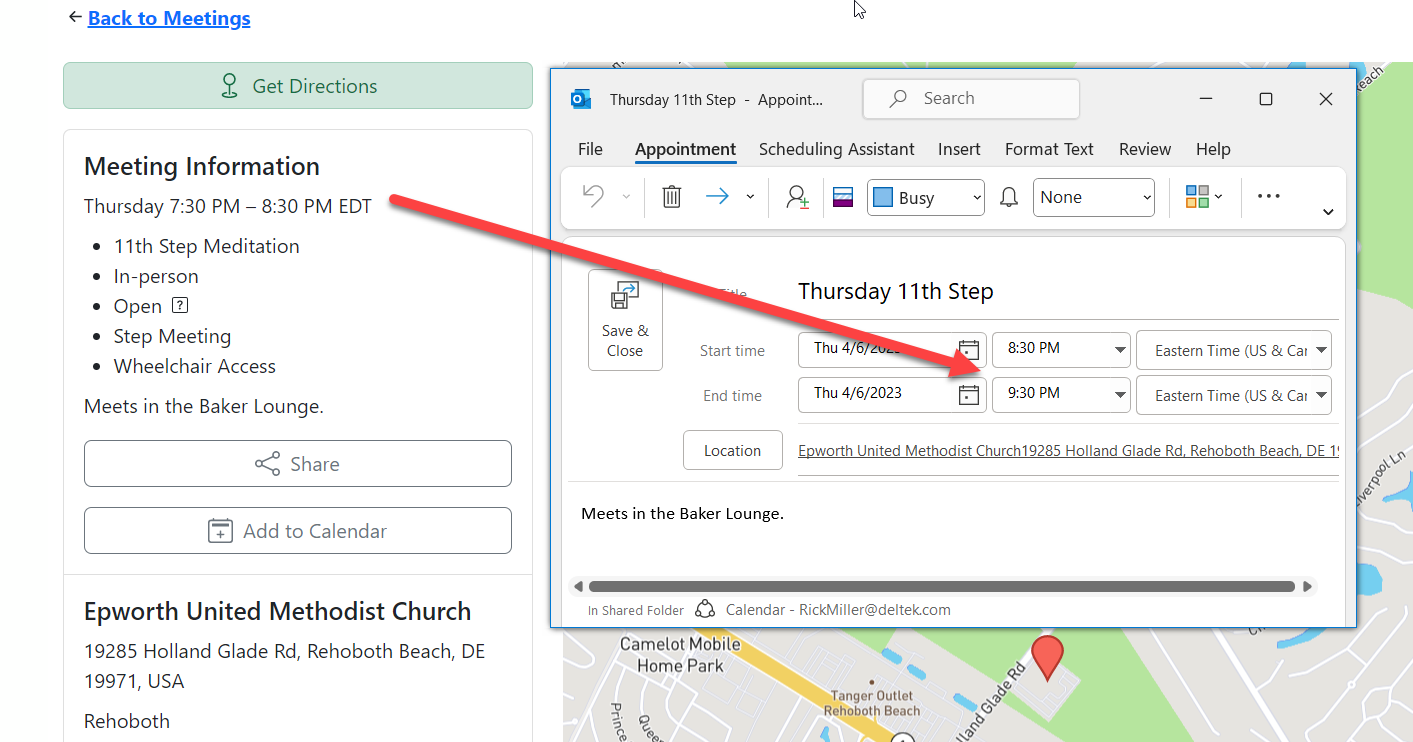
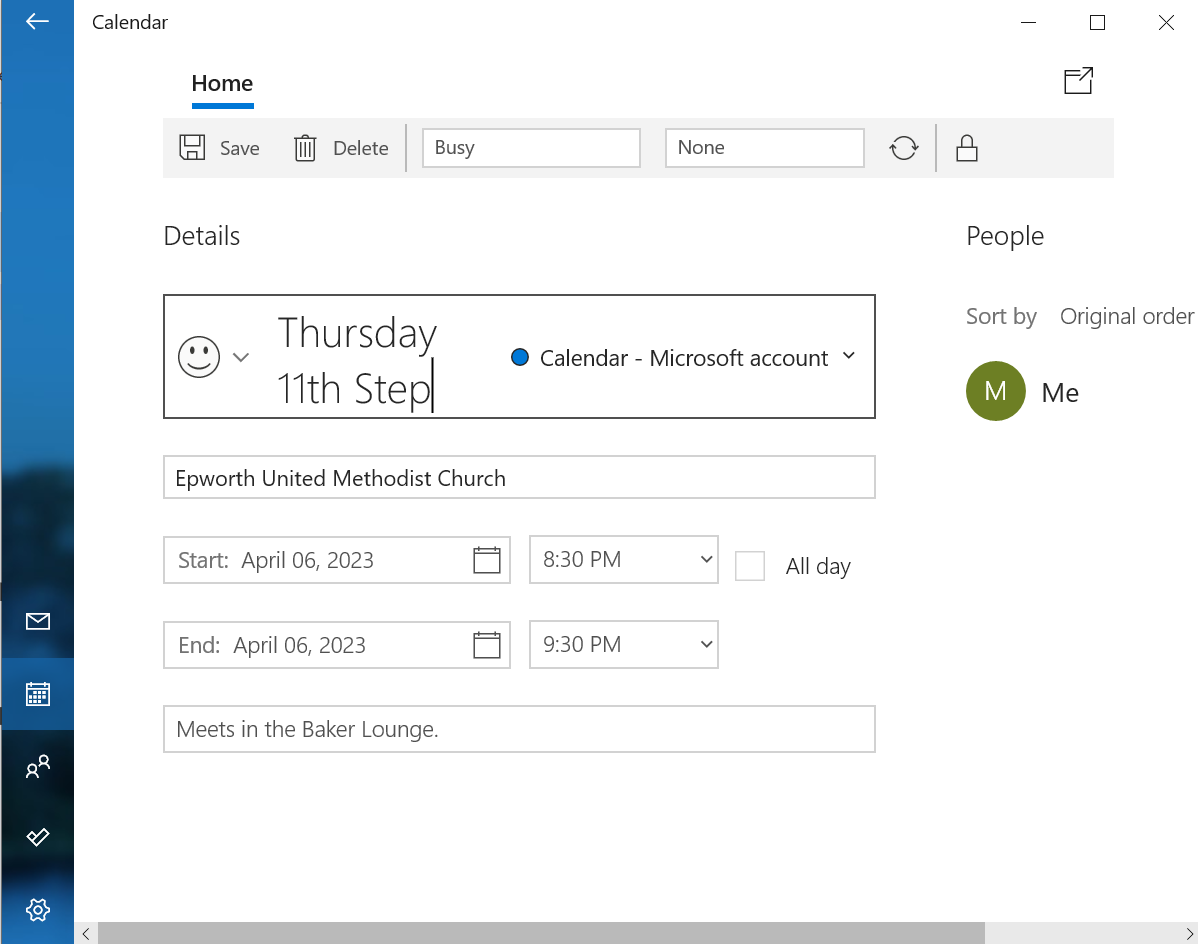
It's been brought to my attention the meeting ics files are generating an hour late. I was told this wasn't always the case and wonder if the time change has anything to do with this.
This is also true to with Meeting Guide app, not just through the website. I tested this out on my iPhone and iPad and it is correct, however under Windows, it is not. See images below.
Answer by @joshreisner
@Grateful-Viv i think this may be a problem with the windows / outlook time zone setting - we have had a report about this in outlook before, but are unable to reproduce on other platforms.
Having issues getting 12 step meeting list plugin output to display properly using the Avada theme on mobile phones
Show question & answer
Question
HI,
I'm building a new website for an AA group on a staging server using the Avada Wordpress theme. The 12 step meeting list looks fine on the desktop but isn't displaying properly when viewed on mobile devices. Please see attached screenshot ![Plugin not displaying properly on mobile devices on Avada staging server]
I'm using the Legacy UI setting as when I try the TSML UI the meeting list doesn't show up. Not sure why.
I'm not sure how to fix this and any help would be greatly appreciated. The client really wants to use the Avada theme and I'm guessing something about the theme styles is causing this issue. I've tried everything I can think of with no success. I have ticket out with the Theme developer but thought I would try from this end as well.
Thank you in advance for the help
Answer by @joshreisner
hm strange! if you ever want to debug the TSML UI thing you can check the javascript console, or send us a link and we can take a look
here's some CSS you should be able to drop in to fix the margins:
#tsml \{
  margin: -30px -30px 0;
  width: calc(100% + 60px);
\}
Changed website URL - Meetings not syncing
Show question & answer
Question
Greetings.
Meetings aren’t updating to the app.
I created a staged website at subdomain https://test.aa-acadiana.org/ to replace our outdated website that was at https://aa-acadiana.org/site/.
I migrated the staged website to our TLD at https://aa-acadiana.org/. (I also had to set the absolute path to the WordPress directory in the wp-config.php file because when I did it through Wordpress settings I couldn’t log in to Wordpress at the …/site/ account.)
JSON Feed Validator failed. There are remnants of test.aa-acadiana.org in the “Server Returned” as well.
The correct URL for our new, current site is https://aa-acadiana.org/.
The incorrect URL that is probably still locked in with Meeting Guide is https://aa-acadiana.org/site/.
Please help!
PS – I don’t know “code”. I’m just a drag-and-drop website builder.
Answer by @joshreisner
hm, hard to say in the abstract! can you give a specific example of something you changed on the backend that isn't showing up on the frontend so we can check it?
you might try adding this custom CSS to your site so the meeting finder uses the whole width of the page
body.tsml-ui #content .wp-site-blocks \{ width: 100%; \}
Meetings conflicts with another Area
Show question & answer
Question
Josh and others:
Thank you for all the help on the way as my understanding grows using the Meeting Guide. I have an issue with Area 5 presenting Area 93 meetings about 68 of our meetings in the Meeting Guide App; more accurately, some still do not show in the Meeting Guide App for either group. We seem to null each other out. I went to Area 93 meeting today and talked to another member of District 7 (my district); he told me you might be able to help. He mentioned that the meeting address closest to the CO address would win. I read that in the docs, but that is not the case. He then mentioned that you may have the ability to make that happen. Is that possible? We are closer in location. We are [AASCV.org](http://AASCV.org) in (Area 93); the other CO is [LACCO.org](http://LACCO.org) (Area 5). What information do you need from me if you folks can help?
Answer by @joshreisner
Hi @dougie-wougie
> He mentioned that the meeting address closest to the CO address would win. I read that in the docs, but that is not the case
this is not accurate - did you say you saw some docs where it says this? if so we should get them corrected!
here are the correct docs: https://meetingguide.helpdocs.io/article/ompwn3xgy7-when-multiple-entities-list-a-meeting
reach out to the app support team appsupport@aa.org with the specific meetings and they can take a look.
Can Area site's 12-step-meeting-list plug-in read feed from District sites' plug-ins?
Show question & answer
Question
Hi, all! Thanks, huge thanks for this wonderful plug-in and its community. I apologize if I'm not looking in the right way, but I've searched the forums in vain. I know that the Meeting Guide app "reads" the feed of our Area 12-step-meeting-list plug-in, automatically updating info about our Area's meetings. Can our Area 12-step-meeting-list plug-in be made to "read" the feed from District plug-ins? I realize that's probably an ignorant question, but I don't know how to describe the online processes or other programs that might be needed to effect this. Many thanks, BillCinVT District 5 Meeting List Chair
Answer by @BillCinVT
Yes. For example, Vermont District 5 is represented by uppervalleyaa.com, using 12-step-meeting-list, and Area 70, VT, found on aavt.org, also uses 12-step-meeting-list.
It seems pretty common for Districts to have their own sites. Sometimes just cities or communities within Districts. In the case of District 5, which I serve, a separate site is a good idea because our "Upper Valley" region straddles the Connecticut River. People living here often attend meetings in both New Hampshire and Vermont. Area 70 won't list NH meetings, so we do.
On Thu, Aug 31, 2023 at 11:53 AM Anthony Baggett @.***> wrote:
> So your districts have their own website with 12 Step Meeting List > installed? > > — > Reply to this email directly, view it on GitHub > <https://github.com/code4recovery/12-step-meeting-list/discussions/1207#discussioncomment-6877360>, > or unsubscribe > <https://github.com/notifications/unsubscribe-auth/BCISZYAESSXXTPRQZHKHJ3LXYCXQPANCNFSM6AAAAAA4GIO5ZM> > . > You are receiving this because you authored the thread.Message ID: > <code4recovery/12-step-meeting-list/repo-discussions/1207/comments/6877360 > @github.com> >
Changing URL of Meeting Guide
Show question & answer
Question
We are changing the location of our meeting guide and I need to know how to make sure the new meeting guide is syncing with the meeting guide app.
I filled out the form: https://meetingguide.helpdocs.io/article/jsydw3bxw8-connection-form and submitted the info.
Our meeting guide was at (still active for now) https://guide.ncintergroup.com/Guide/meetings/
The new location is @ https://aadistrict28.org/meetings/
I am not sure what else I need to do to effect this change.
Answer by @kiyote33
Hi @DanMTampa, it seems like you've done what's needed to advise GSO of your new feed URl by filling out and submitting the necessary form. If you are having issues or there is some kind of delay, you might try contacting the GSO support team via their Contact form at https://meetingguide.helpdocs.io/. Hope this helps...
Phone Meeting Info
Show question & answer
Question
Hi - we noticed that the meetings that have only phone meetings are not listed on the meeting guide app. I'm thinking that the information is in the wrong place. I've attached an example of 1 meeting this is occurring. meeting error.xlsx
Answer by @joshreisner
hi @ATLCOTech , to clarify, when you say the "meeting guide app" do you mean it shows on your website but not on the blue chair mobile app?
is this the meeting on your website? https://atlantaaa.org/meetings/new-beginnings-womens-group-tara-club-virtual-sat-1200pm/ the information in the spreadsheet is slightly different than what i'm seeing at that URL
Label Phone only Meeting as "phone" and not "oniine"
Show question & answer
Question
The Meeting Guide shows phone only meetings with an icon of a phone. We would like our 12th step meeting list to show phone meeting and not online as it does today. The example group, Andrew's Armed Forces, has hybrid meetings using a phone conference phone number in the In Person meetings and at other times they have phone conference only meetings
If the Meeting Guide App can show phone only meetings, we assume the 12 step plugin should also be able to do it. We have several other phone only meetings that would like there meetings correctly identified as phone meetings.
If you can provide us with lines of code and where to put them, we have a couple of people who can go in and fix it.
Thanks!
Luellla Tabor, WAIA Office Administrator, 202-966-9783
Answer by @joshreisner
hi Luella! one option might be to switch to the TSML UI appearance? this is in WordPress Dashboard > Meetings > Settings > User Interface Display -- it will make the meeting finder look like https://aasanjose.org/meetings - this appearance makes the distinction between types of meetings
<img width="1218" alt="Screenshot 2023-10-16 at 10 54 32 AM" src="https://github.com/code4recovery/12-step-meeting-list/assets/1551689/b740df5a-eda4-427c-b021-0c93c7102a6f">
We've been investing more time in improving this UI than in the "Legacy" interface - let us know if that works for you
TSML UI Width
Show question & answer
Question
How do I set the width of the TSML UI ? The UI is 100% width on the page. I would like to have Left and right margins or Padding, some white space to the left and right of the Meeting Guide
The Legacy UI was centered with white space on the left and right. When I select TSML UI the Meeting List goes to 100%. of the page and seems to ignore the parent theme and any CSS I add to the page or site.
Answer by @joshreisner
could we see a URL on your site with TSML UI on it?
hard to say in isolation, because every theme is dfferent. but i would try
#tsml-ui \{
  margin: 0 auto;
  max-width: 1200px;
\}
How to Distribute TriState Meetings List between 3 Orgs Involved
Show question & answer
Question
Hi All,
I've got a question and I want to make sure my thinking is logical. I currently live in Cincinnati which is part of the Tri State Area of SW Ohio, N. Kentucky and SE Indiana. At some point in time the NKY and SEID intergroup offices closed and Cincinnati Intergroup took up the slack. Now all 3 offices are up and running but all of the meetings are being managed soley by Cincy. They have a shared meeting guide.
If Cincy sends a filtered out list to NKY and SEID of their meetings (less the Cincy), If Cincy uploaded just their meetings, NKY uploaded theirs and SEID uploaded theirs. Then Cincy reuploaded NKY and SEID (for the purposes of a printed meeting guide) would that give each city the ability to update their own meetings? Currently Cincy is having to do it for all 3. Also, what is the time frame from meetings being removed from the TSML plugin?
This may be better understood with a phone call. My name is Mark 678.368.8368
Answer by @joshreisner
sounds like the goal is for AA Cincinnatti to import ID meetings from SEID, and import KY meetings from NKY
they should then do what you say, which is export a CSV and send the ID meetings to SEID, and send the KY meetings to NKY and have them get set up
have those sites then get connected to meeting guide.
once that's done, AA Cincinnatti can delete ID and KY meetings from their site, and wait 12 hours for them to switch to be registered to the other offices
then they can re-import the feeds from other sites using JSON. the meetings will be managed remotely, and they can update by clicking "refresh"
Settings issues on site update
Show question & answer
Question
I am working in a staging site and I have two issues I am hoping someone can offer some guidance on. First I am having issues with the upcoming meetings widget in my sidebar. The font size with my new theme Astra is not allowing me to adjust font size for that widget and the text is breaking poorly, you see what I mean on this page, https://008.681.myftpupload.com/al-anon-links/. I do not see anywhere where I can control the appearance of the table in settings? It also is coming up as a legacy widget with not much other info.
The other issue is I wanted to switch the the TSML UI but when I do that the table goes into a 2nd column that I don't understand because it's a full width page. I have a capture of the differences attached here
I am not the original builder of the site but I do not see any place to customize this. We use elementor and I can't make changes to the meeting table with it.
Any ideas are greatly appreciated
Thanks Rose L Al-anon District 6 NC/Bermuda
Answer by @joshreisner
looks like the page is showing up in columns because of some styling coming from the theme, not TSML UI. there is a div with class ast-container which is setting the layout here to be flex, here's some some custom CSS but i think that something might not be set up correctly? not sure why they would want it like that.
body.tsml-ui .ast-container \{ flex-direction: column; \}
<img width="1840" alt="Screenshot 2024-07-25 at 3 06 15 PM" src="https://github.com/user-attachments/assets/69a1879e-7192-44fa-b271-9e3963762653">
as for the upcoming meetings widget, if you go into properties and click the "Style with CSS?" box it should look a little better for you
<img width="168" alt="Screenshot 2024-07-25 at 3 10 02 PM" src="https://github.com/user-attachments/assets/1b996074-ea76-4305-8c49-a36e8883b515">
JSON Feed Validator- Undefined variable slug
Show question & answer
Question
The Data Source refresh would not complete. It keeps stalling. There has been no changes we are aware of to any formatting of the sheet.
When I used the JSON Validator I get this message: UNDEFINED VARIABLE $SLUGURL
I don't know what I'm looking for in this data to correct the issue that is here now?
Answer by @joshreisner
Google Sheet API urls won't validate in the Meeting Guide JSON Feed Validator, so don't worry about that
not sure why the data refresh is not working for you on your site - i was just able to import and refresh the data (370 meetings) so the sheet is fine
perhaps there is a problem in your hosting where it's not able to fetch the remote URL? you might make sure you're using the latest version of the plugin, and during the refresh check out your browser's javascript console to see if there is an error?
<img width="1555" alt="Screenshot 2024-07-31 at 1 42 42 PM" src="https://github.com/user-attachments/assets/61059b33-bf99-40b5-b664-48dfde536649">
Reporting & Updating
Show question & answer
Question
Hi Team,
I wanted to ask a question. In the meeting guide app there a Meeting called Franklin Twelve Steppers Group. When you scroll down it says that Central Office of Dayton is the POC for updating. However, when you click on contact>Update Meeting Information it shows Cincinnati Intergroup, Central Office of Dayton, Area 56 District 12 and 13 and Area 26 Kentucky.
- It's not on the Cincinnati website at all
- should it be showing all of those POC's as the updating entity?
This is the case with many of the meetings in the Tri-State area of of Norther Kentucky, SW Ohio and SE Indiana.
Answer by @joshreisner
@ATLCOTech when you go to Contact > Update Meeting Information, you are seeing all the entities providing meeting information to you.
that particular meeting is provided by the Central Office of Dayton, but the other entites are providing other meetings. there are usually 500 meetings on your device at any one time
Missing Meeting...?
Show question & answer
Question
Merry Chistma-Kwanza-kkah (& Festivus for the rest of us) everyone! I need help. I have a meeting, Women 2 Women - Midtown, that for whatever reason I cannot get to populate in the meeting guide app. It is showing on our site. The plug-in is updated and I've ensured the the permalink is different for both meetings. The locations are different and I've even searched for the meeting just using the location Chabad Intown and only 1 other meeting is showing there.
Here's the link to the meeting on our site
Answer by @joshreisner
here are the other reasons why a meeting might not show up in the app
did you contact app support? they can be reached at appsupport@aa.org
Double feed
Show question & answer
Question
I work with a few entities.
code4recovery/tsml-ui#1 eamo.org has tsml and shows meeting list but contains no internal meetings. They provide no feeds outside of itself. code4recovery/tsml-ui#2 aastl.org has tsml has internal meetings and takes a feed from tricounty and a few other entities. they provide a feed to meetingguide.org and eamo.org code4recovery/tsml-ui#3 tricountyaa.org has tsml internal meetings only but provides a feed to aastl.org and meeting guide.
eamo.org gets a feed from aastl.org, this feed has the meetings from tricountyaa.org but shouldn't. eamo.org should get its tricountyaa.org feed from tricountyaa.org only. I would add the tricountyaa.org feed but am concerned that would muck it up. with the data from aastl.org. I would just take it from aastl.org but its sometimes out of data as they are having issues with synchronizing with tricountyaa.org.
Why does the aastl.org feed have the tricountyaa.org data in it. How do we remove it from aastl.org's feed? Should it even be working this way?
How is meetingguide.org not picking up duplicates seeing as aastl.org is providing duplicated data in its feed.
Answer by @joshreisner
looks like you have four questions here, hope this helps
> Why does the aastl.org feed have the tricountyaa.org data in it?
the short answer is that aastl added tricounty's meetings to its site, and in order for those meetings to be displayed they need to be in the feed, because that's what powers the meeting list on aastl.org/meetings
> How do we remove it from aastl.org's feed?
i think there might be a clunky way to do this now, by adding this code to your theme's functions.php file. it should exclude any imported meetings from the feeds you're importing from
if (!function_exists('tsml_import_reformat')) \{
	function tsml_import_reformat($meetings)
	\{
		return array_filter($meetings, function ($meeting) \{
			return empty($meeting["data_source_name"]);
		\});
	\}
\}
> Should it even be working this way?
as above, the feed is used for more than importing and exporting, it's also used for displaying meetings on one's own site, so that's the primary reason that it needs to contain imported meetings by default. additionally, many areas are set up so that they are connected to meeting guide, and their districts are not, so this makes it possible for GSO to connect to a central point. finally, in some cases data sources do not represent a service entity, for example some sites use google sheets to share responsibility for maintaining a large schedule. while meeting guide can connect to a google sheet, they can only do that if it represents the meetings for a specific service entity listed on AA Near You on aa.org.
> How is meetingguide.org not picking up duplicates seeing as aastl.org is providing duplicated data in its feed?
Meeting Guide is designed with the expectation that it will get information from overlapping service entities. it has a system for de-duplication which TSML does not use, because their use-cases are different.
Don't work find near location
Show question & answer
Question
After last updates don't work find near location. For example: https://spis.aa.org.pl/index.php/meetings/?tsml-day=any&tsml-mode=location&tsml-query=b%C4%99dzin Input with location is empty.
vs
Answer by @joshreisner
ok thanks - sounds like the location search is working, but linking to a location search is not using the legacy UI
see that woodbridge, va is not filled in, although it should be
if you enter woodbridge, va and search, then it works
we'll fix it! let us know if we've missed anything
[Feature Request]: Multiple locations with the same name
Show question & answer
Question
Contact Details
Requested Feature/Enhancement
Wondering if the team have encountered the issue whereby town planners have decided to reuse location names which exist elsewhere (in upto 5 - 6 places) ?
- Are there plans to support the situation within 12 step meeting list?
- The simplest would seem to be extend the prompt in location field to include the countries word for < county, state >
Checking in should there be work afoot / an alternate way to support the situation ?
Kate F
Answer by @joshreisner
hi kate, could you provide a little more context on where in the plugin it's not working as expected? frontend or backend? a screenshot of the user experience not working would be great if you can provide one
"Location Notes" in sheets not updating on front end Meeting Guide App
Show question & answer
Question
Our volunteers have **removed Location Notes multiple times from the Sheets integration.
When we continued to encounter the error we attempted to remove it from the WP side.
Both seem to work, and then fail after approximately 48 hours.
Any guidance would be sincerely appreciated!
Here are the ref assets: here is the link to the G Sheet: https://docs.google.com/spreadsheets/d/1otk733FYwzF7JA4NlXfgEy6E1JKAkWOAxabjSOuuDIE/edit?usp=sharing <img width="1505" height="781" alt="deleted data in sheet - keep populating prior data in location notes" src="https://github.com/user-attachments/assets/4038486e-5491-4f46-b5e3-7b7e026ff277" /> <img width="2006" height="888" alt="Lee-County-Area-Intergoup-Meeting-Sheet-Google-Sheets-10-09-2025_07_52_PM" src="https://github.com/user-attachments/assets/6a40304a-0b41-4095-be77-257f3bba3726" />
Answer by @joshreisner
location notes are shared by every meeting at that address - make sure it's the same value for each meeting since you're importing from a google sheet. if it needs to only appear on some meetings at that address, move that info to the notes (aka meeting notes) field
false designation on Meeting Guide Only
Show question & answer
Question
<img width="1179" height="2556" alt="IMG_9046" src="https://github.com/user-attachments/assets/f8b08b64-5475-4bd7-8606-b5d24b7cd866" />
<img width="1179" height="2556" alt="IMG_9047" src="https://github.com/user-attachments/assets/fb2f630a-53ad-4f10-b1f8-48bc55821a91" /> I updated Meeting Guide plug in yesterday. Today a group called Loved and Tolerance in Oklahoma City reports that all of their meetings are showing up for Wednesday as "men's meetings". When you select the meeting, it doesn't show up, only showing up on the list. I checked my database and the meeting has correct input.
Answer by @CathyN-Oklahoma
So sorry. I didn't see it. I will follow the response to that ticket.
On Wed, Oct 15, 2025 at 3:29 PM SIA-WebSup @.***> wrote:
> This is a dupe of #1779 > <https://github.com/code4recovery/12-step-meeting-list/discussions/1779> > ... > > — > Reply to this email directly, view it on GitHub > <https://github.com/code4recovery/12-step-meeting-list/discussions/1785#discussioncomment-14691313>, > or unsubscribe > <https://github.com/notifications/unsubscribe-auth/ASZNUAUXMV6QPEIZTNCQROT3X2VCLAVCNFSM6AAAAACJI2YNBOVHI2DSMVQWIX3LMV43URDJONRXK43TNFXW4Q3PNVWWK3TUHMYTINRZGEZTCMY> > . > You are receiving this because you authored the thread.Message ID: > <code4recovery/12-step-meeting-list/repo-discussions/1785/comments/14691313 > @github.com> >
Translate Buttons to Spanish, or another language
Show question & answer
Question
Hello C4R team! I'm reaching out because I'm trying to help our local Spanish-speaking Intergroup with their TSML plugin. Do you know of an easy way to translate the navigation buttons and other items to spanish? Here is what it looks like currently.
https://alcoholicosanonimosdallas.org/reuniones/
The meetings are listed in Spanish, but all the controls, etc are in English, which many of their community can't read. Another thing to note, is I'm helping them connect their TSML plugin to Meeting Guide, so I want to be sure any edits to language don't affect that handshake.
I'd love to learn a solution to this. I have limited web editing experience, but can get help from a webservant if needed. Thank you for your time.
Sam F. Dallas Intergroup office@aadallas.org
Answer by @westlinksonline
Hi @dallasintergroup , the way this works is based on the users browser preferred language. If set to Spanish / Español (and many other languages), TSML-UI will reflect that setting. Please give that a try.
Firefox <img width="717" height="161" alt="image" src="https://github.com/user-attachments/assets/bd7b7a4c-dd71-4ed6-8eb2-073bb669c493" />
Chrome <img width="712" height="220" alt="image" src="https://github.com/user-attachments/assets/ee18d02c-c0f6-4af8-b58e-18b10f33c53b" />
This should result in TSML-UI being translated into the selected language including the controls. <img width="900" height="340" alt="image" src="https://github.com/user-attachments/assets/dba20052-1019-4b3e-b4f0-0acb47ca9c43" />
Column headings in TSML UI are not translated
Show question & answer
Question
discussed in https://github.com/code4recovery/12-step-meeting-list/discussions/840#discussioncomment-9306126
TSML UI is getting English string overrides from TSML which is why these are showing in English on https://m.aa87.org/meetings
Answer by @pjaudiomv
TSML UI sets the language/translation based off navigator.language ignoring any language parameter. You can test this by using google chrome dev tools and changing your locale
I think one solution would be to do something like this, where if language setting is passed in then don't auto-detect
--- a/src/hooks/settings.tsx
+++ b/src/hooks/settings.tsx
@@ -155,10 +155,13 @@ export const SettingsProvider = ({
-    const preferredLanguage = navigator.language.substring(0, 2);
+    // Only auto-detect language from browser if not explicitly set by user
+    if (!userSettings?.language) {
+      const preferredLanguage = navigator.language.substring(0, 2);

-    if (preferredLanguage in settings.strings) {
-      settings.language = preferredLanguage as Lang;
+      if (preferredLanguage in settings.strings) {
+        settings.language = preferredLanguage as Lang;
+      }
then explicitly pass that in from 12 step wp plugin
--- a/includes/shortcodes.php
+++ b/includes/shortcodes.php
@@ -177,6 +177,7 @@ function tsml_ui($arguments = [])
                 'feedback_emails' => array_values($tsml_feedback_addresses),
                 'flags' => $tsml_programs[$tsml_program]['flags'],
+                'language' => $tsml_language,
New TSML UI feature: Speaker/Discussion
Show question & answer
Question
Announcing a minor update to TSML UI:
> Now, when meetings are tagged both Speaker (SP) and Discussion (D), TSML UI merges them into a combined Speaker/Discussion type. This enables users to use existing filters to locate Speaker-only and Discussion-only meetings.
For an example, see: https://aasfmarin.org/meetings
Previously, selecting "Speaker" or "Discussion" types would include meetings with one or both types applied, making them less useful to people looking for a specific type of meeting.
Answer by @joshreisner
yes but it's more that we're changing the way we render meetings that have both the Speaker and Discussion type. if a meeting has both, then it looks like they have a merged Speaker/Discussion type
no changes if the meeting is Speaker-only or Discussion-only
Example embedded code for WIX, SquareSpace with customization
Show question & answer
Question
We use WIX for website development and host our domain on SquareSpace. Getting TSML-UI up and running was a bit of a chore and I wish I had had a simple example to work from as I went down so rabbit holes along the way. Below is the code we ended up with which includes customization to list meeting types on the summary meeting lists rather than the limited default set.
If we had our website and domain on the same platform (plan to remedy this with move to SquareSpace) then this code can just b embedded on the webpage itself and all is well. But with IP forwarding Apple devices block geolocation so we currently have to wrap this as a sub-domain using Netlify and then link WIX to that subdomain (in this case meetings.aawilliamsburg.org). This is why the code below includes a link to go back to our home page. If this were embedded in our web page directly then it would have our header with that link. I testd this on SquareSpace and it works like a charm without having to go through any gymnastics with Netlify and sub-domains - just paste code into a block on a web page.
Note that the <meta name=viewport line is needed to get the mobile formatting correct. Without this one gets the multi-column listing like a laptop o tablet on a phone and it is tiny print.
My final recommendation is to start with a known good .json file to do code tests and then to get our .json file sorted out.
—— UPDATED CODE BASED ON COMMENTS BELOW—-
<!DOCTYPE html>

</body>  <html lang="en">
    <head>
      <meta name="viewport" content="width=device-width, initial-scale=1">
      <meta charset="UTF-8">
      <title>Williamsburg Area Intergroup Meeting Finder</title>
    </head>
    <a href="https://aawilliamsburg.org" target="_blank" style="font-size: 25px;">* Return to AAWILLIAMSBURG.ORG * </a>

<body>
 <script> //this script should change what meeting codes are displayed in the list - THIS WORKS
      var tsml_react_config = \{
         'flags': ['M', 'W', 'O', 'C', 'LGBTQ', 'X', 'AL-AN', '11', 'B', 'BE', 'D', 'LIT', 'SP', 'ST'],
      \};
 </script>

 <div
  id="tsml-ui"
  data-src="https://sheets.code4recovery.org/storage/1LzVrSE-t-iYMnSmiZtg8449rctjJ8Xn9l-nz9_t4H6k.json"
  data-timezone="America/New_York"
 ></div>

 <script src="https://tsml-ui.code4recovery.org/app.js"></script>

</body>
</html>
Answer by @joshreisner
thanks @waiwebsitecommittee-lab - it'd be great to add a <!doctype html> at the top
do you need the geolocation code? doesn't look like it's does anything yet. if you want to send people to the near me mode you can link them to that page with?mode=me at the end of the location
also to people coming along, you'll also need a data-src attribute, and we suggest a data-timezone attributes as well if you're only listing meetings in one timezone - otherwise people in other timezones will see it displayed in their own timezone which can be confusing for users.
more basic setup info can be found at https://tsml-ui.code4recovery.org/ and advanced setup info at https://github.com/code4recovery/tsml-ui
Meeting distance location variable not interpolated {{location}}
Show question & answer
Question
Describe the bug
Detail pane for meeting shows distance with uninterpolated variable and error message string. e.g. 1.07 mi from [missing \{\{location\}\}]
To Reproduce Steps to reproduce the behavior:
- Open Meeting Guide
- Search for meeting near you.
- Tap on meeting for details.
- Notice the distance indication section (middle) of the display. Displays distance from [missing {{location}}]
Expected behavior [missing {{location}}] should not be displayed - it should be a location or an error message indicating the problem.
Screenshots

Desktop (please complete the following information):
- OS: iOS
- Browser: Any
- Version
Smartphone (please complete the following information):
- Device: [e.g. iPhone6]
- OS: [e.g. iOS8.1]
- Browser [e.g. stock browser, safari]
- Version [e.g. 22]
Additional context
Answer by @joshreisner
Thanks @mrlynn this'll be fixed in 3.3.4, in beta already.
PHP version - plugin down
Show question & answer
Question
Describe the bug A clear and concise description of what the bug is.
[Hello,]
My Shield Security plugin and WP dashboard have been nagging me to update my php version to 7.X
I just attempted to update the php version and now the Meeting Guide plugin isn't displaying on my website. I've tried to turn back the php version to 5.6 the minimum version that will work with WP 5.4.2. Not getting the Meeting Guides to display yet. Please advise on how to reactivate the plugin.
Will the Meeting Guide plugin be upgraded to a php version of 7.X in the near future?
Thank you,
Screenshots If applicable, add screenshots to help explain your problem.
Desktop (please complete the following information):
- OS: [e.g. iOS]
- Browser [e.g. chrome, safari]
- Version [e.g. 22]
Smartphone (please complete the following information):
- Device: [e.g. iPhone6]
- OS: [e.g. iOS8.1]
- Browser [e.g. stock browser, safari]
- Version [e.g. 22]
Additional context Add any other context about the problem here.
Answer by @brianw-area24
I'm using PHP 7.2 on my test site, and the plugin works fine, so I don't think that's the problem.
I'm guessing that if you go to the WordPress dashboard, and select Meetings from the Admin menu, all your meetings are still there, but when you go to the /meetings URL on your site, you're getting a page not found. We've had a couple people experience this recently. The good news is so far, it's been a really easy fix.
In the WordPress dashboard admin menu, select Settings -> Permalinks. Don't change anything on this page, just go to the bottom of the page, and click "Save Changes". This resets something in WordPress, and hopefully will make that Meetings page work for you again.
Brian W.
How do you change the Intergroup information listed in The Meeting Guide?
Show question & answer
Question
Is your feature request related to a problem? Please describe. A clear and concise description of what the problem is. Ex. I'm always frustrated when [...]
Describe the solution you'd like A clear and concise description of what you want to happen.
Describe alternatives you've considered A clear and concise description of any alternative solutions or features you've considered.
Additional context Add any other context or screenshots about the feature request here.
Answer
I'm assuming you're talking about the service entity that shows up with a meeting listing on the app's screen. That information is controlled by GSO when they import the data. It is not controlled by 12-step-meeting-list.
Please contact appsupport@aa.org for all questions regarding the Meeting Guide app.
Al-Anon Open and Closed wording change
Show question & answer
Question
Is your feature request related to a problem? Please describe. A clear and concise description of what the problem is. Ex. I'm always frustrated when [...] Wording change for Open and Closed meeting type for Alanon groups Describe the solution you'd like A clear and concise description of what you want to happen. To 12-meeting guide application,
I am creating website for Al-Anon users and am using the 12 step meeting guide plug-in and would like to know if the wording can be changed for Open and Closed description for the meeting types.
Here is the new language
- instead of closed Meetings for friends and families of Alcoholics -Instead of open - Observers, friends and families of alcoholics welcome
Again, This is for Al-Anon meetings only.
I have some coding experience and would like to know if this is something I can change?
Describe alternatives you've considered A clear and concise description of any alternative solutions or features you've considered.
Additional context Add any other context or screenshots about the feature request here.
Answer
Hey @district6wc,
It sounds like you don't have Al-Anon selected as the program type under settings:
<img width="280" alt="image" src="https://user-images.githubusercontent.com/31904316/97608500-6ef74680-19e0-11eb-9488-d9a8dda23e72.png">
If you're still wanting to make changes, you can create your own customized type. Please see the FAQ for this.
Please let us know if this resolves the issue.
Unable to Publish Changes/New Meetings
Show question & answer
Question
Hello,
I am the website admin for the AA District 60 group covering eastern NC and need some help with the Meeting Guide app please. The app is updated to the most recent version and still has the same issues as before. When I try and make changes/additions to certain meetings like the times, dates, etc. the app does not allow for me to publish the changes but only remains in draft mode. Please see the screenshots below of the Beaufort County Group attempted changes. We have over 100 meetings with many needing updating recently due to the COVID-19 situation. Any help would be greatly appreciated and most of the meetings are outdated now and the website gets about 1,000 hits per month seeking details about meetings. Attached are some screenshots for your review.
Thank you. James Smith 919-610-5310 cell AADistrict60@gmail.com email
Answer
To help our continued education efforts, you're talking about the Twelve Step Meeting List Plugin for Wordpress, and NOT Meeting Guide. Meeting Guide is the mobile app on our phones and it is managed by GSO.
Now, to your issue, please make sure you've updated to the latest version of TSML.
Please tell me what version of Wordpress you have installed. If you have not updated to v5.5, hold off.
If you are using Wordpress 5.5 or later, or don't want to hold off on updating, you should install and activate another plugin called Enable jQuery Migrate Helper. Once those steps are done, please try changing the meeting again.
You may see some warnings on the meeting edit page after you install Enable jQuery Migrate Helper. You can safely disregard them.
If your problem persists, tell me if you're using Google or Mapbox for maps. And confirm the MapBox key is valid.
Let me know...
Contact information
Show question & answer
Question
Describe the bug Contact information on a smart phone is not the good one. If we ask for contact information near home, we have a false info for Région 88 Sud-Est du Québec: webmestre88@aa-quebec.org which is the old contact. Now we use : webmestre@aaregion88.org. The web site info is OK.
Expected behavior use the new contact information
Screenshots
Showing what we have on our web site (desktop) showing the good info
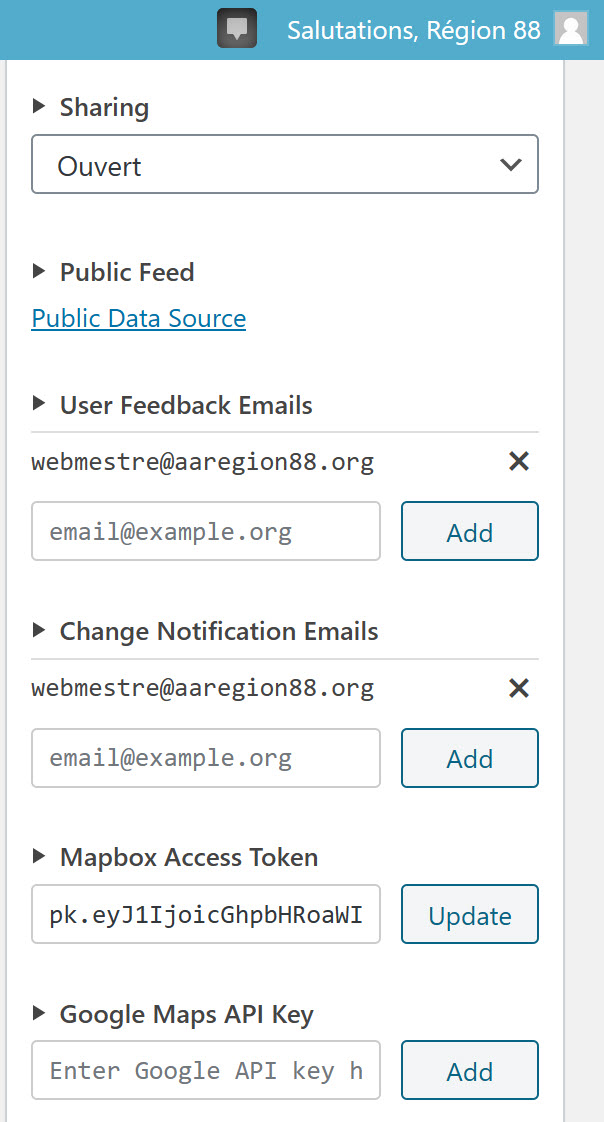
Smartphone (please complete the following information):
- Device: samsung S20 Ultra 5G
- OS: android
- meeting guide
Additional context Add any other context about the problem here.
Answer by @Web-R88
Yes when we use the Meeting Guide application from drummondville, for exemple, at the buttom of the screen we have Contact button. Clicking on it, we have false email contact = webmestre88@aa-quecec.org Now we use email= webmestre@aaregion88.org. Thank you
Amour et Service Raoul C. Webmestre https://aaregion88.org
courriel: webmestre@aaregion88.org
De : Tech2Serve <notifications@github.com> Envoyé : 6 novembre 2020 13:38 À : code4recovery/12-step-meeting-list <12-step-meeting-list@noreply.github.com> Cc : Web-R88 <web-r88@aaregion88.org>; Author <author@noreply.github.com> Objet : Re: [code4recovery/12-step-meeting-list] Contact information (#211)
When you say "on a smart phone", do you mean in the Meeting Guide app? — You are receiving this because you authored the thread. Reply to this email directly, view it on GitHub <https://github.com/code4recovery/12-step-meeting-list/issues/211#issuecomment-723236722> , or unsubscribe <https://github.com/notifications/unsubscribe-auth/AO25M3F5BELEAXZRDJOVXU3SOQ7A5ANCNFSM4TNAIZ7Q> . <https://github.com/notifications/beacon/AO25M3C6LLHIKXDKUYVTG7LSOQ7A5A5CNFSM4TNAIZ72YY3PNVWWK3TUL52HS4DFVREXG43VMVBW63LNMVXHJKTDN5WW2ZLOORPWSZGOFMN3O4Q.gif>
Start & Stop Dates
Show question & answer
Question
Is your feature request related to a problem? Please describe. I'm often given meeting schedule changes that are post dated, today i was given one to start on 12/1. I currently need to keep the request around and remember to do it, should i file it early it gets lost. On the flip side I'm given end dates for meetings as well, a fellowship lost their lease this summer and i had to remember to take it down. This would also be useful for moving of fellowships.
Describe the solution you'd like I would like two nullable date fields, START DATE and END DATE, should they be null they would not effect the behavior of the meeting. However if there is a date in the START DATE field I wouldn't want that change to synchronize to The Meeting Guide app until that date, If there were a date in the END DATE field i would want it to removed from The Meeting Guide as of that date.
Describe alternatives you've considered I manage it via a manual workflow - leaving requests in the inbox if i can't service them until a certain date.
Additional context N/A
Answer
Hi @eranstrong,
Thanks for the idea. It is not one I've heard of before. I suspect most people create the meeting but leave it in draft.
I'm going to close this for now, but if we get a lot of people asking for it, we may revisit. And we can reopen at that time.
Yis,
Meetings Not showing Up On Meeting Guide App
Show question & answer
Question
Hi good morning I have three meetings from the same area that I am having problems with not showing up on the meeting guide app. One of them I sort of rectified by taking out the building number and only put the street and postal code. The other two are not showing up. I have googled all three to make sure I have the correct address but don't seem to want to list. They are populating on our website but won't seem to show on the app. Are you able to contact me by phone? 604-916-4500 Darren
These are the meetings: Www.district43aa.org/meetings/cloverdale-crowd Www.district43aa.org/meetings/Saturday-night-coffee
www.district43aa.org/meetings/ladies-big-book-meeting-new-night
Answer
Hi Darren,
Please start by checking a couple of things with each of those three meetings:
- Check the online conference URL and make sure it is valid. By valid, it should look something like "https://www.zoom.us/j/meetingid" . You should be able to copy and paste the contents to a browser window, and open the meeting.
- Confirm the address is complete without inappropriate characters. At a minimum, it should have what we would call city and state. I think city and provinces in your neck of the woods? In any case, if the address geocodes and the meeting publishes, it should be okay.
BTW, what version of TSML are you using? If v3.10.0, are you experimenting with our beta api gateway?
Most often though, in these situations, the meetings in question are really close to whatever AAWS/GSO has set up for the geographical boundaries for the reporting entity (maybe because another district shares those meetings or is close by?).
If my suggestions above don't help, you'll probably have to contact appsupport@gso.org to check that or otherwise resolve this. In general, if the meetings are correctly in the feed (which they should be if they're published and showing up on your site), then the issue is most likely with Meeting Guide.
Please keep us posted.
Meetings not syncing after change in Plugin "Meeting Guide"
Show question & answer
Question
After a year of using the Meeting Guide Plug in with no issues, after making changes to the list on the our site, "WordPress" the Meeting Guide App does not sync the changes. I've waited well over 4 days. area34district12.org Thanks for any insight
Answer by @joshreisner
If specific information isn't syncing please let appsupport@aa.org know what it is and they can track down the issue. They can see if there are any errors importing your data and/or if there are conflicts with neighboring areas.
I took a quick peek and I don't see any of those issues happening, so my guess is it's been corrected.
For sure though please let them know the specifics, as in "on my website at this URL the meeting says X but in the app (screenshot attached) it says Y."
Types: Open
Show question & answer
Question
Is your feature request related to a problem? Please describe. The existing "Type: Open" makes a specific Open Meeting declaration: This meeting is open and may attend.
Describe the solution you'd like Local members say that the actual declaration should be same as it is listed in the Big Book as well as on the Meeting Guide App.
Describe alternatives you've considered Change the declaration to: "Open meetings are available to any one interested in alcoholics anonymous program of recovery from alcoholism non-alcoholics may attend open meetings as observers." <img width="349" alt="Screen Shot 2021-05-04 at 3 01 07 PM" src="https://user-images.githubusercontent.com/69115383/117055806-96113680-ace9-11eb-844c-3502a888627d.png">
Should be:
Additional context Add any other context or screenshots about the feature request here.
Answer by @mochel23
I made a change on my end to see how it looks and seems to fit:
https://aaflagler.org/meetings/tuesday-morning-silver-dollar-2/
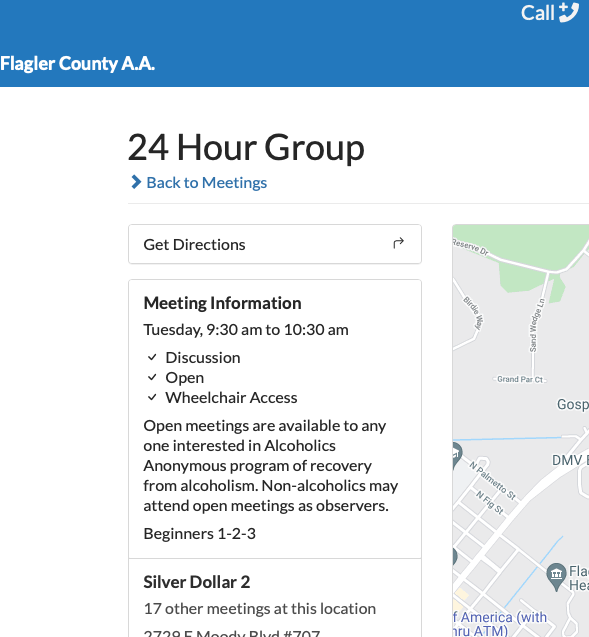
I suppose I could add this to the child function in our site but I am not sure if it will create an error.
Ability to set time zone at the meeting (or location?) level
Show question & answer
Question
Contact Details
No response
Requested Feature/Enhancment
Already requested a few times, for example https://github.com/code4recovery/12-step-meeting-list/issues/266. Also recently discussed in https://github.com/code4recovery/12-step-meeting-list/discussions/929
TSML UI will soon be adding the opt-in ability for sites to normalize a variety of meeting timezones into the user's timezone, but this would require those timezones being in JSON
Not having this is already a barrier for multi-zone sites such as CER to adopt TSML UI
Meeting Guide spec already has timezone as a supported key. Format must be in IANA timezone format, eg America/New_York or Africa/Cairo here is a complete list.
There is a native wordpress function that could be helpful: https://developer.wordpress.org/reference/functions/wp_timezone_choice/
An ideal solution would set this value automatically based on the meeting location entered using an API such as the Google Timezone API, but that may be a challenge from a financial and administrative perspective.
TSML Version
Latest (default)
Wordpress Version
Latest (default)
Answer by @joshreisner
thanks @gobborg for the excellent conversation about approachs in slack.
having thought about it a bit i would like to try it first on the location with no change to the meetings box. the ethos of the plugin is minimalism / simplicity / reliability, and i think this is the approach that best encapsulates that
benefits of putting it on the location: prevents situations where meetings at the same location have different timezones, or some have it and some don't, and fewer changes needed for users
because we are using IANA time zones, the dropdown will appear geographic, with values like America/New_York, so i think it will look right going in that box
Meeting Guide Page empty after deactivating, reactivating plugin
Show question & answer
Question
should see if there's something we can do about this
Discussed in https://github.com/code4recovery/12-step-meeting-list/discussions/1199
<div type='discussions-op-text'>
<sup>Originally posted by Area18Webservant August 23, 2023</sup> Hi all,
Was having trouble with our new gravity forms plugin, and as one of the initial checks. I tried deactivating plugins one at a time to find any potential contamination. When I have done this before, I usually skip over the 12 step meeting guide plugin, but I accidentally disabled it this time. I enabled it again right away, but now the Meeting guide page is empty. How do I restore my meeting database on that page?</div>
Answer by @kiyote33
While this is a repeatable issue, the standard way we've dealt with it in the past is to simply "Save Changes" on the /Settings/Permalinks page resolving the issue pretty much every time. A little google research hasn't shown a reliable solution to automate this. One suggested way to do it is to call flush_rewrite_rules but that doesn't appear to work all the time. We could try it with this code which uses the set_permalink_structure() method of the $wp_rewrite object:
add_action( 'init', function() \{
    global $wp_rewrite;
    $wp_rewrite->set_permalink_structure( '/%postname%/' );
\} );
-- Lots of comments indicating that this is not a good practice and may lead to other problems. Must test extensively if we decide to use.
Here's code which only updates the permalinks automatically after a plugin is activated:
function reset_permalinks()
\{
    global $wp_rewrite;

    $wp_rewrite->set_permalink_structure( '/%postname%/' );
\}
add_action( 'plugins_loaded', 'reset_permalinks' );
-- Above code doesn't work for me...
Fix headers and footers in WP block themes
Show question & answer
Question
review plugin support for wordpress block themes
we may be lacking some support in this area, see:
- https://discourse.tiaa-forum.org/t/meeting-guide-in-wp-2023-theme/8917
- https://github.com/code4recovery/12-step-meeting-list/discussions/1258#discussioncomment-7549326
actions:
- review the plugin display in legacy and TSML UI mode
- determine what should be added to our template to make block themes such as Twenty Twenty Three and Furnishop render properly
Answer by @joshreisner
having reviewed this i think there are two actions to take for this:
- fix our template pages to output headers and footers properly
- add a TMSL UI block
having created an issue for the second item, i'm going to re-title this issue to focus on the first
Marathon Type & functionality
Show question & answer
Question
Contact Details
Requested Feature/Enhancment
This is to serve as both an enhancement and feature request.
The enhancement is the addition of a new type of meeting, called "Recovery Marathon". Keeping the type to be non-fellowship specific will allow it to cross the borders of AA, NA, CA, GA & others. Because of its type, then the individual fellowship will be free to utilize their form of "-athon" for the name of the meeting. Example: "Thanksgiving Alc-athon".
The feature request is for what happens next once the type is selected. As the TSML plugin & the meeting guide app both have access to the internal date / time modules of their respective platforms, the feature can then bring forward a calendar picker to select a start date & time and another to select an end date & time. Once these selections are made, on the back end, the application will evaluate the selections and create the appropriate number of meetings, spanning the time(s) correctly.
Example: selecting 5 pm thanksgiving eve and 11:59 pm Friday after thanksgiving. This will generate 3 meetings, one for Wednesday from 5 pm to midnight, one for Thursday from midnight to midnight, and one for Friday from midnight to midnight.
TSML Version
Latest (default)
Wordpress Version
Latest (default)
Answer by @tim-rohrer
An interesting idea, but since I do not believe every area implements alc-athons the same way, I don't think it makes sense for the base TSML. And TSML tries to focus more on recurring meetings on a weekly basis. So meetings that occur once or twice a year don't really fit in this way. I believe marathon meetings are better advertised using announcements and websites.
If you still want a marathon type, my suggestion is to create it locally and then use the notes to explain the pattern.
Pull-Down Menu Issue with TSML UI Japanese
Show question & answer
Question
Hello Team!
I thought it happened today or a few days ago. On Kansai Area Website and Japan Online Intergroup, 'Anywhere' and 'Any Type' pull-down menu do not work correctly. These show only a few addresses and types. Actually these were working well but issues happened suddenly. So any solutions?
Kansai Area Website https://aa-kansai-hp.jimdofree.com/%E3%83%9F%E3%83%BC%E3%83%86%E3%82%A3%E3%83%B3%E3%82%B0%E5%A0%B4%E6%A1%88%E5%86%85/
Japan Online Intergroup Website https://aajapan-online-intergroup.org/meetings/
<img width="382" alt="Any Type" src="https://github.com/code4recovery/12-step-meeting-list/assets/100449629/a3e9b679-3a38-4dd4-a79e-7dd92bd1dd2f"> <img width="351" alt="Anywhere" src="https://github.com/code4recovery/12-step-meeting-list/assets/100449629/18dcf2b1-09c8-4a5f-b8f5-9cfa002eaf24">
Answer by @joshreisner
hi @Hiro-Tokyo thank you for posting here.
the issue should be fixed now. a change we made on july 8 seems to have broken japanese language type URLs - hopefully it is working for you again. you may need to hit refresh in your browser to see the types menu again
https://github.com/code4recovery/tsml-ui/commit/db9f29839d4de8d2736edbcd4e1fffa6db8f9324
Meeting Guide not Syncing with GSO
Show question & answer
Question
Hi folks. We have received a notice from the NY tech team that they are not able to sync with our meeting directory. Nothing has changed on our side. Could someone take a look and advise? www.oc-aa.org Faith
Answer by @joshreisner
hi @fbarnese do you have access to the TIAA forum? sites using GoDaddy have experienced this same issue and have shared experiences fixing it here: https://discourse.tiaa-forum.org/t/meeting-guide-app-cannot-access-json-file-error-403/9257/18
The cities in my surrounding area are no longer showing on the Meeting Guide
Show question & answer
Question
The cities in my surrounding area are no longer showing on the Meeting Guide - The only city showing up is the local city "Fresno, Ca," - I check my meeting schedule on the website https://www.fresnoaa.org/meetings/ and they are there on the schedule - I am confuse if this is a issue on The Meeting Guide side or what? Please help - Thank you
Answer by @tim-rohrer
Yes, if the meeting data is showing on your site, but not in Meeting Guide, then you will need to contact them to research why.
You didn't say, and I'm just curious, if the "surrounding areas" are being reported by district or similar websites?
Address changes - bigger issue
Show question & answer
Question
We are getting into some difficult territory with the address of our meetings. I originally had a problem with a meeting and thought we had fixed it. Today I am writing because the issue has changed a bit. I published the change on our site but for some reason the folks picking up our feed in the meeting guide are changing the address from the feed. Is there a reason this might happen? Is this our problem or theirs. Either way its ultimately the alcoholics problem because the end result is bad data. How would I address this? Please see the attached images that illustrate the problem.
I have an account with the meeting guide folks where I can flush and or reload our meetings in the meeting guide. I can't figure this one out and I don't have even knowledge of the system to really know what is going on.
I also don't really understand the geocoding that google/the TSML are doing. It seems I can't just edit the data in the sql tables and fix things
<img width="966" alt="Screenshot 2024-05-27 at 1 29 53 PM" src="https://github.com/code4recovery/12-step-meeting-list/assets/132401769/15493819-6bc5-492f-b14b-eb8dd843469f">
<img width="1137" alt="Screenshot 2024-05-27 at 1 28 59 PM" src="https://github.com/code4recovery/12-step-meeting-list/assets/132401769/7aa59445-f6a1-493f-9611-1db93317ffee">
Answer by @ginslo
Good afternoon, @Tech4TriCounty. It looks like this location is listed on your TSML list as well as on AA St. Louis with different addresses. See below for the differences in the listings:
AA St Louis
https://aastl.org/meetings/group-616-2/
204 W Pitman St
O'Fallon, MO 63366
Tri-County Intergroup
https://tricountyaa.org/meetings/group-616/
207 E Pitman St
O'Fallon, MO 63366
Best suggestion at this point is to collaborate with AA St. Louis to be sure you are both listing matching addresses. It takes some time for changes to propagate to the Meeting Guide, but after some time these differences should resolve.
Please let me know if this addresses the reported issue.
Filtering by distance not working in Legacy UI
Show question & answer
Question
Filtering by distance broken.
Tested suffolkny-aa.org, queensaa.org and a test site I spun up.
All are running v3.16.11
Legacy UI specific. Pretty sure it works fine in TSML UI.
The tsml-distance= param looks off in the URL.
I know we reworked some of this stuff recently, perhaps the bug was introduced then?
Answer by @joshreisner
the filtering problem was fixed and released right around the time this discussion was opened. we didn't notify here because the original report was from the issue i linked above.
but it sounds like you're talking about sorting now, which is different…
TSML-UI Query Type Codes Now Abbreviated and Columns do not align
Show question & answer
Question
Abbreviated Query String: "o" vs "open" "w" vs "women" "m" vs "men" "be" vs "newcomer"
Not sure when this started. It appears that the long form URL worked until 1/28/2025. Based on our log, I was running plug-in version 3.16.13 at that time. It updated to 3.16.14 on 2/17/2025. Old way - stopped working https://dupage41aa.org/meetings/?type=open Now, it must be coded with the abbreviated syntax: https://dupage41aa.org/meetings/?type=o
I added redirects to our site. However, I am seeing others that are broken.
e.g. https://www.pugetsoundaa.org/
As does dupage41aa.org, this site still points to the long form query parameters...and no longer works...
Column title / column data alignment issue In addition, for every site that I have viewed (3), the column titles no longer line up with the columns:
See
Thanks! Jim Area 20 / District 41 Alt Web dupage41aa@gmail.com
Discussion also posted here: https://discourse.tiaa-forum.org/t/tsml-meeting-type-codes-changed-women-men-open-newcomers-agnostics/11134/6
My config: TSML-UI TSML Plug-in: 3.16.14 Wordpress: 6.7.2 PHP 8.0 Theme: Divi
Answer by @JimPretlow
Just fyi...I was looking around and found that St. Louis looks just like mine looked when it was working.
- long form query parameters
- columns align.
Sortable columns
Show question & answer
Question
Wondering, when I feel like the old TSML UI had sortable columns? Is there something amiss in config - that could lead to the meeting columns not being sortable in the new UI?
Wondering if its possibly a setting meaning the meetings tables are sortable now?
Ive probably mot enabled an option or something Im sure.
https://codauk.org/meetings/?tsml-day=any
Answer by @joshreisner
the Legacy UI does have sortable columns - TSML UI hasn't implemented that feature yet - it's got some things though that the Legacy UI doesn't have, like live-searching and starting at "now"
what would be the main use-case do you think for sorting columns? would it enable something specific for you, or is just just a feature you're accustomed to seeing?
Checkbox Filters For Meeting Types
Show question & answer
Question
Hi All,
I saw a similar request to filter on Men's v Women's meeting. Wondered if there was a way to allow/implement a checkbox for Meeting types, so If you wanted a Newcomer meeting that met online or a Men's 12&12 study , Or a Closed Women's meeting etc. you could choose that.
Answer by @joshreisner
hi mark, not sure what the other request you're referring to is, but you can currently select multiple types by holding down the command key (on mac, it's a different key on windows) while selecting types to select additional types.
example: https://atlantaaa.org/meetings/?type=big-book%2Fmen
we have an open issue in TSML UI to convert these to checkboxes, we just need design help implementing it: https://github.com/code4recovery/tsml-ui/issues/171
AI & SEO
Show question & answer
Question
Responding to concerns raised this week in an A.A. forum, we’ve released an update to TSML today (version 3.18). We are hoping these changes will have a positive impact on Search Engine Optimization (SEO) and data visibility to LLMs for all sites that use 12 Step Meeting List, regardless of whether they use Legacy UI or TSML UI as their frontend, and regardless of what their sharing permissions policy is.
Specifically, this update adds a hidden crawler-friendly page, which lists basic metadata about each active meeting in plain, server-rendered HTML. This page, which lives at /locations, is linked to by a hidden link at the top of the /meetings page (Legacy or TSML UI).
<img width="1728" height="1079" alt="new-page" src="https://github.com/user-attachments/assets/73617d26-bee6-4958-ae0a-80b4b8b8be4f" />
Additionally, this page also features the same data in crawler-friendly ld-json structured data to make it more friendly to search engines.
<img width="1728" height="1079" alt="schema" src="https://github.com/user-attachments/assets/f94ea561-5d16-4640-9138-cbae4df27c87" />
We deliberated as a group whether to restrict this feature to sites that have their “Data sharing” setting to “Open” but ultimately decided that it should apply to all, because this data is only a high-level summary. (However, if there are sites that wish to restrict this hidden page, please let us know and we can devise a method to accomplish that.)
Making website content more appealing to search engines is a complex process that is hard to measure and often unclear. I will capture some “before” images of searches in the thread below, hopefully we will see some movement in the coming days and weeks.
Big shout-out to @gkovats , @anchovie91471 and @ginslo for being part of the initial dev effort! We want to expand the conversation and hear from more voices. What actions can Code for Recovery take to make meetings easier to find through search engines and AI?
Answer by @joshreisner
here are some typical search results today for "aa meetings in <city>"
<img width="1728" height="1079" alt="nyc" src="https://github.com/user-attachments/assets/3bd71d0a-d89e-4167-9441-c001801dea0b" />
<img width="1728" height="1079" alt="phoenix" src="https://github.com/user-attachments/assets/a1074ab5-475c-4542-aff5-dbcf9a1392df" />
<img width="1728" height="1079" alt="st-louis" src="https://github.com/user-attachments/assets/67679b58-fee6-4c26-a0c4-4e23754e47a3" />
User Feedback Change Notification Emails
Show question & answer
Question
The User Feedback and Change Notification Email Settings Allow for Multiple Email addresses but I am only receiving emails at the first Email address. I am trying to determine if the issue its related to the mail server settings or the Meeting Guide settings. We are using Gmail mail server and have Cpanel set to use external Mail server.
Answer by @anchovie91471
It looks like you've got TSML setup correctly. You're not receiving either type of email to those last 2 addresses?
Have you tried putting one of the area22indianan.org emails first to see if you are still getting email at the Comcast address?
You'd have to remove and re-add to change the order of them.
Also, have you checked the box that the emails come from to see if you're getting bounce back emails? If area22indiana.org is bouncing them for some reason, you'll likely get some notice.
Meeting Guide list link no longer works
Show question & answer
Question
Since the latest update, the Meetings page would open, but no meetings would display when users clicked links that opened https://www.area26.net/?post_type=tsml_meeting. This is new behavior, as those links have been in place for a LONG time.
I found that meetings were presented without issue when I replaced the links with https://www.area26.net/meetings/
While this issue is resolved if someone clicks an updated link on our website, I am concerned for anyone who may have bookmarked the old URL.
Answer by @joshreisner
hm, as a quick fix, could you try redirecting from that legacy url to the main meetings url?
Controlling when TSML updates are installed on our copy of TSML?
Show question & answer
Question
We've been using the 12 step meeting list component aaaages - literally thousands of members have found a meeting wholly due to this component.
I believe in the annals of time
- it was possible to control WHEN TSML updates were installed locally - in Legacy TSML?
- it doesnt SEEM to be controllable now? The updates get pushed out automatically to everyone using TSML UI?
I cant seem to find the option to stop updates being installed as soon as they're released? Can site admins still control when TSML updates are installed? Does that options still exist?
I ask as a couple of the recent updates - affected our sites functioning Particularly:
- "search by location URLS not resolving"
- "find a meeting near me"
Answer by @joshreisner
hi @k8fish3r thanks for posting yesterday about the problems redirecting to TSML URLs, this alerted us to a timing problem that has been around for a few weeks. we're working on fixing it!
you can get some measure of autonomy by making sure wordpress doesn't install plugin updates automatically, but these only apply to updates to the WordPress plugin, while the problems you're having right now are part of TSML UI, which does get handled in a separate process. we don't have a process identified yet for holding back and opting into updates, but it's something we can definitely discuss.
JSON arguments for TSML meetings pages
Show question & answer
Question
Hi
I was wondering is there a sense of arguments which can be applied to a JSON fed instances of TSML?
I'm using the JSON method as:
- I have a widget assigned to the TSML URL based meetings page.
- also I've another TSML instance on the same page.
Example page: https://codauk.org/twentyfourseven/
The UK tab: <div id="tsml-ui" data-src="/wp-content/tsml-cache-380e85c57c.json?1760956539" data-timezone="Europe/London" ></div> <script src="https://tsml-ui.code4recovery.org/app.js" async></script>
Apologies if I've missed a really clear example page within the support area/discussion forums.
I was hoping to:
- adjust the meeting type (to online) on the UK tab (React UI of TSML)
- or timezone on the Canadian tab (I think is using Legacy TSML possibly?)
Answer by @joshreisner
hm, looks like the "canada" tab of https://codauk.org/twentyfourseven/ is hosting a remote website in an iframe: https://codacanada.ca/?tsml-day=any&tsml-attendance_option=online&post_type=tsml_meeting. you could potentially import their meetings but it doesn't look like they have any timezones set in their data so this would probably lead to some confusion - i'd reach out to them and see if that's something they can do.
we do have an open issue to apply a default timezone to a JSON feed based on local settings, so if we were to make that change and they were to update this is a potential solution. then you could import their feed and the meetings would all be in the correct timezone.
regarding the UK tab, sounds like you want to limit this to just online meetings. this is normally possible - we have an instruction on how to do that in our readme here: https://github.com/code4recovery/tsml-ui?tab=readme-ov-file#override-type-defaults
looks like when testing it out locally it's not working - a bug due to a recent refactor. i just raised a pull request to fix it, so once this merges you'll be able to add this code to limit to just online meetings in your UK tab:
var tsml_react_config = \{
  defaults: \{ type: ['online'] \},
\};
Customizing “Meetings in Progress” Button (Text + Size)
Show question & answer
Question
Hi there — I’d like to customize the “Meetings in Progress” button in TSML-UI so it says: “Click here for X Meetings in Progress” (where X is the current count of active meetings).
Is there a way to pull that number dynamically and update the button label — ideally without editing core files? Also, what’s the recommended way to make this button larger (wider or taller) while keeping it consistent with TSML-UI styling — through CSS overrides or a built-in variable/class?
Thanks for any pointers!
Answer by @joshreisner
hi @trusteema
MA is already customizing a few TSML UI strings using PHP per this comment so you can just expand that customization with more strings like this:
$tsml_ui_config = [
    'strings' => [
        'en' => [
            'types' => [
                'inactive' => 'Invitation Only',
                'in_progress_single': 'Click here for 1 meeting in progress',
                'in_progress_multiple': 'Click here for %count% meetings in progress',
            ],
        ]
    ]
];
if you wanna customize more strings the full list is here: https://github.com/code4recovery/tsml-ui/blob/main/src/i18n/en.ts
i would probably style the in-progress button with CSS. there's no CSS classname on the button, but you can probably use this selector:
#tsml-ui table button \{
  color: pink;
  font-size: 48px;
\}
[Bug]: TSML UI: distance unit is mi instead of km while kilometers is set in the settings tab
Show question & answer
Question
Contact Details
Website With Issue
https://aa89.org/wordpress/reunions
What happened?
the distance displayed in search result should be in km as it is set to kilometers unit in settings General section. Here in Québec (Canada), mi is not a valid distance unit... it is only recognized by older people as we use kilometers SI unit since 1970's ;-)
TSML Version
Latest (default)
Wordpress Version
Latest (default)
What browsers are you seeing the problem on?
Firefox
Relevant log output/errors
No response
Answer by @joshreisner
thanks @Piteurrr for the report. the bug has been fixed in main branch and the issue has been closed, it will make its way to you as part of the next release
Translation with type overrides on programs other than AA in Legacy UI
Show question & answer
Question
discussed in https://github.com/code4recovery/12-step-meeting-list/discussions/1394
<img width="1840" alt="english" src="https://github.com/code4recovery/tsml-ui/assets/1551689/c2d8a9af-9b67-4478-9bf5-3283fd43c184"> <img width="1840" alt="french" src="https://github.com/code4recovery/tsml-ui/assets/1551689/6d2fc1e5-aee3-481c-8bfb-3adaa5d0769f">
Answer by @joshreisner
hi, i'm afraid not @BookOfDiscovery - we're a small team and all allocated to other issues at the moment.
to restate the problem a little, none of the custom meeting types are working in other languages, for example "Grab Bag" does not show up if your browser is set to French.
partly this is a problem in the way our wordpress plugin handles custom types - there's only a way to specify them in one language, when there would need to be a way to specify for each language.
for that reason, i'm starting to think this should be a TSML issue instead of TSML UI.
for example, this is working for me in TSML UI:
      var tsml_react_config = \{
        strings: \{
          en: \{
            types: \{
              'CUSTOM': 'My Custom Type',
            \},
          \},
          fr: \{
            types: \{
              'CUSTOM': 'Mon type personnalisé',
            \},
          \},
        \},
      \};
i see you've made a bunch of customizations on your site, perhaps you could also specify the translations of your custom types in the tsml_react_config object?
this is where you have:
<div id="tsml-ui" data-src="https://workaholics-anonymous.org/wp-content/meetings/sfdc_transformed_json_n8n_no_unscheduled_FINAL.json" data-mapbox="pk.REDACTED_MAPBOX_TOKEN" data-google="AIza_REDACTED_GOOGLE_KEY"></div>
<script src="https://workaholics-anonymous.org/wp-content/meetings/app.js" async></script>
<script>
var tsml_react_config = \{
columns: ['time', 'distance', 'name', 'location', 'address', 'region'],
flags: ['online', 'in-person', 'EN'],
distance_unit: 'mi',
conference_providers: \{
'bit.ly': 'Custom',
't.me': 'Telegram',
'join.skype.com': 'Skype',
'sites.google.com': 'Custom',
'groups.google.com': 'Email Group',
'workaholics-anonymous.org': 'WA International Numbers',
'webex.com': 'Webex',
'tinyurl.com': 'Email',
'chat.whatsapp.com': 'WhatsApp',
\},
flags: ['online', 'in-person', 'EN'],
map: \{
style: 'mapbox://styles/mapbox/streets-v12',
\},
strings: \{
en: \{
type_descriptions: \{
O: 'Open meetings welcome anyone interested in the Workaholics Anonymous Program of Recovery from workaholism. Non-workaholics may attend open meetings as observers.',
C: 'Closed meetings are for WA members or for those who desire to recover from their problem with work, activity, and/or work avoidance.',
\},
types: \{
WA_bilingual: '- Language: Bilingual',
WA_Book_of_Recovery: 'Book of Recovery',
WA_business_owners_enetrpreneurs: 'Business Owners/Entrepreneurs',
WA_Dutch: '- Language: Dutch',
WA_games_night: 'Games Night',
WA_general_sharing: 'General Sharing',
WA_grab_bag: 'Grab Bag',
WA_non_smoking: 'Non-Smoking',
WA_other: 'Other',
WA_topics_rotate: 'Topics rotate',
WA_work_avoidance_anorexia: 'Work Avoidance/Anorexia',
WA_WorkAnon_wellcome: 'WorkAnon Welcome',
DA: '- Language: Danish',
DE: '- Language: German',
EL: '- Language: Greek',
EN: '- Language: English',
FA: '- Language: Persian',
FR: '- Language: French',
HE: '- Language: Hebrew',
HI: '- Language: Hindi',
HR: '- Language: Croatian',
HU: '- Language: Hungarian',
ITA: '- Language: Italian',
JA: '- Language: Japanese',
KOR: '- Language: Korean',
LT: '- Language: Lithuanian',
…
<div class="c4r-source">Source: <a href="https://github.com/code4recovery/12-step-meeting-list/issues/1491">Issue #1491</a></div>
</details>
### TSML UI error {#tsml-ui-error}
<details>
<summary>Show question & answer</summary>
**Question**
I got this error when opening aaspokane.org/meetings/ when using the TSML UI. "Configuration error: time zone is not set." When I switched back to Legacy UI, it went away.
**Answer** _by @joshreisner_
Hi @DanGMaher yes you need to set the WordPress timezone in the general settings. In your case it should be set to `Los Angeles`
We will add a warning to the WP dashboard for sites that don't have this set.
<div class="c4r-source">Source: <a href="https://github.com/code4recovery/12-step-meeting-list/discussions/936">Discussion #936</a></div>
</details>
### PDF Generated Meeting Guide {#pdf-generated-meeting-guide}
<details>
<summary>Show question & answer</summary>
**Question**
Hi Y'all,
When you try to print the meeting guide by just the day we are getting a 500 server error.

**Answer** _by @gkovats_
What meeting list are you trying to print? There's an upper limit to how large a list of meetings it'll print.
<div class="c4r-source">Source: <a href="https://github.com/code4recovery/12-step-meeting-list/discussions/1508">Discussion #1508</a></div>
</details>