Troubleshooting
Errors, bugs, things that aren’t working.
62 questions — sourced from GitHub discussions & issues.
Why am I seeing 404 error on all meeting pages?
Show question & answer
Question
Contact Details
Website With Issue
https://area82aa.org/meetings/
What happened?
Suddenly all of my meeting pages no longer exist - individual meeting pages and the main meetings page. I've tried deactivating all of my plug ins as well as my themes and none of them are causing this bug.
TSML Version
Latest (default)
Wordpress Version
Latest (default)
What browsers are you seeing the problem on?
Firefox, Chrome, Safari
Relevant log output/errors
Failed to load resource: the server responded with a status of 404 ()
Answer by @tech2serve
This is most likely not a bug with TSML. The two most common reasons for this issue are permalinks or a change by the webmaster or host provider that affected the links.
For the permalinks, it is often not clear why Wordpress experiences this, but luckily it is an easy fix. Navigate to Settings->Permalinks, and then simply scroll down and click "Save Changes". This refreshes Wordpress links that affect TSML, and often resolves page not found issues.
If that doesn't fix your issue, take a look at why your site is loading from a "temp.domains"
<img width="538" alt="image" src="https://user-images.githubusercontent.com/31904316/133624556-018dcece-879d-438c-84e9-cbae9b8f1a87.png">
I'm not saying this won't work, or that it would cause problems, but it strikes me as unorthodox and does have your site going from secure pages to unsecured. There may be a better way to arrange you data.
Let me know if these steps resolve your issues.
Meeting showing as inactive when it shouldn't do
Show question & answer
Question
Describe the bug A meeting in my directory is displaying "Temporarily Inactive" but it shouldn't do. Is also having issues with saving the meetings after I've edited them or made any changes.
Web Host has upgraded the PHP version used - when is this issue going to be fixed to support newer versions of PHP because the plugin is unusable at the moment?
To Reproduce Steps to reproduce the behavior:
- Go to: https://www.ddauk.org/meetings/hows-your-head-topic-discussion-meeting-face-to-face/
- Meeting is showing "Temporarily Inactive" when it shouldn't do
Expected behavior Not display: "Temporarily Inactive". Allow me to save whenever I've made changes to the listing.
Screenshots If applicable, add screenshots to help explain your problem. https://paste.pics/DF942
Desktop (please complete the following information):
- OS: [e.g. iOS]
- Browser [e.g. chrome, safari]
- Version [e.g. 22] MacOS Big Sur: 11.5.1 (20G80) Safari: Version 14.1.2 (16611.3.10.1.3)
Smartphone (please complete the following information):
- Device: [e.g. iPhone6]
- OS: [e.g. iOS8.1]
- Browser [e.g. stock browser, safari]
- Version [e.g. 22]
Additional context Add any other context about the problem here.
Answer by @joshreisner
Hi @nextlevelwebdesign to give a little context on what is going on: the plugin uses addresses to distinguish between online and in-person meetings, and it allows you to use approximate addresses, like London, or England, for online meetings.
This is relevant because it looks like the address for your meeting is "Africa" which the plugin, understandably, considers an approximate location. Having a specific address or geographic point is necessary for the plugin to consider it an in-person meeting.
There is a secondary problem which is that we use Google to get the corrected address for every meeting, this store inside a shopping mall is a tricky one.
I recommend using Ariel Way, London W12 7GF, UK as the address for the meeting, I think this will produce the result you want.
PHP version should not be a factor here.
widget compatibility with WP 5.8
Show question & answer
Question
There appears to be a compatibility problem with widgets since WP 5.7 - I am seeing the issue reported by many people in other plugin forums. I didn't notice it until now, but the "Upcoming Meetings" function no longer works.
It will throw errors when I look at widgets. Error example: "The "tsml_widget_upcoming" block was affected by errors and may not function properly. Check the developer tools for more details."
Other widgets sometimes continue working on the sites despite errors, but in the case of TSML they are not. In my case for TSML the broken widget seems to be "Upcoming Meetings."
Sometimes the simpler ones (like "custom HTML" widgets) can be fixed by just removing and re-creating them as blocks.
Unfortunately, that is not working for this problem. Re-creating it just brings back the errors. Any help is appreciated.
Answer by @Grateful-Viv
Try using the classic widget plugin. I found when upgrading to 5.8 that the new widget blocks broke most of my html widgets as it tried to convert them to these ugly blocks. It didn’t just affect tsml. Once broken you will have to redo it unless you can restore from backup.
Urgent request: leave the meeting time alone when I change the day
Show question & answer
Question
This has bitten me in the backside more than once and I would like to enter an urgent change request:
Whenever I change the day of a meeting, the times jumps to 12am. This makes no sense to me whatsoever. Sometimes a group changes their meeting day, but the time usually stays the same. Sometimes the day is given to me in error so I want to be quick and adjust it and then I often miss the time change.
I would like the time, if there is one entered already, to stay the same, even when I change the day. It is very easy to miss and I don't see the reason why it would be changed if all I do is adjust the day....
Pretty please? Nicky
Answer by @kiyote33
Hi Nicky, I tend to agree with you. I can't think of a reasonable explanation why it would be necessary to change the meeting time when altering the meeting day. It may be that no one ever brought it up before. We will discuss and if the team agrees with us, then this discussion topic will get transferred to the issues list for action. Thanks for bringing it up...
Meeting finder not defaulting to the current day
Show question & answer
Question
We're having an issue on some computers where the day doesn't default to the current day. Also, when the day is changed, the meeting information doesn't update. The weird thing is that it doesn't happen on every computer all the time. My phone app (Android) and computer (MS) tend to work all the time (only had two instances where the day was not current). Our intergroup office's computer (MS) will never have the default day. Is anyone else having this same issue? lbardiv@gmail.com
Answer by @joshreisner
there are two things that could cause this:
-
do you have a caching plugin installed? that can make the meeting finder show the previous day (or earlier). one way to address this is to uninstall the plugin, or force the cache somehow to refresh.
-
is the wordpress timezone set correctly?
we might be able to say more if you share your website URL with us
WordPress not sending email
Show question & answer
Question
I got a report from user that the feedback feature on the listing details page does not work. She tells me the code she get is this: "Error: Could not instantiate mail function."
I just tried to use it myself and it does seem to be unresponsive. I am on version 3.14.8 on Wordpress 6.1, on a Mac. My user is on Windows. I tested it in Safari and Chrome, neither work.
Feels like a bug? It would be appreciated if this could be corrected asap, as many of my users use this option to notify us about changed.
Thanks!
Nicky al-anon.alateen.on.ca
Answer by @97eighty
@OSAwebsite, One method you might use to verify the proper mail function is to add a new user to WordPress. WordPress will send out an email in this process. This would verify that the native WordPress mail is functioning correctly. The 12 Step plugin uses this same method to send mail. For security, many hosting companies turn native SMTP access off and suggest using your mail system to send mail. A good plugin for this is https://wordpress.org/plugins/post-smtp/. This plugin will allow you to send mail through your own account and can help in testing. This problem is definitely a WordPress and hosting issue.
Warning: Undefined array key
Show question & answer
Question
Hi Josh and Dev Team...
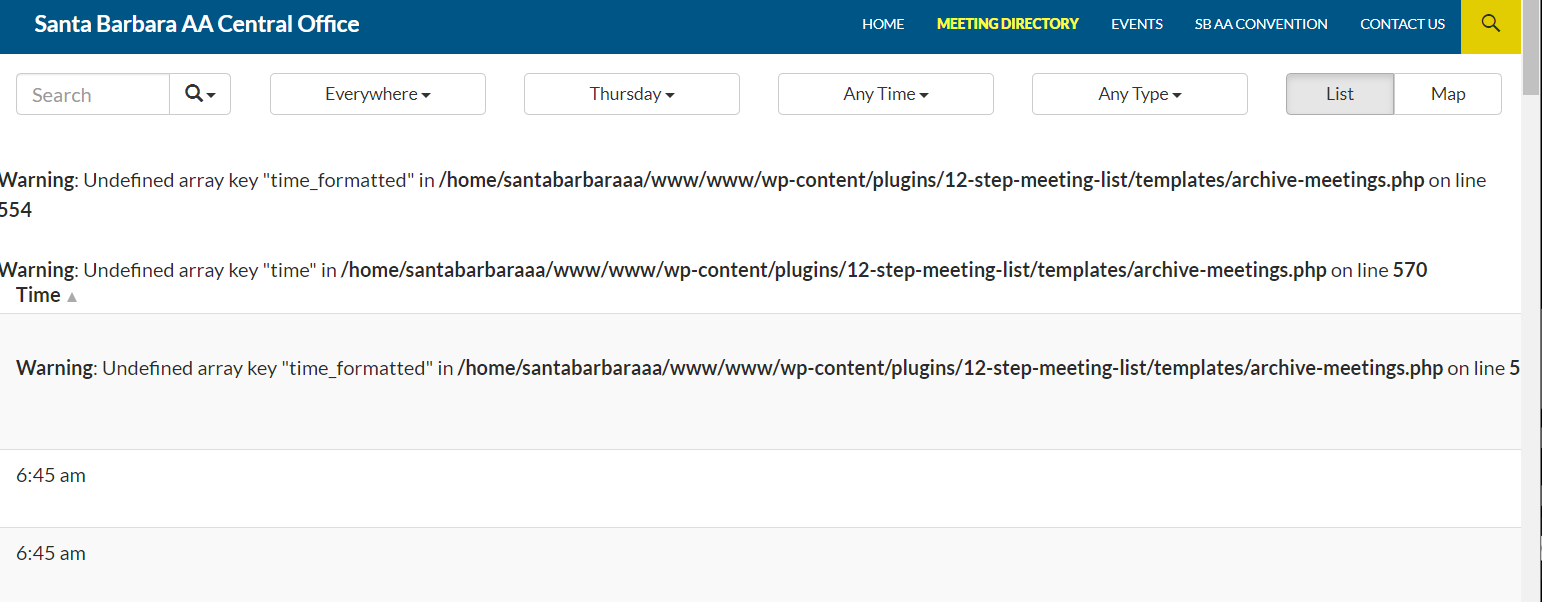
Our site is throwing the error messages below. It was first noticed today.
It's probably something simple or obvious, but I can't figure it out.
- https://santabarbaraaa.com/
- TSML Version 3.14.9
- Wordpress version: 6.1.1
- I tried deactivating all plugins except TSML but that the errors persisted
Answer by @joshreisner
hm! sounds like you have a meeting without a time and WP_DEBUG mode set to on, so its complaining. not sure why it's not rendering the whole list though!
we can fix that on our end, but in the meantime you might want to check if you need that appointment meeting. looks like the meeting in question is https://santabarbaraaa.com/meetings/sb-aa-convention-planning-meeting - could you try removing that?
another thing you can do to hide the warning is set WP_DEBUG to false in your wp-config.php
finally you could try switching the user interface to TSML UI
Scrolling not working
Show question & answer
Question
Hi,
New here and new to basic plugin knowledge,
In the state scroll down box, members on safari/mac cannot scroll down. I will post pictures. Can anyone help please?
Also, the search seems inconsistent, when typing in "Texas" the search is not pulling from all of the meetings and says no meetings were found even though there are plenty of Texas meetings. Is there any way for the search bar to pull from all of the meeting information?
url is https://heroinanonymous.org/meetings/
Answer by @kiyote33
So I was able to replicate the issue as soon as the Bodega theme was installed, before installing any of the other plugins. As I don't have a license for that theme, can you advise if there are any updates available? I went ahead and installed all of the required plugins for the Bodega theme and there wasn't any change on the behavior of the dropdown regions list scrolling. When testing against all the other themes, they behaved correctly which confirmed my thinking that it's the Bodega theme causing the problem. Looking at the Developer Console on the meetings page, I'm seeing this error: "bodega.test/wp-content/themes/bodega/img/logo.png:1 Failed to load resource: net::ERR_NAME_NOT_RESOLVED". Looks like some theme developer code that should have been removed before releasing the theme. I would think you should contact the Envato Market team to get a patch or fix for this issue. Hope this helps resolve your issue.
Feedback Emails separated by a comma
Show question & answer
Question
User Feedback Emails are configured with two recipients.
When clicking on Update Meeting Info
I get an email email with the recipient addresses separated by a comma altwebcoord@aavirginia.org,webcoord@aavirginia.org In Outlook, this gives me a problem. I know to replace it with a semi-colon. But, I'm worried about end users.
If this is a WP issue, I apologise. Also, I think I remember the Update Meeting Info button used to generate form that the user could fill out.
Please comment at your convenience. Thanks!
David
Answer by @joshreisner
hi @dcfnet yes the TSML UI appearance only has the capability of forming a mailto link because it is frontend-only. some sites i know have set up a feedback form on a page with gravity forms (or similar) and then pointed the update meeting info button to that address using these instructions: https://wordpress.org/plugins/12-step-meeting-list/#can%20i%20set%20a%20custom%20%22update%20meeting%20info%22%20button%20in%20tsml%20ui%3F
using commas appears to still be the recommended way to specify multiple recipients in a mailto link. i don't have access to outlook unfortunately to confirm that there's an issue there, but if you're concerned about your users you could also create a single email alias like feedback@aavirginia.org that forwards to both recipients
Meeting Types
Show question & answer
Question
Hi Folks,
We have a meeting Queer ideas of Fun that we have marked as LGBTQ. On our website, it is picking that up, but on the app, it is not. Can you help me out? Is this a global issue <img width="485" height="442" alt="image" src="https://github.com/user-attachments/assets/53ac874a-0936-4bda-9bc0-826b3a1aa23c" /> <img width="1125" height="2436" alt="image" src="https://github.com/user-attachments/assets/98d9b0c4-eea5-4b19-811c-2cd52741628e" />
Answer by @SIA-WEBSUP
Hey @ATLCOTech,
Assuming this is the feed the meeting guide app is reading ( link ), they should be picking up that type:
<img width="723" height="663" alt="image" src="https://github.com/user-attachments/assets/10e71a0e-a2a6-446e-b91c-fc3b7dffa8f4" />
Did you just add the type to the meeting? The meeting guide app reads feeds every 12 hours or so.
If you only just added the type, perhaps they haven't picked it up yet?
If you did add this type more than 12 hours ago, follow up directly with the meeting app support team ( appsupport@aa.org )
Created a stanging site, feed now not working on the main domain
Show question & answer
Question
created a staging site until it was developed to launch to the public. We launched last week but now the feed still contains the stanging url insted of the main url. any suggestions? thank you!
Answer by @brianw-area24
I'm noticing a couple things when I look at the "Public Feed" URL you provided, and when I import this feed into my test site:
- Most (all) the meetings have both Regions and Sub Regions. The Regions appear to have the city/town, and the Sub Regions have "SD", "SD 57105", etc
- I'm seeing more meetings than I'd expect outside of South Dakota. For example https://area63aa.org/meetings/https-us04web-zoom-us-j-897492804/, this meeting looks like it should be in Sturgis, but the address is San Jose, CA
- Some of the other information doesn't appear to be in the correct fields
I'm not seeing the image you tried to attach. That might be helpful. Can you try again?
I'm also curious, how did you get the meetings into this site? Did they come from CSV file(s)? Feed(s) on the Imports & Settings page? Other?
Meeting page not working
Show question & answer
Question
Greetings
I just reinstalled the plugin and now when I goto my meeting page it doesnt show up "page not found"
Any ideas?
Thanks
http://lucasg11.sg-host.com/meetings/
Answer by @lovethecodelabs
Resave permalinksOn Sep 11, 2022 9:59 AM, eflashlogistics @.***> wrote: Greetings I just reinstalled the plugin and now when I goto my meeting page it doesnt show up "page not found" Any ideas? Thanks http://lucasg11.sg-host.com/meetings/
—Reply to this email directly, view it on GitHub, or unsubscribe.You are receiving this because you are subscribed to this thread.Message ID: @.***>
Meeting Notes auto generating
Show question & answer
Question
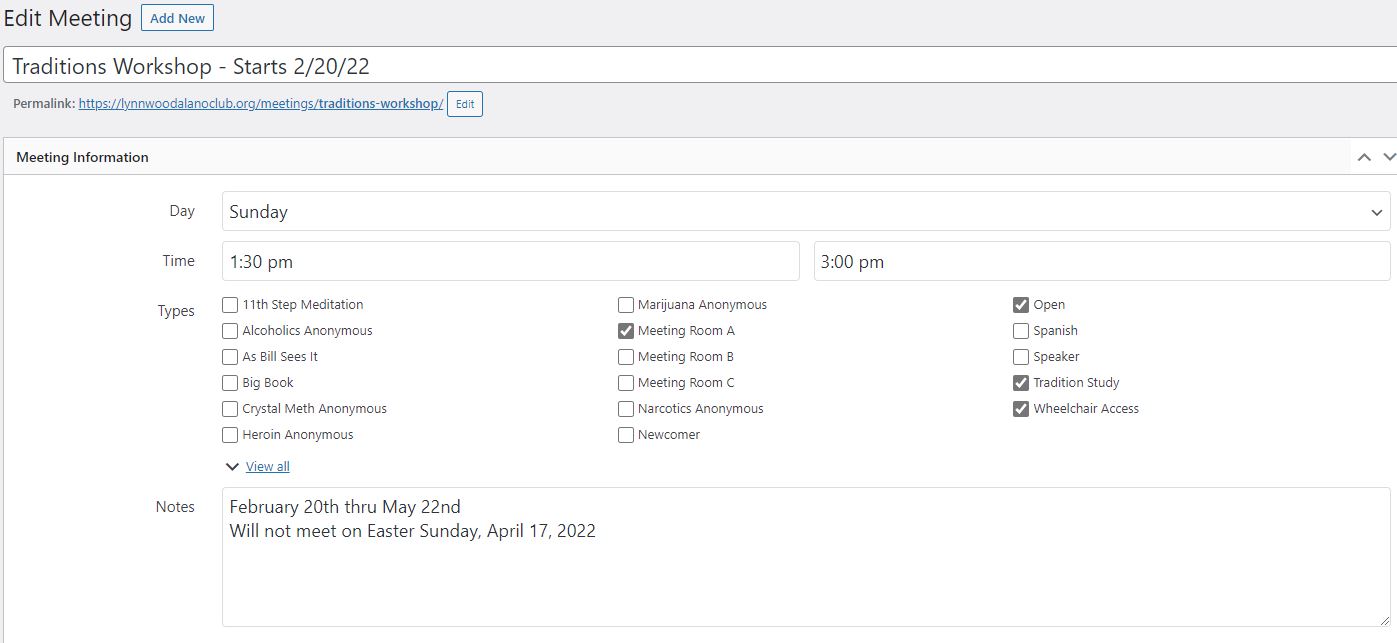
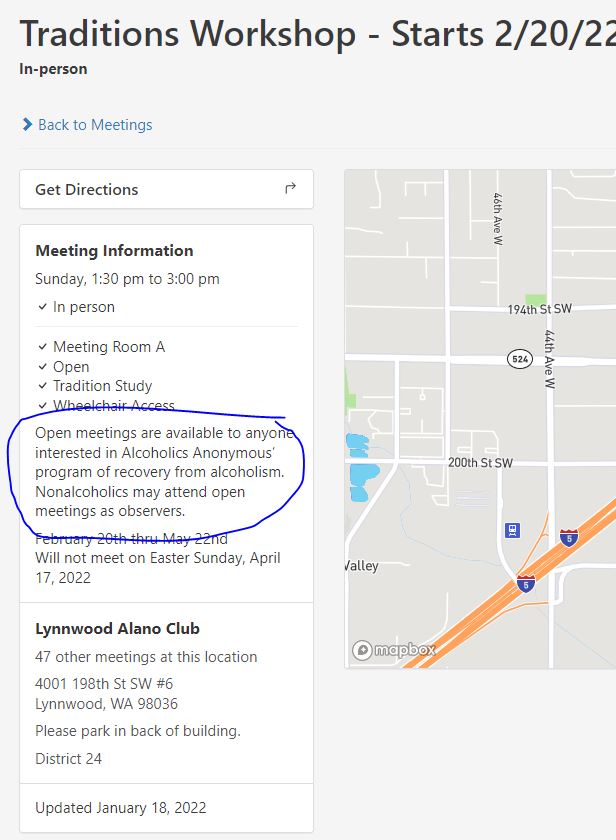
Hello, I am having a problem in which meeting notes are being automatically entered for each meeting but I am not writing anything in on some of them, I don't want the text to appear on every single meeting. How do I disable this?
This is what it looks like when I am editing.
This is what shows up, the circled area is the section ant removed.
Answer by @Grateful-Viv
If it’s not an open AA meeting, then uncheck open as a type.
tsml_scan_data_source Cron Job
Show question & answer
Question
I'm running into an issue where tsml_scan_data_source() is a part of our scheduled actions in WP_control, and it seems to be running daily per the date stamps, but it's not actually refreshing the Data source in TSML. Any ideas on what might be happing?
Answer by @joshreisner
hi @Nickjones818 - i believe that job only scans the data source and notifies you by email if there's a change, it doesn't actually refresh the data source automatically
WordPress caught an error with one of your plugins, 12 Step Meeting List.
Show question & answer
Question
I cannot login or access meeting plugin when activated Wordpress email said this plugin is causing a fatal error. I can login in when deactivated. my hosting said contact developer the site is aameetingspahrump.org site with plugin activated but cannot get in to change anythig
Answer by @Alanwr2024
I fixed it, by updating my php verson from 7.2 to 8.4 thank you
"Data Source Changes Detected" notifications persist even after refresh
Show question & answer
Question
For this (woodbridge VA) website we have two meetings that continue to show up in the "Data Source Changes Detected" emails even after the data source has been refreshed
- https://woodbridgeaa.org/meetings/?meeting=real-alcoholic-womens-big-book
- https://woodbridgeaa.org/meetings/?meeting=winners-circle
I've tried two methods to fix this
- Refreshing the data source
- Deleting the meetings and then refreshing the data source
This is also an issue for meetings from several data sources on https://aavirginia.org/meetings/. I can provide the list of meetings there if you need it :)
Answer by @joshreisner
ah that's super helpful thanks - the entity field that appears changed for these meetings does contain an apostrophe. we'll push an update soon that should resolve it 🤞
TypeError: e is undefined -- Error When Loading Meetings Page
Show question & answer
Question
Hi, I am getting an error when loading the meetings page: TypeError: e is undefined.
So far to troubleshoot, I have tried disabling ALL plugins and leaving only the 12 step meeting list enabled, same result. Also I have tried disabling the theme and enabling a vanilla theme, same result. Does anyone have experience with this, and can suggest how to proceed? thanks. -- note the site link is https://naranonontario.com/meetings
Answer by @lu-onthenet
Changed the program to drug addicts anonymous and the selection changes. That allows an entry under 'type'. Now the page works!
[Bug]: Meeting list not displaying showing following error "Timezone -04:00 is not valid. Please use one like Europe/Rome."
Show question & answer
Question
Contact Details
Website With Issue
https://capecodaa.net/meetings/
What happened?
Hi,
Contacted by user that the meeting list was no longer displaying. When you go to the page you get the following error message.
https://capecodaa.net/meetings/
Timezone -04:00 is not valid. Please use one like Europe/Rome.
The problem only appears on desktop browsers, when I tested the site on my mobile phone it still appears to be working correctly.
Really not sure what the issue is, please advise. Thanks in advance, Joe Bryan
What browsers are you seeing the problem on?
Firefox, Chrome
Relevant log output/errors
Timezone -04:00 is not valid. Please use one like Europe/Rome.
Answer by @joshreisner
yes judging by your site name, your timezone should be set to America/New_York - this way daylight savings will work properly
in the future please create a discussion rather than filing a new ticket, thanks!
json error, not show meeting list on webpage where it was previously posted
Show question & answer
Question
Contact Details
Website With Issue
trivalleyaa.org/meetings
What happened?
initially I went in to change my widgets, and one widget is for the Meeting Page top and botton where I had info posted with links, I could not do anything in the entire widgets section, it was locked with lots of error messages along the top of the widget working page.Many mentioned Json error but I do not read code so did not know what it was about. I deleted the text in the Meeting Page Top box and the Meeting Page footer box. And deleted many other boxes in the Widget sections and was able to fix the sidebar widget. However, the TSML would not repopulate. In addition, I am having a similar posting of TSML meetings on a new site I am building. The meetings show up on the Meeting Sidebar in the WP Dashboard, but not on a website page. Any suggestions would be very helpful.
What browsers are you seeing the problem on?
Firefox, Chrome, Safari
Relevant log output/errors
Sorry, but I did have a json validation error for the second site. Json syntax error
Answer by @tim-rohrer
I’m not fully following your description of your issue, so we may need a few back and forths.
First, I see your meetings here: https://trivalleyaa.org/?post_type=tsml_meeting
So your first concern is that you don’t see the meeting list, you may need to rebuild the link to it, or perhaps update the permalinks (General—>Permalinks—Save).
Any new instances of the Upcoming Meetings widget need to be created in a Wordpress Legacy Widget block. Try that and see if you’re able to get them back.
Firefox .pdf meeting list output error
Show question & answer
Question
The latest versions of Firefox (Windows & Android) may have a bug that causes .pdf printed output of meeting lists to display one column per page, rather than two.
Could someone consider verifying this, perform some error isolation, and work with developers at Firefox (if need be)?
The error does not occur using Edge, Chrome, or Opera.
Thanks in advance.
Answer by @kiyote33
Hi @John-L, I've tested this on Firefox version 112.0.2 and while the PDF Meeting List does default in a single column, it is a simple matter to click on the tools menu and change the Spreads option from No Spreads to Odd Spreads which will give you the desired two column display. As this is not a Code For Recovery issue but a feature of Firefox I will be closing this discussion.
Updating meetings
Show question & answer
Question
Hi, Is it only me or does anyone else having problem with updating and creating new meetings?
When I try to update a meeting the button "update" is grayed out and when I try to create a new meeting the "publish" button doesn't work. The meeting is sat as "draft". I have tried to check the box in the meeting list and choose "edit" from the drop down menu and set published from there but without any luck.
Answer by @tim-rohrer
What is the website URL? Have you set up a MapBox mapping token?
If it is for an existing site that used to work, when did things stop working?
I believe whatever issue you're facing is limited to your site at this time, so let's focus on trying to find what data is likely not valid.
Most often this occurs because the address is not geocoding, or some other field isn't validating. For example, if you're entering an online meeting, you need to put in a valid conference url.
In the case of the plugin failing to geocode the address, it is often because the admin is trying to put something into the address field besides a valid address.
If you provide some screen shots or addition data on what you're trying to enter, we can help you better.
If we're sure the data is valid, then we'll have to dig further.
Data Source issue
Show question & answer
Question
I have a meeting on our Intergroup site aaspokane.org that syncs with area92aa.org. The meeting "The Way Out Group Spokane" is correct on both sites. It continues to appear as a meeting that needs to sync daily. I have deleted it from both sites and added it to aaspokane.org without affecting this issue. Not a big deal because the meeting is correct on both sites, but it would be nice not to get emails
Answer by @kiyote33
Hi Dan, There's probably some slight difference in the way the meetings are stored in their respective database. Probably some hidden character that can't be discerned by the naked eye. You're in luck though as we will be publishing a major maintenance release which we hope will resolve or at least provide more information as to why the meeting is showing up on the change detected email. Hang in there for a few days, and let us know if the upcoming 3.15 release fixes this issue for you.
Error message on website after using PDF Generator
Show question & answer
Question
We've just started using the PDF generator on our website ct-aa.org. We just got this error message. Has anyone ever gotten this before?
Because the site is down I can't confirm the software versions.
Answer by @joshreisner
i'm not seeing that error, i checked a few hours ago as well <img width="1609" alt="Screenshot 2024-10-26 at 4 16 51 PM" src="https://github.com/user-attachments/assets/dcf8380a-d995-4317-8615-bd92d2e77342">
i don't think using the PDF generator should add any special burden on the website. i'm able to generate a PDF of your meetings without any issues.
are you still seeing the error on your end? when i am dealing with a website that is experiencing intermittent issues i'll set up a free monitor at uptimerobot.com, this can tell you how often the site goes down and for how long
Possible Bug? WP Page name being replaced by Meeting name in List view
Show question & answer
Question
Hello,
I noticed something the other day that I am trying to understand. In my header, I have a div with a class called inner_title. The inner_title is usually the WP Page name across every single page on my site, except for the page with the 12-Step-Meeting-List Plugin List view. In this case, the inner_title is the first meeting on the list. When I click into an individual meeting, the inner_title changes to the appropriate meeting name, as expected.
The expected outcome when you click on my WP Page name Meetings and see the list view is that the inner_title would also be Meetings and not the name of the first meeting on the list. Any Thoughts?
Answer by @steve970
It's hard to share a URL since I am on a local dev. environment.
On Mon, Dec 2, 2024 at 10:49 AM George Kovats @.***> wrote:
> Hi @steve970 <https://github.com/steve970> can you share a URL for the > issue you're seeing? > > — > Reply to this email directly, view it on GitHub > <https://github.com/code4recovery/12-step-meeting-list/discussions/1579#discussioncomment-11439590>, > or unsubscribe > <https://github.com/notifications/unsubscribe-auth/ACQELVEE36EIOG2AJHZ3VR32DSMRRAVCNFSM6AAAAABS3WXWIOVHI2DSMVQWIX3LMV43URDJONRXK43TNFXW4Q3PNVWWK3TUHMYTCNBTHE2TSMA> > . > You are receiving this because you were mentioned.Message ID: > <code4recovery/12-step-meeting-list/repo-discussions/1579/comments/11439590 > @github.com> >
Excessive CPU seconds per hour
Show question & answer
Question
I have a website that often nearly exceeds (sometimes does exceed) the monthly allowable CPU Seconds. Right now the site has reached 80% of the limit and it is only April 10. When it reaches 100% the site will be inaccessible. I believe it to be related to the TSML plugin as the meetings page is by far the most visited page of the website. I have several other sites using the plugin and do not run into this issue. Anyone have any suggestions?
Answer by @joshreisner
an upvote for checking the access log to see if there's a pattern in the traffic. if it's a single IP that's hammering the site then banning them might be a good option. if it's a number of IPs, then cloudflare or a wordpress plugin like wordfence can impose rate-limiting that might help get this down.
i'd also be interested to know what all these console warnings are about - it looks like in elementor is requesting some fonts ~1000 times on each page request, that could be adding up
<img width="1728" height="1084" alt="Screenshot 2026-04-10 at 2 22 25 PM" src="https://github.com/user-attachments/assets/34a7a981-38c0-4db3-8c08-c4195a41079c" />
distance filtering not working after reload
Show question & answer
Question
Discussed in https://github.com/code4recovery/12-step-meeting-list/discussions/1751
in legacy UI, distance filtering is working, but if you share the URL the distance filtering is lost
this is because we are strict-comparing a string to a number in the distance dropdown, so the right item is not selected, so ajax query is not working
we should cast the input as numeric, but also check that it is in the distances array. if it's not, we should default it to the regular distance default, which i believe is 2 (km or mi)
Answer by @joshreisner
hello @wamotechservices that's is a different issue - TSML UI does not support displaying districts in the dropdown, although you can search for them and find them on meeting detail pages. you may want to switch back to Legacy UI, or create your own method of navigating to districts using searches.
Locations / Contacts
Show question & answer
Question
We have started using the plugin recently for the new NA website in the Netherlands, and we are very grateful for being able to use it! https://www.nanederland.nl/meetings/ We are using Legacy UI at this time and have the TSML Xtras installed.
First: I'm not the webmaster but the fairly technical operations guy :)
The questions we have:
Locations: Since locations are "entities" that can be reused, we would expect a menu option that would allow editing of locations.
Contacts (group): same thing.
I'm not saying that it's not working, just wondering if we are missing a setting /extra plugin.
In service, Ewout
Answer by @anchovie91471
Hi Ewout! We're glad you're finding the plugin useful!
Yes, TSML doesn't include the Groups/Locations as separate screens in the menu, even though they are technically WP entities. They can, however, be edited on a related meeting edit screen, and, being that they are entities, they are changed for every associated meeting.
This is an experimental feature in TSML Xtras that isn't available yet, but may be on the roadmap.
restored meetings not displaying.
Show question & answer
Question
Describe the bug See comment on #55. after deleting a meeting and restoring it meeting does not automatically reappear. I have to hit update for it to show up again.
To Reproduce Steps to reproduce the behavior:
- Trash a meeting
- verify meeting is gone on site.
- Restore from trash
- meeting is still gone.
Expected behavior Meeting automatically reappears.
On version 3.4.22 Siteground/Bluehost shared hosting
Answer by @joshreisner
For faster performance, we have a JSON cache of the meeting data. My guess is that when a meeting is un-trashed, that the cache is not getting updated.
I think we probably just need to add a callback for the wp_untrash_post hook and run tsml_cache_rebuild() inside of it.
Don't use PHP Anonymous Functions
Show question & answer
Question
Users with PHP < 5.3 will get the following error when trying to update the plugin:
Parse error: syntax error, unexpected T_FUNCTION in /home/content/82/14032682/html/meetings/wp-content/plugins/12-step-meeting-list/includes/functions.php on line 499
This is due to some code I checked in on 11/22 in b07e113
Answer by @joshreisner
I would guess 95% of sites running it are on 5.x. Let's look and see if we can release an update that requires 5.6+ so that users like Greg who have a lower version don't see the update and can continue to run the existing version.
Also we should finalize our geocoding plan first if a segment of users won't get updates anymore.
cannot update plugin
Show question & answer
Question
I am trying to update the plugin but in the Plugin page on my wordpress site it gives me this error, can you tell me how to get past this?
Update Failed: The package could not be installed. PCLZIP_ERR_MISSING_FILE (-4) : Missing archive file '/tmp/12-step-meeting-list.3.6.2-ir5TVE.tmp'
Answer
This sounds like a permission issue, or has to do with how you're installing the plugin. I've upgraded sites using Wordress's plugin page without a problem.
Please use our Wordpress Plugin Support Page for user-related help issues, and reserve this area for confirmed bug reports and feature requests.
Thanks.
Include Meeting/group ID in "request change to this listing" default email
Show question & answer
Question
Is your feature request related to a problem? Please describe. A clear and concise description of what the problem is. Ex. I'm always frustrated when [...]
Describe the solution you'd like A clear and concise description of what you want to happen.
Describe alternatives you've considered A clear and concise description of any alternative solutions or features you've considered.
Additional context Add any other context or screenshots about the feature request here.
Answer by @OSAwebsite
Many in my membership use the quick comment email ("Request a change to this listing") to communicated changes in the COVID crisis. This is a fantastic tool to do so. I am wondering if it would be possible to include, in the email it auto-generates, the ID of the listing. I am using the plugin for an Al-Anon Area site. There is currently no field/entry box for the WSO ID (AA equivalent: GSO ID) a.k.a. the group ID so I have this information in the meeting details.
My request is this: can we either create an entry box for this ID and show it in this 'Request a change' email, or, alternatively, can we include the meeting information in this email? Both will do me fine.
A new entry box is probably going to be more work than including the meeting details.
Thanks, Nicky
Meetings are blank
Show question & answer
Question
Describe the bug Moved this over from the WP site (https://wordpress.org/support/topic/meetings-are-blank/#post-13170261)
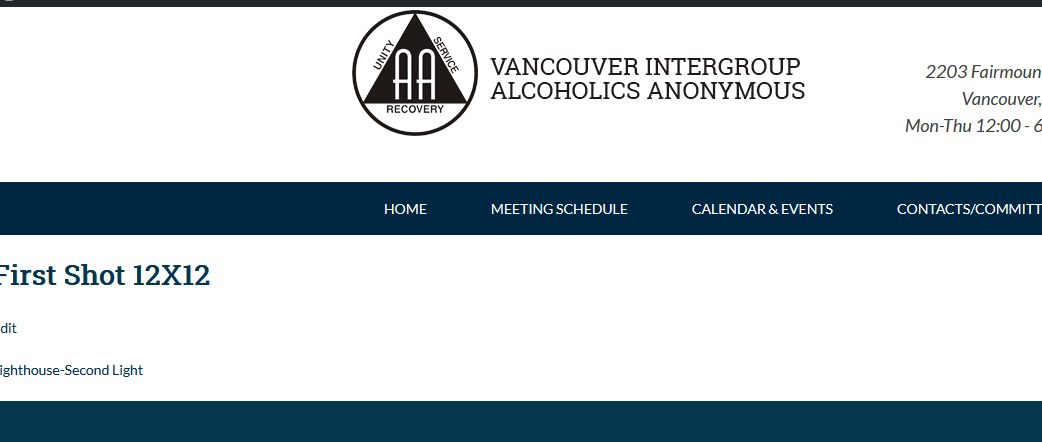
I am updating dozens of meetings who are moving back to being in person. While I was at it I upgraded the plug-in version. When I click on any meeting on any day there is no content. I am unsure why.
To Reproduce Steps to reproduce the behavior:
- Go to https://www.vancouveraa.org/meetings/?tsml-day=0
- Click on any meeting link
- See that page is blank
Expected behavior Page should show meeting info
Screenshots
Desktop (please complete the following information):
- OS: Win10
- Browser Tried both Firefox and Chrome current versions
Answer
Hi @scottvanwa2,
Thanks for moving the discussion over here.
I just tried looking at your meeting list and I'm now getting this:
<img width="730" alt="image" src="https://user-images.githubusercontent.com/31904316/88468432-c72e2200-cea0-11ea-9843-59215ce50a8e.png">
This is almost always due to an issue with permalinks. Have you tried going into the permalinks page and re-saving the settings?
Meeting Search Page not working properly
Show question & answer
Question
When you use the search page not all fields are working and when you change a second field, all the other fields return to default.
To Reproduce
- Go to the meeting search page
- If you click on the day option, you can not change to anything but Wednesday.
- If you click on an other field, it will change to your selection; but, if you click on another field it will return your original selection to its default value.
Expected behavior
- I expect the day menu allow me to select an option besides Wednesday.
- I expect the field menu selection to remain when performing a search
Desktop (please complete the following information):
- Windows 10
- Firefox
- Version 81.0. The same problem occurs in Chrome version 85.0.4183.121.
Answer
It appears the issue you're experiencing is likely related to the SuperFish plugin that is throwing errors on your site. Please disable that, and see if you continue to have troubles with TSML.
<img width="1423" alt="image" src="https://user-images.githubusercontent.com/31904316/95368773-2eeaeb00-089c-11eb-8927-c07b50067df5.png">
Version 3.9.2 Problems
Show question & answer
Question
Version 3.9.2 froze my back end on the live site. Restoring backup until I can figure it out. Refreshing permalinks was not possible since once the update was made, I could no longer get to anything in the back end.
Worked fine on the staging site however.
Describe the bug A clear and concise description of what the bug is.
To Reproduce Steps to reproduce the behavior:
- Go to '...'
- Click on '....'
- Scroll down to '....'
- See error
Expected behavior A clear and concise description of what you expected to happen.
Screenshots If applicable, add screenshots to help explain your problem.
Desktop (please complete the following information):
- OS: [e.g. iOS]
- Browser [e.g. chrome, safari]
- Version [e.g. 22]
Smartphone (please complete the following information):
- Device: [e.g. iPhone6]
- OS: [e.g. iOS8.1]
- Browser [e.g. stock browser, safari]
- Version [e.g. 22]
Additional context Add any other context about the problem here.
Answer by @district6wc
I just updated this plug-in and am having the same issue. I am unable to get to wp-admin dashboard. The webpage comes up blank. I had to call GoDaddy and they renamed the folder for now and this deactivated the plugin. This file contains all the meetings in my district that I entered manually. Please help!
Is there anyway to use this plugin for our Squarespace site? Any help would be appreciated.
Show question & answer
Question
Describe the bug A clear and concise description of what the bug is.
To Reproduce Steps to reproduce the behavior:
- Go to '...'
- Click on '....'
- Scroll down to '....'
- See error
Expected behavior A clear and concise description of what you expected to happen.
Screenshots If applicable, add screenshots to help explain your problem.
Desktop (please complete the following information):
- OS: [e.g. iOS]
- Browser [e.g. chrome, safari]
- Version [e.g. 22]
Smartphone (please complete the following information):
- Device: [e.g. iPhone6]
- OS: [e.g. iOS8.1]
- Browser [e.g. stock browser, safari]
- Version [e.g. 22]
Additional context Add any other context about the problem here.
Answer by @97eighty
@saludapictureman At first glance SquareSpace offers a Premium offering which has the ability to create Code Blocks to add your own JavaScript. See: https://support.squarespace.com/hc/en-us/articles/205815928-Adding-custom-HTML-CSS-and-JavaScript.
With this option you may be able to use the React interface. Instructions for setup are here: https://github.com/code4recovery/react
Display issue on the autofill search field
Show question & answer
Question
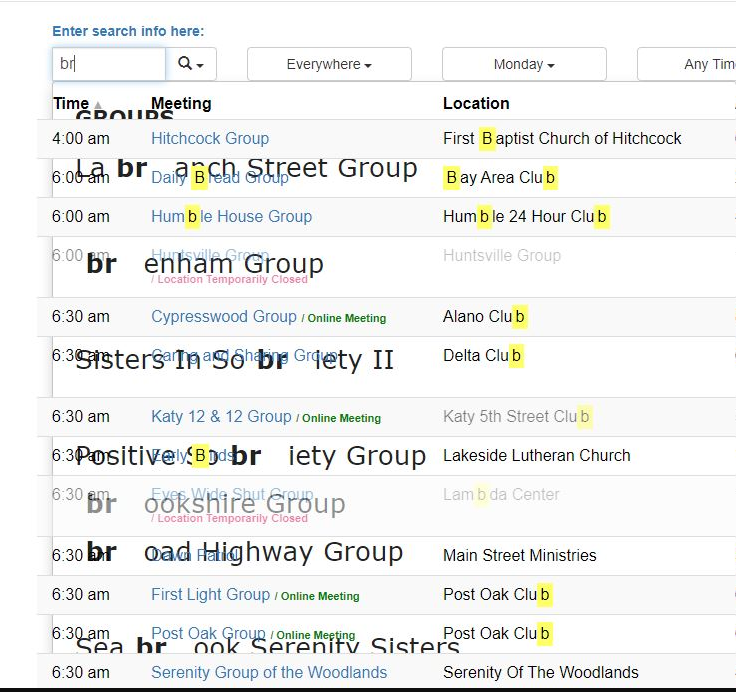
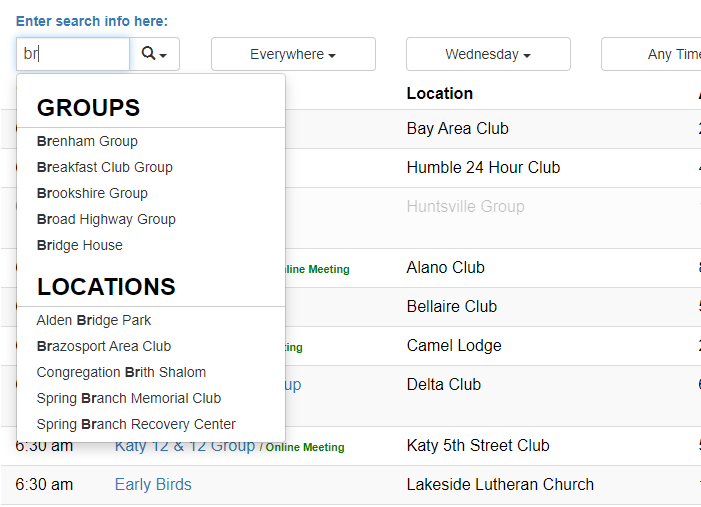
There’s a display issue since v 3.9.4 on the list that appears below the search field as you start typing.
Issue:
Expected behavior:
Answer
Please provide standard information like website link (Houston, TX?), Wordpress versions, theme, other plugins, etc.
My quick suspicion is that this is related to another plugin causing issues with jQuery Migrate. Once I have your website link I can see if I can duplicate the issue. If I'm not able to duplicate (which if it is aahouston.org, another our members already reported he cannot duplicate the issue on three different browsers) it, then please try different browsers/computers to see if the issue goes away.
PayPal username not working
Show question & answer
Question
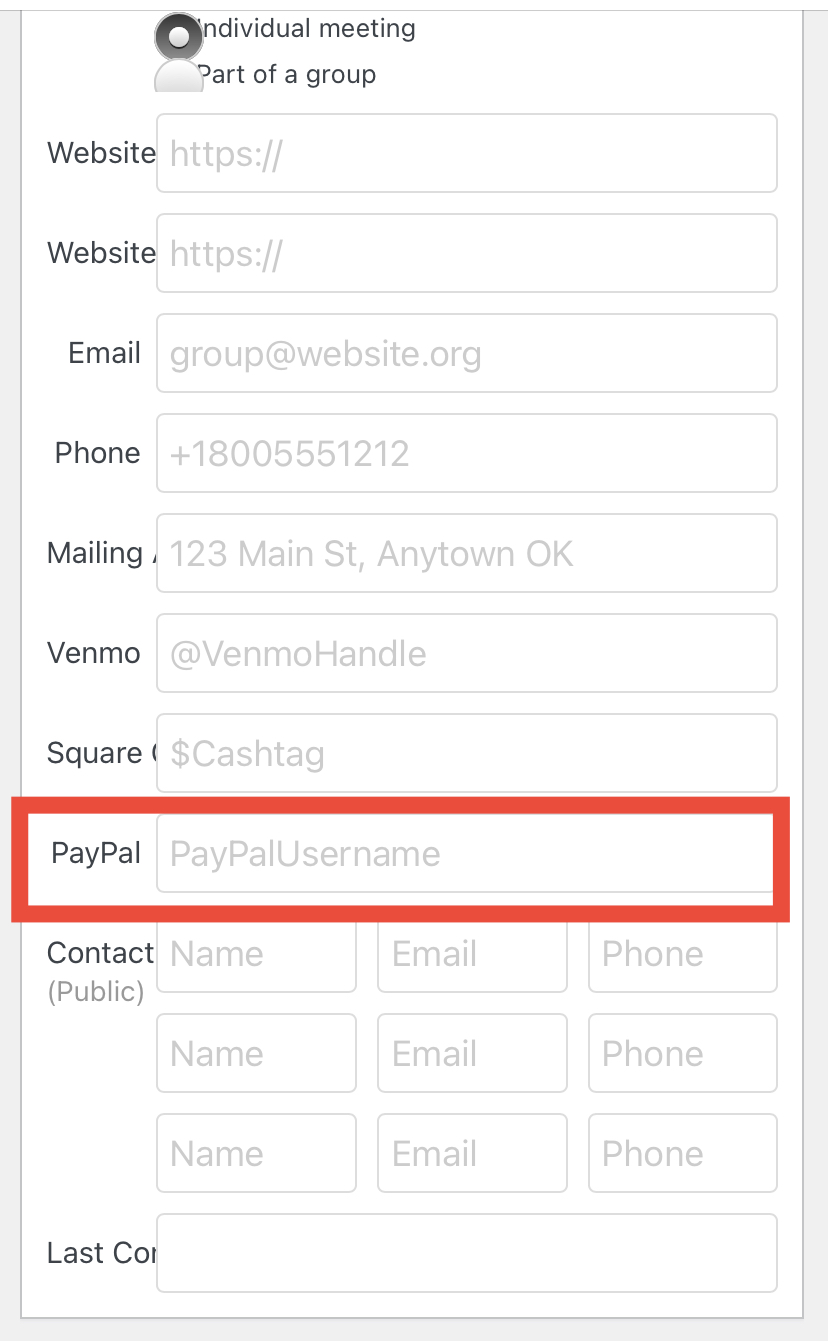
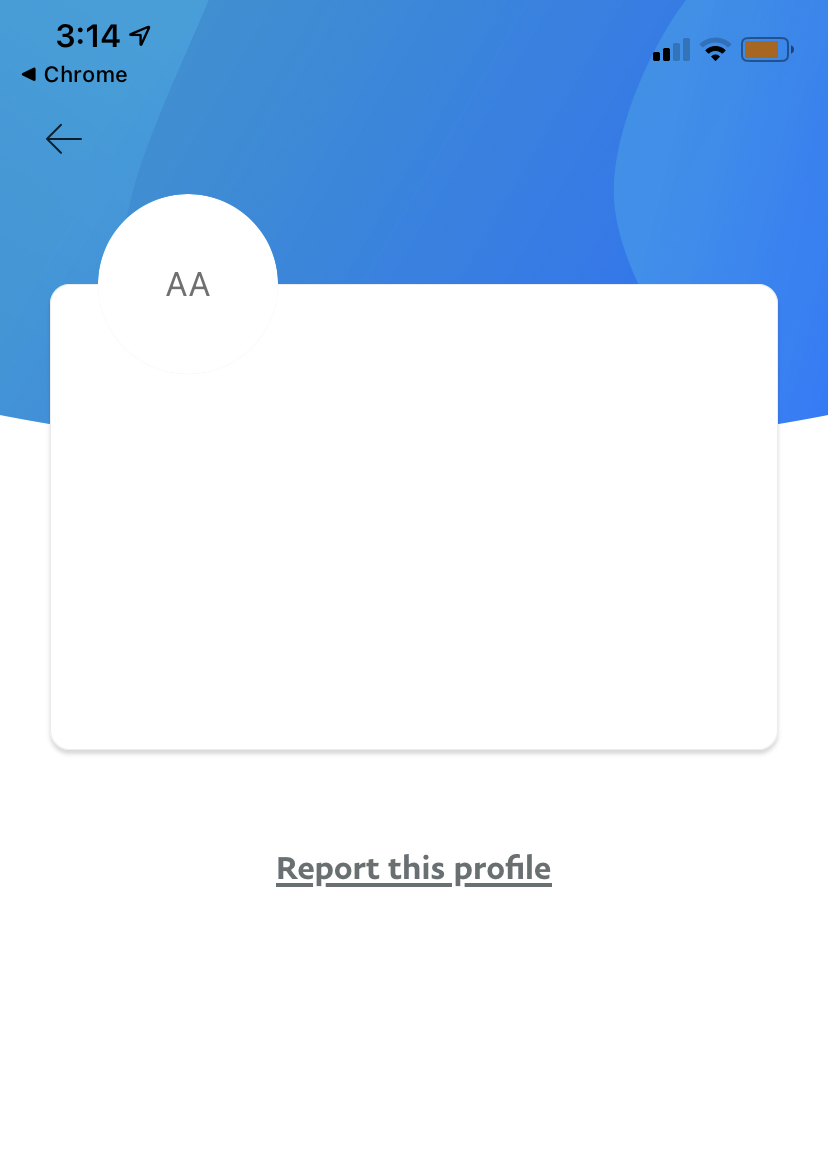
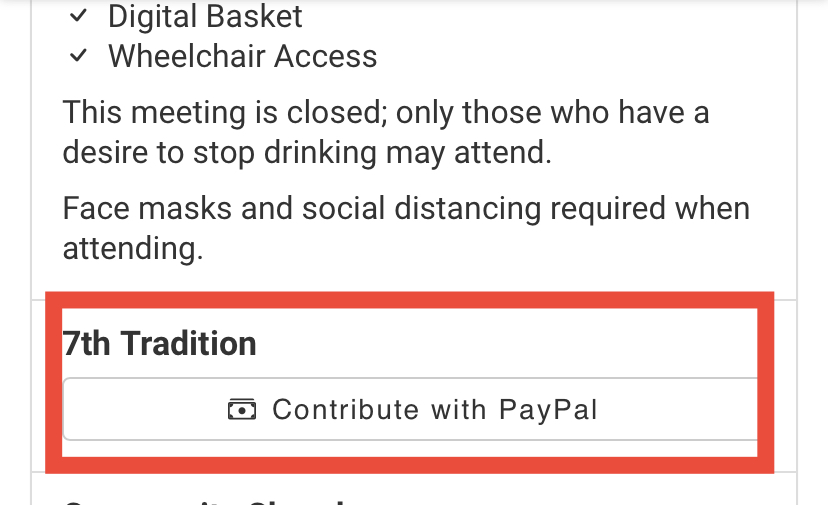
When I enter our group PayPal user name, it links to a blank PayPal page and not the correct group page.
Answer
I confess I don't personally use this feature, but am pretty sure right now the issue is that you don't have the right PayPal page/username
<img width="1225" alt="image" src="https://user-images.githubusercontent.com/31904316/113455086-c5c1db80-93d7-11eb-98e2-c82321dbb932.png">
Let's start by confirming the correct PayPal.me user page.
Odd Upcoming Issue
Show question & answer
Question
Describe the bug Day 2 Upcoming Missing Result(s).
To Reproduce Steps to reproduce the behavior:
- https://aa-stlawrenceny.org/meetings/?tsml-day=2&tsml-time=upcoming --> no results!
- https://aa-stlawrenceny.org/meetings/?tsml-day=3&tsml-time=upcoming --> has results!
This is at 10:42 PM. There are no meetings until noon on the next day which is day (3).
Expected behavior There should be results!!!
Possible Explanation
<?php
if (!empty($arguments['time'])) \{
    $this->time = is_array($arguments['time']) ? array_map('sanitize_title', $arguments['time']) : array(sanitize_title($arguments['time']));
    if (in_array('upcoming', $this->time)) \{
        $this->now = current_time('H:i');
    \}
\}
//callback function to pass to array_filter
public function filter_time($meeting)
\{
    if (!isset($meeting['time'])) \{
        return false;
    \}

    foreach ($this->time as $time) \{
        if ($time == 'morning') \{
            return (strcmp('04:00', $meeting['time']) <= 0 && strcmp('11:59', $meeting['time']) >= 0);
        \} elseif ($time == 'midday') \{
            return (strcmp('11:00', $meeting['time']) <= 0 && strcmp('16:59', $meeting['time']) >= 0);
        \} elseif ($time == 'evening') \{
            return (strcmp('16:00', $meeting['time']) <= 0 && strcmp('20:59', $meeting['time']) >= 0);
        \} elseif ($time == 'night') \{
            return (strcmp('20:00', $meeting['time']) <= 0 || strcmp('04:59', $meeting['time']) >= 0);
        \} elseif ($time == 'upcoming') \{
            return (strcmp($this->now, $meeting['time']) <= 0);
        \}
    \}
\}
I won't comment on whether using strcmp and times makes sense. IMHO these would be better handled as DateTime or Carbon instances.
That said, it could just be there are no meetings on Tuesday after 10:44PM and there will be upcoming meetings shown after midnight (or should I say early on in the morning).
But that's ODD to me.
@joshreisner wrote some of this code according to git blame; what's the code meant to be doing?
Answer by @joshreisner
👍 I agree. We're getting rid of this view in the new version of the meeting finder we're working on and showing all the meetings sorted by upcoming as the default view: https://react.meetingguide.org
This way the next meeting is always at the top of the list (unless you filter to show specific days).
Publish Date not Changing with Edit
Show question & answer
Question
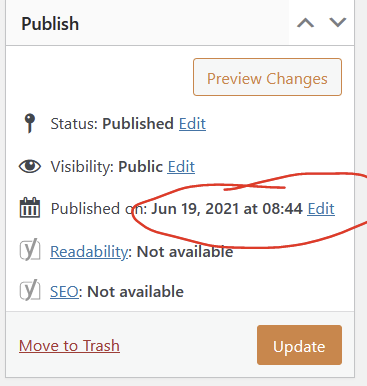
Describe the bug when changes are made by our meeting editor to a meeting and published again, the publish date is not changing.
To Reproduce Steps to reproduce the behavior:
- Go to meeting record and make an edit
- Click on "Update"
- Scroll down to '....'
- See error
Expected behavior The publish date used to update automatically. Now we are doing it manually There was an option to manually update with one click. Now that option is gone and each field (month, day, year and time) must be manually updated.
Screenshots
Desktop (please complete the following information):
- OS: Windows 10 PC
- Browser [Firefox]
Additional context I am also on a PC and the update feature works fine for me. As of yesterday Meeting Editor has a custom WP role and can only access the TSML plugin. However, she said this issue has been ongoing for quite some time.
Answer by @97eighty
@A46webchair A quick look at our code doesn't show that we update this field directly. This is a function of WordPress. I suggest manually looking at the post_date, post_modified fields in your database to see if they are updating properly.
Notify when a meeting is deleted or unpublished
Show question & answer
Question
Contact Details
Website With Issue
What happened?
no notification when a meeting is closed
TSML Version
Latest (default)
Wordpress Version
Other (Identify version in text above)
What browsers are you seeing the problem on?
Firefox
Relevant log output/errors
unknown
Answer by @joshreisner
@CheriJones this all looks correct! It's just not a feature we currently have. Does seem like an oversight. I don't recall it coming up before though.
[Bug]: PDF generator button open window with error
Show question & answer
Question
Contact Details
Website With Issue
aalaroundup.org
What happened?
returns: We can’t connect to the server at pdf.code4recovery.org.
-pds
TSML Version
Latest (default)
Wordpress Version
Latest (default)
What browsers are you seeing the problem on?
Firefox
Relevant log output/errors
No response
Answer by @petermixt
gets to the generator page then... Returns a new error...

[Bug]: Meeting back button leading to 404 error instead of meeting page
Show question & answer
Question
Contact Details
No response
Website With Issue
No response
What happened?
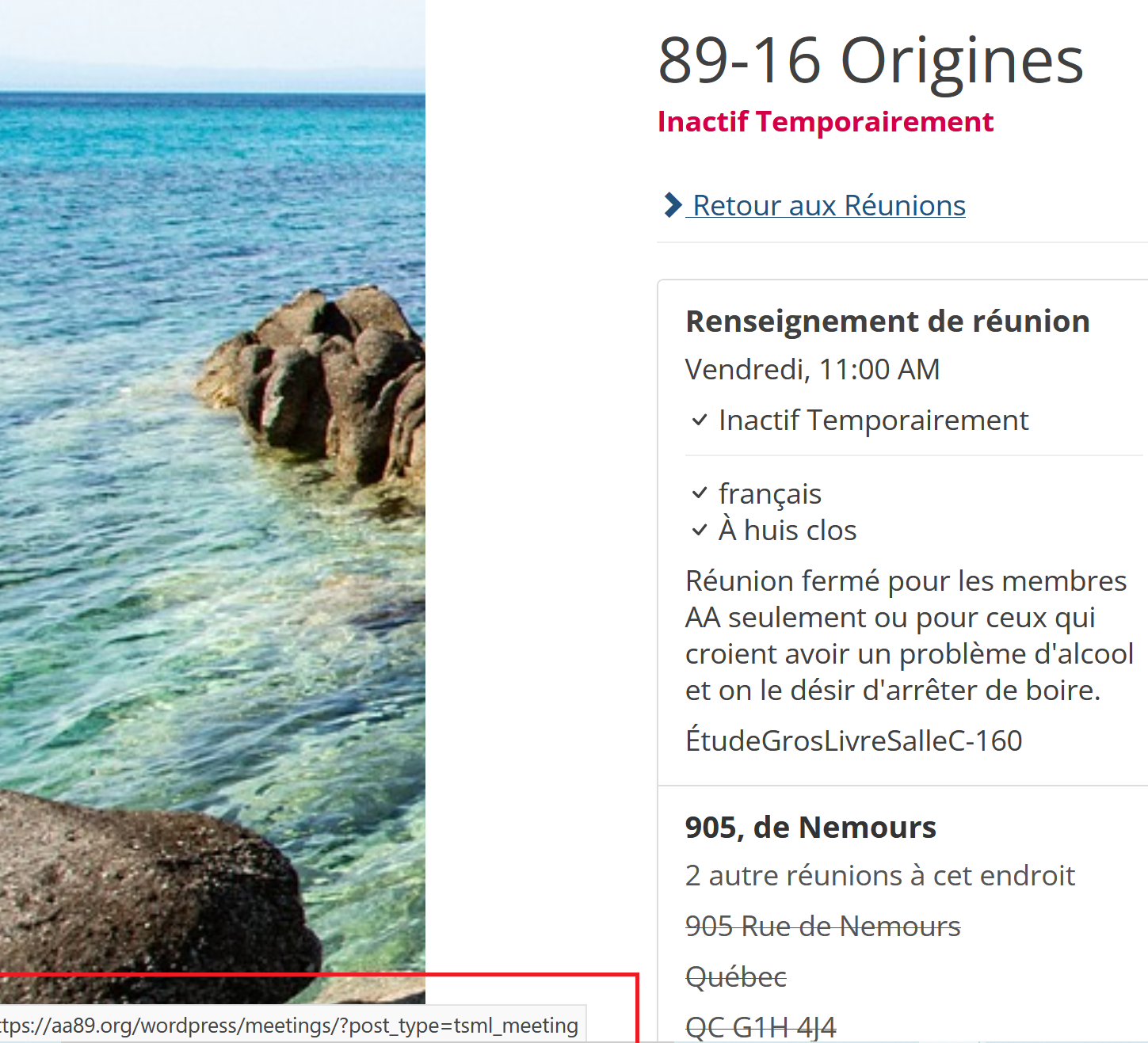
The return button on a specific meeting page lead to an empty page.
 Thanks again :)
TSML Version
Latest (default)
Wordpress Version
Latest (default)
What browsers are you seeing the problem on?
No response
Relevant log output/errors
No response
Answer by @Carlsans
I would suggest the removal of the meeting folder alltogether ex: https://aa89.org/wordpress/meetings/?post_type=tsml_meeting would become : https://aa89.org/wordpress/?post_type=tsml_meeting solved it for me :)
Meeting time should not reset to default when day of week changes
Show question & answer
Question
Discussed in https://github.com/code4recovery/12-step-meeting-list/discussions/652
<div type='discussions-op-text'>
<sup>Originally posted by OSAwebsite January 22, 2022</sup> This has bitten me in the backside more than once and I would like to enter an urgent change request:
Whenever I change the day of a meeting, the times jumps to 12am. This makes no sense to me whatsoever. Sometimes a group changes their meeting day, but the time usually stays the same. Sometimes the day is given to me in error so I want to be quick and adjust it and then I often miss the time change.
I would like the time, if there is one entered already, to stay the same, even when I change the day. It is very easy to miss and I don't see the reason why it would be changed if all I do is adjust the day....
Pretty please? Nicky</div>
Answer by @OSAwebsite
Okidoki!
Yours in service, Nicky D Ontario South Website Coordinator al-anon.alateen.on.ca
This too will pass...
On Thu, Mar 3, 2022 at 2:20 PM brianw-area24 @.***> wrote:
> I'm working on another issue how, and this is the next one on the list. > Hopefully it will make the next release. > > — > Reply to this email directly, view it on GitHub > <https://github.com/code4recovery/12-step-meeting-list/issues/688#issuecomment-1058402740>, > or unsubscribe > <https://github.com/notifications/unsubscribe-auth/AOIWBFZAZPPWKJYQF7FWVO3U6EGJBANCNFSM5OHMSEFA> > . > Triage notifications on the go with GitHub Mobile for iOS > <https://apps.apple.com/app/apple-store/id1477376905?ct=notification-email&mt=8&pt=524675> > or Android > <https://play.google.com/store/apps/details?id=com.github.android&referrer=utm_campaign%3Dnotification-email%26utm_medium%3Demail%26utm_source%3Dgithub>. > > You are receiving this because you commented.Message ID: > @.***> >
Wordfence Blocking Imports
Show question & answer
Question
Contact Details
Website With Issue
What happened?
Running the meeting finder on a site along with Wordfence. Everything seems fine for a period of time and then after about a week imports start to stall and take FOREVER to run. Through trial and error we have found that deactivating Wordfence resets the issue and the imports will run normally for a period of time. Not sure if this is a Meeting Finder issue or something Wordfence is doing wrong. If you have any ideas I'd be interested in hearing them.
Thanks for developing this amazing tool - yours in service, Scott
TSML Version
Latest (default)
Wordpress Version
Latest (default)
What browsers are you seeing the problem on?
Firefox, Chrome, Safari, Microsoft Edge
Relevant log output/errors
No response
Answer by @sgibson71
This is what our chairperson had to say:
On average, I would say we do about 10 imports per week. Marge in group records does 5-7 a week, and many of them require some manual overrides by Lori or me, which we do with another load. So many days, there are two loads done. Marge often starts her about 10 in the morning. Lori or I will usually do the second load in the evening sometime. Each load right now is 416 meetings. And no, we've never experienced the problem while WordFence is deactivated. If the load is having a problem, as soon as I deactivate WordFence, the load immediately takes off and finishes in its usual 3-5 minutes. I can then reactivate WordFence and right now, we appear to be good for a week. The slowdown also appears gradually, hitting a "knee-in-the-curve" by Monday.
<http://www.avg.com/email-signature?utm_medium=email&utm_source=link&utm_campaign=sig-email&utm_content=webmail> Virus-free. www.avg.com <http://www.avg.com/email-signature?utm_medium=email&utm_source=link&utm_campaign=sig-email&utm_content=webmail> <#DAB4FAD8-2DD7-40BB-A1B8-4E2AA1F9FDF2>
On Wed, Apr 27, 2022 at 1:17 PM 97eighty @.***> wrote:
> @sgibson71 <https://github.com/sgibson71> How often and how many imports > do you do? Does the problem ever occur with WordFence deactivated? > > — > Reply to this email directly, view it on GitHub > <https://github.com/code4recovery/12-step-meeting-list/issues/791#issuecomment-1111265740>, > or unsubscribe > <https://github.com/notifications/unsubscribe-auth/ASEV4OYCILA2A6FRSOUM5WDVHFZCNANCNFSM5UPJAA4Q> > . > You are receiving this because you were mentioned.Message ID: > @.***> >
--
MOBILE: (717) 333-4277 *WEB: *www.axiomwebworks.com
restore tsml_link function for the enhanced feedback plugin
Show question & answer
Question
Contact Details
Website With Issue
aacolumbia.org/meetings
What happened?
Version 3.16.7 auto updated yesterday. When selecting a meeting info returned to user states "There has been a critical error on this website."
To view the error https://aacolumbia.org/meetings/lunch-box/
What browsers are you seeing the problem on?
Chrome, Microsoft Edge
Relevant log output/errors
No response
Answer by @joshreisner
hmm, we're not seeing any errors on detail pages on our demo site, eg https://demo.code4recovery.org/meetings/spiritual-progress-group-monday-1205
would you be able to enable WP_DEBUG temporarily to see what the error is? go to wp-config.php and change this to true
define('WP_DEBUG', true);
Remove / adjust Github issue templates
Show question & answer
Question
Contact Details
No response
Requested Feature/Enhancement
Let's take out the weird github issue templates that we use, and ideally just add a message at the top of the "New Issue" form that says:
> ✋🛑 Stop! This form is only for the Code for Recovery TSML team - please Create a Discussion to get help from our support rotation.
Answer by @tim-rohrer
I have no objection. This simplifies things. And perhaps the wording will be better seen. Many users seemed to ignore the request to open Discussions vice issue, but the icons might help :-)
I know some orgs have figured out how to hide Issues from the general users. Last I tried, I couldn't figure that out.
New Twenty Twenty Two Theme not yet supported by TSML
Show question & answer
Question
The new Block themes supported by wordpress 5.9 and newer works differently than all classic themes we are use to. Without an intervening code injection, we get a "Deprecated: Theme without header.php is deprecated since version 3.0.0 with no alternative available. Please include a header.php template in your theme." error message.
Answer by @joshreisner
I notice that the [tsml_ui] shortcode doesn't seem to work with the Twenty Twenty theme. I get a blank page with a console log that says Could not find a div#tsml-ui in your HTML.
I found that changing this line
wp_enqueue_script('tsml_ui', $js);
in shortcodes.php makes it work again. This tells it to include the script in the footer.
wp_enqueue_script('tsml_ui', $js, [], false, true);
JSON: Syntax Error - Malformed JSON
Show question & answer
Question
I get the attached error message when I attempt to add a data source
Another user I know has no problems with same JSON
Help please

Answer by @joshreisner
if you put the URL through jsonlint.com or meetingguide.org/validate does it work?
this can happen if the site has sitelock enabled. they have to 'whitelist' your URL to allow it, otherwise it shows a non-JSON error message, triggering the error
User Feedback Emails Form - Sender email
Show question & answer
Question
Hello all,
- Regarding the meeting feedback form
- When a user fills it out the form and sends it it sends us an email
- previously, when we answered that email, the recipient was the email of the person who had filled the form.
Since last update, this is not the case anymore, the recipient is wordpress@alcoholics-anonymous.eu.
Upon checking, the headers do not contain the "reply-to: intial.senders@email.com"
This also is a problem due to the fact we have an autoresponder which now only goes to wordpress@alcoholics-anonymous.eu
Please advise,
Thanks,
Julien
Answer by @joshreisner
Hi @julien-paris - we haven't made any changes to this area of the plugin in a long time, so I don't think it's related to a plugin update. We are still attaching the Reply-To: header to the emails from the plugin, but there are a lot of stages that come afterward that we don't control.
Are you using a plugin to send emails from your site? I just sent a test email.
Tawk.to Chat Bot and Affiliation
Show question & answer
Question
Hi! Does anyone have any experience strength and hope on feedback from the groups on using chat bots? We have 1 group who feels there is an issue of affiliation (see screen shot at the bottom).
Answer by @joshreisner
hi @ATLCOTech it might be good to get a little more info about the specific objection, perhaps they don't like the way the chat feature is branded and has the message at the bottom? you might ask if they like the presentation of the chat feature on https://aasfmarin.org/ or https://aasanjose.org better? the use a different service which is a little more discreet
Cannot publish a meeting "Sorry you are not allowed to edit this item: website." "A post type mismatch has been detected."
Show question & answer
Question
Contact Details
Website With Issue
fairbanksaa.org
What happened?
I entered everything in for the Sunday Morning Serenity Group meeting, and hit publish. I ended up with an error message. The name of the tab was "Sorry, you are not allowed to edit this item: fairbanksaa.org" and in the window it read "A post type mismatch has been detected." Here are the screenshots:
<img width="1567" alt="Image" src="https://github.com/user-attachments/assets/8fb83dfe-5523-44c5-b106-f834f99150b9" />
<img width="1559" alt="Image" src="https://github.com/user-attachments/assets/56ce9825-3f99-4624-8af6-b0284b65b3ce" />
<img width="1562" alt="Image" src="https://github.com/user-attachments/assets/d40e2ed2-4f6c-4917-9b82-d25c99a418a7" />
<img width="1571" alt="Image" src="https://github.com/user-attachments/assets/a73cab21-1a58-4d31-8f65-c66e909d0c9e" />
<img width="1745" alt="Image" src="https://github.com/user-attachments/assets/e8951803-5cae-4558-9cb5-9a6e6484109f" />
What browsers are you seeing the problem on?
Chrome
Relevant log output/errors
Answer by @joshreisner
i'm with @tim-rohrer - i've never seen this type of issue before. are you able to see the Users page in WordPress? if so, what's your user profile? i wonder if changing it to Administrator would fix it.
also wonder what other plugins your site might have installed? this might help us reproduce the issue
Space at the top of the chart
Show question & answer
Question
The meeting finder is being crowded by the website header. (https://ct-aa.org/meetings/?tsml-day=0&tsml-distance=&tsml-mode=me. All the other pages are fine. Can I add space at the top of the chart to solve that problem?
Answer by @gkovats
I see the large header up top and how it takes over roughly half the screen
But that header is on other pages. Not sure how adding more space would help, but if you can add some CSS to the page you can target the meeting finder easily:
<style>
#tsml \{ margin-top: 5rem; \}
</style>
Tech Sharing Session [TSS] - Demo GitHub workshop for us non-techy volunteers.
Show question & answer
Question
TSS started from the TIAA forum to have workshops on what we do and help support volunteers coming and asking questions. The topic of GitHub is interesting to us, but most of us are nervous and do not know how to use GitHub. It does not have to be about Code4Recovery, but it might be helpful. As an amateur to know a little on how you use GitHub for Code4Recovery: projects, issues, discussion, etc... I was first directed to GitHub through TIAA, since I didn't know to come here first with my plugin problem.
I would like to know what you think and if there would be a volunteer here that is familiar with GitHub to do a workshop. We only do workshops quarterly now, and have April, July, Oct available on the 4th Tuesday of the month.
Personally, I will be rotating on at the end of 2026, and I would like to know what I should be passing on to my incoming chair. I am in Area 39, and we are not looking for techy people but techy enough to catch on build a knowledge base our website admins, without always starting from scratch. Hopeful that this workshop we could help build interest for your team of trusted servants at Code4Recovery. - April
Answer by @tim-rohrer
Thanks April. This is something we could discuss internally about supporting this.
Are you thinking the audience for such a workshop would be developers or people looking for help?
Open Feedback Form in same window
Show question & answer
Question
Added $tsml_feedback_url to my child theme functions.php and pointed it to a "update meeting"-form. And that seems to work not as expected.
I ran into several issues and I don't know how to approach nor solve it. Any help would be appreciated.
-
The update-form opens in a new tab. In html it would be target="_self" to open a link in the same windows. How do open the form in the same windows after clicking on the [Update meeting info] in the left down corner on the single meetings page?
-
It seems I can only pass 1 parameter to populate form fields. Whenever I try to use more than 1 the form does not open, but the single meetingspage opens in a new window displaying the same single meeting page in the legacy interface. When I click on update meeting in that new window it throws me a 404.
Thanks in advance. I appreciate it!
Answer by @MarcelCarels
Solved half of the issues :)
This code added to child themes function.php opens the form in the same window. And only affects the [Update Meeting info]-button.
add_action('wp_footer', function () \{
?>
<script>
document.addEventListener('DOMContentLoaded', function () \{
  function fixFeedbackLinks() \{
    document.querySelectorAll('a[target="_blank"]').forEach(function(el) \{
      if (el.href && el.href.includes('SLUG-OF-FORM-PAGE')) \{
        el.setAttribute('target', '_self');
      \}
    \});
  \}

  // First run
  fixFeedbackLinks();

  // TSML is a SPA → reapply on changes
  const observer = new MutationObserver(fixFeedbackLinks);
  observer.observe(document.body, \{ childList: true, subtree: true \});
\});
</script>
<?php
\});

$tsml_feedback_url = '../SLUG-OF-FORM-PAGE';
broken link
Show question & answer
Question
added pdf generator. can't find meeting list info. reverts to home page Coigaa.org please help
Answer
I assume you're talking about the plugin 12 Step Meeting PDF. That plugin is maintained by a different author and you'll need to contact him through his support site.
If you're talking about 12 Step Meeting List plugin PDF page, please provide specific steps you take to reproduce the issue, along with a run down of your website versions and other info, and we can reopen the issue.
Thanks.
Research stale permalink issue
Show question & answer
Question
we find that when people transfer a site to a new host (and maybe other situations) permalinks need to be refreshed
until this is done it means that the /meetings page is not working
then with just clicking "save changes" the page starts working
why is this? do other plugins have this problem? for example does the events calendar's /events page also go down?
Answer by @joshreisner
this should be fixed now by https://github.com/code4recovery/12-step-meeting-list/pull/1291
thanks @gkovats !!
Error deleting plugin
Show question & answer
Question
a user in #1341 reported an issue deleting the plugin, and i saw that too when trying it on our dev site:
<img width="806" alt="Screenshot 2024-02-07 at 5 01 51 PM" src="https://github.com/code4recovery/12-step-meeting-list/assets/1551689/5a45d7ab-7f08-4a1b-afd4-81dc4e26de59">
Answer by @joshreisner
this should be fixed now in 3.14.30 (just released). thanks @gkovats !
Update "Tested Up To" WordPress version 6.5
Show question & answer
Question
Contact Details
Website With Issue
What happened?
Please update the readme with tested up to 6.5 (RC2) on the next tsml release. One peculiarity noted: the Author role has the same Admin access as the Editor role. Expected it to have the same lack of access permissions to TSML Admin as the Subscriber and Contributor roles. Research showed the current behavior was the same in version 6.3 and possibly before.
What browsers are you seeing the problem on?
Firefox, Chrome, Opera, Microsoft Edge
Relevant log output/errors
No response
Answer by @dvcb
Encountered no problems testing 3.14.32 on two sites using WP 6.5 RC3. Did not have time to explore the role permission issue seen by @kiyote33
[Bug]: unable to publish Updated greyed out
Show question & answer
Question
Contact Details
Website With Issue
What happened?
This bug is encountered via the backend.
While updating an existing meeting, there is no error message printed to indicate why the Update button is deactivated.
Kind Regards, Jason D
What browsers are you seeing the problem on?
No response
Relevant log output/errors
No response
Answer by @joshreisner
yes, thanks @gkovats !
this fix has been released in 3.16.13
Syntax error when updating
Show question & answer
Question
https://www.fayaa.org/ reporting an error when updating the plugin:
<img width="862" alt="Image" src="https://github.com/user-attachments/assets/1cbd696d-ce57-4f97-a9db-19a5012937a3" />
Answer by @joshreisner
right - thank you so much for joining github! yes i think contacting your hosting provider and getting them to resolve is the way forward here. i would ask for 7.4 or above because this is what wordpress prefers, but we support down to 7.2
[Bug]: One Page Theme Missing - Dead Link on Wordpress.org Plugin Site
Show question & answer
Question
Contact Details
Website With Issue
What happened?
// Screen Capture:
//
Links to this page which no longer exists: https://github.com/code4recovery/one-page-meeting-list
~jd
What browsers are you seeing the problem on?
No response
Relevant log output/errors
Answer by @gkovats
Fixed! https://github.com/code4recovery/one-page-meeting-list Thanks @joshreisner !
Contacts not showing
Show question & answer
Question
Hi everyone, here is a video which will illustrate what seems to be a bug with contacts not showing. https://www.loom.com/share/bac5bf14c9644d04b1f06b8083be2b78
Answer by @kiyote33
Hi Julien, I'm looking into this, but looking at the code it appears by-design that the contacts only display for logged-in users. I will attempt to confirm this with the rest of the team, and get back to you soon.