Shortcodes & Display
Using and configuring shortcodes, controlling what appears on pages.
33 questions — sourced from GitHub discussions & issues.
Do Not Display Custom Image Over Map for Hybrid Meetings
Show question & answer
Question
Referencing https://github.com/code4recovery/tsml-ui/issues/109, is it possible to display the map if it's a hybrid meeting and not a custom graphic in TSML-ui?
I realize this is a front-end cosmetic issue and is not a bug in the back end. But perhaps it's a quick answer?
Thanks
Answer by @joshreisner
try adding the :not selector like this:
#tsml-ui .meeting.online:not(.in-person) .map::after \{
  background-image: url(https://images.unsplash.com/photo-1588196749597-9ff075ee6b5b?crop=entropy&cs=tinysrgb&fit=crop&fm=jpg&h=1440&ixid=MnwxfDB8MXxhbGx8fHx8fHx8fHwxNjIyMTIzODkw&ixlib=rb-1.2.1&q=80&utm_campaign=api-credit&utm_medium=referral&utm_source=unsplash_source&w=1920);
  background-position: center center;
  background-repeat: no-repeat;
  background-size: cover;
  bottom: 0;
  content: '';
  left: 0;
  opacity: 0.25;
  position: absolute;
  right: 0;
  top: 0;
\}
SAME ADDRESS CHANGES LOCATION NAME (AND NOTES) FOR ALL MEETINGS
Show question & answer
Question
This seems to be a BUG that would be great to addressed.
I have a meeting at a location that meets in a different room than the other meetings at same location. If I change the location name but keep the same address and put a note in the location section, ALL meetings at that same address also change to the same location name and the same notes. This should not be the case.
I have 5 meetings that meet at same location, same address and same room on different days or times, and then one other meeting that meets at same location, same address, but different room.
I thought if I could rename location to something unique for the 6th meeting that I could put in location notes what was unique to that meeting (different room), but instead it changed all other 5 meetings at that address to display the new location name and location notes.
The common denominator should not be address, it should be the combination of location name and address.
I have temporarily gotten around this by adding unique notes about the location in the meeting note section.
Thank you.
Answer by @kiyote33
Hi @Grateful-Viv, In reviewing this discussion topic with the maintenance team, I learned that by design the Location Information "Location Notes" field should only be used for physical location information that pertains to the building (i.e. "Please enter from the parking lot on the northeast side") which would be useful information for all groups meeting at the same location. Group meeting information that is specific to an individual group (i.e. "Group meets in the main Board Room") should be noted in the Meeting Information "Notes" field. So (by design) most changes made to the Location Information will affect the display of all meetings at the same physical location. So you're work-around is the way the software is designed to work. I hope this answers you're question.
Meetings table width cuts off "Type" column
Show question & answer
Question
Recently switched from SiteOrigin page builder to plain vanilla Gutenberg and now the Meetings table is too narrow to display the "Meeting Type" column. I tried changing width for various DIV elements in the page using the inspector but either can't find the right one or that method just doesn't work. Changing "Page Layout" in the Customizer from "No Sidebar" to "Full Width" causes filter buttons to wrap but doesn't affect the table width. Of course, there's no way to get into the block editor to change the parameters for whatever block the table is in. Thanks for any help!
Theron B
Answer by @Spsrky
Thanks, Wayne! To tell the truth, I don't recall either whether that column was showing before I made the change to the block editor, but our Intergroup office manager told me it was missing. I've added the CSS you suggested and that did the trick, so all is good. Thanks!
Theron On Feb 20, 2022, 10:28 AM -0800, code4recovery/12-step-meeting-list @.***>, wrote: > > @media screen and (min-width: 768px) {div#tsml #meetings .types { display: table-cell !important; }}
(how to) expand "upcoming meetings" display to include next day?
Show question & answer
Question
Howdy! I hope this is the right place for this question :)
Over at rockridgefellowship.org I'm using TSML, and the (initially hidden to me) Upcoming Meetings widget in the footer. If, say, the # of upcoming meetings to display is 3, but there are only 2 left today -- What's the best approach to have the filter roll over to the next day & display the third?
When I realized I was getting ready to edit filter_meetings.php I figured I should ask first ;)
Many thanks in advance for any insight -- Patrick
PS: huge thanks to all the Web Servants involved in the coe4recovery universe -- you have my gratitude, and that of a gazillion people over in my Oakland universe :-)
Answer by @brianw-area24
I'm not sure I have a great answer for you. I think someone a while back looked into making that short code work the way you describe, but I think we ran into more issues that were hard to work out.
However, you may be interested in the new listing of meetings we're working on, TSML UI. It displays the next upcoming meeting first on the page. Currently you could create a page, and use the short code [tsml_ui]. However, we do have a member that's working on making this an option on the settings page, so you will be able to choose whether your meetings page uses the current way of showing meetings, or the new way. There are a few sites currently using the new way, and you can see a demo here: https://demo.code4recovery.org/tsml-ui
Another Plea
Show question & answer
Question
This is a request to rename Location/Groups to simply Location and have whatever the admin entered in the location field display on the meeting list table.
I've mentioned this a few times that displaying group name (if there is one) in place of the location for online meetings is very confusing and looks weird. We have multiple groups doing online and in-person meetings concurrently. These are not hybrid meetings, but rather separate meetings by the same group meeting at the same time, and often following the same topic.
I believe I was told the logic for displaying groups was to encourage meetings to become groups. Yes, we should be educating people about the difference between a meeting and a group, but I don't believe that should be the mission of TSML. I've looked at dozens of websites using TSML, and all I see under Location/Groups heading for online meetings many empty cells.
I get that you don't want it to be ugly cluttered looking with crossed out lines where the address is crossed out, and maybe if any meeting is online, where attendance option is either online, or tc, then the word "online" can be inserted in the displayed location cell.
A previous request was made to to change the text “Location Temporarily Closed” to “Not Meeting at Physical Location” or “Meeting Online Only” or something like that, and I mentioned I put this request into appsupport@aa.org to change the Meeting Guide App, which is still pending. The response I got from you was that you'd sync this change when they make the change. Fair enough.
But with respect to what is being displayed through the App, for natively online meetings, the location field displays what the admin entered.
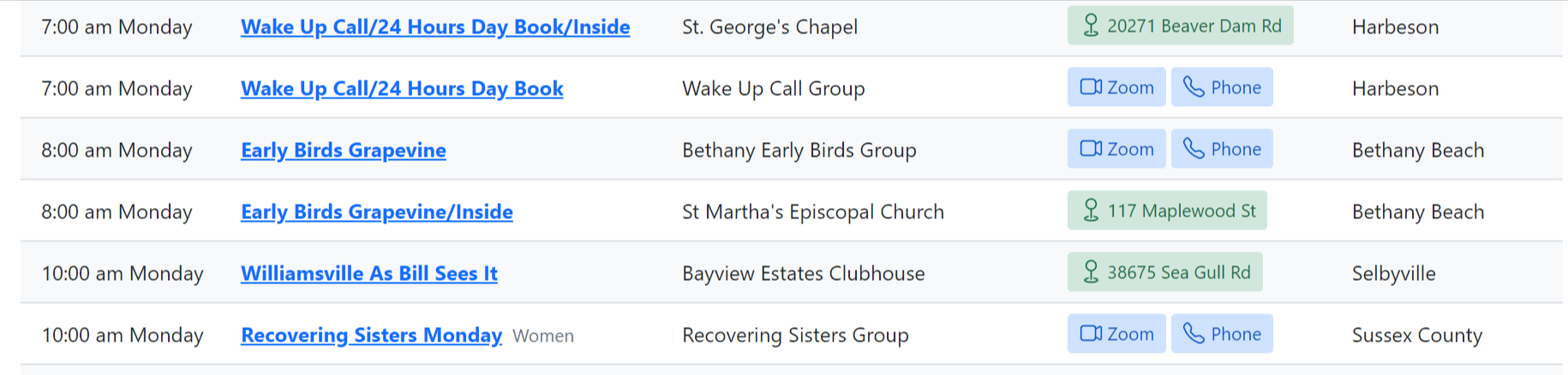
Below is from TSML. Wake Up Call is running two meetings at the same time. One is online and the other in-person. Both meetings are by the same group. Bethany Early Birds does a similar arrangement. Yet looking at this gives the impression that only one of these meetings are part of Wake Up Call and only one of these meetings are part of Early Birds.
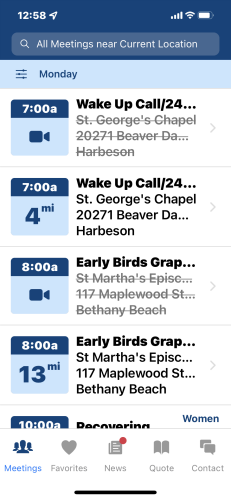
Here's how the App displays this.
This is a natively online meeting. Below is TSML.

Same meeting on the App. Notice it's pulling from the local field.

Answer by @joshreisner
hi @Grateful-Viv this is something you can actually do now in TSML UI by adding a custom script:
<script>
  var tsml_react_config = \{
    columns: ['time', 'distance', 'name', 'location', 'address', 'region'],
  \};
</script>
we're talking about it internally but currently it's TSML UI-only
Suite / Unit Number not displaying
Show question & answer
Question
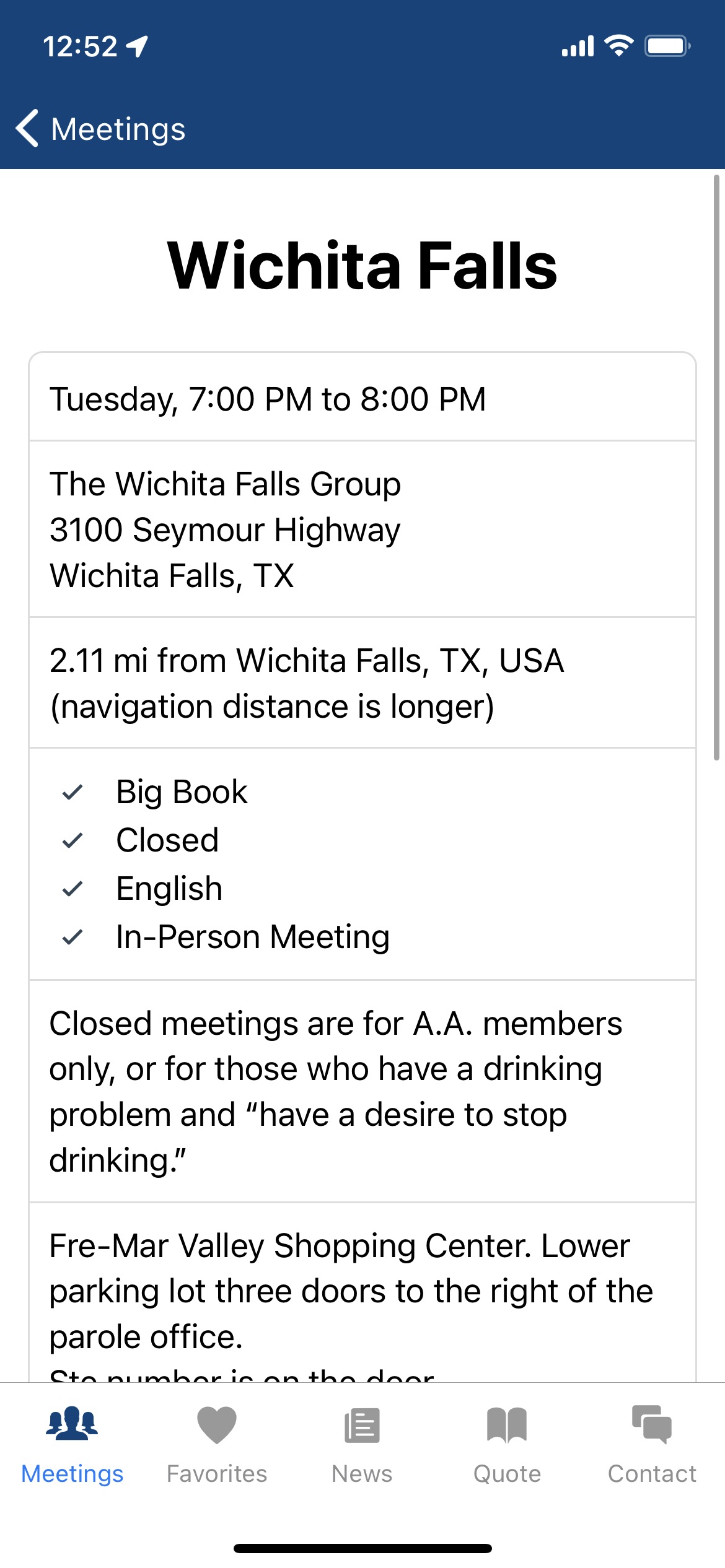
How do I get the Suite/Unit number to display on the Meeting Guide App, meeting page?
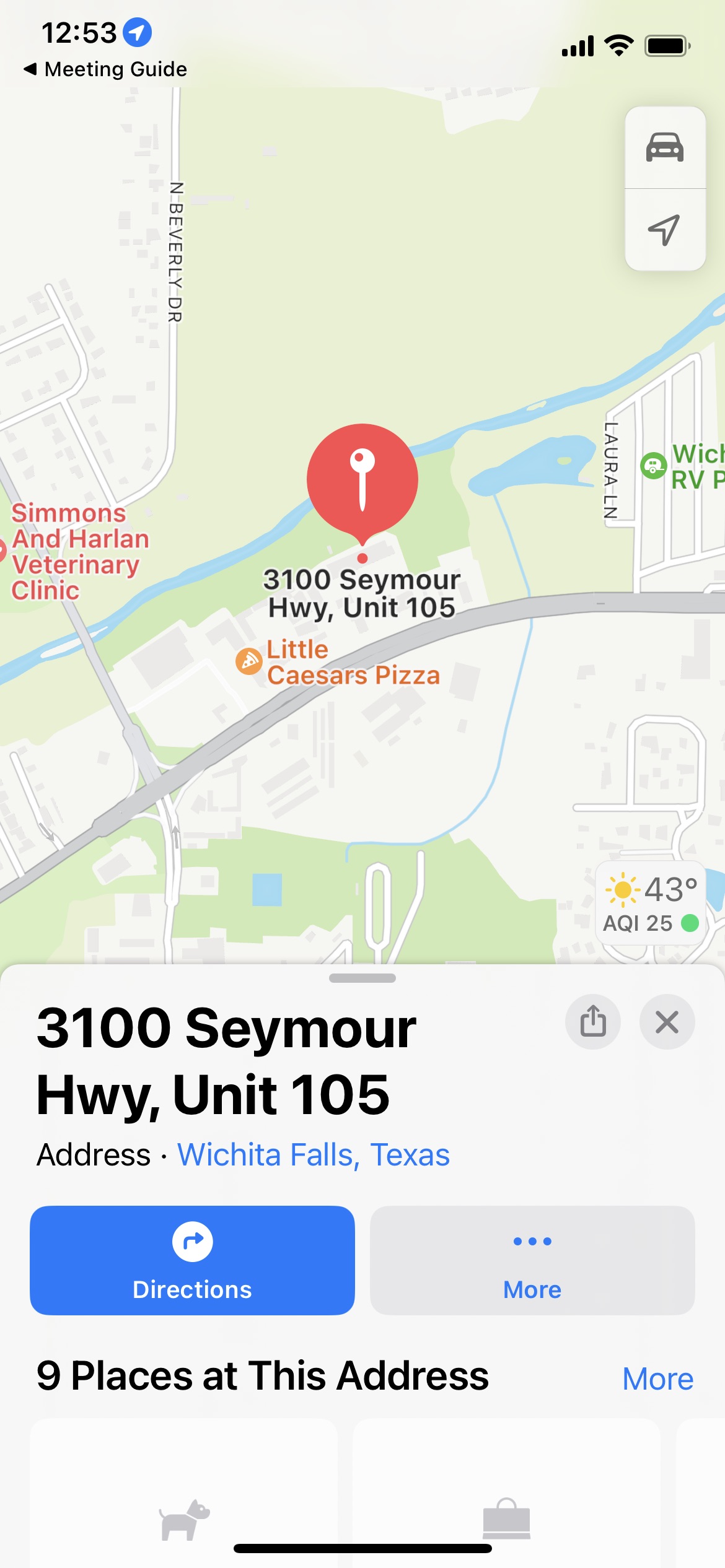
When I click on a particular meeting, the Suite number is missing. However when I click on the Directions button the Unit number appears on the Map.
Answer by @joshreisner
@ebart455987 looks like you've got it displaying properly on your website: https://www.fortworthaa.org/meetings/wichita-falls/
please reach out to the General Service Office at appsupport@aa.org for questions about the Meeting Guide app.
Meeting Load issue
Show question & answer
Question
<img width="1114" alt="Screen Shot 2023-05-15 at 11 46 55 am" src="https://github.com/code4recovery/spec/assets/23748349/39b324f1-3384-4b1f-be00-e38b50e2976a"> My meeting page was loading great a month ago and then my shortcode [tsml_react] stopped working. It would say there was a timezone issue? (screenshot attached)
View page here: https://staging.al-anon.org.au/meetings/
There's also this error message
<img width="995" alt="Screen Shot 2023-05-15 at 11 54 37 am" src="https://github.com/code4recovery/spec/assets/23748349/bc468d06-4ac3-4d4f-8824-35f65c4279af">
I've got the meeting list back up but the layout is being weird. Do you know how I can fix this issue?
Thanks
Answer by @joshreisner
hi @nataliefaith2 you can set your time zone in WordPress Dashboard > Settings. it looks like you solved it by switching to the legacy appearance, but the nice thing about the TSML UI appearance is that it has it shows upcoming meetings next. then you don't need to add the upcoming meetings widget to the meetings page itself
i see that maps are not loading with this error: Uncaught Error: Use a public access token (pk.*) with Mapbox GL, not a secret access token (sk.*). See https://www.mapbox.com/api-documentation/#access-tokens-and-token-scopes
Short code for upcoming in person and zoom meetings
Show question & answer
Question
I am trying to figure out how to write a short code for in upcoming person meetings and another one for zoom meetings
This code works good ---->[tsml_next_meetings count="5"] - but I want to separated the in person and zoom meetings - I try everything I can think of but nothing is working - Any help?
Answer by @brianw-area24
I just took a look at the code that generates the short codes, and I'm not seeing an option to be able to filter the short code results for online or in person meetings. If I'm missing something, someone else will chime in on this.
One of the differences between the newer TSML UI user interface, and the legacy front end is that TSML UL shows upcoming meetings at the top of the list. This might be an alternative for you, as you could link to different URLs that would filter by attendance options. This would be links to other pages, but it would filter as you've indicated. Brian W.
[Bug]: Map row displayed when the map is not displayed
Show question & answer
Question
Contact Details
Website With Issue
What happened?
Hi,
On published meeting pages; The table row to display a map is also not restricted when the map display is restricted.
On location pages; The table row to display a map is also not restricted when the map display is restricted.
This might be resolved by changing the behavior to either display the full earth map, the city and country provided which is required to publish the meeting, or simply remove the row entirely.
As it is, the meeting and location page rendering is broken as the is a small row packed with meeting details and a large row empty where the map would normally display. The table's application is broken.
Kind Regards and thank you for your service, Jason D
What browsers are you seeing the problem on?
No response
Relevant log output/errors
No response
Answer by @joshreisner
great, im glad the in person meetings are fixed
as for the blank space on online meetings, that's how it looks. if you switch to the TSML UI appearance we have a placeholder image there. example: https://aasanjose.org/meetings?meeting=f-f-a-living-sober-unity-group
Error message on pages .../shortcodes.php on line 40
Show question & answer
Question
We are receiving this error message on our pages, it is not browser specific.
Warning: Undefined array key "location" in /home/aaventura/www/www/wp-content/plugins/12-step-meeting-list/includes/shortcodes.php on line 40
Warning: Undefined array key "location" in /home/aaventura/www/www/wp-content/plugins/12-step-meeting-list/includes/shortcodes.php on line 40
Answer by @joshreisner
hm, sorry about that! we'll fix it so it doesn't happen. in the meantime if you wanted to fix it locally we typically suggest that people use a location name, so editing these online meetings to have a location name, eg "Online Meeting" would make it go away.
<img width="347" alt="Screenshot 2024-01-11 at 11 23 18 AM" src="https://github.com/code4recovery/12-step-meeting-list/assets/1551689/73855865-7cfa-42ef-906e-004fa8ba0051">
[tsml_react] Shortcode Not Working...
Show question & answer
Question
Using 3.14.16 plugin @ https://cbiaa.org.
“Meetings in Progress” not appearing / showing, nor do I see place to trigger in settings.
What am I missing?
gb / intergroup web person
Answer by @kiyote33
Ah! For posterity & other new users: I believe both [tsml_react] and [tsml_ui] will work as shortcodes to access our latest front end (that we call TSML UI) on your custom HTML page. You can also use the Meetings/Settings/User Interface Display feature to switch back and forth between it and our standard Legacy UI on the default /meetings page. Glad it's working for you now!
Wordpress 6.2.1 upgrade - [tsml_react] no longer displays meetings
Show question & answer
Question
After upgrading to 6.2.1 the meetings disappeared. I tried changing UI, deactivating and reactivating plugin. I changed timezone in WP settings to UTC-4 and then back to New York. Also, when I press "Where's my Info"? the /meetings page can't be found (404).
I have a backup, but I'd prefer to learn how to fix it as the same thing happened before and one of the above fixed it.
site is https://district2.nenyaa.org
Many Thanks - Ed
Answer by @anchovie91471
Hi Ed!
How is the shortcode inerted into the page? Is it block editor or classic editor or template?
Shortcode
Show question & answer
Question
I have a template page (Divi framework) and want to use the shortcut to show what I see on the /meetings page. I get the known to me shortcuts to work, but I do not want a count anything or limit the listing, such as count=5. Is there a shortcut that acts like the meetings page?
Dougie
Answer by @joshreisner
hey dougie, yes there is a shortcode called [tsml_ui] that is similar to the meetings page
Godaddy Wordpress Site and plugin quit working from messaging site to production.
Show question & answer
Question
I successfully built out a meeting schedule using Legacy UI instead of TMSL UI on my WordPress staging site using Wordpress version 6.4.1. And 12 Step Meeting List plugin. After I migrated my Wordpress staging site (WP VER 6.3.2) to production in Managed Wordpress at Godaddy, the 12 Step Meeting List is not displayed on Meeting page as it had been in staging. I tried Edge Chrome, Samsung Internet and Firefox in both tablet, smartphone and Windows. I deactivated 12 Step Meeting List plugin and then deleted it. After I reinstalled the pkugin, the same issue although the meeting in PLuglin are still there. I checked with Godaddy support to see if I could upgrade Wordpress version and they said no. I already flushed Wordpress cache cleared browser cache. 2 questIons. Is there a shortcode I can insert in a new page to bring up the meeting List? Secondly. Second, has anyone else had this issue or know the solution? Siter url is https//slaa-memphis.org
Answer by @joshreisner
hi we see this issue when sites are migrated, the solution usually is to go to settings > permalinks and click save changes (even if you didnt make any changes) you should only have to do this once
using [tsml_ui] shortcode instead of 'upcoming meetings' widget
Show question & answer
Question
Sorry if this info was easily found and I just somehow didn't find it...
I wanted to use the [tsml_ui] shortcode instead of the the 'upcoming meetings' widget. The widget however, lives on a homepage where the layout is 2 column the infinite scroll is not desirable.
- Is there an easy way to hide columns when using the [tsml_ui] shortcode ?
- Is there an easy way to limit the vertical height so it doesn't trigger the infinite scroll?
Or is the shortcode not really meant to be used as a way to replace the 'upcoming meetings' widget?
Answer by @joshreisner
they could try the Use CSS? option which looks like this: https://aaventuracounty.org
looks like they're using Legacy UI on the main page and have made a number of customizations already
[tsml_ui] shortcode <Router basename="/meetings/"> issue
Show question & answer
Question
Hi, I'm encountering the following error whilst using [tsml_ui] shortcode on WordPress 6.8.3 since TSML plugin update from 3.19 to 3.19.1 page worked prior to update, /meetings continues to work ok.
Suggestions gratefully received.
app.js?ver=3.19.1:2 <Router basename="/meetings/"> is not able to match the URL "/elementor-page-113566/" because it does not start with the basename, so the <Router> won't render anything.
Answer by @ecomm-smidlands
@joshreisner thanks for the prompt resolution (Version 3.19.2), it's much appreciated. YiF Simon
[Bug]: Support gone for displaying upcoming meetings widget on my theme
Show question & answer
Question
Contact Details
Website With Issue
What happened?
Hi there,
We’re using the Optimizer Pro https://optimizerwp.com/ theme since 2016 and the upcoming meetings widget no longer displays on pages. It also appears that the theme does not support the shortcode feature. I disabled all plugins including Jetpack and can safely attest there is an incompatibility between the theme and the 12 step meetings plugin.
Note: I do administrate another 12 step website https://www.navienna.com where the theme and your plugin do not exhibit this incompatibility. (talk about doing the same thing and expecting it to work...)
Thank you for all the support, passion and service! Kind Regards from Vienna, Oclair
TSML Version
Latest (default)
Wordpress Version
Latest (default)
What browsers are you seeing the problem on?
Firefox, Microsoft Edge
Relevant log output/errors
https://validator.w3.org/nu/?doc=https%3A%2F%2Fwww.aavienna.com%2F
Answer by @97eighty
@Oclair Sorry you're having problems with the site. At first glance there doesn't appear to be any obvious console errors that would prevent the widget from rendering and I don't believe it to be a caching problem as I was able to bypass Rocket Cache. The problem may be deeper.
Have you tried to put WordPress in debug mode to see if there are any PHP errors?
Try removing the Widgets from the sidebar and placing a single Text Widget with some random text in its place. This will at least indicate if there is another problem with Widgets.
I'll install the theme you use to see if I can troubleshoot this a bit more.
[tsml_ui] and CSS colored text
Show question & answer
Question
I am using [tsml_ui] and want to change the small text "Closed" to the color red. I tried a few things on my site CSS and it does not reflect any changes. Is it possible and if so, how do I do it?
d
Answer by @joshreisner
@dougie-wougie ah ok! internally we call those "flags" - do you have other flags set? it's not currently possible to style only one value, although if you would like that it seems easy enough to add
#tsml-ui table small \{
  color: tomato !important;
\}
[tsml_next_meetings count="5"] on mobile runs listings off page
Show question & answer
Question
On our homepage we use this shortcode: [tsml_next_meetings count="5"]
It looks fine on desktop and tablet. However, on mobile view it runs beyond the window and messes up the page.
Look here on mobile: https://alanonventura.org/
Make sure it's during the day when there's an upcoming meeting.
Is there a way to list upcoming meetings but only listing name and time or something to short/reduce the block?
thank you!
Answer by @joshreisner
maybe try the "Style with CSS?" checkbox? it is designed for a smaller area
<img width="137" alt="Screenshot 2024-05-22 at 7 17 08 AM" src="https://github.com/code4recovery/12-step-meeting-list/assets/1551689/dd89f7ca-0ef0-4cb4-9964-603e6e6df52f">
Suggestion to (re)consider WPML/Polylang support
Show question & answer
Question
Currently as has always been the case the 12-step-meeting-list has functioned side by side with Polylang on https://navienna.com for almost a decade. Since Polylang and WPML utilize the WPML API for multi lingual website support it just makes good sense to consider adding the support. Thank you for your service! Jason D
WPML (WordPress Multilingual) is the leading multilingual plugin for WordPress, enabling users to translate their websites into multiple languages, including posts, pages, custom post types, menus, widgets, and texts from themes and plugins. It has been available since 2007, making it one of the oldest and most established solutions for international language display on WordPress websites. As of 2025, WPML is used on over 1.5 million WordPress sites and supports translation into 65+ languages, with options for both automated and manual translation methods.
WPML has been a market leader in WordPress multilingual solutions since its launch in 2007, continuously developed and updated by OnTheGoSystems. It is compatible with a wide range of popular themes and plugins, including Yoast SEO, Elementor, Divi, Gravity Forms, and WooCommerce, ensuring seamless integration.
Polylang and 12 Step meeting list in action...
<img width="1282" height="880" alt="Screenshot 2025-12-01 120707" src="https://github.com/user-attachments/assets/d33263d4-2080-4d22-a01e-904bcbc7df19" />
Answer by @joshreisner
TSML UI handles translations a little differently by using the user's browser language to decide which language to show between the options it has translations for. currently that's eight options, you can see them here: https://github.com/code4recovery/tsml-ui/tree/main/src/i18n
we can explore changing how that works, but it's also worth noting that we don't have translations for any of the four non-en languages you have in the screenshot: DE, AR, HU, RU. would you be able to help us with that?
it's a bit of work, it means translating the TSML UI language file: https://github.com/code4recovery/tsml-ui/blob/main/src/i18n/en.ts
as well as the types, which follow a different format: https://github.com/code4recovery/spec/blob/main/src/types.php
Is there a shortcode to display meetings by type
Show question & answer
Question
Hi
I'd like to list the Alateen meetings on our Alateen page, is there a shortcode that can manage this?
Thanks Rose L
Answer by @joshreisner
hi rose, thanks for the extra info! is this the page in question? https://alanonalateen6nc.org/alateen-coordinator-contact/
if so, it sounds like you are looking to be able to pass one or more types to the tsml_next_meetings shortcode
Edit Page or Shortcode
Show question & answer
Question
I'm new to the use of the plugin and after getting all of my data in, it created a page with an address that already existed. We had a header image and breadcrumbs that are now missing. Is there a way to edit the page that's created or use a short code to put the data display (table) on a page that we control?
Answer by @joshreisner
Hi Steve, you can customize where the meetings page shows up, see the FAQ, I think it's at the bottom.
The header and breadcrumbs are up to your theme. Our archive page calls get_header() and get_footer() but some themes don't put the header image in there, and put it in the page template instead.
You're welcome to customize that page, see the FAQ on how to do that. I think it's called "overriding the template."
The meeting list itself isn't in a shortcode, that would be hard to do technically since it's not just one view, you need to be able to link back from all the sub-pages. We're looking at modernizing the plugin with a fully React-based system which might make that more possible, but it's not on the immediate horizon.
Gray out past meetings in today's list
Show question & answer
Question
An enhancement was requested in the support forums for the plugin to gray out meetings that have already occurred (started? Ended? Half way through?).
Answer by @joshreisner
@97eighty graying works well in Meeting Guide because of the way scrolling works; those meetings are above / outside the main viewport. If you scroll up you need an indication that those meetings are not available, and it creates a demarcation so you know where "now" is when you scroll back down.
TSML might benefit from it, since in the default view you are typically seeing a bunch of old meetings at the top of the page.
But TSML UI handles past meetings by putting them at the end of the list, so it's a pretty different use-case than both of those. I don't think it will make sense for a user if they scroll all the way down past six full days of upcoming meetings and get to a patch of grayed out ones.
It's not a lot of work to add a class, but I'm not sure it's something that anyone would ever request in TSML UI.
Modeling TSML Plugin Like AA SF/Marin
Show question & answer
Question
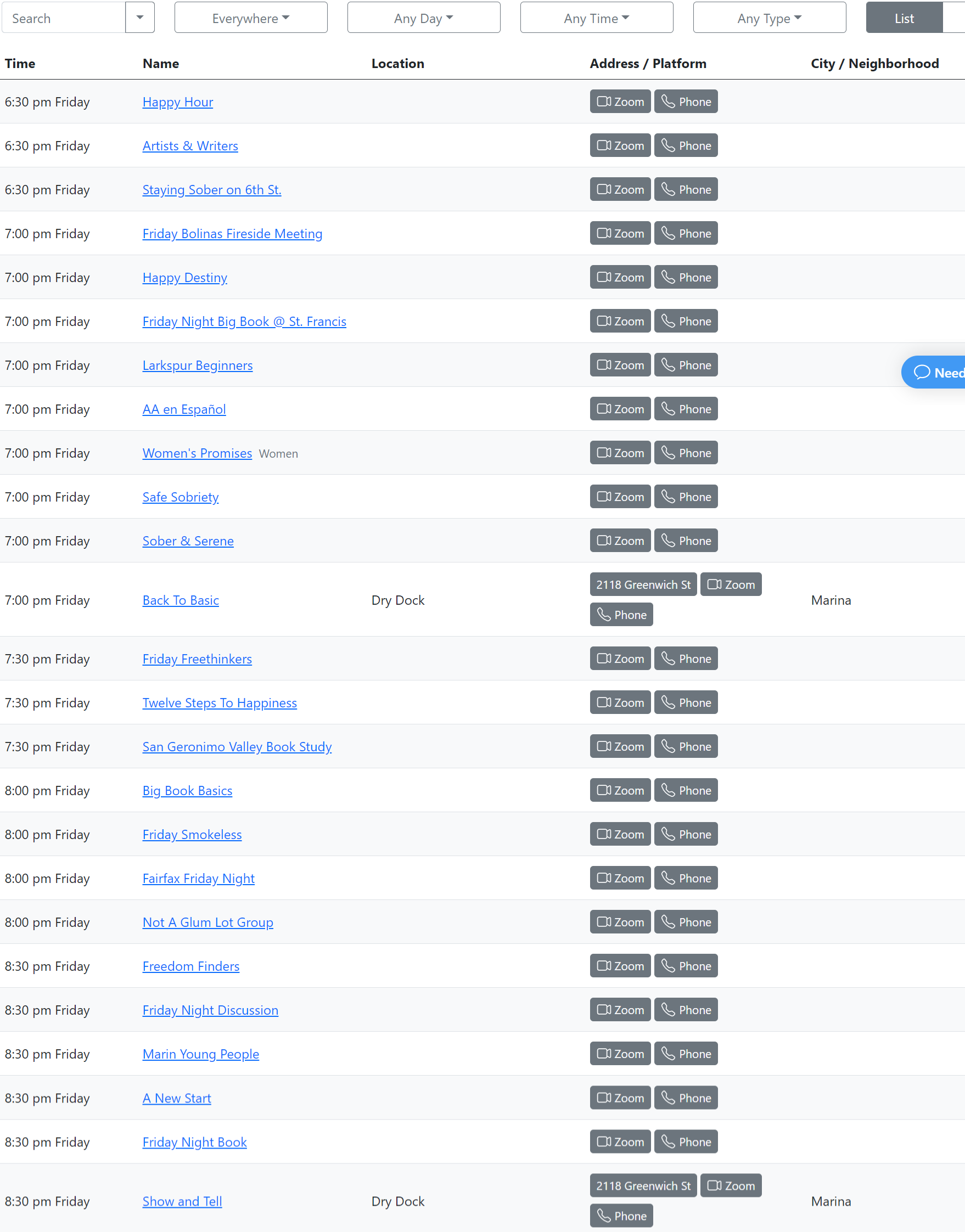
This feature is not related to a problem, but I see there is already a solution designed and published. Wondering how close is the TSML plugin update coming along to function like the AA SF/Marin site (see https://aasfmarin.org/meetings)?
This version has in List View the Address renamed as Address / Platform and displays a graphical depiction in this field (as well as a street address if it is an in-person meeting).
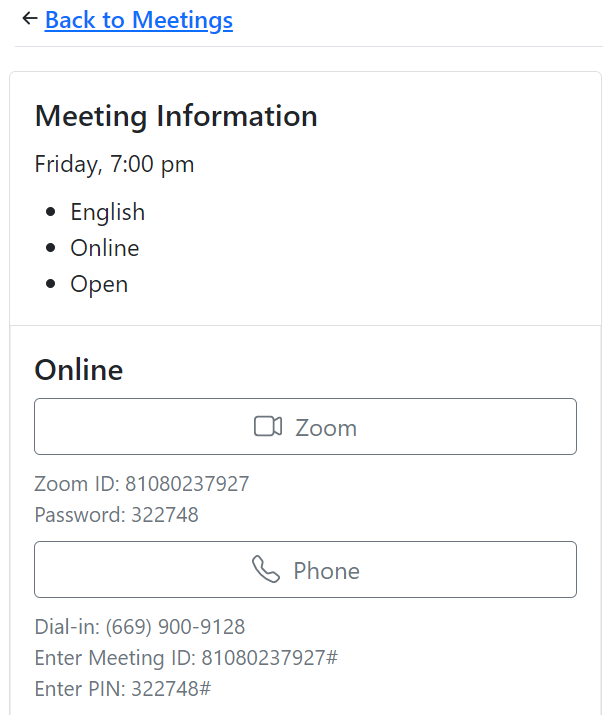
Drilling down to the meeting displays the Zoom ID (and Passcode if it exists) under the Zoom Graphical Link. Under the Phone link, it displays Dial-in number, Meeting ID and PIN. It also does not display a map if it is a remote meeting only, though it gives a geographical location (SF / Marin County, CA, USA) to function with the Meeting Guide App.
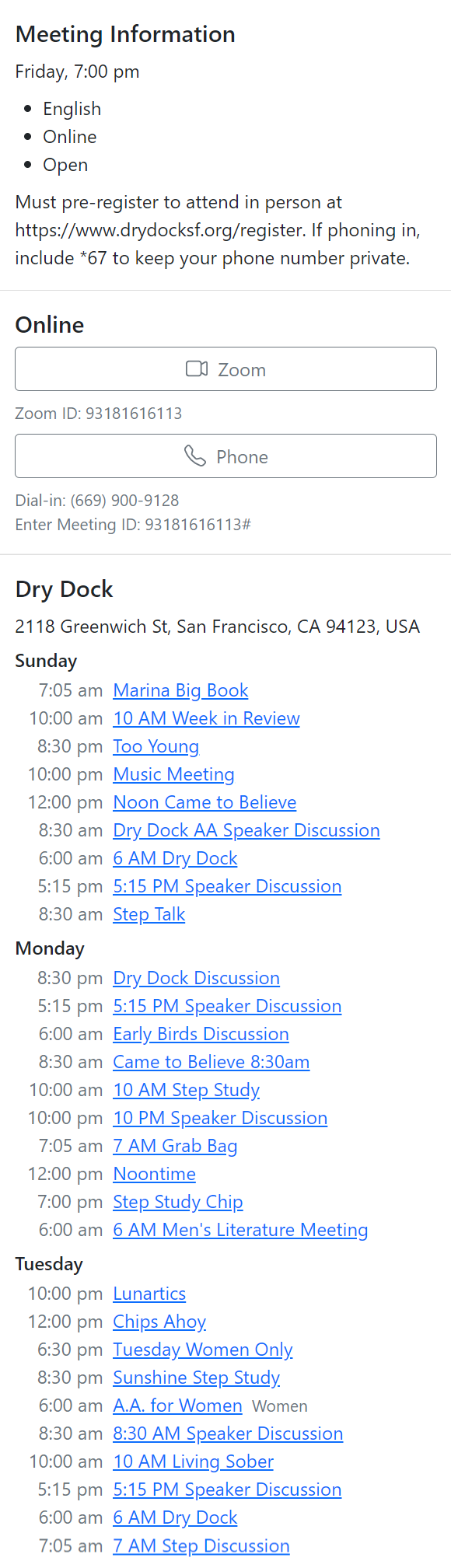
If there are multiple meetings at same location, instead of showing text that says xx amount of meetings at this location, it actually lists the day, time and link to each meeting.
Answer
SEPIA is running a new front-end based on ReactJS that some of our members are developing. And a shortcode has been developed for TSML so that this can be used in place of the existing WordPress meeting list on the front-end.
I'm going to at some point work on directions for people, but in theory it should be pretty simple. Add the shortcode [tsml_react] to a page on your site and link a menu to it. That is the theory.
If you wish to experiment, be our guest. I'd also be happy if you wrote up and steps or hiccups and emailed them to us.
After knocking down a couple more bugs, I do plan to do some more work with TSML and how we handle attendance options for meetings (in-person, online only, hybrid).
Trying [tsml-react] - not working
Show question & answer
Question
Greetings -
I am wanting to take advantage of this feature and because i am already using the plugin, I tried simply typing in [tsml-react] on a page as suggested.
Are there other steps I need to take to utilize this? Thank you! Jodie/Northern Michigan Central Office nmcentraloffice.org
Answer by @joshreisner
Hi @jackieoh1 - sorry that this was left for six months! The shortcode is [tsml_react] or [tsml_ui], but not [tsml-react] (use an underscore instead of a hyphen).
Please let us know if you're still having problems with this an we'll try to get back to you more quickly next time.
Since you're using the 2014 theme on your site, you'll likely need some CSS to make it full-width. If you could wait a little, we'll have a new version soon with an easy way to toggle between appearances.
ShortCode for Meeting page functionality
Show question & answer
Question
Is your feature request related to a problem? Please describe. FYI .. New to working with wordpress.. The Meeting page that the plugin creates doesn't display properly, All the search features are cut off. Also the wordpress themes header image is not displayed: http://aasalem.org/meetings/
Describe the solution you'd like A shortcode that could be added to a page to embed all the meeting list display and search functionality so it works with the theme?
Describe alternatives you've considered Looking for a different theme.
Additional context
Answer
Hey @codehammerz --
There are hundreds of sites with TSML deployed for which the page is displaying correctly.
<img width="1231" alt="image" src="https://user-images.githubusercontent.com/31904316/113346631-1961f580-9302-11eb-8135-dc2b4eb4843e.png">
I have to assume there is something else going on with your site or theme. What theme do you have installed?
v3.11.0-b BETA Type Dropdown
Show question & answer
Question
- Any chance we could select inactive in the dropdown type?
- Any chance it could display a count next to the types?
Both of these exist in TSML-UI, so wondering if it is not difficult to add similar logic to the plugin.
Answer
Good catch on the active vs inactive. There are two schools of thought, and I’m not sure which will win out. Frankly, they both have merit, and they both work. I’ll add it to the list of things for us to discuss.
Not going to try and implement a count. That will remain a feature distinction for TSMLui.
[Bug]: Uniquely numerical slug cause error 404
Show question & answer
Question
Contact Details
No response
Website With Issue
No response
What happened?
Some of my meeting would not display properly. I'va figured out that meetings with only a purely numerical slug ex.: 234567 would display a non existent page error. Slug with at least one letter work.
TSML Version
Latest (default)
Wordpress Version
Latest (default)
What browsers are you seeing the problem on?
No response
Relevant log output/errors
No response
Answer by @97eighty
@Carlsans Yes, you are correct. Wordpress will automatically create the slug when the Meeting is saved. By default, WordPress uses the Post ID (numerical) to identify the meeting. You can change this behavior by going into your General->Permalink settings and chaining the format of your Meeting URL. When you receive 404 errors on meetings it usually means your Permalink settings need to be reset by accessing them and saving.
Incompatibility between TSML UI shortcode and GoDaddy website caching
Show question & answer
Question
We've been using TSML-UI with no issues for a while at http://gayaainthedesert.org/meetinglist
Sometime overnight or early this morning the plug-in stopped working, and is showing the message: "An error was encountered loading the data."
We hadn't done any updates to the site other than some text edits on the home page.
Looking around, I saw a message that our theme was out of date, after updating, no change to the plug-in.
Thankfully the older interface is working at http://gayaainthedesert.org/meetings so for now I've redirected to that page.
Any help would be greatly appreciated!
Answer by @joshreisner
hi @toddjsaunders i'm seeing TSML UI having an error fetching your site's JSON. it says:
Cross-Origin Request Blocked: The Same Origin Policy disallows reading the remote resource at https://secureservercdn.net/198.12.144.78/e47.9d9.myftpupload.com/wp-content/meetings.json. (Reason: CORS header ‘Access-Control-Allow-Origin’ missing). Status code: 200.
this sounds like it's a wp configuration issue that possibly was brought forward by the recent TSML update?
could you check your WP Settings page and see what values it has for site address?
i think it sounds like you also have some type of caching plugin installed, right?
[tsml_next_meetings] short code crashed
Show question & answer
Question
Update: Took care of some Wordfence issues and updated recaptcha plugin. Re-enabled [tsml_next_meetings] and now it works again. Very strange.
Yesterday I used the [tsml_next_meetings] short code on the dixieaaoffice.com home page and it was working. today the next meetings data table for next meetings was missing. For now I have deleted the [tsml_next_meetings] short code.
We are using the Wordfence security plugin - This morning Wordfence reported several critical errors. I used it to fix one file and delete a couple of others. I'm wondering if there's a connection.
The meetings page still works as expected. Now just waiting to be connected the Meeting guide app.
Answer by @tech2serve
@DCO84770, glad you got it working. It often seems interactions with other plugins is the weak link for Wordpress.
If the problem returns, please try to capture more of the error messages from the console, and perhaps we can look at this closer.
3.1.4. TSML UI Widgets
Show question & answer
Question
In the previous version, the widget for Meeting Top only appeared on the list page. It did not show up in the meeting detail.
In this version it shows up on both places.
I could easily type up some words and put it on a page using the shortcode [tsml_react] and forget about the widget and that also shows up in both places. I was hoping the widget would not be on the meeting detail.
The meeting detail bottom does not appear on either the list page or the detail page.
Answer by @joshreisner
TSML team: perhaps we should create an issue or reopen #686 ?
I am seeing an error
Show question & answer
Question
I was working on my site tonight and when I updated my homepage this appeared on my sidebar:
Notice: Undefined index: types in /home/izgr1zclaxch/public_html/wp-content/plugins/12-step-meeting-list/includes/shortcodes.php on line 30 Notice: Undefined index: types in /home/izgr1zclaxch/public_html/wp-content/plugins/12-step-meeting-list/includes/shortcodes.php on line 36
This is my site https://alanonalateen6nc.org/
How do I correct this?
Rose L District 6
Answer by @joshreisner
hi Rose, sounds like we have a bug that is showing that notice when one of the upcoming meetings has no types and debug mode is on. it's harmless, but i'll try to confirm it on our end.
i'm not seeing it anymore, so my guess is the affected meeting probably just passed. it might be this one: https://alanonalateen6nc.org/meetings/new-al-anon-meeting/ - so a non-technical but kludgy way to fix it would be to see if you can apply at least one type to every meeting for now, like Open / Closed.
a better way to solve this but which is slightly more technical is to see if "debug" mode is on for some reason. if you want to use the file manager to check your wp-config.php file you may find that WP_DEBUG is set to true - you want that to be set to false in production
here is one hosting company's instructions on how to do this: https://www.domain.com/help/article/wordpress-how-to-enable-or-disable-wp-debug -- around step 5 the instructions are worth reading
Customizing TSML via Wordpress Action Hook
Show question & answer
Question
TL;DR
If you are running your TSML customizations off a Wordpress action hook, you need to use the init hook to get them to take effect properly. Until a recent release, you could have used the after_setup_theme hook, but no more.
Long version:
I recently debugged and resolved a problem customizing TSML, and wanted to share the resolution in case others have the same issue.
In the TSML FAQ, a number of references are made to customizing TSML by adding snippets to your functions.php file. I don't like to put code in that file, because it is often updated during theme and other site updates, so custom code often gets lost. Instead, I inject my custom code using the free version of the Code Snippets plugin.
Code injected using Snippets is executed when the snippet plugin loads, which is generally not when you want your customization code to execute. To get it to execute at the right time, you write your snippet so that it runs your code from one of the Wordpress Action Hooks, like this:
add_hook('after_setup_theme', function () \{
    // do your customization here
\});
In fact, this is exactly what my snippet looked like, and it was working great until a few releases ago, when it suddenly stopped working. My overrides of things like meeting types and their descriptions were no longer showing up on my site. Instead, I was getting the default meeting types and descriptions.
After some debugging, I figured out that the hook I was using (after_setup_theme), which had been running after TSML initialization, was now running before TSML initialization. Thus, my changes were being overwritten by the TSML default values. The fix was to run on the init hook instead of the after_setup_theme hook. With that one change, everything is working perfectly again. That is, instead of the code above, my code now looks like this:
add_hook('init', function () \{
    // do your customization here
\});
Answer by @joshreisner
thanks for the insight! another option i've found that works in some cases is to add customizations to wp-config.php since that file is never overwritten