Online & Hybrid Meetings
Zoom, virtual meetings, hybrid meetings, conference numbers.
38 questions — sourced from GitHub discussions & issues.
Changing meetings from live to Zoom only - then shows Temporarily Inactive
Show question & answer
Question
Contact Details
Website With Issue
What happened?
A bug happened!
[Bug]: Changing meetings from live to Zoom only - then shows Temporarily Inactive
I looked through the information and cannot find anything. I also deactivated as many plugins as possible to see if that helped. In addition, I rolled back WP from 5.8.1 to 5.8 and that didn't seem to work, either.

Please advise!
Thanks, Sarah
TSML Version
Latest (default)
Wordpress Version
Latest (default)
What browsers are you seeing the problem on?
Chrome
Relevant log output/errors
We still have not moved the site from our old webmaster's personal server to a commercial server, although we are working on that. So I can't get to the files the usual way. Is there any other way to generate the error logs?

Thank you,
Sarah
Answer by @tech2serve
Hi Sarah—
For a natively online meeting, the address must be approximate (i.e., no street) reflecting the city (or possibly county) and state only. By leaving a complete address but telling the app you don’t want meet in-person, you’re indicating you want the location to be treated as temporarily inactive, that is why it shows that way. This is not a bug, it is expected.
To resolve, simply change the address to be just the city and state, and you should see the temporarily inactive flag clear.
Online meetings that don't provide Zoom URL show up as in person meetings
Show question & answer
Question
Some of the meetings in the Georgia area have chosen not to include the Zoom URL in their meeting information. Instead, they provide only the Meeting ID and Password or a contact person to email to obtain the meeting information. These meetings are now showing up on the TSML as In Person meetings. How can I remove that designation?
Answer by @tech2serve
TSML v3.11 follows the same standards as the Meeting Guide app. I realize Al Anon doesn't use this app, but the specification must be met to support the majority of our users.
In order for a meeting to have the attendance option of online, a valid conference URL or conference phone must be provided. This is how users know how attend the meeting.
The recommended option is to provide a valid Zoom link or a phone number (hint) to get the meeting to show up as online. Please remember though that invalid information simply confuses users, so my best suggestion is to educate the groups to provide the Zoom URL.
Keep in mind, natively online meetings expect to have approximate addresses. If you provide a complete specific address in addition to the online information, the meeting will display as being available to attend both in person and online (i.e., hybrid).
Hybrid meetings: best way to show in listings?
Show question & answer
Question
Hi team, I am starting to get requests by groups who are contemplating having hybrid meetings. Everyone has a different interpretation of the possible models and I am wondering if there are things in place to handle them.
The word hybrid can mean many things. 1: A meeting is held in person and at the same time that exact same meeting can be attended via Zoom 2: A meeting is held in person without online access, but there is another meeting, possibly on another day and at a different time, that can be attended online 3: There is an in person meeting and, at the exact same day and time, there is a concurrent online meeting. Both meeting have different people attending
I was thinking making separate listings for the meetings that have their online part on a different day and/or time than the in person. Because, those would simply be online meetings by the same group.
The only real hybrid meeting would be model 1, where people can attend an in-person meeting online. For that, it would be helpful to have a checkbox option with the word 'hybrid'. Is that under development at all?
Any suggestions and ideas about handling this differently or in a better way are very welcome.
Thanks, Nicky
Answer by @tech2serve
Hi Nicky,
Good news! TSML 3.11 already supports hybrid meetings, using definition 1. Here is how we define a hybrid meeting (although, I'm going to back off of that term a little bit in a moment): If an in-person meeting and a zoom/telephone meeting share the same chairperson (at the same time) and the people in both venues can share back and forth, the meeting is a hybrid meeting.
For meetings that are held at the same time, but for which they have different chairs and attendees at each cannot see or hear attendees at the other, those are different meetings and should be listed twice.
TSML doesn't emphasize the term hybrid but it does use it in the notes. To create a hybrid meeting, answer "yes" to the question about whether or not the meeting can be attended in person. Then also complete the online details for that meeting, and TSML will treat it as hybrid. It is that easy.
Hopefully this answers your question.
[Bug]: Publish options goes away once adding Zoom url
Show question & answer
Question
Contact Details
Website With Issue
What happened?
Publish button disappears once I enter the zoom URL. tested multiple url's
https://www.loom.com/share/6dfcd156ded04fc5b173d95e4a78afcb
TSML Version
Latest (default)
Wordpress Version
Latest (default)
What browsers are you seeing the problem on?
Chrome
Relevant log output/errors
No response
Answer by @tech2serve
Please open Discussions and leave the Issues for the developers.
I appreciate the screen cast, unfortunately, it didn't show the entire process.
Please make sure when you're entering an online meeting (i.e., adding the Zoom link) that you also add a city and state (and only a city and state, or county and state) so the address is will come back from Google as approximate. This is required in order to publish online meetings.
If you need further information, there are a number of Discussion threads covering how to add online meetings. Please use the search feature here, and you should them.
Please let us know if this resolves your issue, or you need further help.
What means type "Literature"? Literature being read? Literature for sale?
Show question & answer
Question
Thank you for this wonderful plugin! Maybe a silly question, but what does the type "Literature" stands for?
- A meeting where literature is being read?
- A meeting where literature is for sale?
Do you have a source for that? I've searched quite a bit online for this, but I couldn't find it anywhere.
Thank already! Regards, Jeroen
BTW: For now, I assumed option (2): It seems more important to me that folks can select meetings where they can buy certain literature, than to know whether or not some literature is being read at a certain meeting
Answer by @joshreisner
Hi Jeroen, I think almost all the types are subject to a certain amount of interpretation locally. Open and Closed are the only ones that have definitions included. My sense is for the most part people use definition 1) where Literature, other than the Big Book, is being read or discussed.
Looking back at the history, this was added in 2015 before any of the other literature types like Big Book, 12 & 12, Living Sober, etc., so I suspect it was originally considered a catch-all, and may still be used by some sites as that if they don't want to specify individual titles.
Support for alternative online meeting providers like Telegram?
Show question & answer
Question
How to incorporate online meetings that don't use any of the default providers? E.g.:
- Meetings on Telegram?
- Meetings that publish their link through a URL shortener like Bit.ly?
It seems that whenever I try to add such a URL to the field "URL", that it isn't accepted. If this isn't possible, maybe a suggestion for a workaround?
Thanks already & regards, Jeroen Strompf
Answer by @kiyote33
Hi Jeroen (@Strompf), Yes we do have a work-around for adding an online meeting provider which is not already in our online providers list. It works by adding some code to a child theme which might look something like this:
if (!empty($tsml_conference_providers)) \{ $tsml_conference_providers += [ '[your_telegram_URL' => 'Telegram', ]; \}.
Long term, it might be best if we add Telegram to our internal provider listing in a future release. What does an example Telegram URL look like (eg https://telegram.online.meeting.us/join/12356789?pwd=12345)?
Custom CSS No Longer Working
Show question & answer
Question
None of the custom CSS is working anymore. All has reverted back to default. Examples include adding our own overlay image for online only meetings instead of the stock one used, changing the color from muted gray to green for the small text (e.g. women, men), as well as adding a forward slash.
I don't know when this happened as I am not actively supporting the website anymore, but I have verified the CSS was not removed or changed.
Site: sussexaa.org
Answer by @joshreisner
the recent style change made some things easier, like matching the fonts and colors to a website theme, but also discourages more unique customizations in favor of encouraging a more consistent experience across sites.
i think if there's a problem, like if something is confusing to users, then it's probably something we want to fix for all sites.
Ability to edit time zone layout?
Show question & answer
Question
Hi!
Our intergroup would like to change how the time zone info is displayed on the individual meeting page because we have people joining our Zoom meetings from different areas and we want to more clearly spell out the time zone information. For instance, it currently states PST. We would like it to say US Pacific Time Zone. Is there a way to do that?
Answer by @tim-rohrer
Hi. For the purpose of clarity, the native TSML public meeting page does not display timezone information, and you are seeing this in TSML-UI.
Regardless, we do not have a way to show full time zones in the manner you are asking.
C4R members are discussing ways that we can improve time zone support, especially for online meetings.
For now, if you really want to spell it out, perhaps adding the timezones to the notes will work. However, I'm hopeful most people can Google or figure out PST
Online Meeting Password: Unknown
Show question & answer
Question
Hey,
So when our PDF is generated, the password for the zoom meetings appears as unknown. I was wondering how this can be edited? I can't see a box to input the password seperately, so have been putting it in meeting notes but it doesn't seem to pull over to the WTF.
Any help would be much appreciated, thanks!
Answer by @kiyote33
Hi @calfreycreative, Questions similar to this have been asked before. See topic #1372 for a more detailed response with an alternative suggestion, but the quick answer is that the PDF generator doesn't support online meetings.
Telephone Meetings Only Issue
Show question & answer
Question
We have 3 Telephone-only meetings. We have them on the meeting list. The problem seems that we do not list a telephone #, the are not in-person, and in the notes, we tell them to consult a specific website to fill out a form and then email them the information they need to connect.
The issue and I am not sure why this happened but the meetings come up on the list as Temporarily Inactive. This sends out an incorrect message. I don't know why this happens it seems automatic. Is there something I can to suppress this message? I attached a graphic to show what is happening.
Meeting list - Temp Inactive.docx
Answer by @tim-rohrer
What you are seeing is expected behavior. In order for TSML to feed good information into the Meeting Guide, and make it simple and straightforward for users to join meetings shown in the listing, the plugin requires a valid phone number or online meeting URL in order to publish as an online meeting.
With the types of meetings you're describing, we typically recommend listing them separately on a different web page.
Online and Online Meeting are Displayed
Show question & answer
Question
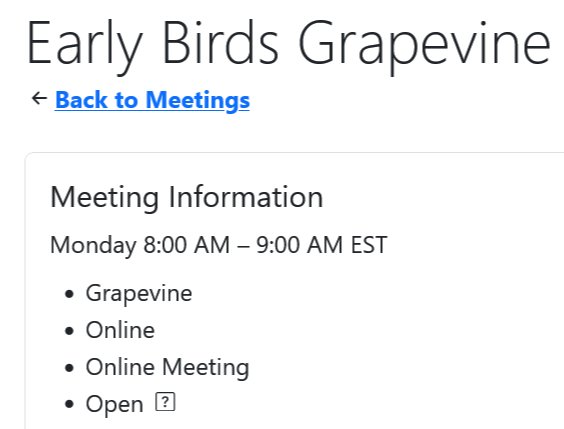
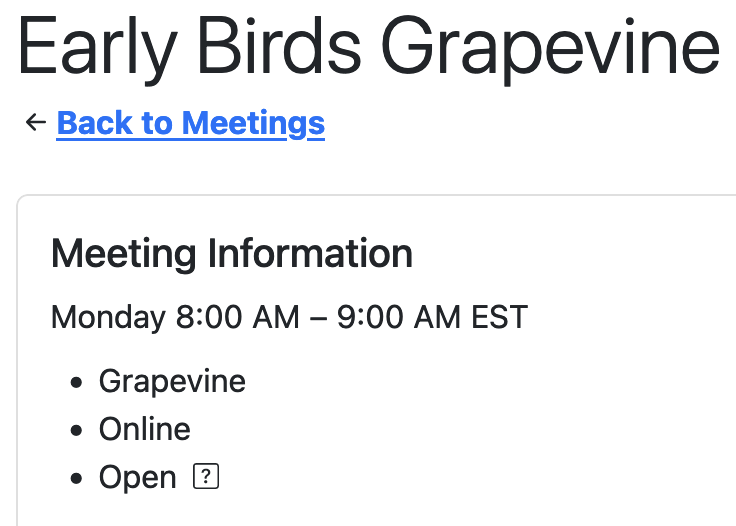
I just noticed that the words "online" and "online meeting" appear in the list of types if it's an online meeting. I don't think this should appear twice.
Answer by @joshreisner
oops thanks should be fixed now, if you refresh
Online meeting URL's can't be deleted
Show question & answer
Question
We just moved to a new web host provider. Don't know if this issue is related.
When trying to remove a URL for an online or hybrid meeting, the URL repopulates after pressing the update button (which sometimes requires pressing twice to get an update notification.) Changing or adding a URL works. All other editing functions appear to work. Deleting the meeting and adding back works. TSML appears to display and function normally.
I had thought to delete and reinstall the TSML plugin but would rather avoid this if I can. Any ideas to fix without going to this extreme would be appreciated.
I will try to logon to the old server and see if the issue occurs there as well. I also see there is a new version of TSML, so I will update and hope that fixes my issue.
Wordpress version: 6.4.3 TSML version: 3.14.30
Thanks, John Read
Answer by @joshreisner
ok we've released 3.14.32 which should address this issue, let us know if you still have problems!
we will follow up on having to click Publish twice in #1357
[Bug]: Issue changing Hybrid meeting to just in-person
Show question & answer
Question
Contact Details
Website With Issue
No response
What happened?
If I have a meeting listed that is currently online and in-person and the meetings changes to in-person only I experience a problem. After I remove the URL and the URL note and click on update, I get a pop-up box at the URL line that says "!Please enter a URL." I have tried this on Chrome and Firefox with the same result, however it does work on my android phone.
TSML Version
Latest (default)
Wordpress Version
Latest (default)
What browsers are you seeing the problem on?
Firefox, Chrome
Relevant log output/errors
No response
Answer by @brianw-area24
Did you ever figure this one out? I've looked at it a couple times, and the only way I've been able to duplicate the issue is if I left a space character in the URL field. I was not able to duplicate it when the URL field was completely empty.
If you're still having issues, maybe post a screen shot of that part of the form would help us figure out what's going on.
Brian W.
Meeting Titles Should Be Sorted in Alpha Order
Show question & answer
Question
I have two meetings on Friday night at 6PM for the same group. One is in-person and the other is online (it was just published). They both start with the same title (Shore Serenity). In the listing they should show up one after the other. Yet they do not. In between is another meeting also at 6PM on Friday. I am sure it's because of the order it was published. It should be the order of day, time, and then title (name).
It looks like this Shore Serenity Discussion Friday Night Ladies Happy Hour Shore Serenity Online
It should like this Friday Night Ladies Happy Hour Shore Serenity Discussion Shore Serenity Online

Update: Seems it's not the publish date or the update date that determines the sort order, because I changed it and it had no effect. How can I get these meetings for the same day of week at the same time show up in alpha order by permalink name or meeting name?
Answer by @joshreisner
hi @Grateful-Viv the sort order currently is:
- day
- time
- location
- name
to group meetings at the same location together. this logic was added years ago, before online meetings support.
import order does not have an impact
Can't publish a meeting after entering certain fields
Show question & answer
Question
We have successfully added a few meetings into the plugin. At some point the [ Publish ] button became greyed out during editing. For example, after entering the Online Meeting URL we can no longer publish the meeting. There are some errors in the js console:
camissouri.org-1693161514878.log
Once the [ Publish ] button becomes grey, it never returns to blue even after removing the value that seemingly caused it to turn grey.
Answer by @joshreisner
hi @dbennett455 i think what is going on here is your have a google maps api key that is not activated. when i check out your site i see this error:
<img width="1374" alt="Screenshot 2023-08-27 at 12 19 33 PM" src="https://github.com/code4recovery/12-step-meeting-list/assets/1551689/dd0d906a-a0f4-4353-8db5-a1739c308890">
which has this link to fix the issue: https://developers.google.com/maps/documentation/javascript/error-messages#api-not-activated-map-error
we should be doing a better job of surfacing errors on this page though, we have an issue to track that work: https://github.com/code4recovery/12-step-meeting-list/issues/1002
at any rate, try fixing the API key (or switch to mapbox) and let us know if that solves it for you, thanks
Meeting list relative to user time zone or site time zone?
Show question & answer
Question
Now that our meetings are largely virtual, our website will be visited by people from many timezones.
https://staging.debtorsanonymous.ca/meetings/?tsml-day=any
Our site is set to Eastern Daylight Savings Time (EDT) and I am in EDT, but it just occurred to me: what happens if someone from Pacific Daylight Savings Time (PDT) visits the site? Is the meeting list relative to the time zone of the visitor or of the site?
For example, we have one meeting at 7:30pm EDT. Will a visitor from Los Angelese see the meeting on the meeting list as 7:30pm or 4:30pm? When I open up the meeting detail, it shows the time zone explicitly, but not in the list.
I just presumed it would convert the time zone local to the site visitor. Is that the case?
If the list times are in the time zone of the site and not to the site visitor, would it be possible to list the time zone explicitly in the list?
Thank you so much
Answer by @joshreisner
hi @willinrecovery your meeting list is set America/Toronto at Meetings > Settings, so that's the timezone that's displayed in the meeting list. it is possible to set this to empty (the first value in the list) and it will adjust the listings to the user's timezone, but that's only recommended that for sites that that list meetings across a range of different timezones, such as a national or international list.
<img width="520" alt="Screenshot 2024-11-01 at 2 55 42 PM" src="https://github.com/user-attachments/assets/2035ac3e-fb0d-42db-a297-0966c4e5204a">
it is intuitive for someone coming from another location to see the meetings listed in local time. users in california who come to Philadelphia's AA website, for example, expect the listings to be displayed in ET.
it is smart about which is the next meeting. for example, a Los Angeles visitor coming to your site at 10am your time tomorrow morning (7am LA time) will see the 10:30am meeting shown as next (just like a local user would). the 9:30am meeting will be "in progress." if they add a meeting to their calendar, it will get added with the right timezone.
we don't think it would be a good use of space to add the timezone in each row of the table. you're welcome to add a notice above the list, but our experience shows this is not necessary. this software is on lots of websites and users are not confused by it
PayPal link to Homegroup Online rejected by TSML
Show question & answer
Question
Using TSML with Wordpress. I'm trying to update a meeting list entry for a group that just switched to using homegroup.online. The URL I need to enter—which I've gone to manually so I know it works—is https://www.paypal.com/donate/?hosted_button_id=[A-Z]+ (with a regex in place of the actual ID). I get the error message, "A valid PayPal username can only contain letters and numbers, and be less than 20 characters" and apparently this error disables the ability to UPDATE.
Is there a workaround?
Answer by @joshreisner
could you give us an example of a real paypal address you want people to end up on after they click the button? our understanding at the time was that paypal URLs are be in the format, for example, https://www.paypal.com/paypalme/joshreisner. in this case, joshreisner would be what you'd enter in this field. this would transfer up to meeting guide as well. we're open to changing this if there is a better way
we're also open to adding homegroup.online as a service provider assuming GSO is as well
Can members select their State or Timezone for accurate meeting times?
Show question & answer
Question
Hi there,
We've received emails from members across Australia concerned about the time of online meetings and the timing for interstate members. In Australia we have some states that use Daylight Savings and others that do not, so some towns can be next to each other but across the state border its an hours difference in time.
We’ve clarified with these concerned members that the timing of the meetings don’t change due to daylight savings.
Is it possible to list the state next to where the meeting is hosted on the website, or any other way to make it easier for interstate members to know what time the meeting is for them?
Answer by @joshreisner
the timezone dropdown pictured is the default timezone. it applies to all meetings that dont have an individual timezone set.
setting this means that all meetings in TSML UI will be normalized to this timezone
meetings can have their own individual timezones on the meeting edit page (in the location box).
for example, an 8am meeting that is set to Perth's timezone on the edit page should show up in the list at 10am (normalized to Melbourne time).
if you prefer not to normalize you can set the default to blank, but it means all meetings must have an individual timezone set.
this is a longer restating of what the pictured label says, hope it helps clarify.
Bug with AJAX Request for Online Meeting
Show question & answer
Question
When clicking zoom link, nothing happen. The problem is intermittent and tested with many users. I caught it in chrome console. Note that other meeting worked.
Answer
Hi @Carlsans --
At this point, because this issue, as best I can tell, is specific to your site, I would ask that explore three things with your site:
- Double-check the link you have entered for the Zoom meeting. Even post one here as an example.
- If you have site-wide cache you can clear, please do so and see if the problem is resolved.
- Disable other plugins to see if deactivating one of them clears the issue up.
I'm not saying with certainty that you haven't found an issue with the plugin; just that we've not had other issues like this reported so we need to try and confirm a few points with your site.
Also, what version of the plugin are you running?
HTML and rich text editor in notes
Show question & answer
Question
With some meetings moving online in varied formats, it may be the most flexible approach to allow HTML input in the notes field along with a rich text editor.
Even prior to this I have several times wanted some html formatting in the notes however it would be very useful at this time.
This will make it easy to post links to online meetings along with codes and whatever else may be required.
Answer by @joshreisner
This doesn't really impact the core of the request but as an FYI, HTML can't be displayed in the Meeting Guide app because it's a security risk for users. In React they call the technique dangerouslySetInnerHTML for a reason :)
The only way to get tappable Zoom links into the app would be by adding new fields, and it sounds like the way to do that would be to create a companion plugin.
Allow non-numeric characters (comma and poundsign) in online meeting phone number TEL: LINK
Show question & answer
Question
Currently, the meeting/group phone number allows a phone number like this to be dialed through the link: (646) 558-8656,,820445398# note the commas which each provide 2 seconds of pause from the connection time to when the second set of numbers is dialed and the pound sign which completes the connection to the online meeting.
https://www.howtogeek.com/263546/how-to-dial-phone-extensions-automatically-with-your-iphone/
Note this example on our website with the phone number working properly in the group information, but not properly in the online meeting link. https://aa-dc.org/meetings/epiphanies-5
BTW - AKA "One touch mobile" link. https://support.pragmatic-conferencing.com/hc/en-us/articles/115010580808-One-Touch-Dialing-from-your-mobile
Thanks!
Available for questions: Alex M, 267-231-2174
Answer
I'm going to have to go and tweak my system. When I hit a phone call link on it, it automatically brings up Zoom, which I think is not what your issue is?
Can you confirm this is a problem only when calling from a phone itself?
And can you confirm we're only talking about the two links in this section?
<img width="300" alt="image" src="https://user-images.githubusercontent.com/31904316/77928543-2a4ed580-726e-11ea-898a-27eb6063a03a.png">
Join With Zoom not working in template/single-meetings.php
Show question & answer
Question
We have found that the Join with Zoom link displayed in the template single-meetings.php is coming up empty on our site.
This is cured by editing line 107 to change it from: <a id="meeting-link" class="btn btn-default btn-block" href="#">
to: <a id="meeting-link" class="btn btn-default btn-block" href="<?php echo $meeting->conference_url ?>">
Please fix this so I don't have to keep changing the line whenever the plugin is updated.
Thank you for all the wonderful work you are doing.
Answer
We'll look into it. I admit I'm confused on why this would be an issue for your site, but we're not hearing from a bunch of others.
I'll also admit I'm not an HTML expert.
Thanks for the feedback.
Time Zone Information
Show question & answer
Question
It would be helpful to have a field where we can have TIME ZONE information. We now have a lot of virtual meetings and people from New York often attend meetings that originate in LA. If we had a clear Time Zone designation, people in New York could easily determine that a 9am PST meeting is actually 12 noon EST. This would help show how virtual meetings are actually a good fit for many outside the time zone that the meeting is actually taking place.
Let me know if this is possible.... Thank you..
Greg
Answer by @joshreisner
@indelg1 @tech2serve I think this is actually a front-end issue, not than a backend one. We should talk about what experience we want users to have, but there's already a kind of solution in place for sites that use TSML UI.
For example, let's say it's 11:45 am on the east coast and a Philadelphia user goes to aasepia.org, they see meetings starting at noon.
Simultaneously, it's 8:45 am on the west coast, and a San Francisco user goes to aasepia.org, they also see meetings starting at noon.
We're not converting the time zone for the user (although there is a request to do that), but the UI is aware what the next meeting is regardless of timezone.
The solution we agreed to for Meeting Guide was also not to convert, but to display a message to the user when there's a discrepancy between the user's time zone and the website's time zone. That would be possible using javascript without any data model changes.
Search results not returning intermittently
Show question & answer
Question
Sometimes (infrequently) the search does not return results. It happened again this morning, I went to our meeting list and got no results - tried it a few times same thing. Came back about 5-10 minutes later and it was working again.
We have several default searches - they are:
https://oahucentraloffice.com/meetings/?tsml-day=any&tsml-type=ONL https://oahucentraloffice.com/meetings/?tsml-day=any&tsml-query=(Physical) https://oahucentraloffice.com/meetings/?tsml-day=any https://oahucentraloffice.com/meetings/?tsml-day=any&tsml-query=(Hybrid)
None of them worked - and then 5-10 minutes later they all worked.
Has anyone else experienced this? Sorry I can't easily reproduce the issue.
Answer
@aanecswebmaster,
If you haven't already done so, turn on Wordpress debugging. There are plenty of Internet articles on how to do that. That should also increase the output you see in the console from the plugin.
Tim
v3.11.0-b BETA - Labels for Meeting Status
Show question & answer
Question
I like that this version tells us it's in-person, or online, or Temporarily Inactive, etc. Is there any way to make that stand out better? Would it be possible to put in on the same line as the meeting name in the detail view?
See before and after screenshots.
This is for suspended meetings.


This is online only meeting (no TC status)


This is a hybrid


Answer
I think they do stand out, quite a bit.
I'm going to close this as it effectively duplicates item 1 in #376. We'll discuss flags, but I'm more concerned about putting some flags in parenthesis and others in bold. As I look at it again, it seems inconsistent.
“/ Online Meeting” tag has been causing confusion.
Show question & answer
Question
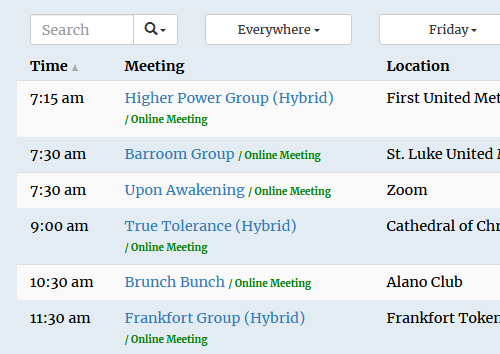
Is your feature request related to a problem? Please describe. The two options I saw were "Bug Report" and "Feature Request". I am not sure what this falls under. When looking up a meeting, I have been told that the green, "/ online meeting" tag makes it look like the meeting is only online. Whether a meeting is Online Only, or Hybrid, they get the same green "/ Online Meeting" tag appended to their name. It is easy enough to list the meeting as "Hybrid", "On-line", or "In-person" in the meeting name or description, so this tag has become a confusing redundancy.
Describe the solution you'd like I would like the "/ Online Meeting" tag to be removed from all listings.
Describe alternatives you've considered Removing the tag entirely seems most practical, but if a tag is necessary, perhaps variations could be added so we could have the choice to select the one we prefer be displayed (e.g. "/ Online Meeting", "/ In-Person Only", or "Hybrid")
Additional context
Answer
Hi @abacusBytes,
We are not going to remove the flags, but they are changing a bit with the version currently being tested (3.11.0-b), including making it clearer when a meeting is available online AND in person. Hopefully that will resolve your issue.
If you still want them off your site, you’ll need to use CSS to hide them. That is beyond the scope of our direct support, but you can search the issues to see if others have done something similar. TIAA Forum is another source where some folks may help you.
Good luck! And thanks for sharing your thoughts.
Join with Zoom Buttons aren't always working
Show question & answer
Question
Describe the bug The 'Join with Zoom' button on the meeting listing pages are working intemtiently and I'm hoping that you can get them working again? To Reproduce Steps to reproduce the behavior:
- Go to '...'
- Click on '....'
- Scroll down to '....'
- See error 1:- Got to https://www.ddauk.org/meetings/ and click on a meeting, 2:- Try pressing the 'Join with Zoom' button
Expected behavior 50/50% as to whether the button will work or not?
Screenshots If applicable, add screenshots to help explain your problem.
Desktop (please complete the following information):
- OS: [e.g. iOS]
- Browser [e.g. chrome, safari]
- Version [e.g. 22]
Smartphone (please complete the following information):
- Device: [e.g. iPhone6]
- OS: [e.g. iOS8.1]
- Browser [e.g. stock browser, safari]
- Version [e.g. 22]
Additional context Add any other context about the problem here.
Answer
Hi @nextlevelwebdesign,
Can you share the exact URL you have in the Conference URL field please?
Have you made changes to your permalinks? It is a bit of a long shot, but please go into Settings --> Permalinks --> Save. Sometimes refreshing these links addresses issues like this.
Sometimes we also see other plugins interfere with javascript functions. For example, I don't know what is providing your Instagram follow link, but perhaps disable it and other plugins (except TSML), reload the page, and then try the Zoom links. If they start working, the issue is probably a conflict.
Version 3.11.0: Auto-tagging of meetings in new version causes problems
Show question & answer
Question
I am entering this as a bug but I realise it might not be considered that by the code-writers.
In short: it seems the newest TSML version auto-tags meetings and this is causing random errors. I would like to know what is triggering the tagging and with that I mean: is a meeting online or in person or both?
I have a lot of meetings, after updating on my staging site, that show 'in person' and there is nothing in the meeting information that justifies that.
I would like to get more clarity about what triggers the tagging.
Ideally I would like all coding to use the check box options to draw conclusions and not do so in a way that is not transparent for me as the admin of the website.
I don't know the coding, but I remember there was a change during Covid at some point, where we no longer had to indicate whether a meeting was online or not. The coding, I was told, just checked if there was a valid URL for Zoom (and similar online platforms) to come to the conclusion that it was online. I wonder if the issue with the auto-tagging was born in that piece of the code. If that is the case, my request would be to change it.
There is no explanation or complex coding needed if we can all influence what the front end shows by using the checkboxes. In any case, I cannot implement this latest version until this issue is fixed.
Thanks for your consideration,
Nicky
Answer by @brianw-area24
Looking at the images of the (elec) Faith, Hope, & Serenity AFG - Orillia (D1) meeting, Sunday 8:00pm, the new version of the Plugin is doing exactly as what I would expect it to do. I say this, because on your live site, this meeting has a Zoom Url, a specific address, and it does not have the "Location Temporarily Closed" flag. Because of the Zoom Url, it meets online, and because of the specific address and not being temporarily Closed, it meets in person. Therefore it's coming into the new version of the plugin as "In-person and Online", exactly as expected.
You've asked that we include the new question in the import. We're not going to do that at this time, because we use the Location Temporarily Closed tag for this. Adding another field to the import would be redundant. In 3.11.x, we're not directly storing your answer to that question, instead, we're using that question to help determine whether to include the "Location Temporarily Closed" flag.
I'm pretty sure we can accomplish this with the current version. Here's what I'd like you to do:
- On your live site, go to the Settings and Imports page, and export a CSV file
- Edit the CSV file, and for any meeting that's Online ONLY, add "Location Temporarily Closed" to the flags if it's not already there
- Import this modified CSV file into your staging server. I'm thinking if you do this, all these meetings will show up on the staging server as Online only as desired.
Looking forward to hearing your results of this test.
Brian W
Update button is greyed out when trying to update a meeting.[Bug]:
Show question & answer
Question
Contact Details
Website With Issue
https://alanonalateen6nc.org/wp-admin/post.php?post=569&action=edit
What happened?
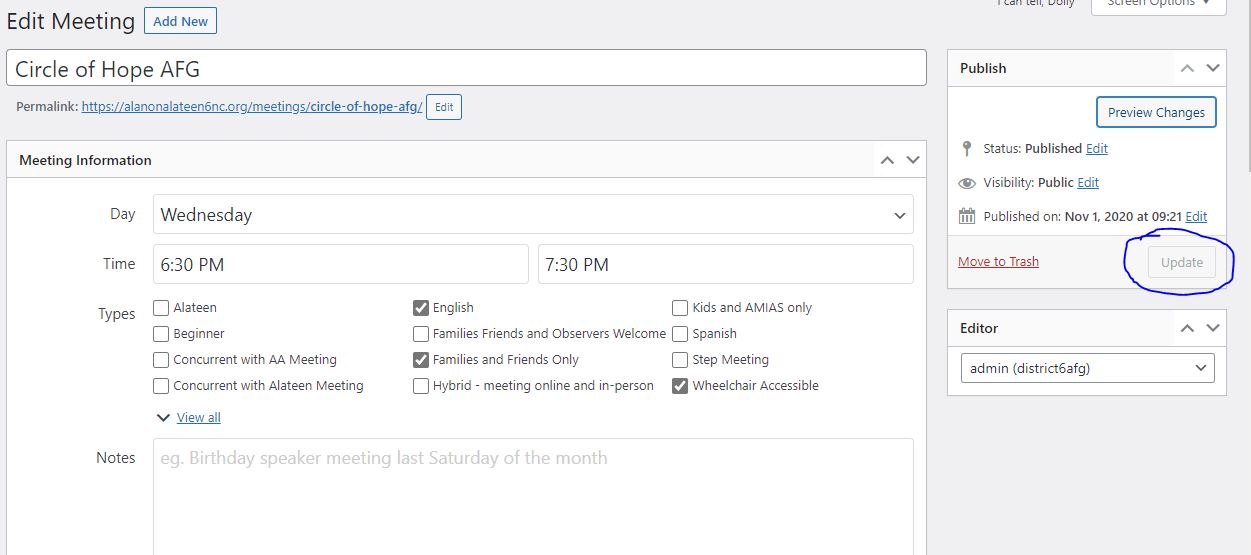
A bug happened! I'm trying to update a meeting and remove the zoom information to make it a in-person meeting. When all my changes have ben made, the only option is Preview changes instead of update. Even when I click on Preview changes, nothing happens.
I have tried using chrome and edge browsers. Wordpress version 5.8.2
12 Steps Meeting List version 3.
 12
12
TSML Version
Latest (default)
Wordpress Version
Other (Identify version in text above)
What browsers are you seeing the problem on?
Chrome, Microsoft Edge
Relevant log output/errors
No response
Answer by @district6wc
Well, I have figured out what is wrong, I think. I noticed map was not showing locations and was blank. I updated the API under import and settings and now I'm able to update a meeting with no problem. However, the API flashes the map and them give error that "This page can't load Google Maps correctly". For development purposes only
Tighten up "Confererence URL" validation
Show question & answer
Question
currently we validate conference URLs only by checking if the domain is in a list of approved domains
we should go further with zoom specifically to verify that the url contains zoom.us/j/ and then 8 or more numbers in row
we are finding that some sites are entering zoom.us/join as a URL, which is causing a bad experience for users
this will cause some customer pain, so we need a clear error message to show up client-side when an invalid URL is entered
Answer by @joshreisner
looking at data from meeting guide, there is a lot of variation in the URLs we're seeing. i think we want to apply the following transformations to be helpful:
- change
http://tohttps:// - strip subdomain if present
- strip URL params that are not
pwd= - strip
pwd=if it's not a valid hash (not 32 characters, or, say, between 28 and 36) - strip
#and anything after - lowercase
/J/ - remove any urlencoded chracters eg
%20and trim
however we should reject if the zoom URL:
- is not parseable
- full url has more than 4 slashes
- full url does not start with
https://(orhttp://which we fix) - path does not start with
/j/(or/J/which we fix) - path does not end with a 8-12 character number
Online meetings in the program "Support Groups" appear as "inactive" incorrectly in Legacy UI
Show question & answer
Question
On latest Version 3.17, all Online meetings are "Inactive" or "Temporarily Inactive" Our team has tried every possible option to fix this. Not sure what to do next. Here is one example https://nlmdev.wpenginepowered.com/groups/meetings/life-recovery-conference-call-2/?tsml-day=any
Note that on an older site with Version 3.16.18 of the plugin and with the same meetings this is not an issue.
Answer by @joshreisner
to echo what @gkovats is saying - meetings to be considered Online must have either a URL or a Phone entered in one of these fields. looks like "Every Man's Battle" withholds its URL which i suspect is the issue.
<img width="1186" height="338" alt="Image" src="https://github.com/user-attachments/assets/09196614-e618-4142-8e5e-3ed6796016e0" />
some groups will put https://zoom.us/join in the URL field to get around this restriction, which isn't great for users. another, better, option which you can advise groups about is to publish most of the URL but withhold the password - eg https://zoom.us/j/23904823 but leave out the ?pwd=930r238hf92uehfuehsdkfuus73832 to make people still need to get the password. we're looking at options for streamlining this process
Open Zoom Dev, with JITSI
Show question & answer
Question
I'm interested in developing Jitsi; an Open-Source 8x8 and Zoom Competitor.
There are enhancements needed for Zoom concerning Integrations;
(Concerning: Data capture, payment, traditions, structure, administration, Voting Group Conscience, tradition 4, talkie 5 min timer, editing, streaming, closed caption, etc...)
I have a list of them.
Please reach out to me if interested in developing a 'Specific' platform for holding meetings online.
Thank you kindly; TidyPy
Answer by @tech2serve
Hey @tidypy,
Thanks for the idea. This had been bounced around when online meetings started taking off, but we didn’t really have the bandwidth to do anything.
I’m reply to your email with more thoughts as any new project like this would not fall directly under TSML.
Anyone attending NAATW?
Show question & answer
Question
Is anyone attending the 2023 NAATW Workshop? I signed up for the online, but I would like to know if anyone is also attending. I know Josh will be presenting.
I hope to get insights to take my understanding to a new level.
Doug
Answer by @brianw-area24
Yes, Josh and Matt are presenting "Helping Online Intergroup Manage a Meeting Directory at Scale". Should be a really good presentation on the that project. I don't know if anyone else will be attending in person from Code for Recovery, but I think some may be online.
Adding Type Descriptions to aid Online Groups.
Show question & answer
Question
The online groups that have transferred to our Area 39 from OIAA. Have a description of "Proof of Attendance". This would be nice to have on the MGA. Also there might be more like this that I am not aware of. But since C4R also did the OIAA meeting app, you would have some insight for this.
Answer by @joshreisner
yes! we are communicating with GSO to see if they will allow these as types in the app. see the "Proposed" sections in the table here: https://github.com/code4recovery/spec#proposed-new-types
in the meantime you can follow our instructions to add a new type locally by adding this to your theme's functions.php:
if (function_exists('tsml_custom_types')) \{
    tsml_custom_types(array(
        'POA' => 'Proof of Attendance',
    ));
\}
it won't show up in the Meeting Guide mobile apps however
How to change information at bottom of meeting listing
Show question & answer
Question
Hi,
I need to change the information at the bottom of a meeting listing, but I am not sure where to do this in the plugin. Is it a setting somewhere?
More specifically - I need to change the link in the hyperlink for the online Group Records form <img width="1040" alt="Screenshot 2024-06-23 at 9 19 07 PM" src="https://github.com/code4recovery/12-step-meeting-list/assets/59859095/367aaf38-5bc9-4850-bbae-760999c8e969">
Answer by @joshreisner
this doesn't look like it's our plugin. maybe it's in a widget? try going to Appearance > Widgets and looking for Meeting Bottom
Zoom Meetings In TSML without a meeting ID
Show question & answer
Question
Hello everyone, I'm hoping someone may be able to give me an idea of how to handle this situation. I am a website helper for Al-Anon Area 91 using the TSML on our website.
Several meetings that are held on Zoom in our Area do not publish the Zoom link or Meeting ID. The two reasons I've heard for why is: 1. several groups only email the link out the day of the meeting and require an individual to email the group to get on the email list to receive the link. 2. several groups are changing the meeting ID periodically or different hosts using a different meeting ID when thy host. They view this as a security measure. I've always used "https://zoom.us/join" in these cases in the URL field. That always showed the meeting as Online. Lately I am getting an error message "Zoom conference urls require a valid meeting number. Example: https://zoom.us/j/1234567890" and am not able to update other meeting details. This link has always worked in the past. Is there a reason ther has to be a meeting ID? Some groups/meetings are just not willing to publish theirs online. Thank you, Mickie
Answer by @joshreisner
hi @Mickmous1 we're sorry for the inconvenience, our goal is to find a way to balance the user experience of wanting to join a meeting without a huge amount of effort with the group experience of wanting to protect their meetings. we find that requiring a meeting ID still allows groups to withhold the password, and thus gatekeep their meetings via email or text message
this experience however is much easier for a user, who only has to copy/remember one piece of information (the password) instead of two (the meeting ID and the password)
could you give us a link to one of the affected meetings? we're curious what types of gatekeeping methods they are using. perhaps by seeing the message we might be able to devise some way forward that addresses everyone's concerns
A "Join now" button at the top level to ease journey to online meetings?
Show question & answer
Question
I happened across a solution which lists "Join now" buttons at the top level - it lists - just virtual meetings.
Wondering if the team have ever thought about making joining easier for online meetings?
Example (https://meetings.love/?f=CoDA)
Mindful there are a million ways to approach this functionality 1000%
Answer by @ginslo
Hi @k8fish3r,
Thank you for the link and observation. TSML has Zoom Join links (or other platforms, if the meeting is not on Zoom) on the meeting detail pages, just not on the top level listing. The example site has more meeting detail at the top level than TSML does. TSML's main page is intended as a brief index view with full details one click in. Once on the detail page, the Join link is basically the same. This approach gives users a chance to learn more about the meeting before deciding to join.
Let me know if there’s anything specific you were hoping to call out with the comparison.
Online meetings
Show question & answer
Question
Is it possible to add other portals, e.g. Telegram? Sample link - https://t.me/+Z0GIveqU4wg2MmFi This group is currently marked as in-person.
Answer by @SIA-WEBSUP
Check out this discussion and see if it answers your question.
Either way, please get back to us and let us know if it does or if it doesn't.