Import & Export
CSV import, data export, migrations between sites.
118 questions — sourced from GitHub discussions & issues.
Unable to Import from Remote Site
Show question & answer
Question
Contact Details
Website With Issue
What happened?
Unable to refresh one of our central offices to our area website. Cannot refresh Albuquerque Central Office. I am able to refresh Santa Fe CO. I have included a screenshot of the error
<img width="1208" height="816" alt="Image" src="https://github.com/user-attachments/assets/b83eeeae-d9ba-44b6-8ce8-5585a0865497" />
What browsers are you seeing the problem on?
Chrome
Relevant log output/errors
WP_Error Object
(
    [errors] => Array
        (
            [http_request_failed] => Array
                (
                    [0] => cURL error 28: Failed to connect to www.albuquerqueaa.org port 443 after 10002 ms: Timeout was reached
                )

        )

    [error_data] => Array
        (
        )

    [additional_data:protected] => Array
        (
        )

)
Answer by @joshreisner
to me, this sounds like albuquerqueaa.org has blocked nm-aa.org - some firewall software may have identitified it as a bot. i can confirm albuquerqueaa.org's feed is up and should be importable
have you turned on automatic imports? i wonder if it was importing too frequently and made ABQ suspicious
i would reach out to the ABQ web servant and see if they can add your IP (35.209.237.176) to an allowlist on sitelock or whatever they're using
i'm going to move this issue to a discussion - we ask people to make discussions rather than issues until we can identify a specific action to take
Temporarily Inactive Meetings
Show question & answer
Question
Hi!
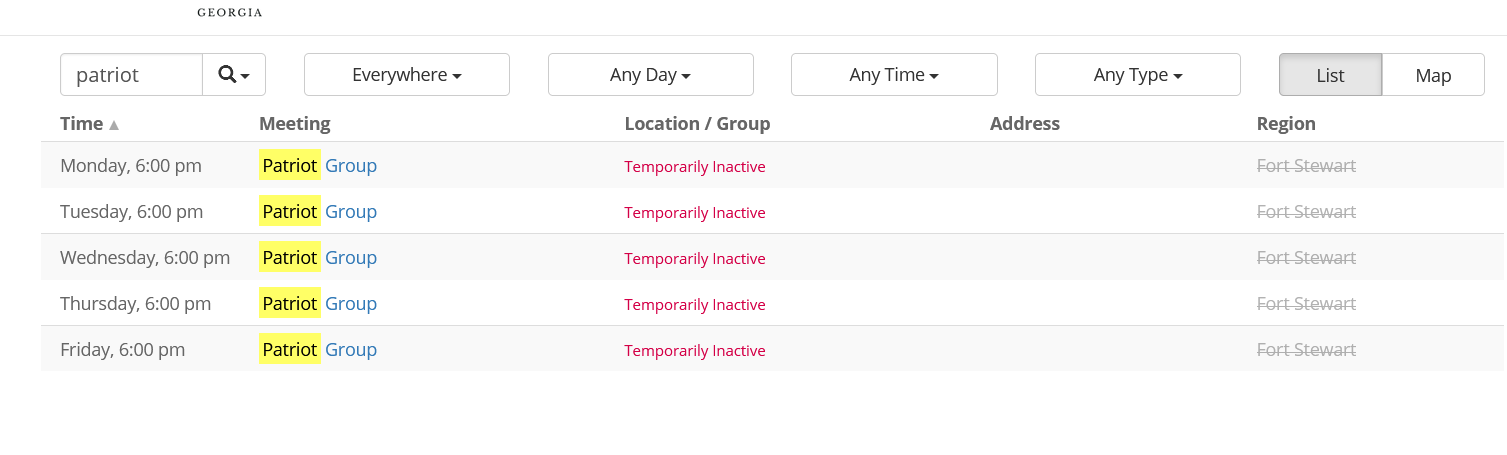
We have a meeting that is showing up as temporarily inactive. We checked the spreadsheet and we can't anything in the cells that would cause this to show up inactive. Can you please help me solve this problem? Our website is https://savannahaa.com. I've attached a screenshot that shows what we are getting.
Answer by @joshreisner
Hi @keligirl43 thanks for including all the info! The issue is that the address for these meetings is Fort Stewart, GA, USA which is an approximate location. If you can make it a specific street address or point of interest then they'll show up as regular in person meetings like the others.
PDF Error
Show question & answer
Question
I'm creating this post to request support help for the AA CSO (Central Service Office) Website here in San Antonio.
- URL: aasanantonio.org
- Description of what I'm experiencing: (all screenshots attached)
-
Log into WP Admin Portal
-
Along left hand side select "Meetings" then "Import and Settings"
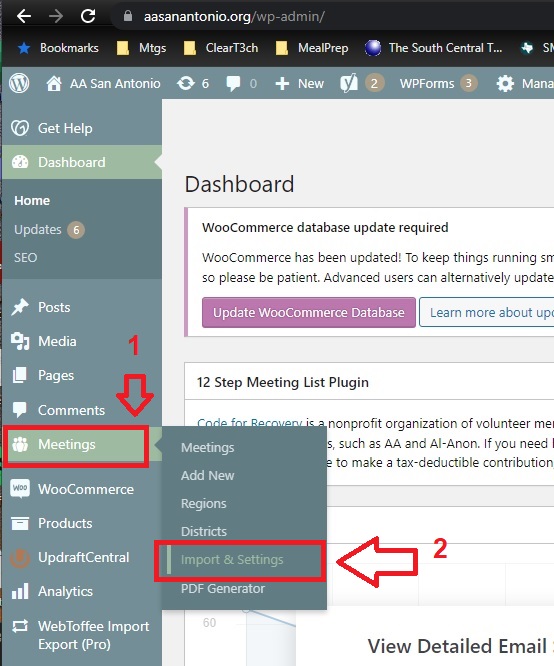
-
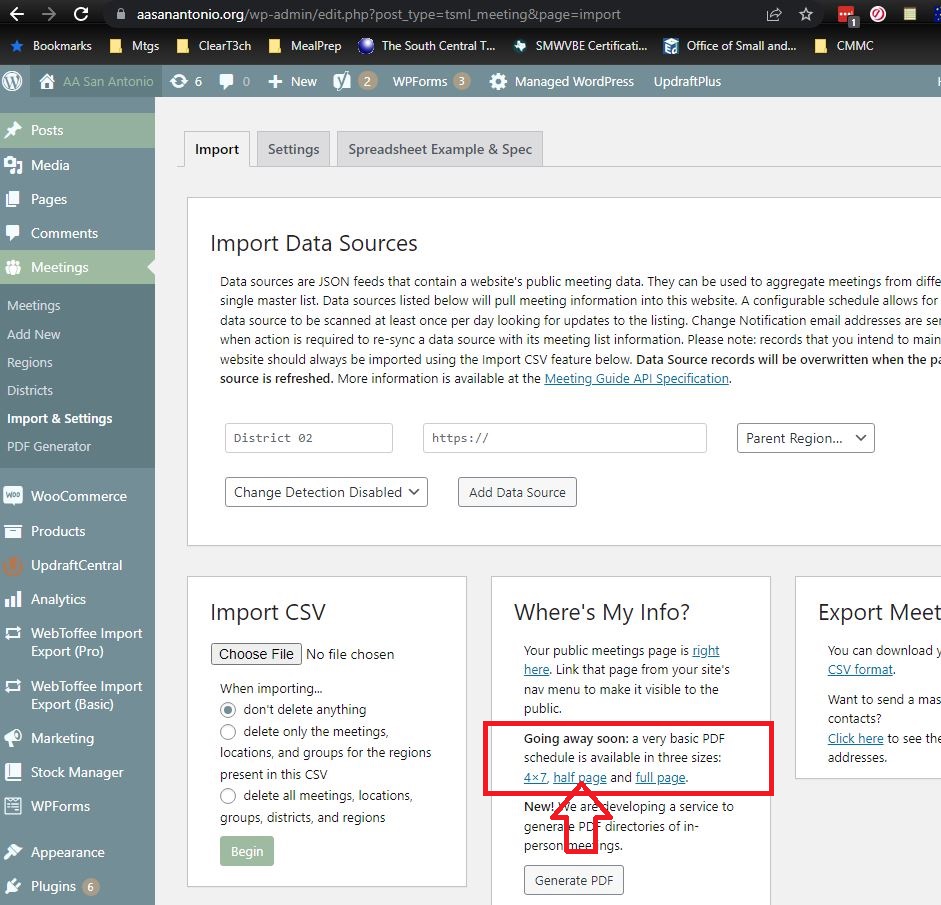
Middle of next page, under "Where's my Info?", 2 paragraphs down where it says: "Going away soon: a very basic PDF schedule is available in three sizes: 4×7, half page and full page."
-
Click on "half page" hyperlink
-
Error Message (SS then Text):
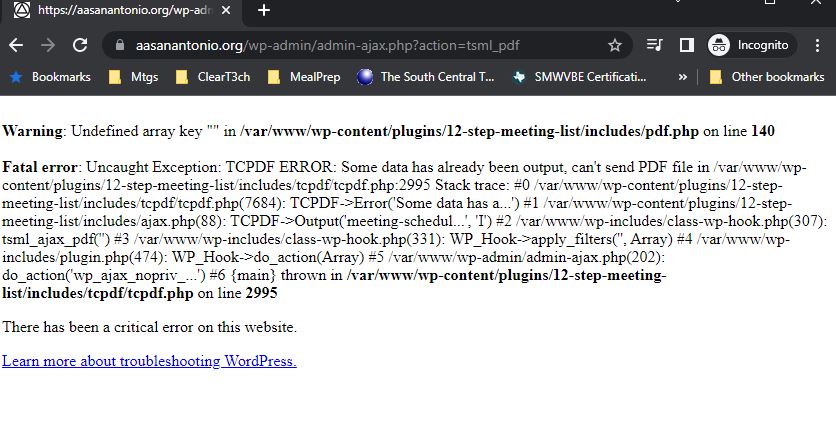 Warning: Undefined array key "" in /var/www/wp-content/plugins/12-step-meeting-list/includes/pdf.php on line 140
Fatal error: Uncaught Exception: TCPDF ERROR: Some data has already been output, can't send PDF file in /var/www/wp-content/plugins/12-step-meeting-list/includes/tcpdf/tcpdf.php:2995 Stack trace: #0 /var/www/wp-content/plugins/12-step-meeting-list/includes/tcpdf/tcpdf.php(7684): TCPDF->Error('Some data has a...') #1 /var/www/wp-content/plugins/12-step-meeting-list/includes/ajax.php(88): TCPDF->Output('meeting-schedul...', 'I') #2 /var/www/wp-includes/class-wp-hook.php(307): tsml_ajax_pdf('') #3 /var/www/wp-includes/class-wp-hook.php(331): WP_Hook->apply_filters('', Array) #4 /var/www/wp-includes/plugin.php(474): WP_Hook->do_action(Array) #5 /var/www/wp-admin/admin-ajax.php(187): do_action('wp_ajax_tsml_pd...') #6 {main} thrown in /var/www/wp-content/plugins/12-step-meeting-list/includes/tcpdf/tcpdf.php on line 2995 There has been a critical error on this website.
Learn more about troubleshooting WordPress.
Additional Notes:
-
The CSO Manager is needing to convert our AA SA Meeting Guide into a 'half-page' PDF due to a request to print hard copies for local entities.
-
CSO Manager says this worked just 5 days ago (half page and Generate PDF button)
-
I believe I updated the PHP on this site 3+ weeks ago (can't find any notes on this at the moment)
- Version Info: AA CSO Website: Version 5.9.3
- Plugin Version Info:
----12 Step Meeting List---- Version: 3.14.2
Last Updated: 2 weeks ago Requires WordPress Version: 3.2 or higher Compatible up to: 5.9.3 Requires PHP Version: 5.6 or higher
----12 Step Meeting List - WordPress - Plug-In---- Version: 0.3.1
Last Updated: 7 months ago Requires WordPress Version: 4.7 or higher Compatible up to: 5.8.4 Requires PHP Version: 5.6 or higher
Any and all suggestions are welcome. I greatly appreciate you taking the time to reply/comment/help. -Vince R.
Answer by @joshreisner
Hi @vrendon852
Looks like you've discovered a bug in the old PDF generator -- it seems to be struggling with a meeting that is by appointment (it doesn't have a day set). Looks like it's this meeting: https://aasanantonio.org/meetings/open-door-group/ -- I am pretty sure that if you set a day on that meeting, or remove it, the PDF will start working again.
That said, we invite you to check out the new PDF generator, since like it says, this one is going away soon.
TSML Updated : now extremely slow
Show question & answer
Question
Describe the bug After updating to 3.11.0, my area's meetings portion seems extremely slow. Updates and imports are taking upwards of 2-3x longer. Am getting frequent 503's on updates. Was there some backend changes done with this update? Wondering if there are any other reported performance issues after upgrading to 3.11.0.
To Reproduce Steps to reproduce the behavior:
- Update TSML from previous version, say most recent WP 5.7 compatible version prior to this.
- Select meetings section
- Import meetings -or-
- Update meetings
Expected behavior Some delay is expected for processing changes and imports, but anything longer than say 5-10 secs should be looked into. And, 503's are not kosher.
Laptop/Desktop (please complete the following information):
- OS: [iOS]
- Browser [chrome]
- Version [Version 91.0.4472.114]
Answer by @jcookson-infoblox
It was most prevalent when editing meetings. All my imports are via JSON feeds currently. I have cleared the site cache as well. I'll see about updating the PHP version and see if that helps. When I close editing tabs it does not speed up, which leads me to think its on the records lock.
Address change issue
Show question & answer
Question
When I attempt to change the address of a meeting (the meeting has changed location), I change the address:

 The map doesn't change...
I change the location:
The map doesn't change...
I change the location:
 The map still doesn't change, and the publish button is greyed out. The save draft button is also greyed out.
 I have version 3.11.2 of the Meeting guide plug in and using Wordpress 5.7.2
My plug ins are:
12 Step Meeting List
Akismet Anti-Spam Version 4.1.10-Akismet Anti-Spam is automatically managed for you.
AMP Version 2.1.3
Classic Editor Version 1.6
CoBlocks Version 2.14.0-This plugin was installed by WordPress.com and provides features offered in your plan subscription.
Enable jQuery Migrate Helper Version 1.3.0
Gutenberg Version 11.0.0-This plugin was installed by WordPress.com and provides features offered in your plan subscription.
Jetpack Version 9.9-Jetpack is automatically managed for you.
Layout Grid Version 1.7-This plugin was installed by WordPress.com and provides features offered in your plan subscription.
Page Optimize Version 0.5.1-This plugin was installed by WordPress.com and provides features offered in your plan subscription.
PDF Embedder Version 4.6.2
WordPress.com Editing Toolkit Version 3.10777-This plugin was installed by WordPress.com and provides features offered in your plan subscription.
I tried disabling all plug ins (except for the Meeting Guide) and followed a sequence I found about changing address and the location. Nothing has worked.
Any suggestions?
I have version 3.11.2 of the Meeting guide plug in and using Wordpress 5.7.2
My plug ins are:
12 Step Meeting List
Akismet Anti-Spam Version 4.1.10-Akismet Anti-Spam is automatically managed for you.
AMP Version 2.1.3
Classic Editor Version 1.6
CoBlocks Version 2.14.0-This plugin was installed by WordPress.com and provides features offered in your plan subscription.
Enable jQuery Migrate Helper Version 1.3.0
Gutenberg Version 11.0.0-This plugin was installed by WordPress.com and provides features offered in your plan subscription.
Jetpack Version 9.9-Jetpack is automatically managed for you.
Layout Grid Version 1.7-This plugin was installed by WordPress.com and provides features offered in your plan subscription.
Page Optimize Version 0.5.1-This plugin was installed by WordPress.com and provides features offered in your plan subscription.
PDF Embedder Version 4.6.2
WordPress.com Editing Toolkit Version 3.10777-This plugin was installed by WordPress.com and provides features offered in your plan subscription.
I tried disabling all plug ins (except for the Meeting Guide) and followed a sequence I found about changing address and the location. Nothing has worked.
Any suggestions?
Answer by @tech2serve
After discussion with the OP, we discovered his configuration for the geocoder had been changed to Google, but that his API key had not been authorized for geocoding.
Changing his configuration to use the API Gateway resolved his geocoding issues.
Error while trying to export to CSV
Show question & answer
Question
Does anyone else see an error when trying to export the data in Version 3.11.2?
Error:
2021/07/28 18:17:07 [error] 32568#32568: *45109 FastCGI sent in stderr: "PHP message: PHP Warning: Undefined array key "notes" in /var/www/html/aacostadelsol.com/wp-content/plugins/12-step-meeting-list/includes/ajax.php on line 238PHP message: PHP Warning: Undefined array key "location_notes" in /var/www/html/aacostadelsol.com/wp-content/plugins/12-step-meeting-list/includes/ajax.php on line 238PHP message: PHP Warning: Undefined array key "group_notes" in /var/www/html/aacostadelsol.com/wp-content/plugins/12-step-meeting-list/includes/ajax.php on line 238PHP message: PHP Warning: Undefined array key "conference_url_notes" in /var/www/html/aacostadelsol.com/wp-content/plugins/12-step-meeting-list/includes/ajax.php on line 238PHP message: PHP Warning: Undefined array key "conference_phone_notes" in /var/www/html/aacostadelsol.com/wp-content/plugins/12-step-meeting-list/includes/ajax.php on line 238PHP message: PHP Warning: Undefined array key "notes" in /var/www/html/aacostadelsol.com/wp-content/plugins/12-step-meeting-list/includes/ajax.php on line 238PHP message: PHP Warning: Undefined array key "location_notes" in /var/www/html/aacostadelsol.com/wp-content/plugins/12-step-meeting-list/includes/ajax.php on line 238PHP message: PHP Warning: Undefined array key "group_notes" in /var/www/html/aacostadelsol.com/wp-content/plugins/12-step-meeting-list/includes/ajax.php on line 238PHP message: PHP Warning: Undefined array key "conference_url_notes" in /var/www/html/aacostadelsol.com/wp-content/plugins/12-step-meeting-list/includes/ajax.php on line 238PHP message: PHP Warning: Undefined array key "conference_phone_notes" in /var/www/html/aacostadelsol.com/wp-content/plugins/12-step-meeting-list/includes/ajax.php on line 238PHP message: PHP Warning: Undefined array key "notes" in /var/www/html/aacostadelsol.com/wp-content/plugins/12-step-meeting-list/includes/ajax.php on line 238PHP message: PHP Warning: Undefined array key "group_notes" in /var/www/html/aacostadelsol.com/wp-content/plugins/12-step-meeting- 2021/07/28 18:17:07 [error] 32568#32568: *45109 FastCGI sent in stderr: "otes" in /var/www/html/aacostadelsol.com/wp-content/plugins/12-step-meeting-list/includes/ajax.php on line 238PHP message: PHP Warning: Undefined array key "conference_url_notes" in /var/www/html/aacostadelsol.com/wp-content/plugins/12-step-meeting-list/includes/ajax.php on line 238PHP message: PHP Warning: Undefined array key "conference_phone_notes" in /var/www/html/aacostadelsol.com/wp-content/plugins/12-step-meeting-list/includes/ajax.php on line 238PHP message: PHP Warning: Undefined array key "group_notes" in /var/www/html/aacostadelsol.com/wp-content/plugins/12-step-meeting-list/includes/ajax.php on line 238PHP message: PHP Warning: Undefined array key "conference_url_notes" in /var/www/html/aacostadelsol.com/wp-content/plugins/12-step-meeting-list/includes/ajax.php on line 238PHP message: PHP Warning: Undefined array key "conference_phone_notes" in /var/www/html/aacostadelsol.com/wp-content/plugins/12-step-meeting-list/includes/ajax.php on line 238PHP message: PHP Warning: Undefined array key "location_notes" in /var/www/html/aacostadelsol.com/wp-content/plugins/12-step-meeting-list/includes/ajax.php on line 238PHP message: PHP Warning: Undefined array key "group_notes" in /var/www/html/aacostadelsol.com/wp-content/plugins/12-step-meeting-list/includes/ajax.php on line 238PHP message: PHP Warning: Undefined array key "conference_url_notes" in /var/www/html/aacostadelsol.com/wp-content/plugins/12-step-meeting-list/includes/ajax.php on line 238PHP message: PHP Warning: Undefined array key "conference_phone_notes" in /var/www/html/aacostadelsol.com/wp-content/plugins/12-step-meeting-list/includes/ajax.php on line 238PHP message: PHP Warning: Undefined array key "location_notes" in /var/www/html/aacostadelsol.com/wp-content/plugins/12-step-m
…
Answer by @tech2serve
Hey @ni3ls--
To answer your first question, I do not get any errors when doing an export of meeting data in v3.11.2.
Regarding your second question, I'm not sure what is going on. Did you recently upgrade TSML? If so, what was the previous version? And does this issue correlate to that upgrade?
If you're not able to export meetings, I think your options may be a bit limited. Hopefully you have a backup of your meetings that is reasonably current.
Not sure how many meetings you have (I couldn't load your site) but you might try going into them to edit and update and see if you get any errors.
It might just be quicker and to delete and reinstall the plugin (you can try activate/deactivate?), then import meeting data from your backup.
General direct API call for posting meetings
Show question & answer
Question
Question : Is there a direct general API call I can POST JSON-ized data to for importing meetings (of course, it will be site specific -- but after the main site url there should be general tsml plugin REST API url data --- eg, https://my-wp.site.com/\{tsl-specific-ap\}>/\{import-url-here\})? This would be outside using the WP UI, and instead sending a postman-like POST call with the body content being the data to be consumed. If not, why not & when can we expect is to be made available?
Answer by @joshreisner
Hi @jcookson-infoblox - nope that's not a current feature, nor is it on our roadmap. Lots of reasons why:
- no one's ever asked for it
- most service entities don't have custom applications that need to sync with their website meeting finder
- you can already pull data into the plugin via the importer
- when data flows into the app, either by save, JSON import, or CSV, the address is re-geocoded, and that takes time, especially for bulk requests, so an API service would have to wait a long time between requests
- sounds like a security nightmare for us to develop a custom REST endpoint
- wordpress already has a REST API which you should be able to use. TSML data is all within the existing data footprint (meetings, locations, and groups are posts, regions and districts are taxonomy terms, everything else is postmeta)
- sounds like a lot of new code to support
All that said, you'd be more than welcome to develop (or hire someone to develop) a companion plugin that works with TSML to achieve this objective.
Import multiple meetings - not picking up day or time
Show question & answer
Question
I'm sure this is a user error. My spreadsheet shows a time and day for each meeting and the import is changing to "appointment". These are multiple meetings at the same location. I changed the slugs to a -numeric and the import still shows appointment. Is there a work-around District70_meetingslist.csv ?
Answer by @tech2serve
Hi @Goonysings,
The problem appears to be with the data in theupdated column. I’m not sure exactly why, but I was able to successfully import your data by completely either of the following steps.
- Delete the column.
- Replace the column with just a date.
In either case, TSML used the time stamp of the import for the publish data, so deleting it in your spreadsheet is safe.
Tim
Adding feeds from live WordPress site to staging site
Show question & answer
Question
Our current Area 59 site (area59aa.org) includes feeds from a dozen or so Districts and Intergroups. It's not apparent to me how I can add those feeds to our staging site, which is nearing go-live: https://rps.866.myftpupload.com/find-a-meeting/
The content currently used in the staging site is a JSON export from the live site.
Answer by @kiyote33
Hi @fritzisa, A simple way to populate your staging site with the contents from your area59aa.org site is to use the export CSV feature found under the "Where's My Info?" section on the Import & Settings page. The generated meetings.csv file will download to your local machine and you can then use it with the "Import CSV" feature to populate your new staging site. Hope this helps...
Google Sheets doc stored on Google Drive used as master data base?
Show question & answer
Question
Dear friends, We recently launched our new site for Area 59 (Eastern PA). Almost all of our Districts and Intergroups have provided me with a link to their data.
I circulated the attached PDF back when I was asking for help from our contributing websites. Recently, one of our Districts told me their Google Sheets doc (see attached .xlsx file) serves as their database, provided it's stored on Google Drive. I understand how to use their spreadsheet as a CSV file and import it into our meetings list. But from my understanding, if they make changes to their file they would need to send me an updated file for re-import? They told me their file is connected to GSO and any changes they make are reflected in GSO's meeting list. I can't find any documentation to confirm or deny this process.
Can you please provide some clarification on what can and can't be done with a spreadsheet similar to theirs?
Meeting List Template Williamsport PA - Meetings.xlsx
Area-59-Meetings-HELP-Request-NOV-11-2021.pdf
Thanks in advance for your assistance!
In fellowship, Scott F. | Area 59 Web Servant
Answer by @kiyote33
We have a new utility for importing Google Sheets at https://sheets.code4recovery.org. I ran your link through it and it generated the following link: https://sheets.code4recovery.org/storage/1jhAO6X9egDa18Pp04n3NcLp9_CM9gcEu0IVUSCZG0OQ.json which I then tested and it loaded successfully. Our Google Sheets project at sheets.code4recovery.org fetches meeting data from Google Sheets using the v4 API and transforms it into a CORS-enabled minified Meeting Guide-spec JSON file. So you can use it to do a data source import.
Hope this works for you. Let me know if there is anything else I can do to help.
WSO Number
Show question & answer
Question
Hi! What would be the best practice for adding our WSO number? We post it now in our old listing format. I added a custom field, but I would need to modify the import template, or add these manually on wordpress correct? We are a small district so that is easy.
Answer by @brianw-area24
A couple of options for you:
- Include it with the group name (Name of Group - GSO number)
- Include it in the Group Notes field
I'm not sure how you added a custom field, but I'm thinking you might have to make changes each time we update the plugin, and that's probably not something you want to do.
Refresh From Source Appears Broke
Show question & answer
Question
I have been trying to do a refresh from a JSON data source today and while the feed appears to be working fine, the refresh stalls. I’ve tried this on two different browsers and on two different machines.
Thanks in advance for your help!
Alan S. Chairman - St. Cloud Intergroup
Answer by @joshreisner
Hi Alan, hm, I'm able to import the San Jose feed ok on our demo site. Are you able to import other feeds on your site?
Does the feed validate properly here? https://meetingguide.org/validate
Do you mind sharing the feed address? Perhaps we can try it locally to see if there are any snags.
Day / Time not displaying and link not working
Show question & answer
Question
Hi there, love this plugin. Thank you for creating it!
We have a staging site here: https://wordpress-772911-2627160.cloudwaysapps.com/
Several issues after importing:
-
We copied the Example CSV file and filled in client data. When we go to Meetings > Meetings, though, the Day and Time columns (the first two columns) are just showing "Appointment" instead of displaying the actual data whereas with the example CSV file, it was showing the days and times. I looked at both files to compare and I don't see anything different.
-
Also, when clicking on any link under "Meeting" or "Address", it does nothing even though it has data and we also added the MapBox token (and added the URL to the token). https://wordpress-772911-2627160.cloudwaysapps.com/index.php/meetings/. These links weren't working with the example data either. Don't think that's because it's a staging server but maybe?
-
After importing the data, we got the message, "no location information provided for ___". Each of the entries it listed was for a Zoom meeting. But all the Zoom info was in the Conference URL and Conference URL Notes columns just like the other Zoom meetings that imported fine.
What am I missing?
I did search the discussions for similar issues but couldn't find anything. Maybe I didn't find the right word or phrase.
Thanks in advance!
Answer by @joshreisner
hi! i think you've caught a bug on the inside page which we can fix.
regarding "appointment" could you upload your CSV, or just a screenshot of the first few lines? I'm guessing something is slightly off with either the day or the time column.
Export to CSV
Show question & answer
Question
Dear All,
Thank you for your reply.
Searched through discussions but was not able to find out how to export to CSV. Where is the menu option for that?
Sorry, I know this question must have been asked a 100 times.
Very much appreciated, Richard
Version 3.14.5 WordPress 5.9.3
Answer by @tim-rohrer
Hi @rstelma,
I transferred this question to the TSML Discussion area. Spec should be reserved for discussions related to the to meeting information exchanges specification.
From your Dashboard, navigate to Meetings->Import & Settings. Under the Import tab, you’ll see an panel on the lower right labeled “Export Meeting List”.
Public meeting list not displaying!
Show question & answer
Question
URGENT! We were having trouble adding a new meeting so I deleted the plugin and reinstalled, then uploaded the saved CSV. Meetings now are showing in the backend but there is nothing on the public side meetings list at https://www.pdxaa.org/index.php/meetings/. During upload there was a Google Maps error message for every meeting saying we needed to enable billing, but we are using Mapbox and have the Mapbox key entered in Settings.
Answer by @kiyote33
Hi @Spsrky, sorry to hear about your meeting list problems. Quite often when redoing the 12 Step Meeting List plugin, it's necessary to reset the WordPress permalinks. Go to the Settings/Permalinks page on your admin menu and simply click on the Save Changes button, which should get meetings displaying again on your /meetings page. Let me know if that doesn't resolve your issue and I'll dig a little deeper into your error messages.
Problem importing CSV in TSML
Show question & answer
Question
Hi, I'm not sure this is the right place for this request. My problem is that when I import a CSV file (exported from Meeting Guide) in TSML, I end up with "Appointment" for the Time of every meeting. I checked and double-checked the format of "Time" and "End Time" fields. I played around with the format: leading zero or not, AM/PM or 24 hour, to no avail. I read that a "non-legit" name in the "day" field can cause the same error, is there some other fields that could produce a similar error? I tried importation on 2 different staging sites with the same results. Test site: www.devtest.aa90.org PHP 7.4.30 WP 6.0.2 fr_CA TSML plugin 3.14.6
Answer by @joshreisner
is your interface language in French? What if you change one of the days to Français? does that meeting import properly?
if that doesn't work perhaps could you share your whole CSV here? we can try importing it on our demo site
the double returns look a little suspect to me, but i can't say for sure if it's a problem or not. guessing it's ok if the meetings are importing ok otherwise
Region Missing
Show question & answer
Question
I've got everything running, but for some reason the "Region" isn' populating for most of my meetings. I've looked my sheet over to find some sort of typo, but can' find any pattern to why only a few meetings are importing regions.
Answer by @joshreisner
i think it’s likely there might be some inconsistencies in the sheet. my suggestion would be to sort it by address and confirm that the location and region columns are the same for each meeting at a given address
if that doesn’t work please upload it to a google sheet and we can take a look together
Import CSV is Clobbering the Start Time, End Time and Day of the Week
Show question & answer
Question
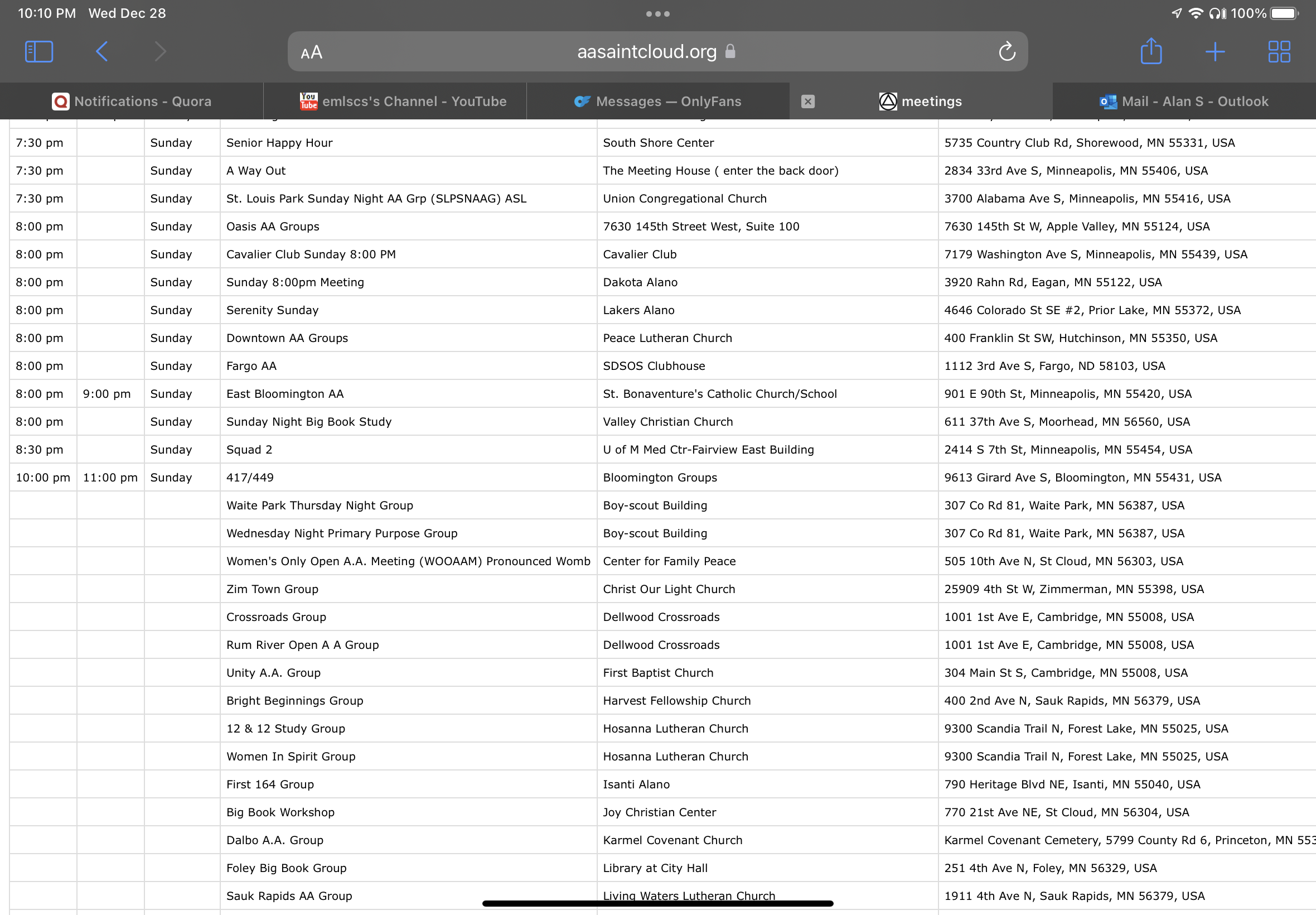
Using the import CSV in the latest version of the plugin (3.14.9) is now clobbering the Start Time, End Time and the Day of the Week columns. Help!
Answer by @joshreisner
Again I'm transferring this issue out of the spec repository. The spec repository deals with our JSON specification, not the 12 Step Meeting List WordPress plugin. Going forward, if you have a question, please create a new discussion at https://github.com/code4recovery/12-step-meeting-list/. Thanks
I don't think the issue you're having is related to the recent plugin update. You reported in #1016 that you had uploaded a CSV and some meetings were showing up as appointment. I suggested that there might be something amiss with the Day and/or the Time column. Could we see that upload? In this screenshot it looks like you are now re-downloading the CSV, with the time information already dropped.
Area64 - Middle Tennessee Intergroup
Show question & answer
Question
Area64 https://www.area64assembly.org/ imports 4 data sources. The largest source is from AA Nashville with over 1k meetings. At the moment, when we try to run the refresh or import, we get a curl error.
The data source is:
https://aanashville.org/wp/wp-admin/admin-ajax.php?action=meetings
The error we get is:
WP_Error Object ( [errors] => Array ( [http_request_failed] => Array ( [0] => cURL error 28: Connection timeout after 10000 ms )
    )

[error_data] => Array
    (
    )

[additional_data:protected] => Array
    (
    )
)
This was working in the past but now it's not. My guess is that it's just too much data and we need to increase the timeout setting. I don't have access to area64s server but could likely work with their person to fix this.
I tried to delete the source and readd it but it failed with the same error.
Answer by @joshreisner
thanks @marvabban for the clarification yes the feed works great. i'm pretty sure then the problem is with your host, they said "the address is not blocked by them" - i'm guessing that all outbound requests are blocked, not just that specific one. here's another relatively small open feed that you could try importing to confirm
i would tell them that outbound requests appear to be blocked. perhaps there's a non-json way to confirm? maybe try this? https://webmasters.stackexchange.com/questions/92355/how-can-i-check-if-my-hosting-provider-blocked-outbound-traffic-to-some-ips
because you confirmed that it doesn't work with pure php i think you can be sure that the problem is not wordpress (or .htaccess) related
Importing Issues
Show question & answer
Question
Hi there,
Using the latest version of the plugin we’re unable to import our meetings spreadsheet, the page reloads but no meetings are created. Is anyone else having this issue?
wp version 6.2
php version 7.4.7
Thanks in advance.
Answer by @joshreisner
having slept on it, i'm still very puzzled. maybe try logging out of wp and logging in again? i wonder if something has gone wrong with your user session. it looks from the video like your admin stylesheet is not loading, perhaps other admin features are not as well.
if that doesn't do anything, perhaps try uninstalling / reinstalling the plugin?
if that still doens' help, maybe try temporarily deactivating plugins? perhaps start with these since they seem security-related:
- adminimize
- ninjafirewall
- restrict-user-access
- wordfence
- wp-2fa
Can I connect a database to the JSON Feed for instant updates?
Show question & answer
Question
Is there a way to connect a database (Access/ Excel) to the Meeting Plugin/ JSON Feed so when the different areas make updates to meeting times/locations the webiste feed can be updated?
I saw this page: https://sheets.code4recovery.org/
And I feel like that's close to this result but it's an import as oppose to a constant feed, is that correct?
My team would love this solution.
Answer by @kiyote33
Hi @conrac01, the quick answer is "No, the refresh does not work that way!"
The behavior described by the member of your area tech committee could currently only be achieved by using custom code to overwrite the default behavior of our plugin tsml_scan_data_source function code. Our code is designed to simply detect data source import meetings which have been updated since the last refresh timestamp, and then list the results of the scan in a generated email which is sent to the email addresses listed on the Settings page under the Change Notification Emails heading. A recipient of the generated email (titled "Data Source Changes Detected: <data_source_name>) can then click on the embedded link in the email which takes them to their WordPress Meetings "Import & Export" admin page where pressing the <data_source_name> Refresh button resyncs their website meeting list with those meetings found in the import feed.
I would suggest contacting the member of your tech committee for details on exactly what they did to achieve the auto refresh feature, something which is not provided by our plugin at this time.
Hope this answers your question...
Importing Json file from another district
Show question & answer
Question
I am webmaster for our district website which I installed TSML. I want import from a data source at our Intergroup website which is already installed and connected to the meeting app. The import setting is looking for a Json file and I don't see a permanant one on the Intergroup website. The intergroup website does have some Json files in it's cache folder with the name of tsml-cache-82b71d8423.json and these can successfully be connected to our site but these appear to be temporary files created when Intergroup updates the meeting app data. Is there a permanent json file to be imported? Where is it?
Sorry if i am not making sense, I am new to this and only trying to help my district.
thanks,
pete
Answer by @joshreisner
ok it's moved now. there are some instructions here: https://meetingguide.helpdocs.io/article/tjn0po3zco-providing-meeting-listings-to-another-entity on how to provide meeting data to another entity. someone with access to the intergroup site should follow these instructions to provide a URL and then you should be able to import that URL to the district site
Configuration error: time zone is not set.
Show question & answer
Question
I have just installed TSML on a new test site. I have successfully imported my meetings from another site, after using the export function. Which is excellent, that that works! I have not connected the meeting pages to any menus yet. But when I used the option 'View posts' from the black top bar, this error came up: Configuration error: time zone is not set.
I checked my Wordpress settings and it says my timezone is UTC + 0 so it seems there is a timezone configured. Then I checked my Mac Settings and it is set to configure automatically and sees I am in the general Toronto area.
So what do I do with this error that prevents me from seeing the meetings in the front end? I have looked all over the TSML settings but do not find anywhere to set a timezone. Have not had to do that before either. So I am hoping someone knows what it going on....
Thanks, Nicky
Answer by @joshreisner
hi nicky, it sounds like you have TSML UI enabled. one option is to disable it, another is to set the time zone to be Toronto in WordPress settings, rather than UTC +0
TSML UI needs to know where to start the list at
Connecting to Meeting Guide App with Google Sheet
Show question & answer
Question
Hello team!
Kansai Central Office is attempting to connect Meeting Guide App. Meeting Guide App support says they have some issues to import the data.
_We attempted to load the data feed provided but received mostly errors - please see attached excel file.
It looks like the google sheet needs some adjustments, the 2 primary ones are: Change column header "slug" to "ID" Provide a day in the format in this google sheet template (that is the error you will see in the spreadsheet attached)
Regarding the "day" column - the issue may be a translation issue when we import it - can you confirm that what is in the column should translate to English as "Sunday", "Monday" etc.?
Also, it looks like your website is using the TSML plug-in- which generates a json string which is usually easier to import than google sheets - can you send in the json instead? Then the "day" field will be numeric which should help._
Website meeting list URL: https://www.aa-kco.org/meetings/
Google Sheet URL: https://docs.google.com/spreadsheets/d/1JSqXehcLk91qffMHRIx-8ddryYEC-vnrqb6aGHmApys/edit?usp=sharing
- We can replace "slug" with "ID" easier. Will it be good way?
- How we can generate a json string of meeting list Google Sheet? TSML plug-in- which generates a json string
Please help support us for these issue.
Answer by @joshreisner
hi hiro,
you should be fine to change Slug to ID, TSML UI should still work
it's too bad the meeting guide importer can't use the japanese day names, but TSML UI can handle those as well. Sunday, Monday, etc. this won't impact what TSML UI displays
not sure why they are confused and think you are using the plugin, but tell them you are not. (there is a way to convert to JSON but this is an extra step that you will have to do every time there is a change so I don't recommend this because it is liable to get out of sync)
nginx-helper plugin conflicts with feed import progress bar?
Show question & answer
Question
We are trying to move our site from DreamHost's standard shared hosting to their managed shared hosting (DreamPress) plan. Their standard shared hosting uses Apache all the way, but their managed plans put nginx in front of Apache. They do their caching on the nginx side by using this version of the nginx-helper plugin. The problem we're having is that there is some sort of interference between the admin-ajax.php GET that updates the progress bar and the nginx-helper, with the result being that we don't see any progress reported. Disabling the nginx-helper plugin when we refresh feeds and then re-enabling it after is an effective workaround.
Has anyone encountered something like this before? Does anyone have any clues about what the source of the conflict is?
Answer by @clickonetwo
So I believe I've gotten to the bottom of this issue with nginx-helper. The import process works by deleting all the existing posts from the feed, then recreating them. The nginx-helper plugin is monitoring these deletions and synchronously trying to clear the nginx fast-cgi cache of all these posts. That takes quite a while and eventually causes things to timeout.
There is another plugin, LifterLMS, that reported this issue to the maintainers of nginx-helper back in 2020, with no response. (See their internal issue here.) They eventually fell back to the workaround that I am using, which is to disable the plugin when refreshing the feed and then manually purging the cache. Kind of a drag.
JSON feed meeting list (on Area website) is different than what's displayed on the Meeting Guide app
Show question & answer
Question
Dear Code4Recovery friends,
The meetings list for District 48 (Williamsport, PA) is slightly different when viewed on the Meeting Guide app versus the Area 59 website.
https://area59aa.org/find-a-meeting/?region=williamsport&search=sober&weekday=sunday
When viewed on the Meeting Guide app, there are (2) listings for the same meeting (with different addresses). (see attached)
A59-District-48-Meetings-Inconsistency-DEC-15-2023.pdf
Area 59 website uses C4R Google Sheets Importer for their D48 Google Sheet to create a JSON file:
A59-D48-MeetingGuide-MASTER:
https://docs.google.com/spreadsheets/d/1fJINOisOEM7Fpv5gTOAPnmkPi6NuBWkZ95W72FemmQI/edit?usp=sharing
https://sheets.code4recovery.org
Feed created:
https://sheets.code4recovery.org/storage/1jhAO6X9egDa18Pp04n3NcLp9_CM9gcEu0IVUSCZG0OQ.json
The new D48 webservant did not receive much guidance from its predecessor and has asked if Area 59 could maintain its Google Sheet. I am glad to help, as I'm already doing that with another District in Area 59 that uses the Google Sheets process.
QUESTION: I am unclear where the apparently "old" list is coming from that displays on the Meeting Guide app.
We really appreciate any assistance you're able to provide.
In fellowship,
Scott Fritzinger, Area 59 webservant
Jim L., District 48 webservant
Answer by @joshreisner
looks like the problem meeting is imported directly from the district, perhaps confirm with gso what url they are importing from for the district and make sure the information there is correct. appsupport@aa.org
or if you are importing their info to to the area, ask them to disconnect the district so the listings will come from the area?
Include custom fields in Meetings Export
Show question & answer
Question
Hello,
I have a few custom fields added via ACF and I would like them included in the meetings export.
Dashboard -> Meetings -> Import & Export -> Download CSV
Is there some code I can add to my functions.php?
Thank you in advance.
Answer by @kiyote33
So between Josh & me we sort of figured out that the two piece label when setting up ACF in your environment was not working. We added 'test' => 'Test' which worked fine, but after many fruitless attempts to get 'admin_comments' => Admin Comments' to work we settled on 'comments' => 'Comments' and that worked. There seems to be something in your environment that is causing our code to bomb when it sees the two-word label, or a hyphen or underscore in the ACF field name. Weird. But I think you've now got a work-around. Let us know if that will work for you...
Time / Day displaying as appointment
Show question & answer
Question
Hello, I imported a .csv file into the 12 Step Meeting List plugin but neither the date nor the time show up. The column only says appointment. I checked the csv and the Date and Time are in the right columns and formatted properly. Maybe I left too many columns in it? Please also tell me how to delete the csv I imported because it's not working. I don't see how to delete it. Thank youl RIC VA AA Mtgs.csv
Answer by @joshreisner
sorry to add another voice here, but i observed the same issue and i'm not exactly sure why the meetings where showing up as appointment.
i resolved it by creating a google sheet from the original CSV you uploaded @whateverx28 and then formatting the time column with Format > Number > 3:59 PM (see screenshot below)
i also made a few of the column edits @kiyote33 suggested above. i also added a Conference URL column (online meeting urls can't go in the address column)
i then saved it as CSV and was able to import it with no Appointment meetings: Richmond - RIC.VA.AA.Mtgs(1).csv
there are still some issues in the data however with online meetings. you'll want to make sure all the links start with https:// and that they all have at least a city and a location name even if that's "Richmond" and "Online Meeting" respectively
hope it helps
<img width="682" alt="Screenshot 2024-02-16 at 10 00 07 AM" src="https://github.com/code4recovery/12-step-meeting-list/assets/1551689/ae7cec3a-4501-4266-b97a-40d852039d1d">
How to publish a traveling meeting on google sheets tsmlui?
Show question & answer
Question
This is a traveling meeting that never meets at the same destination. It meets at different times and days once a week. Meetings are announced via email Wednesday before. All info found here: https://sites.google.com/view/thenomadclub/home
I'm stumped. Hoping someone can come up with a helpful solution.
Answer by @joshreisner
no, i'm afraid not. if the meeting can't stay updated, it shouldn't be posted to the directory.
i have heard of traveling meetings, or meetings at a member's home where the address can't be shared as a matter of privacy. in these cases we recommend using another page on the site to mention them. perhaps a page called something like "Additional Recovery Resources"
CSV upload with Location Notes entry is not updated
Show question & answer
Question
Hello All Springdale meetings are here: https://dixieaaoffice.com/meetings/?region=springdale I added a new meeting for 2 pm Wednesday and entered Auxiliary Room in Location Notes and Uploaded the file. Repeated attempts resulted in that field inheriting another meeting's location note as Library Room. I can change it in the web interface to Auxiliary Room, but then all in-person meetings show as Auxiliary Room. This seems like a bug to me as I would think different meetings ought to have different meeting notes if needed. IE different rooms at the same street address.
If this operation is normal, can anyone advise a workaround? Thanks Roger
Answer by @joshreisner
hi @DCO84770 the location name and notes fields are shared by all meetings at a given location, which is determined by address. this is a little clearer when entering information manually on the edit screen. we do get people confused about this from time to time if they are importing their changes from a spreadsheet, since it doesn't follow those rules
if the info needs to vary, such as a room number that is not shared by the other meetings at that address, then it should go in the notes field
Using Salesforce as Data source
Show question & answer
Question
Currently, I am storing all of my meeting information in Salesforce. I am in the process of using a SF report exported to a csv file that I will use to import into TSML. Has anyone had any success fully integrating Salesforce data into the TSML plugin? Any insights or documentation on how to align the different column headings would be insightful. Thanks!
Answer by @joshreisner
this looks good! no need to remove the old array keys, that i'm aware of. you might need to lowercase the keys, i'm not sure. eg $meeting['name']
we have a spec of all the fields that we support: https://github.com/code4recovery/spec
there is likely some trial-and-error involved here, good luck!
Import/Export page yields "There has been a critical error on this website."
Show question & answer
Question
Getting this error upon accessing the Import/Export page of TSML plugin: "There has been a critical error on this website. Please check your site admin email inbox for instructions. If you continue to have problems, please try the support forums." Unfortunately, we're not receiving the email it mentions. The front end of TSML is working properly and no other issues are presenting on the back end of the site. We're reluctant to disable/re-enable TSML for fear of losing the working front end. Same with uninstalling and reinstalling. Do you have any experience and/or guidance on this?
Running Version 3.19.9 of TSML on WordPress 6.9. The export function is used to create the printable meeting list.
Answer by @onemooresam
@SIA-WEBSUP @tim-rohrer : We got it sorted! I ran the debug log through AI and it showed me a PHP memory limit error. Increased PHP memory in wp-config and in PHP on Dreamhost and loading the import/export page works and I got a csv download.
Thank you for pointing me in the right direction!
Google Spreadsheet with Time Zone Options
Show question & answer
Question
Good morning, I am in an Area with multiple time zones, and we are importing from the El Paso Central Office their meeting list to share on our Area website. The importing process when smoothly, however I've noticed that all the meeting as populated as Central Time. Is there an option within the Google Spreadsheet to denote a time zone. I have reviewed the example noted on the website: https://meetingguide.helpdocs.io/article/g0ykqkdq0u-connecting-to-meeting-guide-step-by-step and the spreadsheet doesn't have a time zone option.
I see my option is to manual adjust the meeting times for about a 100 plus meeting. This would be a timely process and may require repeating this once the spreadsheet is revised.
Please share your thought and recommencations.
Thanks
Answer by @tim-rohrer
I suggest coordination with El Paso Central Office as you'll want to ask for some changes to the spreadsheet to make this work well:
- Add a timezone column and specify "America/Denver" to reflect Mountain Time.
- Make sure all meeting id values are unique, and reflect the meeting itself. Customarily this can be a slug (see this section of the Meeting Guide spec for more details).
- Categories for meetings (for example, Men/Women, 12x12) should be included in the Types column separated by commas. You can use the spelled out form for these. Refer to the meeting types in the spec.
Related (but won't affect the import), one would normally expect the Paypal column to only reflect the groups' PayPal information.
Override AA Label to Other Recovery Programs (Google Sheet (via Sheet Importer))
Show question & answer
Question
Hi,
I’m using TSML UI with a Google Sheets data source for a non-AA 12-step fellowship. We're using Shopify.
Is there a supported way to change or override (or remove) the AA-specific label within the "?" info icons for meeting types? See screenshot below:
<img width="316" height="553" alt="image" src="https://github.com/user-attachments/assets/fda2b781-018f-46aa-8e83-0a722da32cbb" />
Thank you for service!
Answer by @joshreisner
☝️ this is great if you're using WordPress with the 12 step meeting list plugin. if on the other hand you're using TSML UI in another environment like shopify then here are some instruction on how to override those descriptions: https://github.com/code4recovery/tsml-ui?tab=readme-ov-file#override-type-descriptions
TSML WP Plugin Ver 3.14.1 update
Show question & answer
Question
Hello We use ver 3.13. Will updating to latest ver of 3.14.1 alter the template we use for uploading CSV meeting list files? Thanks Roger P
Answer by @kiyote33
No, version 3.14.1 does not alter the schema used for uploading CSV files at all. We always recommend updating to the latest, but most local admins find it prudent to test the latest version on a staging site prior to going live, just to be safe.
Location Notes Don't Display
Show question & answer
Question
Hello - Seems like location notes (eg behind bleachers) used to show. Now they don't? Or is there a setting I need to change?
thanks
Roger P
Answer by @joshreisner
i just entered location notes on our demo site and i see it showing up: https://code4recovery.org/meetings/carcassonne-monday-evening-meeting
could you share a link to the page on your site? are the changes published?
Group showing as Inactive even though imported as active
Show question & answer
Question
Hi,
I'm importing active groups to TSML, but they are showing as inactive on the website. Any suggestions?
Answer by @kiyote33
Hi @OSAwebsite, I suspect you may have answered your own question here. As Tim mentioned, Online Only meetings must have an approximate address and the Online Details URL or Phone fields must be populated with valid information. As you mentioned, if there is no zoom info in the URL field, then I would expect the meeting to show inactive. Hope this helps.
Regions generated are inaccurate
Show question & answer
Question
I've noticed that some regions that are showing on our meeting list are incorrect. I am wondering if anyone elase has encountered this and if so, how it was corrected.
Answer by @ginslo
Hi David. Yes if you're importing from a CSV or any data source, that is going to overwrite what is on the website. So you're correct, examine the source data and fix the issues there before reimporting.
Alternatively, if you have edits on the website that you want to keep, you could do a full export from the website and then use that copy for further changes and then import it rather than the old one.
Unable to export meeting list to CSV
Show question & answer
Question
I am running V3.12 (the 3.12.1 upgrade broke my site, thats another topic). When I try to generate the CSV export I get the following error (I'm running PHP 7.4):
20211226T144801: birminghamaa.org/wp/wp-admin/admin-ajax.php PHP Notice: Undefined index: location_notes in /hermes/bosnacweb05/bosnacweb05bj/b338/ipw.birminghamaa/public_html/wp/wp-content/plugins/12-step-meeting-list/includes/ajax.php on line 232 PHP Notice: Undefined index: group_notes in /hermes/bosnacweb05/bosnacweb05bj/b338/ipw.birminghamaa/public_html/wp/wp-content/plugins/12-step-meeting-list/includes/ajax.php on line 232 PHP Notice: Undefined index: conference_url_notes in /hermes/bosnacweb05/bosnacweb05bj/b338/ipw.birminghamaa/public_html/wp/wp-content/p
Answer by @97eighty
@namdrino I've imported your feed and exported these meetings without any problems. I suggest trying to disable your plugins to see if one is conflicting with the process.
Allow Individual Meetings to Assign a District
Show question & answer
Question
Hello!
As of now, the only way I can assign a meeting to a District is to select 'Group' as opposed to 'Individual Meeting'. All 350+ of the meetings in our area are divided into four Districts. When I assign the meeting to a Group, then District, I lose the ability to provide Contact Info for that meeting. Or the Contact Info for that meeting is populated with the info for the District.
Although I can't do this from the web interface when editing or adding a meeting, I can add Contact, PayPal, Email, etc to the downloaded CSV and upload it to the website.
It would be handy to be able to assign a District and also unique contact info to a particular meeting. Make sense?
Thank you all for your continued excellent service!
David (757) 652-1711
Answer by @joshreisner
try giving a unique value in each group name. maybe add the day and time to the end of it
Zoom Meeetings Showing as "Inactive"
Show question & answer
Question
I.m using the 12-Step Meeting List plugin with my (experimental. at this stage) WordPress Web site (test.cnia30.org), and following all the instructions (I think) for entering meeting information into the template spreadsheet (CSV file) provided by them. As recommended, after it refused to import any meeting that didn't have both a meeting location and address field, I filled in both of these (as also recommended) with just the town and state the meeting was associated with. The Zoom IDs and passwords were put into the "Conference URL" and "Conference URL Notes", fields, respectively. This allowed the meeting information to be imported, but all of the on-line meetings were shown as "Inactive", and of course, no Zoom login information was shown. Can anyone tell me what is still going wrong with this, and what I need to do in order to get these meetings properly listed? Thanks for any help you can offer.
Answer by @joshreisner
hi! could you share the CSV so we can see what's going on? a meeting will display as inactive if it doesn't have a specific street address and no recognizable conference_url (or conference_phone)
Missing Meetings In Control Panel Sorting By Region
Show question & answer
Question
When sorting meetings by region in the control panel for "Portland" or "District 1" and so on, it displays only a limited number of meetings, while on the website you can see many more.
What is being displayed in the control panel is inaccurate.
Why is this happening?
Answer by @COMPUMEC
kiyote33 This worked as you described. I did get it to work. But I simplified it with just 1 region which is the towns. Less is sometimes better.
How to format online meetings in Sheets
Show question & answer
Question
We have meetings that are listed as online only. In our sheets it requests and specific address and we are getting error code during import saying ERROR. The listing online shows the address as INACTIVE (see screenshot)
How should get format the data in the cell to represent online only meetings? (see screenshot) Here is a link to view our current G Sheet template:https://docs.google.com/spreadsheets/d/1otk733FYwzF7JA4NlXfgEy6E1JKAkWOAxabjSOuuDIE/edit?usp=sharing
Answer by @joshreisner
also @Eric-Anderderson i'm noticing your timezone is set to Denver, please set this to New York at Wordpress > Settings. otherwise this will throw the times off for your meetings
HTTPS request for meeting CSV returns 400
Show question & answer
Question
Hi,
I'm invoking the TSML CSV export URL from a Powershell script that also automatically downloads a Formidable export CSV, then compares the two to determine differences. The TSML download URL is a copy of the URL on the TSML export button and has the form "https://xxxxx.org/wp-admin/admin-ajax.php?action=csv". This URL recently used to work with Powershell invoke-Webrequest, but for some reason it now returns 400, which seems to be coming from admin-ajax.php. The same URL works fine in a browser provided I'm logged in as admin. I thought maybe I needed to pass the site username and password credentials as well as the HTTPS URL, but that still gets a 400 response for some reason. Any ideas what else I need to do to get the non-browser download to work?
Answer by @joshreisner
hey, we recently revoked access to the CSV for non-logged in users, because it was determined to be a security breach :(
for scripting data access we recommend using the data feed
How do I embed it in Shopify?
Show question & answer
Question
Our intergroup uses Shopify as they also sell literature. We have a google sheets doc with all meetings and details. How can I utilize this great tool to help fellows find out meetings easier?
Answer by @97eighty
@SwissMediaRocks
Create a custom page in Shopify and use the TSML UI to connect your data source. Check out https://tsml-ui.code4recovery.org for an example.
PDF export not containing online only meetings
Show question & answer
Question
I am using the Export utility to generate a pdf for a local meeting schedule book. The pdf being generated does not contain any online only meetings. Is there a way to include these meetings?
Answer by @gkovats
Currently the utility is only for generating a listing of in-person meetings only. The tool doesn't online-only, inactive, or by-appointment meetings.
[Bug]: Meeting import: confused #570 in Discussions
Show question & answer
Question
Contact Details
Website With Issue
al-anon.alateen.on.ca
What happened?
The field or toggle that is responsible for showing 'part of a group' (or individual meeting) is not part of the import sheet. Is it possible to include this? I am looking at a mass update of my data (over 300 meetings) and if I can do that using the import feature without having to go back in and adjust that identifier, it would save me a lot of work.
As an in general I feel that the plugin would be better useable for all if any data that determine how a listing is shown in the front end would be accessible, at least via import. I remember somebody saying that the import sheet has not gotten a lot of developer attention and to this day it looks unchanged to me.
My issue is in the Conversations part so if you want more details, let me know.
Thanks for your consideration, Nicky
TSML Version
Latest (default)
Wordpress Version
Latest (default)
What browsers are you seeing the problem on?
Chrome
Relevant log output/errors
I wish the import sheet was able to produce errors or remarks about the out put. There are none.
Compare what the import of the Calendar plugin looks like: it has a preview option where you can change the field mapping. It would be great if that was part of the meetings plugin as well.
Answer
@OSAwebsite,
Please stick to Discussions and leave the Issues feature for developers unless we create an issue from your question. That will help the team keep things organized and plan work.
This issue appears to duplicate #570, for which we provided an answer. Maybe we got it wrong? Or, maybe this is a little different, but still related? In any case, please use that thread to discuss further.
I will offer that it shouldn’t be necessary for you to have a column in the spreadsheet for “Part of a Group” because the importer should detect that if the Group information is completed. This check box is a UI feature to help show what fields you need to complete. This is similar to the dialogue about meeting in person. It isn’t necessary (and actually makes data validation harder) if fields like that are included in an import file.
Duplicates #570.
[Bug]: Sync/Import - Regions hierarchy not working
Show question & answer
Question
Contact Details
Website With Issue
https://alcoholics-anonymous.eu/meetings/
What happened?
Bug report submitted by CER (Julien) and Berlin (Soren) following extensive testing
As an admin, I am setting up data sources to be pulled into the CER (Continental European Region) website; I set a parent region; Expected behavior copies of the source regions should be created or re-used under the selected parent region, regardless of whether they previously exist outside of the parent region or not.
What happened
2 issues arise:
1.a. when I select a parent region wihch does not exist in the source website, the regions of the source website become a top-level region in the CER website 1.b. when I select a parent region whch does exist in the source website, the regions of the source website become a top-level region in the CER website
- in both scenarios above, the regions are marked with 0 meetings associated. And in meeting list, the meetings are not associated with the correct region. they are "regionless", until i manually re-save them, in which case they then are associated with their region.
Context This has been tested both with "Change detection" on and off. The bug also happens with other data sources. We have tested both with the region existing and not yet existing We tested with Berlin as a parent region. We also tested with Germany as a parent region - which does not exist on the Berlin website. Both sides using the latest TSML version 3.14.3 The data source: https://www.alcoholics-anonymous-berlin.de/wp-admin/admin-ajax.php?action=meetings&key=39eca0e9954989d7080c24284097fd05
Please don't hesitate to request a zoom/TeamViewer session in order to dig in.
TSML Version
Latest (default)
Wordpress Version
Latest (default)
What browsers are you seeing the problem on?
Chrome
Relevant log output/errors
Example meeting:
Geocoded:
Object
approximate: "no"
city: "Berlin"
formatted_address: "Jungstraße 26, 10247 Berlin, Germany"
latitude: 52.5113636
longitude: 13.4659246
status: "cache"
[[Prototype]]: Object
Answer by @joshreisner
as per discussion just now with @kiyote33, parent region is not being set on imported records, we need to add some code above this line: https://github.com/code4recovery/12-step-meeting-list/blob/main/includes/ajax.php#L387
Problems w video-only meetings: random addresses used
Show question & answer
Question
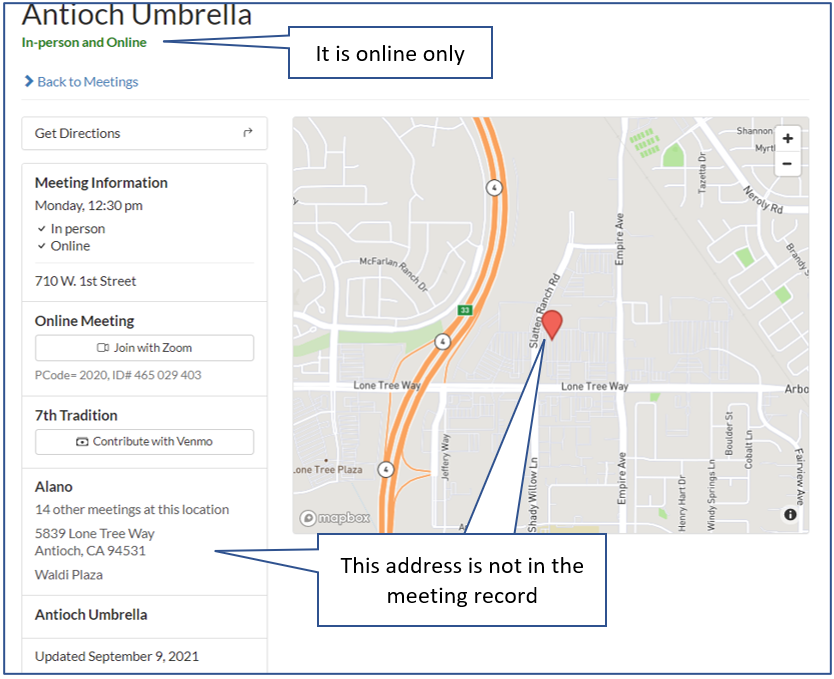
If the Address field of a meeting is empty or contains a non-address, then the site grabs an address from someplace in my upload and shows that address for this meeting. The site also shows that the meeting is a member of a large group of meetings with the same random address.
If anything at all is in the Address field (such as "Video Only") in an attempt to disable this automatic address grab, then the page lists it as "In-person and Online" (which it is not).
I have attached the Excel file I convert to a CSV before uploading. This file includes some fields not used by the WP site.
I would appreciate any guidance. Thanks Mike C Here is a grab from the page showing a video only meeting with a random address.
This is a snip from the Excel file for that meeting. I have hidden some columns so hopefully you can read it here.

Answer by @tech2serve
Hi Mike--
All addresses must geocode. In order to enter a meeting, you need to enter a valid address.
For meetings that cannot be attended in person (i.e., online only), please enter the city and state where the meeting is hosted, and then enter the online details in the appropriate fields.
For meetings that can be attended in person, you enter a full street, city and state address.
This should correct any issues you see.
Tim
Import & Settings –– JSON: Syntax error, malformed JSON.
Show question & answer
Question
When refreshing we started receiving the message above.
Here is one of the two we're having problems refreshing:
Any help would be appreciated!
Answer by @joshreisner
i'm not seeing a malformed JSON error, are you still getting it? if so, maybe take a screenshot?
feed is looking valid to meeting guide: https://meetingguide.org/validate?url=https%3A%2F%2Fwww.d35pa-aa.org%2Fwp-admin%2Fadmin-ajax.php%3Faction%3Dmeetings%26key%3Dc092a973561757a0f800a6bc5822dd2a
3.1.4. Cannot load import
Show question & answer
Question
Haven't gotten very far with this. Installed it on staging site and when I tried to move to the Settings or Spreadsheet Example & Spec received this error on a blank page: Cannot load import.
As with all other updates to this plugin, it would be helpful if you could give us a heads-up the new version is out and what we can expect. Yes, I did look at the details before I updated, but it was not very descriptive on how to use. Comments below,
Where is this switch UI feature to facilitate switching between the two available user interface displays: Legacy UI and TSML UI?
What is Refactor Import & Settings page with tabs & cards to segregate and group features and settings?
What does this mean to modify feed to follow the directive from setting “Meeting/Group Contacts Are” (Private/Public)?
How is this improved for CSV export/import, includes contact and imported feed information?
Answer by @kiyote33
Hi @Grateful-Viv, I'm happy to try and provide some clarity for you. The Switch UI feature simply provides an easy way for Admins to change the User Interface that the public sees from the standard UI (that we call Legacy UI) to the new one called TSML UI. The default is Legacy UI, but we do encourage everyone to give TSML UI a look and see if it's a fit for you and your website. Refactor Import & Settings is pretty much a simple reorganization of that page, adding tabs to segregate Import/Export features from Settings configurations and the Example & Spec detail. The features that existed before are still there, mostly unchanged in their use and behavior. The Switch UI and About Us info cards are new to this version and the Need Help card now has a 2nd linked button which takes you directly to this forum. Meeting/Group Contacts Are is a typo that we didn't catch before publishing. After refactoring, that heading is now "Contact Visibility". I believe what is meant by follow the directive is to ensure the code follows the directive set by the Contact Visibility setting (either public or private) and toggles the visibility of the contact information fields on the meeting detail screen accordingly. The default is private so those contact information fields should not display unless this setting is changed to public. Your last question I'm unsure of exactly what was done to "improved for CSV export/import". Maybe one of the maintainer can pipe in with some clarity on that. I do know that we did include some new Q & A in the readme.txt file providing information on the Change Detection feature introduced in version 3.13. Hope this provides some of the clarity you we're looking for...
Location of meeting changing to wrong town and zip code
Show question & answer
Question
Hi All, thank you for your continued and awesome service.
We have two meetings (at the same location) that are listed correctly in our database (airtable) but when importing the JSON the location of the meeting, specifically the town and zip code are changed to an incorrect town and zip code. I have tried manually changing the address to the correct one within the TSML plugin, right on wordpress, but before I can hit the update button it changes back to the wrong town and zip code. Thank you in advance for any help you can provide.
Some specifics: Our website - nenyaa.org Meetings affected - https://nenyaa.org/locations/jefferson-methodist-church/?tsml-day=any&tsml-query=Covered+Bridge+Group Address should be: 158 Main St., Jefferson, NY 12093
Answer by @tim-rohrer
Hello!
I entered the address into "https://maps.google.com" and it returned showing in Worcester, NY. It appears that is the source of the problem.
Two things you can do:
- The Google maps page provides a link to suggest an edit. Google may then fix this long term.
- In the meantime, you should be able to use a child theme and local
functions.php, or other method of your choosing, to override the address TSML. We provide general directions on how to do this, but we have an error in our code sample. Try this:
	if (function_exists('tsml_custom_addresses')) \{
		tsml_custom_addresses(array(
			'158 Main St., Jefferson, NY 12093' => array(
				'formatted_address' => '158 Main St., Jefferson, NY 12093, USA',
				'city' => 'Jefferson',
				'latitude' => 48.858372, // Enter whatever is the correct latitude
				'longitude' => 2.294481, // Enter whatever is the correct longitude
			),
		));
	\}
Save Draft Meetings.
Show question & answer
Question
How can I ensure that draft meetings do not get over written if I do an import of a CSV file?
Background: We have a few seasonal meetings that are put in draft mode that I’d like to preserve. For example we have outdoor meetings during the summer months. These meetings are not included in a CSV export. But I find when I do the CSV import that everything gets over written and no longer have these draft meetings.
Initially I thought if I put them in the trash and did not empty the trash, that these meetings would stay even with doing a CSV import. But that turned out not to be the case either.
Answer by @joshreisner
hi Viv, could you tell us more about this use-case? what percentage of the time do you update on the site vs in a spreadsheet?
i think we kind of expected people to manage only on the site or in a spreadsheet.
one approach you could take would be to move the seasonal meetings to a different tab in your worksheet for the winter and then copy them back in the spring.
if we were to solve this in TSML what would be the solution? either
- make it so "delete all meetings, locations, regions, etc" doesn't include drafts
- add a new option: delete all meetings, locations, regions, etc BUT NOT DRAFTS!"
- export the publishing status as a column in the CSV aka "draft" or "published" so when reimporting they were given the right status
Failure to import one meeting from a public feed
Show question & answer
Question
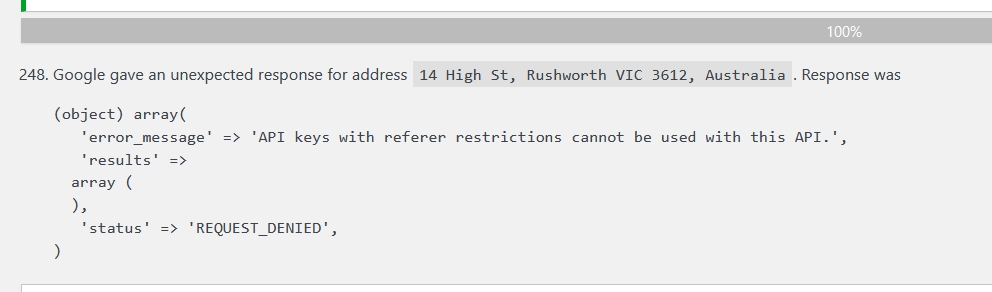
What does the attached Google error message mean? All meetings imported successfully except this one.
Answer by @joshreisner
hi, this means that the importer sees a new address but it can't look it up with google because of the referrer restriction on your API key. to fix it you could remove the restriction at the google api console or switch your maps to mapbox
Import JSON maximum 100 meetings
Show question & answer
Question
I'm syncing my meeting list with a datasource. I know there are more than 100 meetings for my district but I'm only able to import 100 when I refresh the feed. Is there a setting that limits the maximum number of entries in the JSON file either as what's being hosted or what I'm able to import?
Answer by @joshreisner
huh, there's no limit, so it sounds like something is breaking during the import. does the progress bar only go a certain extent and stop? could you open the javascript console and see if there's an error there?
we had a user recently who encountered a similar limit and she was seeing a 404 error in the javascript console:
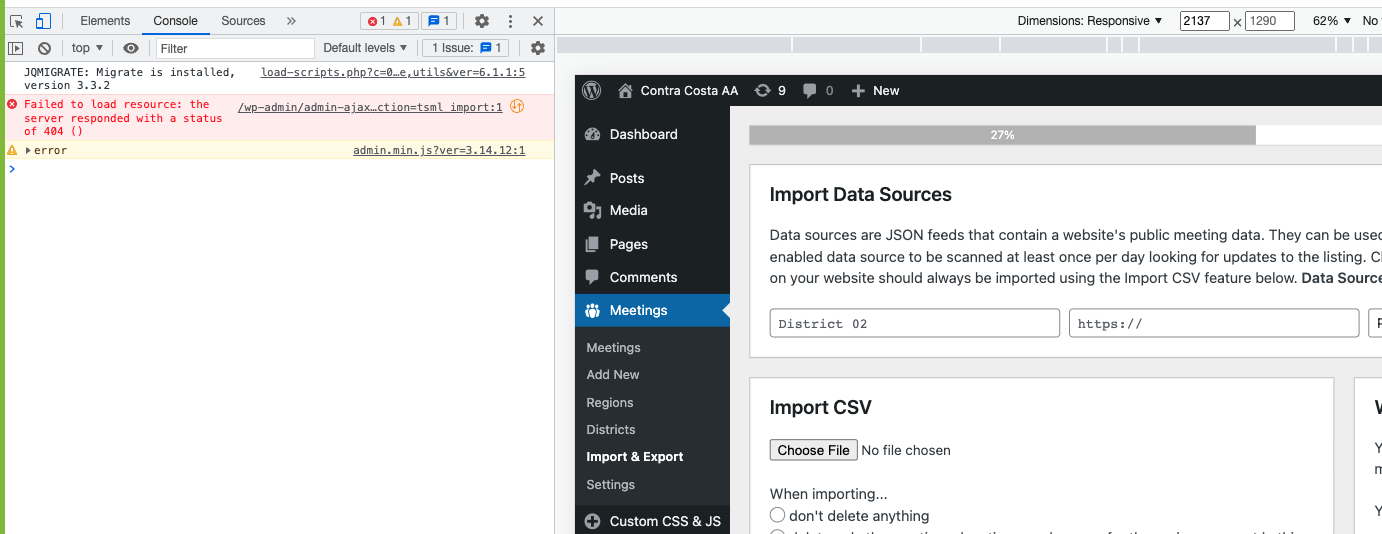
the script imports in batches of 25 meetings, apparently after 4 imports it started causing problems
Central office > Alano Club
Show question & answer
Question
I have all meetings for our district in the Meeting Guide. Awesome. I would like an Alano club to have their meeting in an additional meeting guide on the Alano club site—they receive a read only feed showing only that club's meetings.
I saw the Import & Export > Import Data Sources, but not sure if that is something I can use.
The issue for me is I am updating meetings in two places; I prefer one place and feed the other.
I hope that makes sense.
D
Answer by @kiyote33
Hi @dougie-wougie, I think I understand your question. You have two websites: a district site using our 12 Step Meeting List plugin, and an Alano Club site where you would like to display in it's own 12 step meeting list a read only feed of Alano Club meetings from the district site. This is a common scenario for many sites using our plugin where the first site is where the records are maintained, and the second site which simply displays a filtered view of the records maintained in the first site. Is this what you are after?
location_notes created from a TSML JSON feed do not update when the feed updates?
Show question & answer
Question
Our meeting list includes a tsml json feed for an Al-Anon district. That feed defines meetings at several locations which are used only by meetings in that feed.
The current behavior of the wp_ajax_tsml_import action, on lines 433-448 of ajax.php, is to prefer cached location data (based on address) over the data in the feed about a meeting. This means that if the feed has updated the location_notes field, the import will not update this value.
This feels like a bug to me, especially in the situation where there are no meetings at that location other than in this feed. And there seems to be no workaround, other than deleting all these locations from the database before refreshing the feed.
Given that locations are posts of type tsml_location, it seems to me that a more conservative caching strategy might be to use the cache only when the location last-modified date is greater than or equal to the meeting update date. A simpler but more brute force fix would just be always to update the location_notes from the feed.
I am happy to contribute either of these fixes, but first wanted to ask the community whether I'm missing something obvious (e.g., that there is a way to force the update when defining the feed) or whether there's another reason why the code works this way.
Answer by @joshreisner
yeah, those lines do look problematic to me, but it also goes deeper than that. TSML makes locations unique by address, so two locations (imported or not) that share an address will also by necessity share fields like location, region, and location_notes
the feed you are importing from does not obey that logic, so even when we fix that code, by necessity you will still be losing some location notes when importing from that feed.
for example, Morning Light Women's Meeting is in Berkeley, CA and has location notes of Enter the church from the (free) parking lot. We meet downstairs (same level as the door)., however, there are several other meetings in Berkeley CA that have no location notes, so I think they are colliding.
(note that TSML considers it an address even from an approximate location like Berkeley, CA)
the fix for this is to ask the website you're importing from to move the location notes to the regular (meeting) notes field. these can vary by meeting, while location_notes apply to every meeting at that location, and group_notes apply to every meeting with that group name
Meeting displays correctly on our website with plugin but is not picked up by meeting guide app.
Show question & answer
Question
our web site, https://ncsandiegoaa.org/, covers North San Diego County including Marine Corps Base Camp Pendleton. We have 6 meetings aboard Camp Pendleton and we can get all 6 to display correctly, including excellent directions to the meetings. The meeting Guide App only picks up 4 of these meetings. Camp Pendleton is problematic in that for the most part there are no street addresses. Locations on base are obtained by building numbers, street intersections, etc.. If street intersections are unique enough, Santa Margarita Rd & Roosevelt Dr, Camp Pendleton North for example, this will sometimes work. A more generic address like 3rd & B St. for example will show up in another city 40 miles away. Using a Google Plus Code, CCFV+CG or 9GG9+82 for the meeting that we are having trouble with will work on our site but the meetings don't get added to the app. I have tried many different ways of trying to enter the location, for instance I added "Camp Horno Chapel" to google maps using the add missing location button. Some or these different attempts will work on our site but none get added to the app.
I appreciate any help you can give. I can be reached at cmzncaa@gmail.com or [phone deleted].
I have added several files below. This is a list of our meeting on Camp Pendleton in both list and map mode: <img width="1298" alt="Camp Pendleton Meeting List" src="https://github.com/code4recovery/12-step-meeting-list/assets/77302343/4ed5dbdf-700b-4f65-9561-43820f427c17"> <img width="938" alt="Camp Pendleton Meetings Map" src="https://github.com/code4recovery/12-step-meeting-list/assets/77302343/9751e7fc-ded7-4b31-8c4d-a8331d9b1a2a"> The following are the meeting displays and directions display from our site. <img width="1106" alt="San Mateo Page" src="https://github.com/code4recovery/12-step-meeting-list/assets/77302343/8491c228-1b75-4c85-b03b-78a04b0d3aa4"> <img width="402" alt="San Mateo Directions" src="https://github.com/code4recovery/12-step-meeting-list/assets/77302343/5a30f141-c3a4-4093-98d7-4cadcc0c62cb"> <img width="635" alt="Camp Horno Directions" src="https://github.com/code4recovery/12-step-meeting-list/assets/77302343/fb60daf2-f5b5-4490-8e6c-3fec28afcbaa"> <img width="1215" alt="Camp Horno Page" src="https://github.com/code4recovery/12-step-meeting-list/assets/77302343/3f8bbb52-b1a6-4fde-80c5-f1a9665c71dc"> I have also included the csv for the two problem meetings. Camp Pendleton Problem Meetings.csv
Answer by @ginslo
Thanks for your detailed report. For issues related to the Meeting Guide app, the best path forward is to send a report to appsupport@aa.org as Code For Recovery does not manage the app.
Actual addresses are always best, but as you explained, in the case of Camp Pendleton, that is not possible. The meeting with the + code, Camp Horno Discussion, should be okay actually but the San Mateo Sober Nooners meeting is too approximate; needs additional detail.
So again, best suggestion at this point is to submit a report to appsupport@aa.org. Please keep us posted here on the progress.
Import error (adress or city is required)
Show question & answer
Question
When I import a CSV it gives me an error (in Dutch), translated it would be something like "adress or city is required". But there is an adress and city in the file. I also get the error when I try to import the template.csv.
Screenshot of the error:
And I have added the csv file I tried to import. meetings (1).csv
Answer by @joshreisner
try renaming your Address column to Formatted Address - i believe that will fix it.
the translation is supposed to say address and city is required, but formatted address is a way to specify both in a single column
Valid JSON feed creates 500 Server Error when importing into Google Sheets Importer
Show question & answer
Question
I started with a District's Google Sheet, which JSON Feed Validator validates: https://docs.google.com/spreadsheets/d/1AEjqCJqoHYTLPtg7pElBTDsWSWKC_Uy-dYp0qTD6qS4/pubhtml
When I import that into Google Sheets Importer, I get a 500 | Server Error
Any assistance is greatly appreciated.
Answer by @joshreisner
hi @fritzisa i dont think the validator message is accurate - if you look at the data it's all empty
<img width="1367" alt="Screenshot 2024-08-20 at 7 37 39 PM" src="https://github.com/user-attachments/assets/1a33c5a7-eceb-48d4-948d-2f060aec1b02">
i would remove the first row that says "meetings" and then enter the sheet URL that you use when editing (https://docs.google.com/spreadsheets/d/1AEjqCJqoHYTLPtg7pElBTDsWSWKC_Uy-dYp0qTD6qS4/edit?gid=1764299868#gid=1764299868), and i think it will work
Rough idea of RAM and max_execution_time for 1600 meeting feed? Or general import throughput?
Show question & answer
Question
Hi there, we are currently having trouble importing the https://www.seattleaa.org/ feed using the WP plugin. Our host currently assigns us 768 MB of RAM, and has max_execution_time of 120s which is the limit with our plan. We are typically seeing the import fail at 2 minutes with the host's error page, although an interesting thing is that I've seen 500, 502, and 504 errors. We don't ever see the progress bar.
We could just bump up to a larger plan that permits longer max_execution_time... but before I do that, I am hoping to get a sense of how long it should take. 1600 in 120s is ~ 13 meetings per second. Not sure what the importer's expected throughput might be. And I don't want to just run into the same problem in a few months.
I've done some testing and found 4-6 meetings/sec for feeds exported from various Intergroup wordpress sites. Interestingly, google sheets API feeds appear to be processed at around 11 meetings/sec. It's possible this is a total red herring, and there's some other check going on that makes that particular feed faster... but I have imported each of these feeds multiple times and am getting pretty consistent results on the times.
Anyway assuming 4 meetings/sec, that puts our required max_execution_time at 400s. I'll try to get some more info from the guy who has been running the importer, to see if the number of meetings made a big jump recently. But in the mean time, I'm hoping to get some info on what to expect, or suggestions on configurations for a feed with 1600 meetings in it.
Also, it looks like ~250 of the meetings have "attendance_option": "inactive". I wonder if it would be possible to skip importing them to save time?
Answer by @patmaddox
> Also, it looks like ~250 of the meetings have "attendance_option": "inactive". I wonder if it would be possible to skip importing them to save time?
Turns out yes. I added this to functions.php (based on this comment):
function tsml_import_filter($meeting) \{
	return $meeting['attendance_option'] != 'inactive';
\}
and now we're able to complete the import.
It's a bit of a stop-gap, but we get at least one more day! :)
Import/Export data
Show question & answer
Question
Howdy, I was helping Cincinnati last night w/ a meeting. Exported the list, made a change, imported, and noticed that the Location of the meeting went to where the meeting name should have been. Any idea why that would have happened if I did not rearrange the column headers?
Answer by @SIA-WEBSUP
Hey @ATLCOTech,
- Did the meeting where the location changed to the addresss have a location name to begin with?
- Was this the same meeting you updated, or was it a different meeting?
- If it was the the same meeting, which field did you update?
If you need us to look into this further, you might provide a link to
- the website
- the exported csv
- the specific meeting(s) in question
Enable recognition of LGBTQI+ in "Types" for CSV Import
Show question & answer
Question
Hi,
Recently I submitted this PR which I thought would enable us to enter and import a Type value of LGBTQI+ so that it appears in the dropdown. However, it doesn't appear to work (e.g., there's no entry in the dropdown for that type after importing).
For example, here's the value of the Types column for a meeting:
<img width="687" height="138" alt="image" src="https://github.com/user-attachments/assets/60dc3c69-3a86-47e6-8b9d-0a5ce0375f2e" />
But that type isn't brought through for this meeting; e.g.:
<img width="413" height="365" alt="image" src="https://github.com/user-attachments/assets/484d2aa8-63a4-435c-803b-22d07d3eed4b" />
And that "type" isn't listed in the "Any Type" dropdown:
<img width="301" height="490" alt="image" src="https://github.com/user-attachments/assets/38a50a41-a275-410d-af65-73ab2b38ecca" />
Any help with triage / understanding this appreciated!
Thanks.
Answer by @noodnik2
🥳 - It Works (well, sorta...)
@SIA-WEBSUP - I tried your minimal file in a new installation, and... it works!.
<img width="259" height="414" alt="image" src="https://github.com/user-attachments/assets/ba308e30-50f1-478b-bdf3-f524cb3c8f36" />
And;
<img width="323" height="493" alt="image" src="https://github.com/user-attachments/assets/f330db78-3aba-4ba0-9282-bcefcaeaf701" />
Forensics - Smoking Gun?
Backtracking, I may have found the "smoking gun".
It leads back to a suggestion in Discussion-1738 which we followed by adding the recommended snippet to our Theme's functions.php:
$tsml_ui_config = [
    'strings' => [
        'en' => [
            'types' => [
                'inactive' => 'See Meeting Notes'
            ],
        ]
    ]
];
It seems - at least in my highly controlled experiment running in Docker - that removing this snippet enables the new LGBTQI+ type to come through.
The Problem
The problem is, we're depending upon the effect of this snippet, as explained in that aforementioned Discussion...
Any ideas for what we might do to get both of the results we're looking for (i.e., remapping of inactive and our special Type value added in PR-1778)?
Thanks again for your support!
-- Marty
Imported Meetings posted with Appointment noted for meeting time
Show question & answer
Question
meeting template Dist 14 Area 66 10-20-25 R2-a.csv We are creating a new website for our Area: NWTA 66, This is the temporty site: https://johnk588.sg-host.com/meetings/ to view the issue. I'm using the import option due to the large number of meeting assoicated with our Districts to migrate.
We are utilizing WordPress 6.8.3 with Elementor Pro. This site was cloned from another Area to simplify the effort of building a replacement website for our Area
I've validated the spreedsheet comparing formating and column positions with another AA Area team.
Each time I attempt to import the file most of the entries are post instead of the time it shows "Appointment" Only a few of the entries migrated correctly.... need assistance as I really don't want to have to enter hundred's of meetings manaully across our 9 Districts.
I can provide a copy of the CSV file I'm trying to import if that would assist.
Thanks for your assistance in advance
John K
Answer by @SIA-WEBSUP
Yes, please do provide the CSV to better troubleshoot.
The most likely explanation is that the CSV doesn't have the day of the week or the time in a format that the plugin recognizes on import. So please inspect those fields carefully. In the past, even leading spaces could cause a hiccup ( see https://github.com/code4recovery/12-step-meeting-list/discussions/1542)
Incomplete Meetings listed
Show question & answer
Question
On a new site, https://douglasw43.sg-host.com/meetings/
The meetings listed seemed to be random and not the full list. Today is Thursday, and you see other days and not all of Thursday. This CO has 270 meetings. I do not know if I did something or something else. I exported/imported a CSV file a few days ago with editing changes, but no errors were reported. I am stumped. This CO is over two time zones. The report seems to be only Central and not the Eastern TZ. Central TZ is tagged, and Eastern TZ is not. I left the Time Blank for Eastern. The settings suggest that.
<img width="1169" height="723" alt="CleanShot 2025-11-13 at 13 37 13" src="https://github.com/user-attachments/assets/c472b1a1-7365-4c37-91be-22ab26d6c9ab" />
Answer by @tim-rohrer
So I'm not super familiar with how this should work with time zones, but I do note a lot of meetings are being reported in the console without a time zone being set. Can you share a little more about what you've got set and to what?
Either way, it would seem that we should be able to handle that situation when it exists. I'm a little surprised this hasn't come up before, which always makes me wonder if there is a plugin conflict...
Import error from CA meeting api to wordpress tsml
Show question & answer
Question
Hi Folks!
I'm trying to import my meetings from https://caws-api.azurewebsites.net/api/v1/meetings-tsml?area=new%20york into wordpress tsml import. The in person meetings are importing fine but the zoom meetings are not.
I'm getting the following error: Google could not validate the address Online
I'm assuming there is some validation going on during import on region but not sure how to get this to work beside updating the data on api side.
At this point - I'm using Region to group meetings easier pre wordpress site - https://canewyork.org/meetings.html
Any help will be great appreciated!
Answer by @joshreisner
hi @canewyork even online meetings need some geographic reference to be listed in TSML. here's the instruction we put on the meeting edit screen when you're entering meetings:
> For online-only meetings: Use an approximate address, example: Philadelphia, PA, USA. It may help to think of it as the meeting's origin. The Meeting Guide app uses this information to infer the meeting's time zone.
In your JSON, the quickest fix is to replace:
"formatted_address": "Online",
with
"formatted_address": "New York",
Import from Google Sheet documentation and refinement
Show question & answer
Question
See this topic for more info: https://discourse.tiaa-forum.org/t/integrate-meeting-guide-plugin-with-google-sheets-site/6508/4
We should make it so you can enter the "edit URL" and not bother getting the JSON URL - and document it somewhere.
Answer by @joshreisner
This issue was filed right before v4 came out, which changes the picture. To import a google sheet by just pasting the URL, as this ticket requests, would involve a) shipping an API key in the plugin and b) refactoring the code to import their new format.
Instead I recommend instructing users that they can import a google sheet by generating a standard JSON feed at sheets.code4recovery.org.
We might also remove the tsml_import_reformat_googlesheet($data) functionality as it's obsolete.
Closing issue.
Error generated from tsml_pdf action
Show question & answer
Question
Writing this up in case others have seen this error ...
Describe the bug Getting a critical error from tsml_pdf action, url = https://area72aa.org/wp-admin/admin-ajax.php?action=tsml_pdf&width=4&height=7
To Reproduce Steps to reproduce the behavior:
- Go to 'area72aa.org'
- Login & then select 'Dashboard' to load WP Admin
- On left side nav, select 'Meetings'
- Then select 'Import & Settings' sub-selection
- Scroll over to 'Where's My Info' section
- Click '4x7' link
Generated Error
Notice: Undefined index: in /home/customer/www/area72aa.org/public_html/wp-content/plugins/12-step-meeting-list/includes/pdf.php on line 140

Notice: Undefined index: in /home/customer/www/area72aa.org/public_html/wp-content/plugins/12-step-meeting-list/includes/pdf.php on line 140

Notice: Undefined index: in /home/customer/www/area72aa.org/public_html/wp-content/plugins/12-step-meeting-list/includes/pdf.php on line 140

Notice: Undefined index: in /home/customer/www/area72aa.org/public_html/wp-content/plugins/12-step-meeting-list/includes/pdf.php on line 140

Notice: Undefined index: name in /home/customer/www/area72aa.org/public_html/wp-content/plugins/12-step-meeting-list/includes/pdf.php on line 108

Fatal error: Uncaught Exception: TCPDF ERROR: Some data has already been output, can't send PDF file in /home/customer/www/area72aa.org/public_html/wp-content/plugins/12-step-meeting-list/includes/tcpdf/tcpdf.php:2927 Stack trace: #0 /home/customer/www/area72aa.org/public_html/wp-content/plugins/12-step-meeting-list/includes/tcpdf/tcpdf.php(7626): TCPDF->Error('Some data has a...') #1 /home/customer/www/area72aa.org/public_html/wp-content/plugins/12-step-meeting-list/includes/ajax.php(90): TCPDF->Output('meeting-schedul...', 'I') #2 /home/customer/www/area72aa.org/public_html/wp-includes/class-wp-hook.php(303): tsml_ajax_pdf('') #3 /home/customer/www/area72aa.org/public_html/wp-includes/class-wp-hook.php(327): WP_Hook->apply_filters('', Array) #4 /home/customer/www/area72aa.org/public_html/wp-includes/plugin.php(470): WP_Hook->do_action(Array) #5 /home/customer/www/area72aa.org/public_html/wp-admin/admin-ajax.php(187): do_action('wp_ajax_tsml_pd...') #6 \{main\} thrown in /home/customer/www/area72aa.org/public_html/wp-content/plugins/12-step-meeting-list/includes/tcpdf/tcpdf.php on line 2927
Screenshots Just a plain standard error output page generated.
Application
- 12 Step Meeting List Version == 3.11.3
- WordPress version == 5.8
- Theme == Spacious Pro Child
- PHP version == 7.4.22
- MySQL version == 5.7.32-35-log
Laptop
- OS = mac OS Catalina v10.15.7
- RAM = 8GB
- Browsers:
- Chrome Version 92.0.4515.131 (Official Build - x86_64)
- Safari Version 14.1.2 (15611.3.10.1.5, 15611)
- Firefox Quantum Version 59.0 (64 bit)
- Microsoft Edge Version 92.0.902.73 (Official build - x86_64)
Additional context Never clicked this link before so not sure if its been around for some time or not. Also, prior to looking at this page link, I updated a couple of plugins -- (gravity forms Version 2.5.9 & give donation plugin Version 2.12.3).
Anyways, pease advise your thoughts.
Answer by @tech2serve
Hi @jcookson-infoblox,
Thank you for the detailed write up.
I am running Wordpress 5.8 with PHP 7.4 on my dev site, and am not seeing this error. I also installed the Spacious theme (not Pro, nor modified with a child).
Can you try disabling plugins and see if the problem clears up?
Allow any type of URL in the Teleconference URL field
Show question & answer
Question
Is your feature request related to a problem? Please describe. Our district uses short URLs or custom URLs to link to our Zoom meetings online. We don't like to explicitly share our Zoom links because of Zoom bombing. We created short URLs to redirect to the Zoom meetings. The bombers can use these if they want but perhaps their scraping tools are only looking for "zoom.us" or some sort of flag.
Describe the solution you'd like Please allow us to add custom URLs to the CSV, in the teleconference URL field.
Describe alternatives you've considered I don't know why there's a constraint in place for this, but you could restrict it to http: and https: to validate the fields.
Additional context Relates to my closed issue #135
Answer by @joshreisner
For background: we aren't aware of any confirmed instances of URL scraping on recovery websites, but we have added functionality to prevent it anyway to 12 Step Meeting List. On the meeting listing page the Join with <Provider> button does not contain the online meeting URL, that is only added by javascript at the time the user clicks the button. (Screenshot below.)
Users who click the conference button expect to be taken to a conferencing service, so we added link checking to help meet those expectations consistently.
That said, you're welcome to extend list of providers, or disable checking altogether. To disable it, add this to your theme's functions.php file:
$tsml_conference_providers = null;
Or instead you could extend it with:
$tsml_conference_providers += array(
    'aa-ksdist23.org' => 'District 23 Secure URL',
);
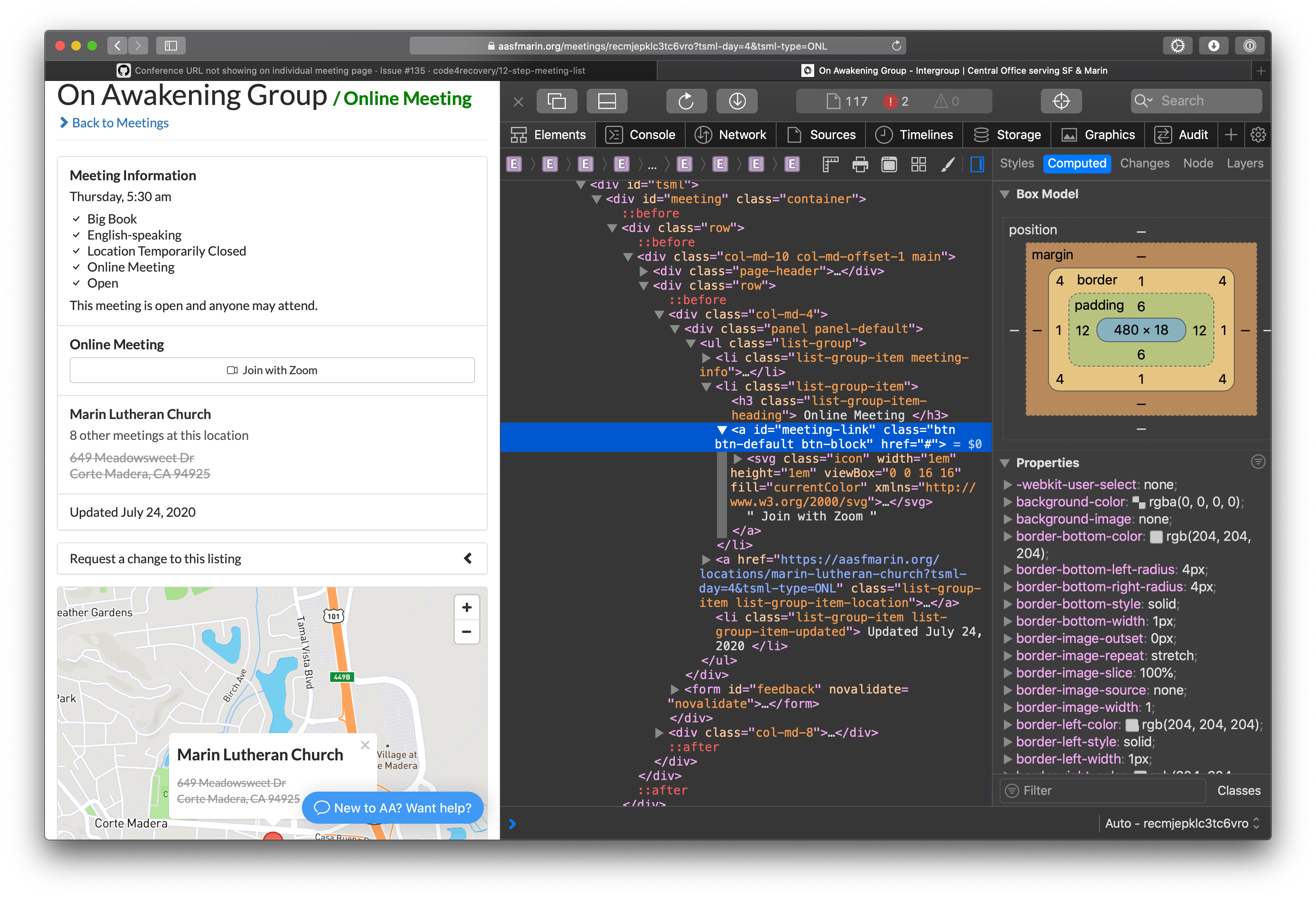
Sample Template
Show question & answer
Question
The current sample template does not appear to include fields for PayPal and Online Meeting Details (Zoom link). Perhaps one of the fields included is intended to be used and is mapped in the import process, but its not clear which fields should be used. One of the Conference fields?
Answer
Hey @wsotreasurer,
My apologies for a late reply to some of your issues; I've been out of commission for a few days. You are correct that we need to update the template.
The PayPal field is simply Paypal. Conference URL is used for Zoom (or other provider) links.
If anyone else is unsure about template field names, you can add dummy data to the field using the plugin, and then download your meetings in CSV format. Then look at the resulting file, and you should be able to see the field in question.
What is best plugin backup to insure TSML data restore?
Show question & answer
Question
Is your feature request related to a problem? Please describe. Apologies if this is not a Feature Request, more like a General Question.
We are reviewing our website Backup / Restore structure & want to insure TSML is properly set for Backup AND Restore.
We run Backups as follows: Weekly - Linode Weekly - WP Plugin = UpdraftPlus Backup/Restore (Free)
I dug around on UpdraftPlus. UpdraftPlus does not backup TSML.
Describe the solution you'd like Q1 = Can we run all backups as needed AND still have a TSML Backup on the side? A1 = Assume yes, this would be optimal. That way as needed we can restore just what we need. Q2 = What is best plugin to insure TSML data Backup? A2 = ?? Q3 = Is this just a matter of exporting several files manually and calling it a day? A3 = Yes, export meetings and filename.??? Q4 = Is this just a matter of finding a "better" Free Backup Plugin OR please no ... spending $? A4 = ??
A clear and concise description of what you want to happen. See Q's 1-4 above
Describe alternatives you've considered See Q's 1-4 above
Additional context So as to insure we have tested a good clean backup / restore, we are cloning the site so we can play around with this more.
As always you all rock.
Best to you in safety, good heath and peace.
- Pete B.
Answer
> I dug around on UpdraftPlus. UpdraftPlus does not backup TSML.
TSML does not create it's own tables, so any solution that backs up your entire Wordpress database will also cover TSML. Using any decent Wordpress backup service plugin is a good idea.
The other step I recommend is related to your previous question ( #190 ). A common use of csv files after you've set up your site is to create off-site backups of your TSML meetings. After you've updated all of your meetings, click on Import & Settings, and then download in "CSV format"
<img width="277" alt="image" src="https://user-images.githubusercontent.com/31904316/96523591-b2f98700-123b-11eb-9453-1396222767aa.png">
Meetings disapear from list when removing a Data Source from Import & Settings
Show question & answer
Question
Our list of meeting was initially imported from another system.
So when modifying meetings, there is always a message "'This meeting was imported from an external data source. Any changes you make here will be overwritten when you refresh the data.".
Now that we are using 12-step-meeting-list exclusively, we want to remove the entry for the Data Source in the Import & Setting page. But when I do that, all the meetings disappear from the listings (although they are still present in WP).
How can we get around this problem?
Answer
With all the data in your site, export the database to a csv by navigating to Import & Settings, then look over to the right by "Where's My Info"
Export a csv of the meeting database, then delete the source. After you have a empty database, import the csv overwriting any data.
I think that should work.
Just curious, are two sites going to manage all the meetings or are the two sites going to split them up?
JSON parse error
Show question & answer
Question
When using the data sources feature to aggregate a JSON feed from another site's TSML data, i'm now getting JSON parse errors in the admin ui. This just stopped working within the last month or so.
Steps to reproduce:
- Go to /wp-admin/edit.php?post_type=tsml_meeting&page=import to add a data source
- Fill in a title, then paste this URL for the source: https://www.pdxaa.org/wp-admin/admin-ajax.php?action=meetings
- Click on Add Data Source
Nothing is imported, and an error shows in the admin:
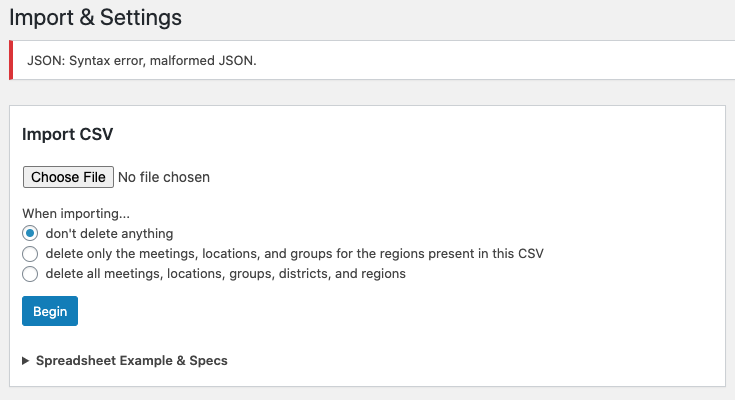
I've run the JSON from the feed through various JSON linters and it comes up clean every time. I would normally start at the data source to see if there's a formatting problem, but the validator makes me think something else might be going on.
Has anyone run into this before? Is it just me?
Desktop (please complete the following information):**
- OS: Mac Catalina
- Browser: Chrome
- Version Version 87.0.4280.88 (Official Build) (x86_64)
Answer
Hey @mpgeek,
I just tried your link using both Safari and Chrome on a Mac, and the data imported just fine both times.
Which version of TSML are you using? Wordpress? If not, consider upgrading both to the latest versions.
I would then take two steps if the problem persists:
- Disable all of your other plugins and see if the problem clears up. You can and should also look in the developer console for errors that might point towards the offender.
- Clear your website server and browser caches.
Keep us posted.
Meetings not showing
Show question & answer
Question
Describe the bug
Hi folks, Following a server migration I ran into some trouble with the meeting guide. All meetings are still in the DB and accessible through their single URLs; however, the meetings page does not list the info. Please see here: https://www.aaparis.org/meetings/ I have also deactivated/deleted/reinstalled the Meeting guide plugin, to no avail. Please advise. Kind regards, and thanks so much for your amazing service. Julien
To Reproduce Steps to reproduce the behavior:
Expected behavior The meetings should show
Answer
For some reason, the plugin is not completely installed/activated/whatever.
In my browser, when I look at the file structure of the loaded sources, they look like this:
<img width="191" alt="image" src="https://user-images.githubusercontent.com/31904316/102498197-a8931800-4047-11eb-8d5d-f920631df9f4.png">
It should look like this:
<img width="180" alt="image" src="https://user-images.githubusercontent.com/31904316/102498349-daa47a00-4047-11eb-9d51-7252bb54dac2.png">
Your site doesn't have the necessary javascript from the plugin loaded, and no code is being run to list the meetings.
If with your new server you have direct access to the file structure, navigate into the plugins directory and the 12-step-meeting-list folder. Inside of that, you should have an assets/js folder.
If that folder is missing, then the installation has failed for some reason. You should focus your efforts there first.
If you do have that folder, then something in the loading process is broken. In this case, I'd look into themes or other plugins that could be creating a conflict. Are you using a child theme?
Meeting export function not working
Show question & answer
Question
When I try to export the meeting list as CSV from the admin page it just hangs...nothing ever downloads. This feature used to work but for some reason no longer does. I tried in 2 different browsers. Any ideas? What other info is needed for someone to help with this? THANKS!
Answer
If you have a lot of meetings, the process might take a couple of minutes.
In general, the standard troubleshooting steps should be tried. These include:
- Make sure you're using the latest versions of Wordpress and TSML.
- Open a development console and look for errors.
- Disable all other plugins and re-test.
- Clear the server cache.
Page no found for public meeting list
Show question & answer
Question
Hi!
We were updating plugins, brought the site down and had to restore from backup. When we clicked on the public meeting page in import and settings, we received a page not found. We put in a redirect to our staging site as a workaround, but how do we correct this on the production site?
Thank you!
Sean K. Technology Chair, Area 43 (NH)
Answer by @brianw-area24
Many times it's a simple fix to repair these page not found errors. Go into the "Permalinks" page under Settings in the WordPress admin pages, and click "Save Changes". You don't need to change any settings, just save changes.
Hopefully this will fix the issue, if not, let us know and we'll dig deeper.
Brian W
Updating addresses
Show question & answer
Question
There are import errors for our Keep It Basic meetings - the street address for those meetings may not be input correctly in our plug in. Where do I go to change them? The street address should be 215 Memorial Dr., Jacksonville, NC 28546
Answer
On your admin page, click on Meetings, and then find the meeting you want to edit. Click on that meeting and a page will come up with all the gory details. You edit it there.
In general, "Location" should reflect the general name of the location. For example, the name of church where the meeting is held. That location information is for you and your website.
Then enter the full address in the "Address" field, and tab or click elsewhere. The plugin will automatically geocode the address, and if there are no issues, you should be able to publish the meeting.
Looking at your website, you have the street address under "Location". That isn't correct for an in-person meeting. You should change it as I described above.
Good luck. We can re-open the issue if something else is weird or not working.
JSON import performance degraded
Show question & answer
Question
I'm not certain this is a bug.
I run a JSON import from a remote source every day. For the last few months, up to about a month ago, the import process would complete in just a few minutes. Over 1000 meetings would come in error free. I ran this every night. At some point recently this process now takes hours and it seems to batch the import into sets of 25 meetings, and hangs in between sets.
I'm wondering about the implementation of the JSON import. Did something change such that data import is now batched? Did it move to cron-type scheduling? I'm also not convinced my hosting (Siteground) is not somehow interfering. I'm hoping a contributor can shed light on whether or not the implementation changed in a recent update.
Answer
Hi @mpgeek,
Let's start by some additional information:
- What is your site address?
- Where are you importing from?
- Have you changed the geocoding option from Legacy to the beta API gateway?
- Are you seeing any errors in the debug/developer console (you'll need to open it for your specific browser)?
Nothing of significance has changed unless you're using the beta API gateway. However, since only meetings with changed/new addresses should be geocoded, I suspect this is not the issue. But, I'd like to rule it out. Oh, I should add that an exception might exist, and we should probably rule that out as well.
For background, the import process is done in two stages. First, all the data in ingested and sanitized before being stored in a temporary buffer. That buffer is then parsed in batches of 25 to update your meeting list. In that sense, what you're seeing there is correct.
As you can imagine, this process is very database intensive, and so I also think it is reasonable for you to investigate database loading with Siteground.
Unable to upload our meeting list (CSV file).
Show question & answer
Question
Describe the bug A clear and concise description of what the bug is.
To Reproduce Steps to reproduce the behavior:
- Go to '...'
- Click on '....'
- Scroll down to '....'
- See error
Expected behavior A clear and concise description of what you expected to happen.
Screenshots If applicable, add screenshots to help explain your problem.
Desktop (please complete the following information):
- OS: [e.g. iOS]
- Browser [e.g. chrome, safari]
- Version [e.g. 22]
Smartphone (please complete the following information):
- Device: [e.g. iPhone6]
- OS: [e.g. iOS8.1]
- Browser [e.g. stock browser, safari]
- Version [e.g. 22]
Additional context Add any other context about the problem here.
Answer
Please fill out a more complete bug report and we'll be able to help you better.
I will say up front the plugin has not changed recently, and so if something worked but doesn't now, it is likely because something else changed. Either you updated another plugin that is causing a conflict, or you changed the CSV, etc.
Online Meetings Listing/Sorting
Show question & answer
Question
Hi, I've filled out my Intergroups CSV, and right now in the middle of trying to change some of what is listed for online meetings. I'm using the Elation Theme in Wordpress under GoDaddy.
What we're finding is if we search for an Online Meetings, Any Day, we're only getting the "Ladie's Night" which is a Google Meet. Nothing else is coming up, as I've tried to change the "Brown Bag" on Monday to where I think the information should be, but it's still not showing in the search as an "Online Meeting".
As always, your help is appreciated.
Scott
Answer by @joshreisner
Hey Scott, I was able to import this CSV based on your spreadsheet pretty well. I made the following changes:
- like @tech2serve suggested, set address to Columbia, SC for all online meetings
- removed Online Meeting from types, because this gets set automatically when the plugin sees a conference URL it recognizes
- lowercased Zoom.us in the URLs to zoom.us (👈 important)
There are several meetings that don't have a conference URL, those won't be considered "Online" meetings by the plugin, FYI
GCI Meetings - GCI Meetings.csv
Hopefully this works for you.
Settings Option To Switch User Interface
Show question & answer
Question
I would like to make it easier for WordPress users to use the new tsml-ui frontend. As an alternative to using a shortcode on a page, I'd like to have a setting on the Import & Settings page where the user could switch back and forth between tsml-ui, and the plugin's legacy interface.
Then on the archive-meetings page, it would check which frontend is chosen. If tsml-ui is chosen, it would simply output the top widget code, next it would output the code generated by the shortcode, and lastly, it would output the bottom widget code.
This would be a good next step in encouraging people to use tsml-ui. For now, the default behavior would be to use the legacy UI, therefore new sites would use legacy for now. However, we may want to change this up sometime in the future...
Answer by @joshreisner
I think it should default to use the latest TSML UI, but allow the user to select another version, which can be gotten from here:
https://data.jsdelivr.com/v1/package/gh/code4recovery/tsml-ui
default: https://cdn.jsdelivr.net/gh/code4recovery/tsml-ui/public/app.js
versioned: https://cdn.jsdelivr.net/gh/code4recovery/tsml-ui@1.0.1/public/app.js
TSML-UI Options page
Show question & answer
Question
It would be nice to have an additional page on the Admin Menu under Meetings for TSML-UI options. This would allow Wordpress admins to adjust the behavior of TSML-UI on their sites. Then the code that generates the shortcode, and will also be used for Issue #368 , would use the options from this page. This would make TSML-UI much more flexible on WordPress sites.
I think this new page would always be available, even when using the legacy front end, because the shortcode would benefit from these options as well. Once this page is in use, we may want to move the option to use TSML-UL onto this page, rather than the existing Import & Settings page, see #368
Answer by @joshreisner
FYI pull request #341 brings feedback emails, custom meeting types, conference providers, and columns for free, and provides a new $tsml_ui_config variable for specifying additional configuration options.
TSML Updated : now extremely sow
Show question & answer
Question
Describe the bug After updating to 3.11.0, my area's meetings portion seems extremely slow. Updates and imports are taking upwards of 2-3x longer. Am getting frequent 503's on updates. Was there some backend changes done with this update? Wondering if there are any other reported performance issues after upgrading to 3.11.0.
To Reproduce Steps to reproduce the behavior:
- Update TSML from previous version, say most recent WP 5.7 compatible version prior to this.
- Select meetings section
- Import meetings -or-
- Update meetings
Expected behavior Some delay is expected for processing changes and imports, but anything longer than say 5-10 secs should be looked into. And, 503's are not kosher.
Laptop/Desktop (please complete the following information):
- OS: [iOS]
- Browser [chrome]
- Version [Version 91.0.4472.114]
Answer by @jcookson-infoblox
Additional data, I sometimes open multiple browser tabs with different meeting info in each one to work en-tandem. Have encountered 503's (a lot and predictably regularly) when submitting more than 2 diff tabs (each with diff meeting info submitted one after the other). This should be allowed, because each tab should be placing a lock on that specific meeting's info and none others. So submissions en-tandem would be processed one after the other.
Add method for custom/overrideable Import formatting
Show question & answer
Question
**Is your feature request related to a problem? ** Need to modify data source records from regional central offices to align with format used by area website. For example, some regional central office websites use sub-regions like 'NorthEast', 'SouthEast', etc. which need to be stripped out as they are meaningless when imported into the area website.
Describe the solution you'd like 1 - Create empty function 'tsml_import_reformat' which receives/returns meetings array. Make it overrideable by adding "if (!function_exists('tsml_import_reformat')) before its declaration and give it an action filter so the function can be intercepted and modified from a child theme. 2 - Modify function 'tsml_import_buffer_set' to always pass meetings array through tsml_import_reformat.
Describe alternatives you've considered Modify functions.php directly, which would of course always get over-written on every version update. Or... 1 - Rename function 'tsml_import_reformat_googlesheet' to simply 'tsml_import_reformat', 2 - Add global variable $tsml_domain_identifier with a default value (i.e. tsml_domain_identifier = 'spreadsheets.google.com') to variables.php, 3 - Make tsml_import_reformat function overrideable by adding "if (!function_exists('tsml_import_reformat')) before its declaration, 4 - Modify function 'tsml_import_buffer_set' to call tsml_import_reformat instead of tsml_import_reformat_googlesheet, and use the new global variable $tsml_domain_identifier instead of the hard-coded "spreadsheets.google.com". 5 - Add an action filter for the function so it can be intercepted and modified by the area website code from a child theme.
This is starting to violate the KISS principle. So am going with the top level thoughts...
Additional context Add any other context or screenshots about the feature request here.
Answer by @joshreisner
This exact function check already exists for CSV importing so this request should be pretty easy; just move this functionality into tsml_import_buffer_set so that it's shared with JSON importing as well.
Creating an empty function should not be necessary. Also don't worry about the overlap with Google sheets, just call it after tsml_import_reformat_googlesheet. That way if a Google sheet data needs to be reformatted in some way when it's imported it can do that.
Meetings showing in-person and Zoon[Bug]:
Show question & answer
Question
Contact Details
Website With Issue
https://savannahaa.com/meetings/
What happened?
All of our Zoom meetings are showing in-person as well. We've checked our spreadsheet and it says Zoom only. I'm not sure why this is happening. Any help would be appreciated!
Thank you 11.17.21.csv !
TSML Version
Latest (default)
Wordpress Version
Latest (default)
What browsers are you seeing the problem on?
Chrome
Relevant log output/errors
No response
Answer by @Grateful-Viv
Look at the actual meetings in your WordPress Admin. If it is online and not meeting in person, then under Location Information, the answer to the question "Can I currently attend this meeting in person?" should be no.
The way it was explained to me by the developers is there are four types of attendance options.
- In person - the Location Information question should be "yes".
- Online - the Location Information question should be "no", but there must be a valid URL or phone number.
- In person & online - the Location Information question should be "yes" & must have a valid address that Google can map to & must have a valid URL or phone number for the online info.
- Inactive - the Location Information question should be "no", and nothing in the URL, but it must have a valid address that Google can map to.
[Bug]: Import sheet errors
Show question & answer
Question
Contact Details
Website With Issue
al-anon-alateen.on.ca
What happened?
Please see the attached documentation about the failing TSML import sheet. I am posting this here because it seems like a technical issue but feel free to move it to another section. As long as the team reads this and responds, I would be fine with that.
Thanks for your consideration,
Nicky D
TSML Version
Latest (default)
Wordpress Version
Latest (default)
What browsers are you seeing the problem on?
Safari
Relevant log output/errors
No response
Answer by @97eighty
@OSAwebsite Thank you for your efforts in documenting the process you went through. I'm sorry you're having difficulty. I'm trying to understand the entire picture. Please tell me if this is correct:
- You have your own data in a different database.
- You have an export process to CSV
- You are using WordPress and trying to import the CSV file
- It used to work but now its broken.
Is this correct?
A few more answers might help.
- Is your WordPress meeting database empty or are the same meetings already present?
Could you attach a complete CSV file from your database?
Could you attach a CSV export from WordPress, if these meetings exist?
I may have more questions as I look at the data.
Regions Dropped When Using Block-based Theme
Show question & answer
Question
Discussed in https://github.com/code4recovery/12-step-meeting-list/discussions/885
<div type='discussions-op-text'>
<sup>Originally posted by COMPUMEC July 25, 2022</sup> Hello, Please help. This is an ongoing problem I have been trying to resolve. I have a problem importing meetings. The import process is dropping Regions and I don’t know why. I used the Region column to organize meetings by town. The exported meeting list shows missing Regions as well. Attached is my clean meeting list. I have a video showing the problem.
</div>
Answer by @douggreen
I can't reproduce the problem on twenty twenty-two. I'm on Wordpress 6.0.2 and the current version of TSML (3.14.6). I tried all three options for "delete all meetings, locations, groups, districts, and regions". Every time I ended up with 175 regions.
Can @COMPUMEC try again? Are there any errors in the console log? Are you on twenty twenty-two OOTB or with customizations? Are you on WP 6.02? TSML 3.14.6?
[Bug]: Feeds import puts 12x12 meetings in notes
Show question & answer
Question
Contact Details
Website With Issue
No response
What happened?
First, thanks for the amazing plugin and all the hard work you have put in for the recovery community!! I used the plugin on several sites for districts & our area. It's a huge help!
I identified a bug today in the latest version:
When importing meetings from a JSON feed. The 12x12 meeting type gets imported into the Meeting Notes field instead of the meeting types array.
This appears to be due to a failing if statement on line 1521 of includes/functions.php.
if (array_key_exists($upper_type, $upper_types))
The key for all 12x12 meetings in the variables.php file is set to "12x12" (lowercase x) instead of "12X12" so it fails this test and gets put in the notes field.
I sent an email a week or two ago to info@code4recovery.org asking for info regarding how best to do pull requests but didn't hear back. I'd be happy to do the PR and fix if that's helpful.
What browsers are you seeing the problem on?
No response
Relevant log output/errors
No response
Answer by @tim-rohrer
I apologize; I missed your email from a couple weeks ago. I just searched for it, and it is there, so this is my simply having missed it. I'm glad you mentioned it. I'll provide a more detailed response there.
I am going to convert this issue to a discussion as we ask for conversations to start there, and then C4R developers use and manage the issues. As you'll see in my comment when I open the Discussion, I don't believe this is a bug. I'll explain there :-)
[Bug]: 3.14.27 is vulnerable to Broken Access Control
Show question & answer
Question
Contact Details
Website With Issue
What happened?
Technical details of recent vulnerability → Unfortunately our 3.14.27 patch didn't quite fix the problem referred to in the details. While a subscriber could not access the "Import & Export" page when logged in as a subscriber, they could and still can execute "https://code4recovery.org/wp-admin/admin-ajax.php?action=csv" from the address bar and download the meetings.csv file. The good news is that it's pretty easy to wrap the export code with some current_user_can () code. The 3.14.27 patch did get us off the Wordfence radar for now, but we will need to submit a patchlink to PastchStack so it doesn't get put out to the larger community in February...
What browsers are you seeing the problem on?
No response
Relevant log output/errors
The original report is available here: https://patchstack.com/database/report-preview/68ad7d69-5e92-4fcc-9a30-62501b3b26b8?pin=FUIrb4IghDgUA6b0
Answer by @joshreisner
just a note: this is not really a bug. the intent of the CSV function is to be allowed to be used publicly, it's sort of the whole thing that started me on this journey back in 2013, our local website was terrible but they had a "download CSV" link i could use to make it better. the intent of keeping this a 'nopriv' ajax function was to enable sites to share their data if they chose to. i suppose that there are other ways to go about this though that don't look like a security oversight, so i can expedite a 'fix' to revoke this capability
[Feature Request - Import custom fields from csv import]
Show question & answer
Question
Contact Details
No response
Requested Feature/Enhancement
See discussion #1413. Wondering if we might slip this in with the upcoming patch instead of waiting for the 3.15 release? Repopulating the ATF fields from the CSV seems pretty straight forward, no?
Answer by @kiyote33
Hi,
I've been away for the last week and will start working on this today. The plan is to initialize custom fields with their CSV import values. We have a small timezone related enhancement that's just about ready for release and if I can keep my nose to the grindstone we should be able to include this new feature with it.
Regards, Wayne
From: bubfcg @.> Sent: Friday, May 17, 2024 7:34 AM To: code4recovery/12-step-meeting-list @.> Cc: Wayne Parker @.>; Author @.> Subject: Re: [code4recovery/12-step-meeting-list] [Feature Request - Import custom fields from csv import] (Issue #1416)
What is the status of importing custom fields? Any code I could test already for example?
— Reply to this email directly, view it on GitHub<https://github.com/code4recovery/12-step-meeting-list/issues/1416#issuecomment-2117745586>, or unsubscribe<https://github.com/notifications/unsubscribe-auth/ANT2UM7CTTEMBLLWSLP43H3ZCYIN3AVCNFSM6AAAAABHIZB3KKVHI2DSMVQWIX3LMV43OSLTON2WKQ3PNVWWK3TUHMZDCMJXG42DKNJYGY>. You are receiving this because you authored the thread.
Refactor TSML import ajax
Show question & answer
Question
looks like $remaining is never set if there are no $meetings in the import buffer. fixing this should solve a 500 error that a site is getting
[22-Jul-2024 14:28:14 UTC] PHP Warning:  Undefined variable $remaining in /wp-content/plugins/12-step-meeting-list/includes/ajax.php on line 609
[22-Jul-2024 14:28:14 UTC] PHP Fatal error:  Uncaught TypeError: count(): Argument #1 ($value) must be of type Countable|array, null given in /wp-content/plugins/12-step-meeting-list/includes/ajax.php:609
Stack trace:
#0 /wp-includes/class-wp-hook.php(324): \{closure\}()
#1 /wp-includes/class-wp-hook.php(348): WP_Hook->apply_filters()
#2 /wp-includes/plugin.php(517): WP_Hook->do_action()
#3 /wp-admin/admin-ajax.php(192): do_action()
#4 \{main\}
  thrown in /wp-content/plugins/12-step-meeting-list/includes/ajax.php on line 609
[22-Jul-2024 14:29:52 UTC] PHP Warning:  Undefined variable $remaining in /wp-content/plugins/12-step-meeting-list/includes/ajax.php on line 609
[22-Jul-2024 14:29:52 UTC] PHP Fatal error:  Uncaught TypeError: count(): Argument #1 ($value) must be of type Countable|array, null given in /wp-content/plugins/12-step-meeting-list/includes/ajax.php:609
Stack trace:
#0 /wp-includes/class-wp-hook.php(324): \{closure\}()
#1 /wp-includes/class-wp-hook.php(348): WP_Hook->apply_filters()
#2 /wp-includes/plugin.php(517): WP_Hook->do_action()
#3 /wp-admin/admin-ajax.php(192): do_action()
#4 \{main\}
  thrown in /wp-content/plugins/12-step-meeting-list/includes/ajax.php on line 609
[22-Jul-2024 14:33:08 UTC] PHP Warning:  Undefined variable $remaining in /wp-content/plugins/12-step-meeting-list/includes/ajax.php on line 609
[22-Jul-2024 14:33:08 UTC] PHP Fatal error:  Uncaught TypeError: count(): Argument #1 ($value) must be of type Countable|array, null given in /wp-content/plugins/12-step-meeting-list/includes/ajax.php:609
Stack trace:
#0 /wp-includes/class-wp-hook.php(324): \{closure\}()
#1 /wp-includes/class-wp-hook.php(348): WP_Hook->apply_filters()
#2 /wp-includes/plugin.php(517): WP_Hook->do_action()
#3 /wp-admin/admin-ajax.php(192): do_action()
#4 \{main\}
  thrown in /wp-content/plugins/12-step-meeting-list/includes/ajax.php on line 609
[22-Jul-2024 14:50:45 UTC] PHP Warning:  Undefined variable $remaining in /wp-content/plugins/12-step-meeting-list/includes/ajax.php on line 609
[22-Jul-2024 14:50:45 UTC] PHP Fatal error:  Uncaught TypeError: count(): Argument #1 ($value) must be of type Countable|array, null given in /wp-content/plugins/12-step-meeting-list/includes/ajax.php:609
Stack trace:
#0 /wp-includes/class-wp-hook.php(324): \{closure\}()
#1 /wp-includes/class-wp-hook.php(348): WP_Hook->apply_filters()
#2 /wp-includes/plugin.php(517): WP_Hook->do_action()
#3 /wp-admin/admin-ajax.php(192): do_action()
#4 \{main\}
  thrown in /wp-content/plugins/12-step-meeting-list/includes/ajax.php on line 609
while we're at it, would be good to add the value of WP_DEBUG to the tsml_info ajax
Answer by @joshreisner
seeing a few more issues
07/23/24 01:16:47 - init with cfg result :
[23-Jul-2024 12:34:40 UTC] PHP Warning: Undefined array key "status" in /wp-content/plugins/12-step-meeting-list/includes/ajax.php on line 428
[23-Jul-2024 12:55:41 UTC] PHP Fatal error: Uncaught TypeError: array_merge(): Argument #1 must be of type array, null given in /wp-content/plugins/12-step-meeting-list/includes/functions.php:245
Stack trace:
#0 /wp-content/plugins/12-step-meeting-list/includes/functions.php(245): array_merge()
#1 /wp-content/themes/Divi-child/functions.php(22): tsml_custom_addresses()
#2 /wp-settings.php(663): include('/home/u74505162...')
#3 phar:///usr/local/bin/wp-cli-2.10.0.phar/vendor/wp-cli/wp-cli/php/WP_CLI/Runner.php(1374): require('/home/u74505162...')
#4 phar:///usr/local/bin/wp-cli-2.10.0.phar/vendor/wp-cli/wp-cli/php/WP_CLI/Runner.php(1293): WP_CLI\Runner->load_wordpress()
#5 phar:///usr/local/bin/wp-cli-2.10.0.phar/vendor/wp-cli/wp-cli/php/WP_CLI/Bootstrap/LaunchRunner.php(28): WP_CLI\Runner->start()
#6 phar:///usr/local/bin/wp-cli-2.10.0.phar/vendor/wp-cli/wp-cli/php/bootstrap.php(83): WP_CLI\Bootstrap\LaunchRunner->process()
#7 phar:///usr/local/bin/wp-cli-2.10.0.phar/vendor/wp-cli/wp-cli/php/wp-cli.php(32): WP_CLI\bootstrap()
#8 phar:///usr/local/bin/wp-cli-2.10.0.phar/php/boot-phar.php(20): include('phar:///usr/loc...')
#9 /usr/local/bin/wp-cli-2.10.0.phar(4): include('phar:///usr/loc...')
#10 \{main\}
thrown in /wp-content/plugins/12-step-meeting-list/includes/functions.php on line 245
[23-Jul-2024 12:55:42 UTC] PHP Fatal error: Uncaught TypeError: array_merge(): Argument #1 must be of type array, null given in /wp-content/plugins/12-step-meeting-list/includes/functions.php:245
Stack trace:
#0 /wp-content/plugins/12-step-meeting-list/includes/functions.php(245): array_merge()
#1 /wp-content/themes/Divi-child/functions.php(22): tsml_custom_addresses()
#2 /wp-settings.php(663): include('/home/u74505162...')
#3 phar:///usr/local/bin/wp-cli-2.10.0.phar/vendor/wp-cli/wp-cli/php/WP_CLI/Runner.php(1374): require('/home/u74505162...')
#4 phar:///usr/local/bin/wp-cli-2.10.0.phar/vendor/wp-cli/wp-cli/php/WP_CLI/Runner.php(1293): WP_CLI\Runner->load_wordpress()
#5 phar:///usr/local/bin/wp-cli-2.10.0.phar/vendor/wp-cli/wp-cli/php/WP_CLI/Bootstrap/LaunchRunner.php(28): WP_CLI\Runner->start()
#6 phar:///usr/local/bin/wp-cli-2.10.0.phar/vendor/wp-cli/wp-cli/php/bootstrap.php(83): WP_CLI\Bootstrap\LaunchRunner->process()
#7 phar:///usr/local/bin/wp-cli-2.10.0.phar/vendor/wp-cli/wp-cli/php/wp-cli.php(32): WP_CLI\bootstrap()
#8 phar:///usr/local/bin/wp-cli-2.10.0.phar/php/boot-phar.php(20): include('phar:///usr/loc...')
#9 /usr/local/bin/wp-cli-2.10.0.phar(4): include('phar:///usr/loc...')
#10 \{main\}
thrown in /wp-content/plugins/12-step-meeting-list/includes/functions.php on line 245
[23-Jul-2024 12:55:44 UTC] PHP Fatal error: Uncaught TypeError: array_merge(): Argument #1 must be of type array, null given in /wp-content/plugins/12-step-meeting-list/includes/functions.php:245
Stack trace:
#0 /wp-content/plugins/12-step-meeting-list/includes/functions.php(245): array_merge()
#1 /wp-content/themes/Divi-child/functions.php(22): tsml_custom_addresses()
#2 /wp-settings.php(663): include('/home/u74505162...')
#3 phar:///usr/local/bin/wp-cli-2.10.0.phar/vendor/wp-cli/wp-cli/php/WP_CLI/Runner.php(1374): require('/home/u74505162...')
#4 phar:///usr/local/bin/wp-cli-2.10.0.phar/vendor/wp-cli/wp-cli/php/WP_CLI/Runner.php(1293): WP_CLI\Runner->load_wordpress()
#5 phar:///usr/local/bin/wp-cli-2.10.0.phar/vendor/wp-cli/wp-cli/php/WP_CLI/Bootstrap/LaunchRunner.php(28): WP_CLI\Runner->start()
#6 phar:///usr/local/bin/wp-cli-2.10.0.phar/vendor/wp-cli/wp-cli/php/bootstrap.php(83): WP_CLI\Bootstrap\LaunchRunner->process()
#7 phar:///usr/local/bin/wp-cli-2.10.0.phar/vendor/wp-cli/wp-cli/php/wp-cli.php(32): WP_CLI\bootstrap()
#8 phar:///usr/local/bin/wp-cli-2.10.0.phar/php/boot-phar.php(20): include('ph
…
<div class="c4r-source">Source: <a href="https://github.com/code4recovery/12-step-meeting-list/issues/1469">Issue #1469</a></div>
</details>
### Potential Improvements to PDF Export {#potential-improvements-to-pdf-export}
<details>
<summary>Show question & answer</summary>
**Question**
The current behaviour of the export to PDF is a little odd in several ways:
**Meeting types run into the address**
[meeting-schedule.pdf](https://github.com/code4recovery/12-step-meeting-list/files/6794168/meeting-schedule.pdf)
Notice how in the above the meeting types run into the address.
**Online Meetings**
You'd not know they're online meetings! So Nooners during the week are all online but it's listed as meeting at Maple St!
**Possible Changes**
[meeting-schedule(14).pdf](https://github.com/code4recovery/12-step-meeting-list/files/6794171/meeting-schedule.14.pdf)
So I played about a bit with the code and came up with the above; notice that:
- I've put the meeting types onto their own line
- If it's an online meeting I've made it just print out the URL
**Further Changes/Enhancements**
1. Make it more configurable
2. Make it template-able
3. Add internationalisation (i18n) --> it's very English specific ATM
4. Print out the name of the start day
(If you change L154 https://github.com/code4recovery/12-step-meeting-list/blob/d06856d27e52fddb93cd7dfa69bacc805886f42e/includes/pdf.php#L150 to something like):
if (isset($meeting['attendance_option']) && $meeting['attendance_option'] === 'in_person') {
	$this->Cell($day_width, .1, '', 0, 0);
        $this->Cell($time_width, .1, '', 0, 0);
            $this->MultiCell($right_width, .1, $location . ', ' . @$meeting['formatted_address'], 0, 'L');
            $this->Ln(.1);
} else { $this->Cell($day_width, .1, '', 0, 0); $this->Cell($time_width, .1, '', 0, 0); $this->MultiCell($right_width, .1, 'Check this URL: ' . $meeting['url'], 0, 'L'); $this->Ln(.1); }
Now, I might be motivated to put some effort into this but am wondering if there is a ROADMAP to improve this functionality already, who else might be working on this, or what any work in this area might affect.
**Answer** _by @joshreisner_
I think a microservice architecture could be an option here. How that would work:
* set up a new hosted service at `https://pdf.code4recovery.org` (or another domain)
* this can be running PHP / Laravel / Python / Node / maintainer's choice
* to generate a PDF on the fly, go to a route on this domain that sends the JSON feed as a parameter, eg `/generate?json=https://path/to/my/meeting.json`
* the microservice grabs this JSON, and returns a PDF
* we add links inside TSML to this service
Benefits of this architecture:
* ability to install whatever platform / libraries you want
* updates and support aren't tied to TSML
* update once / update everywhere
* no need to support various versions of PHP or other hosting oddities
<div class="c4r-source">Source: <a href="https://github.com/code4recovery/12-step-meeting-list/discussions/430">Discussion #430</a></div>
</details>
### Critical error + JS Synthax error {#critical-error-js-synthax-error}
<details>
<summary>Show question & answer</summary>
**Question**
Hi folks and happy holidays,
I have 2 issues:
1. All updates after 3.11.3 create a critical error on the site
2. We use various sources to import meetings and this one now stopped working:
https://aa-israel.org/wp-admin/admin-ajax.php?action=meetings
Error: JSON: Syntax error, malformed JSON.
Please advise,
Much thanks!
Julien
**Answer** _by @kiyote33_
#Response #
Hi Julien,
Thanks for reporting the issue you are having and providing the link to your json feed. I've done some investigating and here's what I've found:
1. I was able to replicate your issue in my test box.
2. I ran your json through a couple different validators and they all passed.
3. I then copied the json into a text file and loaded it locally. It successfully loaded the 12 Step Meeting List with 115 records.
4. A deeper dive into the import process with the link you provided discovered that the import was failing because the SSL certificate verification is turned off on your server. To be more precise, this is the 403 Forbidden debug message returned: **Certificate verification disabled (sslverify=false) https://aa-israel.org/wp-admin/admin-ajax.php?action=meetings**
I believe you simply need to get the aa-israel.org hosting provider to enable ssl verification, which appears to be turned off for some reason.
I hope this helps you resolve the issue on your end.
<div class="c4r-source">Source: <a href="https://github.com/code4recovery/12-step-meeting-list/discussions/616">Discussion #616</a></div>
</details>
### Importsheet help needed ASAP please - BUGS! {#importsheet-help-needed-asap-please-bugs}
<details>
<summary>Show question & answer</summary>
**Question**
I am refreshing my database today and I find out the following serious shortcomings of the Importsheet. PLEASE HELP ASAP!
1. The 'types' checkboxes are not imported
2. There is no way to set the toggle YES/No for in-person meeting.
Which means I have to go through all of my 300 plus meetings by hand to add this information after an import.
What am I missing? Is this a BUG?
If the Yes/No toggle cannot be included in the sheet, at the very least include it in the bulk actions; there is only a 'set to re-open' option in there. There needs to be a 'Close for personal access' in there as well.
The types: I don't understand why these come across. When I enter them manually they do show up, even in an inactive meeting, as they should.
Thanks
Nicky
**Answer** _by @OSAwebsite_
I am reverting back to a backup - actually, I restored my old files but now see that they came back in draft. Is there a way to publish all meetings all at once?
<div class="c4r-source">Source: <a href="https://github.com/code4recovery/12-step-meeting-list/discussions/628">Discussion #628</a></div>
</details>
### Two Separate Meetings, With Same Name, Seem linked {#two-separate-meetings-with-same-name-seem-linked}
<details>
<summary>Show question & answer</summary>
**Question**
Hi everyone, we have two meetings with the same name but in different districts and they seem linked by showing on the meeting finder in the same district. When I manually try to correct this through the plugin both meetings change to whatever district I adjusted to. We use airtable to import our meeting information and they are listed as separate districts in that database. Any help would be appreciated!
**Answer** _by @joshreisner_
@Area48Webmaster group names (as opposed to meeting names) need to be unique in TSML. try adding a city name or some other difference and they should appear in separate districts
<div class="c4r-source">Source: <a href="https://github.com/code4recovery/12-step-meeting-list/discussions/739">Discussion #739</a></div>
</details>
### Admin Page : Ability to sort by Districts {#admin-page-ability-to-sort-by-districts}
<details>
<summary>Show question & answer</summary>
**Question**
Am asking the question as well as making a request for a potential enhancement.
Currently the districts that utilize the TSML pieces, enter info in the "District" column in their import data. This info populates and is then searchable in the front end UI. However, the back end admin page still does not have the capability to search by all the districts that may have been there as result of association via this field. Am requesting the capability to switch to districts, like the front end UI does.
Admin Page UI component,
<img width="841" alt="Screen Shot 2022-04-26 at 10 14 35 AM" src="https://user-images.githubusercontent.com/52213936/165358240-edbedfc7-c29b-4d9b-9425-196ec6f8ee02.png">
Region drop down component expanded,
<img width="842" alt="Screen Shot 2022-04-26 at 10 14 26 AM" src="https://user-images.githubusercontent.com/52213936/165358334-99978e23-4d25-49fe-a6f7-7b9e8d9d267f.png">
**Answer** _by @brianw-area24_
We have a current issue, #370, about improving the searching in the back end admin page. At this point we don't have specific plans on what should be added there. Based on your question, I'll add districts as a possibility that we should consider...
<div class="c4r-source">Source: <a href="https://github.com/code4recovery/12-step-meeting-list/discussions/788">Discussion #788</a></div>
</details>
### [Feature Request]: PDF meeting lists for website visitors {#feature-request-pdf-meeting-lists-for-website-visitors}
<details>
<summary>Show question & answer</summary>
**Question**
### Contact Details
os.website.a86@gmail.com
### Requested Feature/Enhancement
Hi team,
Thanks for all your great work on the meeting list plugin! I would not know what to do if your product did not exist!
Having said that, I would like to circle back to two features that have been discussed before. I am not sure what the status is.
**1. New design**
When I last tried out the new design on my staging site, I noticed that performing a search no longer includes the meeting notes field. Which means I can no longer do a front-end search by the unique WSO ID > the unique identifier that Al-Anon used for their groups. Has that changed? And if not, are there plans to create an additional field to enter that ID in and then to include this in the custom search in the list of meetings? It could be an optional field. I know that WSO ID and GSO ID are different phenomenons. But in Al-Anon, when it comes to the identity of a group, this WSO ID is the only fool proof way to find the right group.
**2. PDF lists for selected meetings or districts**
There used to be an option to create a PDF export for the admins. That is not what I am talking about. I know it has been removed. What I am referring to is a feature that website visitors can use to create a list of meetings for a specific region.
Example of how I envision this:
on my website I have a separate page with meeting lists for each District.
Each District is associated with s a list of regions, where the actual meetings are held.
So, in theory, if a website visitor would have the option to select a region, the underlying TSML code could match it with the list of regions and the relevant District. This could result in a PDF format list of meetings. It would not have to be a fancy list. Any kind of list would be helpful.
I know that some think that having such a PDF will result in printouts that are out of date the moment they are printed. This is true. But if members or newcomers find out that it is easy to reprint, they may not keep the list but just look up the PDF online. And not download and print it. And it would also help those who do not live on their computer, but like to have an old-fashioned piece of paper in their hand.
I know it will not be that simple to program for the TSML, but still. I would love to have that option. Volunteering to be a tester as well, if you would consider building such a feature.
Thanks for your consideration!
Nicky D
**Answer** _by @tim-rohrer_
Hi Nicky. The idea of a front-side PDF generator was recently discussed. Not sure we're completely in favor of this yet. In the meantime, I suggest the admin generates the PDF and then puts a Wordpress link to it for end users. I realize this doesn't complete satisfy your request, but it is a viable workaround.
We strive to keep TSML responsive so that it should show reasonably well on mobile devices. I know a lot of people are using it that way, even AAers who have the Meeting Guide app available.
We'll need to experiment with the search. I'm not aware of any changes but I could have missed something.
<div class="c4r-source">Source: <a href="https://github.com/code4recovery/12-step-meeting-list/discussions/1056">Discussion #1056</a></div>
</details>
### Allow hard returns in meeting notes field {#allow-hard-returns-in-meeting-notes-field}
<details>
<summary>Show question & answer</summary>
**Question**
When I import a new meeting via .csv, I noticed that whatever is in the Notes field (the field below the checkboxes in the back end) is stripped of hard returns. Is there a way around this?
Thanks
**Answer** _by @tim-rohrer_
I completed several rounds of testing, including using your test4 file. If I start with your file, import into TSML, add carriage returns in the notes, export it, edit it with TextEdit, save it, reimport it, the new lines remain and all is well.
However, if I simply import your file, the extra lines are not present.
For next steps, I want to focus on your original file and its history. When you wrote "text edit", is that the name of the app you're using? I'm assuming you're on a Windows machine since you mentioned "Word". There are subtle differences in how Windows and Mac/Linux systems handle new lines. That said, most of this is so well documented that the shortcomings arising from it have been resolved, but not always. I suspect that whatever process you're using is stripping the linefeeds, but not the carriage returns.
For example, if I take your original file, and `cat` it in a terminal, I should see the column headings first, and then in the next line, the data. But I don't, instead, I'm only getting one line that looks like this:
```sh
Password: 878352","St. Andrew's Memorial Presbyterian Church","24 Stavebank Road, Mississauga, ON, L5G2T5, Canada","Mississauga","Lakeshore Rd and Stavebank - Front door - upstairs front room.","Suburban West Port Credit AFG(D16)","District 16","Group ID: 16469 - Program: Al-Anon - Region: Mississauga, Oakville, Port Credit","Families and Friends Only,Online Meeting,Location Temporarily Closed,Concurrent with Alateen Meeting","https://zoom.us/j/81387697701",""%
What database is it coming from? How is it pulled from the database? What are you doing with the data after that, but before you try importing it into TSML?
Use Online Meeting Database post info outside meetings list
Show question & answer
Question
Hi,
First of all, huge thanks to all who built and maintain the TSML plugin. I'm sure it has saved many lives over its relatively brief history and will save many more.
I'm sure this question has been asked before but I can't find it here: Is there any way to use the online meeting database outside of the meeting guide? I know we could export it, but we'd prefer read access to the data in real time if possible. What we'd like to be able to do is use the meeting information to trigger submitting meeting information changes to the area registrar when a meeting is updated, but combine the online database info with additional user information about the meeting (such as number of group attendees) that is not in the online meeting database. Is this possible?
Answer by @joshreisner
> read access to the data
to expand on what @kiyote33 said above - you can provide another application with a read-only JSON view of your meetings by setting your sharing to open and copying the "Public Data Source" link
<img width="510" alt="Screenshot 2023-07-29 at 10 55 52 AM" src="https://github.com/code4recovery/12-step-meeting-list/assets/1551689/287e8f0e-8c60-45b9-95c7-0ae8dd92b6e6">
not sure if this fits what you're needing to do or not
Change how automatic tags are determined
Show question & answer
Question
Hi team, When I upload a brand new meeting or a re-activated one, I use the import sheet rather than manual entry. Not too long ago I had to refresh my entire list of meetings. I have discovered that some incorrectly got the tag 'temporarily closed'. When inspecting the listing, I saw that the tag 'Can I currently attend this meeting in person?' was set to 'no' and this was unexpected. When I checked my database, I found what caused the error. I had the checkbox 'Location temporarily closed' ticked. This was an error on my part.
However...
This checkbox is nowhere to be found in the backend of a meeting listing. So it is easy to miss an error like that on the website listing. When I do a complete refresh, I do scroll through the list of all meetings but this time I missed about 6 meetings that got the red tag 'temporarily closed'.
The only way to correct this was to manually reset the 'Can I currently attend this meeting in person?' from 'No' to 'yes'.
My request is this: is it possible to add the 'Location temporarily closed' box to the backend so I will at least be alerted quicker to a mistake?
As a general comment I think that there is some implicit coding going on in the background that make it too easy to miss a mistake.
Another example is the link to a Zoom meeting. It depends on whether or not there is an URL entered for the online meeting. Would it not be much easier to have 'yes/no' toggles that can be included in the import sheet?
Yes, the meeting can be attended in person (or no) Yes, there is an online component or the meeting is held online (or not)
Thanks for your consideration, Nicky
Answer by @tim-rohrer
Hey Nicky, Thank you for the feedback. There is room for improvement in the plugin's feedback mechanisms, and so we'll discuss this internally. Toggles work for some people, but not all, and they can add complexity because validation of data isn't inherent in the processing (probably preferred).
We've discussed having a checkbox to temporarily close meetings, but for the COVID situation, we determined the best way was to use the dialogue currently present on the edit meeting page rather than having the user try to figure out the different combinations of multiple switches. The user's answers here generate the necessary database values to track if a meeting is TC. I admit, I'm not clear how TSML would have interpreted your imported data as TC unless you had the type listed. Can you send me the csv (devs@code4recovery.org) you used for the import?
Online meetings are a good example of where complexity would be introduced if we had a checkbox on the edit meeting page. A meeting could be checked as online, but then we'd still need to validate if a URL was provided. So why bother with the checkbox? If no URL, the meeting can't be online; if the URL is present, the meeting can be held online. In this sense, the online meeting situation is different than the TC situation.
Regrettably, the approach for TC is a little more complicated, and so the data is needed explicitly in the csv for import. There has to be some way of the user telling the code. As I mentioned above, if that indication wasn't in your CSV, then we need to look closer and why those six meetings were indicated as closed.
Delegating Meeting Management
Show question & answer
Question
- Is it possible in WordPress when using the AA mtg plugin to delegate a meeting manager to be able to manage all meetings but not edit the rest of the website?
- How can we allow local meeting organizers to manage their own meetings so they can update meeting details?
- If the prior two questions are not possible with granular security of some kind, how are meetings best managed in order to delegate mtg management responsibility and create efficiencies for day of updates? Is a separate form for new meetings and updating existing meetings needed and there is some automated or manual import to replace/update mtgs via a CSV?
- Is there a setting to not push/share meetings with the AA mtg guide app?
Answer by @joshreisner
> Is it possible in WordPress when using the AA mtg plugin to delegate a meeting manager to be able to manage all meetings but not edit the rest of the website
to edit a meeting, users must have the "author" role or above in wordpress. it might be possible to restrict users to edit only the meetings / locations / groups post types with the User Role Editor plugin, i'm not sure offhand
> How can we allow local meeting organizers to manage their own meetings so they can update meeting details?
some large areas create user accounts for their districts, it's not typical for sites to create logins for their individual meetings. that said, you can do that, by giving them "author" role or above. if you give a user an author role they can only edit their own meetings, so you need to set the author field of those meetings to them.
> how are meetings best managed in order to delegate mtg management responsibility and create efficiencies for day of updates
there are other methods available. some areas import meetings from a district, which can be managed on a remote website or on a google sheet. for the most part, many sites will have a technical person responsible for technical aspects of site admin, and a program person (usually a central office administrator) who is responsible for day-to-day updates to the listings. many sites use the "feedback email" feature on the settings page to get feedback
> Is there a setting to not push/share meetings with the AA mtg guide app
no. if GSO has connected to your site, they will import all the meetings. if there is a meeting you don't want to propagate, such as a business meeting, we recommend listing this outside the meeting plugin
Zoom link (with password) not working
Show question & answer
Question
This Google Sheet includes (2) Zoom meetings. One is working, but the other isn't. https://docs.google.com/spreadsheets/d/1AEjqCJqoHYTLPtg7pElBTDsWSWKC_Uy-dYp0qTD6qS4/edit?usp=sharing
The link that was provided includes a Password and doesn't appear in the District's meeting list: https://us02web.zoom.us/j/84352241003?pwd=Vm82TDlod0pITG5hVVNxOE9lZEVjUT09#
Here is the website, currently in staging: https://custom-memories.com/website_1f23693b
Any help would be appreciated. In fellowship, Scott F., Area 59 web servant
Answer by @joshreisner
yes https://us02web.zoom.us/j/87669658243 Meeting ID: 876 6965 8243 is not a valid zoom URL - if you can move the Meeting ID: 876 6965 8243 part to conference URL notes that should fix it
12 Step Meeting Plugin Changes Address
Show question & answer
Question
When I import the .csv, there is a meeting on Sunday @ 5:00pm with the address of 190 N Mail, Parowan, UT 84761. It imports fine but when I look at it on the website, it changes the zip code to 85760 and the city to Paragonah. Even if I go to the meeting plugin in word press and try to change the address manually, it changes it back. Please help, it’s mapping an address in a completely different city. Thanks,
Mike
Answer by @joshreisner
we use google to confirm addresses, and looks like in this case it's putting the pin in the correct place, but mistaking the city name and postal code with a nearby city
<img width="1078" alt="Screenshot 2024-09-24 at 2 57 43 PM" src="https://github.com/user-attachments/assets/abb41cd9-c771-4a8e-8eb2-fc36b239ef35">
you should be able to fix this by adding this code to your theme's functions.php:
if (function_exists('tsml_custom_addresses')) \{
    tsml_custom_addresses(array(
        '190 N Main St, Parowan, UT 84761, USA' => array(
            'formatted_address' => '190 N Main St, Parowan, UT 84761, USA',
            'city' => 'Parowan',
            'latitude' => 37.8453719,
            'longitude' => -112.8273439,
            'approximate' => 'no',
        ),
        '190 N Main St, Paragonah, UT 84760' => array(
            'formatted_address' => '190 N Main St, Parowan, UT 84761, USA',
            'city' => 'Parowan',
            'latitude' => 37.8453719,
            'longitude' => -112.8273439,
            'approximate' => 'no',
        ),
    ));
\}
TSML/Mapbox won't recognize rural address - meeting won't list.
Show question & answer
Question
Hello, I hope this is ok to post in this spot. I looked through other postings that seem related, but I really can't tell whether this is "same issue" with my level of knowledge.
I am working with a group in rural Missouri who want their group to show up in the Meeting Guide app.
This is the problem. The meeting rep gives me this address:
Hahn Chapel, 15574 Leghorn Lane, Marble Hill, MO 63764
When I enter that into the Twelve Step Meeting List interface, the plugin corrects the address to just this:
Hahn Chapel, Marble Hill, MO 63764
And I get an error message in TSML: "Error: In person meetings must have a specific address."
When I go to my "import" log at the Meeting Guide dashboard, this entry shows up with "error" status. And the meeting shows up on my website, but not in the Meeting Guide app.
Can this be corrected by hand, or some other way?
Thank you! Tom
Answer by @joshreisner
specifically, for this address you'll want to add
if (function_exists('tsml_custom_addresses')) \{
	tsml_custom_addresses(array(
		'15574 Leghorn Dr, Marble Hill, MO 63764, USA' => array(
			'formatted_address' => '15574 Leghorn Dr, Marble Hill, MO 63764, USA',
			'city' => 'Marble Hill',
			'latitude' => 37.306133,
			'longitude' => -89.949255,
			'approximate' => 'no',
		),
	));
\}
TSML isn't creating /meetings/ page
Show question & answer
Question
aa-tulareco.org has been having trouble this last week with Out-Of-Memory errors in MariaDB. In trying to diagnose where the problem is coming from, I disabled all plugins in WordPress. Then I am re-enabling plugins, one-by-one. The first plugin I want to enable of course is the TSML plugin.
I've enabled it, but it isn't creating the https://aa-tulareco.org/meetings/ page.
How would I diagnose what is going wrong?
I have also tried deleting the plugin, rebooting the server, adding it back in, and importing the data file from the saved .CSV export. No joy.
Any pointers on how to diagnose and/or fix this are appreciated.
Answer by @joshreisner
hi @degrees57 - sometimes it's necessary to go to settings > permalinks and click save changes to get the meetings route working again after deactivating - we're not sure why. let us know if that fixes it! thanks
[RFC]: Reliable import of large feeds (aka avoid a timeout)
Show question & answer
Question
This is a followup to #1608
Context is:
- area72aa.org imports the feed from seattleaa.org
- shared hosting plan has
max_execution_timeof 120s - as the number of imported meetings exceeds ~1400, the import process times out
I have for the time being come up with a workaround, which was by luck that ~25% of seattleaa.org meetings are from eastsideaa.org - so I was able to import eastsideaa.org directly and in tsml_import_filter exclude any meetings where $meeting['data_source_name'] == 'Eastside AA'.
I also identified another workaround if needed, which is that clean imports happen fast because they have no meetings to compare against. Thus it is possible to add a new feed with a unique URL by adding a dummy query param, and then delete the original once the new one is imported.
As of now, there is a solution should these workarounds fail: double our yearly hosting cost by an additional $500, to a plan that lets us have a longer max_execution_time. That or find another hosting provider (A72 currently uses Siteground for Wordpress hosting).
I'm reaching out in hopes that we can develop a solution that fits within the 120s max, and avoid doubling hosting costs or moving providers.
I've only written PHP as a hobby ~20 years ago, but here's my assessment of the current state of things:
- when
tsml_import_pagereceives an existing feed, it checks for changed meetings and deletes missing ones tsml_import_get_changed_meetingscould be slow because it compares every meeting in the feed to a saved version- it sets
tsml_import_bufferand then (somehow?) triggers an ajax action to finish the import in chunks
If I'm correct (not sure how likely that is), then there is already an async batch mechanism - and the "check for changed meetings" logic is causing the timeout. I unfortunately have not been able to find any error logs yet, just request logs.
I wonder if a potential solution is:
- save the meeting list directly from the feed into
tsml_import_buffer - async identify the deleted meetings, and delete them (this may be fast enough to continue to do inline)
- batch async over the list, update meetings if needed
In other words, stop calculating the entire changeset in the synchronous request (which may timeout) and then doing batch async. Instead, save off the data and determine needed updates in batches.
I believe A72 is at a fork in the road where the reliable solutions are to either a) change our hosting plan or b) change 12 step plugin to accommodate our needs. If b) is out-of-scope / unworkable, then at least I can provide an informed opinion for a).
Answer by @gkovats
Hey @patmaddox, I'll look at this later today on a local instance to narrow down the issue, but you're naming the possible culprits. The first pass does ingest the entire feed, and then compares each entry with existing meetings to determine which have changed and if any are deleted. It's not clear to me which step would be choking / leading to a 2 minute execution. The heaviest step in importing is calling Google to geolocate addresses, so we process final imports in batches of 25. Either way, will look more to see what can be done.
Issue Importing Meeting from Data Source
Show question & answer
Question
https://aavictoria.ca and https://bcyukonaa.org
When I tried to sync this data source from aavictoria.ca (https://aavictoria.ca/wordpress/wp-admin/admin-ajax.php?action=meetings) to the meeting list on bcyukonaa.org (https://bcyukonaa.org/meetings/) I got this error:
> "Invalid response: > > WP_Error Object > ( > [errors] => Array > ( > [http_request_failed] => Array > ( > [0] => A valid URL was not provided. > ) > > ) > > [error_data] => Array > ( > ) > > [additional_data:protected] => Array > ( > ) > > ) > ."
I deleted the data source and then tried to re-add it and got the error again. I switched the data source to private and back to public and have continued to get the error. I have two other data sources synced without issue on the bcyukonaa.org website. When asking a question, please include details such as:
Both sites operating TSML 3.16.18 and Wordpress 6.8.1
This data source was working properly until very recently.
-Charles
Answer by @joshreisner
hi charles, i'm able to import that URL without issues - judging by the error message i wonder if an extra space or quote or something go into the form somehow?
i would try one more time to remove it and re-add it to your list of imports and be sure that exactly https://aavictoria.ca/wordpress/wp-admin/admin-ajax.php?action=meetings is pasted where it says https://
🤞
JSON: Syntax error, malformed JSON.
Show question & answer
Question
I'm getting this error when I tried to refresh the feed to my Area 34 website? I'm getting the same error message from another district feed. All the other feeds refreshed no problem. Could someone help us out please? District 12 is also getting this error to the Meeting guide APP? Thanks for all you do! Brett Area 34, District 12
Answer by @joshreisner
this reminds me of https://github.com/code4recovery/12-step-meeting-list/discussions/724#discussioncomment-2348163
the feeds themselves are fine, so it sounds like a communications error. especially odd since other feeds are importing ok.
do you have command line access to the site you're importing from? if so you might try running curl "https://area34district12.org/wp-admin/admin-ajax.php?action=meetings&key=f4cbba8b20f057b4cbd192711197c25c" to see what's returned
it's possible that some firewall has kicked in and is blocking requests from your importing site
Differentiate ‘Inactive’ from Address/Conference Errors
Show question & answer
Question
Differentiate ‘Inactive’ from Address/Conference Errors
Background Context
We are considering replacing our current, home-grown "meeting finder" application with the 12-step-meeting-list Plugin configured to use the TSML-UI.
We have produced a .csv file containing the meeting information for all our 524 meetings in the format expected by the Plugin's "Import" facility, yet are blocked from deploying it since it incorrectly displays an Inactive status for meetings lacking complete conference attendance information. Many of our meetings include text in their "description" attribute describing how potential users can obtain that information, and that approach works for us.
Support Request
As discussed in #1720, we're looking for a way to prevent the 12-step-meeting-list plugin running TSML-UI from mistakenly labeling a meeting as Inactive due to missing "Conference" information, as depicted below. This is a follow-up discussion to that support ticket, which concludes with:
> From: @SIA-WEBSUP
> To: @noodnik2 ,
>
> My recollection from Saturday is that several options were floated to address your concerns. Since this thread has gotten long, I > suggest opening a new discussion focused solely on:
>
> - In-person meetings that geocode to an approximate address are currently shown as Inactive.
> - Online meetings with invalid conf_url and invalid conf_phone are also shown as Inactive.
>
> Your request: allow meetings in these two cases to be labeled as something other than “Inactive” (e.g., “Invitation Only” or “Additional Info”), while preserving Inactive for truly unavailable meetings (e.g., location temporarily closed).
>
> In the new discussion, I’d propose:
> - State the two scenarios above as the scope.
> - Ask TSML/TSML-UI maintainers for recommended approaches.
> - Prioritize the least invasive solution first.
To: Plugin & TSML/TSML-UI maintainers
As suggested above, please consider and suggest some recommended approaches for allowing us to import our data to the 12-step-meeting-list plugin - preferably in the same format we're using now, which is its .csv import format - and presumably trigger some new option that would cause it to substitute a more accurate "chicklet" / label instead of Inactive for these two cases?
One proposal that I recall being suggested at last Saturday's C4R meeting was to trigger this new behavior by including a new column in the .csv import file that provided some "guidance" to the import process, such as possibly a new label to use instead of Inactive for this situation.
Answer by @joshreisner
i'm not sure i'd agree with the characterization of it being "inaccurate" or "mistaken" to label these meetings as inactive, since that's the way this plugin has always worked. labeling it this way may encourage these meetings to get past their reluctance to share definite information with the public, in furtherance of the third tradition.
we'll need to discuss the idea of adding a new field more. i described how this could potentially have unintended consequences in my reply to another program here: https://github.com/code4recovery/12-step-meeting-list/discussions/1735#discussioncomment-14191380
that said, we do want to support you customizing the appearance of your meeting finder as much as possible. one option to explore is to use existing tools for customization, such as renaming the Inactive metatype, using the instructions here - in your WordPress theme, you can try add the following PHP code:
$tsml_ui_config = [
    'strings' => [
        'en' => [
            'types' => [
                'inactive' => 'Invitation Only'
            ],
        ]
    ]
];
this should fully remove the "inactive" nomenclature from the app - it will show up in the filter as "Invitation Only" and the URL for the filter will be type=invitation-only
additionally, you can customize the color of that chiclet with the instructions here by adding the following CSS:
#tsml-ui \{
  --inactive: #666;
\}
this is what it looks like before: <img width="2474" height="492" alt="before" src="https://github.com/user-attachments/assets/fb16cd9e-37a1-475a-a682-6991f6fef144" />
and after: <img width="2500" height="502" alt="after" src="https://github.com/user-attachments/assets/fd76081c-0f4d-46f6-939a-e9109a8ba8eb" />
hopefully these suggestions will get you a little closer to your goal!
12 Step meeting list: importing meetings from a virtual region
Show question & answer
Question
I am a member of AA/OA and webmaster for our OA virtual Intergroup. I want to change our event calendar for meetings from a top heavy and expensive plugin to 12 step meeting list (which we use in our district, thank you!) but I am having a hard time importing our meetings into the plugin in WP because virtual meetings (phone, Zoom, and other online services) do not match the columns that are required. Is there an easier way for the non-programmer to do this?
Answer by @joshreisner
hi there, could you upload the CSV (or a sample) so we know what we're dealing with?
my guess is you probably need to form complete URLs for your Zoom meetings, and possibly add a general location and timezone, but we'll see when we can see a sample of what you're trying to import!
thanks
Warning: foreach() argument must be of type array|object, null given in functions_import.php:1206
Show question & answer
Question
Description
The tsml_auto_import_check() function throws a PHP warning when executed via cron if the global $tsml_data_sources variable hasn't been initialized in that context.
Error
Warning: foreach() argument must be of type array|object, null given in /wp-path-placeholder/wp-content/plugins/12-step-meeting-list/includes/functions_import.php on line 1206
Cause
When WordPress executes the cron job asynchronously, variables.php may not be fully loaded before tsml_auto_import_check() is called. This means the global $tsml_data_sources variable is null when the function tries to iterate over it in the foreach loop.
Current Code (Line 1196-1210)
add_action('tsml_auto_import', 'tsml_auto_import_check');
function tsml_auto_import_check()
\{
    global $tsml_data_sources;

    //  1. If buffer has meetings to import, pull next 10
    $meetings = tsml_get_option_array('tsml_import_buffer');
    if (count($meetings)) \{
        tsml_import_buffer_next(10);
    \} else \{
        //  2. If any data source hasn't been refreshed in last 24 hours, queue up oldest
        $oldest_data_source_url = null;
        $oldest_data_source_last_import = null;
        $cutoff = time() - (24 * 60 * 60); // 24 hours ago

        foreach ($tsml_data_sources as $data_source_url => $data_source) \{ // ← Line 1206: Warning here
            $last_import = intval(isset($data_source['last_import']) ? $data_source['last_import'] : 0);
            if ($cutoff > $last_import && (!$oldest_data_source_last_import || $last_import < $oldest_data_source_last_import)) \{
                $oldest_data_source_last_import = $last_import;
                $oldest_data_source_url = $data_source_url;
            \}
        \}
        if ($oldest_data_source_url) \{
            tsml_import_data_source($oldest_data_source_url);
        \}
    \}
\}
Proposed Solution
Explicitly initialize $tsml_data_sources before use in the cron function. This mirrors patterns already used elsewhere (e.g., admin_import.php:240).
Code Change
--- a/includes/functions_import.php
+++ b/includes/functions_import.php
@@ -1196,6 +1196,11 @@ function tsml_import_cron_check($onoff = null)
 add_action('tsml_auto_import', 'tsml_auto_import_check');
 function tsml_auto_import_check()
 \{
     global $tsml_data_sources;
+
+    // Ensure $tsml_data_sources is initialized, in case this is called via cron
+    if (!isset($tsml_data_sources)) \{
+        $tsml_data_sources = tsml_get_option_array('tsml_data_sources');
+    \}

     //  1. If buffer has meetings to import, pull next 10
     $meetings = tsml_get_option_array('tsml_import_buffer');
Why This Fix Works
- Ensures
$tsml_data_sourcesis always an array (or empty array) before iteration - Uses the existing
tsml_get_option_array()helper function (same pattern asvariables.php:111) - Only initializes if needed (defensive check)
- Follows existing patterns in
admin_import.php:240andfunctions_get.php:336
Answer by @joshreisner
thanks for the report
the fix seems fine, but i'd love to unerstand the cause - why variables.php would not be loaded when the cron runs. looks like we define it in the top level, not inside a hook
cc @gkovats
looking at it more carefully, i'm not sure it really should be a global variable at all, since we do check it in a number of places.
i'll raise a PR to take it out of variables.php and just load it as needed
Is jQuery 3.x supported?
Show question & answer
Question
The problem was the map view on the main meetings page. But adding jquery.migrate fixed it.
Answer by @joshreisner
I'm not sure, the jQuery in here is pretty simple, so I doubt it'll cause a conflict with 3x. Bootstrap might be a different story, we are using Bootstrap 3.3. Not sure what its requirements are.
Be sure you're using wp_enqueue_script though and not including jQuery multiple times, that is a common problem.
Mapbox js load error in Javascript console even when Google Maps is in use
Show question & answer
Question
Describe the bug
The following error is logged in the Javascript console whenever a TSML page is loaded, even when the Mapbox Access Token is not configured, and even when the Google Maps API Key is configured and working:
DevTools failed to load SourceMap: Could not load content for http://wpdev.local:8080/wp-content/plugins/12-step-meeting-list/assets/js/mapbox-gl.js.map: HTTP error: status code 404, net::ERR_HTTP_RESPONSE_CODE_FAILURE
To Reproduce Steps to reproduce the behavior:
- Under Wordpress admin, go to Meetings > Import & Settings and Make sure the Mapbox Access Token is not configured
- In Chrome, open Developer Tools and click on the Console tab
- Load any TSML page
- Look for the error in the Console
Expected behavior The MapBox-related content should only be loaded when a MapBox Access Token is configured.
Screenshots
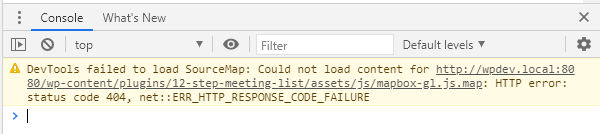
Desktop (please complete the following information):
- OS: Windows 10
- Browser: Chrome
- Version: 86.0.4240.75 (Official Build) (64-bit)
Answer by @97eighty
@crispyatl Just pulled this up and checked to see if still current. I'm not seeing the error in the console. Perhaps we fixed this in the last few releases.
Zoom Password
Show question & answer
Question
I have one Zoom meeting that wants to use a password. I put it on our spreadsheet, but it's not showing up online or the meeting guide. Are we able to put meeting passwords on the spreadsheet?
Answer
Let's start with the meeting detail on the admin meeting page. If this all checks out, we'll look at the spreadsheet aspect (because, that really shouldn't be a factor).
The form for a Zoom link with a password should be:
https://us04web.zoom.us/j/8983736284?pwd=WGJnRUNwZnpUSa9FS2FaRdJemFpyIi09
The portion after the pwd= is the hash of the password, as it is generated by Zoom based on the passcode.
If you make sure link looks similar to that in the plugin, does it then work when you click on "Join Meeting"?
Keep in mind, the password is not going to show up on the front end. We did that to help reduce the chance of someone using the information for Zoom Bombing.
If this still doesn't work, please share some screen caps of what you're seeing, and tell me what you think you should be seeing.
Let me know.
Split Import & Settings
Show question & answer
Question
Contact Details
No response
Requested Feature/Enhancment
Getting to the Settings tab takes more effort than it needs to. It should be Meetings > Settings, not Meetings > Import & Settings > Settings - I find that I'm always giving this instruction to others and wish it was simpler!
TSML Version
Latest (default)
Wordpress Version
Latest (default)
Answer by @joshreisner
I'm thinking two different menu items, Import & Export and Settings
[Bug]: Types not importing from CSV file as before
Show question & answer
Question
Contact Details
Website With Issue
Types not importing from CSV file as before
What happened?
Recently when importing our CSV file, it appears that type are only being imported to types field on the application when there is only one type in our master CSV file. When there are more than one type in our CSV all of the types are being dumped into the notes field.
Was this an intentional change? If so can it not be? If no is there a fix or work-around?
Scott
What browsers are you seeing the problem on?
No response
Relevant log output/errors
No response
Answer by @joshreisner
@sgibson71 thanks for reporting the issue
version 3.16.2 - just released - should hopefully fix it 🤞
CSV Export Not Capturing Updated Data
Show question & answer
Question
After we go in and make meeting updates in the plugin, we export the CSV and that export does not reflect the changes we just made. How can we export the most current version of the database?
Answer by @ginslo
Hi @DFWDesignGuy. Your exports should reflect the most recent changes. I suspect there may be some data caching in your case. Are you able to share some details about your infrastructure? In particular, your hosting provider and DNS provider? Also can you share the URL to the website where you are seeing this condition? That will help us to try to figure this out. Thanks.
Foltered PDF Export
Show question & answer
Question
I'm interested in exporting a PDF without online meetings. Can the PDF exporter be filtered in that way?
Answer by @SIA-WEBSUP
If you're referring to the PDF exporter available here ( https://pdf.code4recovery.org/ ), it already filters out online meetings.
The PDF generated only contains 'active' 'in person' meetings.
- see: Meeting Schedule PDF Generator - Readme