Development & Hooks
Filters, actions, extending the plugin programmatically.
6 questions — sourced from GitHub discussions & issues.
New Site Go-Live
Show question & answer
Question
Hi Community,
I recently went live with a new regional AA website. Throughout development, I had it on a subdomain. When I went live, I switched it from "newsite2024.lancasteraa.org" to just "lancasteraa.org". What is the best way to update the URLs in the public feed? The data source is littered with URLs that still include the subdomain as you can see in the link below. Thank you in advance for any insights!
Answer by @dhambleton
It occurred to me that the file should be updated every time a meeting is updated. I added a meeting, cleared the cache for good measure, and all the URLs in the data source were updated to no longer have the subdomain in them.
Security Vulnerability
Show question & answer
Question
WordFence is reporting a security vulnerability with the plugin.
It states: "The 12 Step Meeting List plugin for WordPress is vulnerable to unauthorized access due to a missing capability check in versions up to, and including, 3.14.26. This makes it possible for authenticated attackers, with subscriber-level access and above, to perform an unauthorized action."
Answer by @kiyote33
@dvcb reports "This morning I heard back from Wordfence and they have updated their database. I ran another scan with Wordfence Pro and it no longer complains about a vulnerability."
[Bug]: Freemius API error
Show question & answer
Question
Contact Details
Website With Issue
https://area72aa.org/wp-admin/post.php?post=740613&action=edit&classic-editor
What happened?
A bug happened! Attempting to update a group, though it may have been just updated a minute earlier, so nothing may have changed - received the following error,
Oops... Your server is blocking the access to Freemius' API, which is crucial for GF Square synchronization. Please contact your host to whitelist api.freemius.com, wp.freemius.com
Error received from the server:NULL
TSML Version
Latest (default)
Wordpress Version
Latest (default)
What browsers are you seeing the problem on?
Chrome
Relevant log output/errors
Just the onscreen error returned,
Oops... Your server is blocking the access to Freemius' API, which is crucial for GF Square synchronization. Please contact your host to whitelist api.freemius.com, wp.freemius.com
Error received from the server:NULL
Answer
Based on the information, I'd say it is a bug or issue with Freemius. Grab error messages out of the console. If any of them say TSML, we can look at them here, but otherwise I suggest contacting them.
TSML doesn't use Freemius, and this message segment would indicate to me something with Wordpress or your site. Your server is blocking the access to Freemius' API
[Bug]:
Show question & answer
Question
Contact Details
Website With Issue
https://secularrecoverygroup.org
What happened?
12 step Plugin update failed
| 12 Step Meeting ListDeactivate | Resume | Manage a list of recovery meetings Version 3.12.1 | By Code for Recovery | View details This plugin failed to load properly and is paused during recovery mode.An error of type E_ERROR was caused in line 9 of the file /home/courtney/public_html/wp-content/plugins/12-step-meeting-list/includes/database_updates.php. Error message: Uncaught TypeError: array_key_exists(): Argument #2 ($array) must be of type array, bool given in /home/courtney/public_html/wp-content/plugins/12-step-meeting-list/includes/database_updates.php:9 Stack trace: #0 /home/courtney/public_html/wp-content/plugins/12-step-meeting-list/includes/admin_meeting.php(32): tsml_db_update_remove_all_approximate_location_cache() #1 /home/courtney/public_html/wp-includes/class-wp-hook.php(303): {closure}('') #2 /home/courtney/public_html/wp-includes/class-wp-hook.php(327): WP_Hook->apply_filters(NULL, Array) #3 /home/courtney/public_html/wp-includes/plugin.php(470): WP_Hook->do_action(Array) #4 /home/courtney/public_html/wp-admin/admin.php(175): do_action('admin_init') #5 /home/courtney/public_html/wp-admin/index.php(10): require_once('/home/courtney/...') #6 {main} thrown |
|---|
TSML Version
Latest (default)
Wordpress Version
Latest (default)
What browsers are you seeing the problem on?
Firefox
Relevant log output/errors
An error of type E_ERROR was caused in line 9 of the file /home/courtney/public_html/wp-content/plugins/12-step-meeting-list/includes/database_updates.php. Error message: Uncaught  TypeError: array_key_exists(): Argument #2 ($array) must be of type  array, bool given in  /home/courtney/public_html/wp-content/plugins/12-step-meeting-list/includes/database_updates.php:9 Stack trace: #0  /home/courtney/public_html/wp-content/plugins/12-step-meeting-list/includes/admin_meeting.php(32):  tsml_db_update_remove_all_approximate_location_cache() #1 /home/courtney/public_html/wp-includes/class-wp-hook.php(303):  {closure}('') #2 /home/courtney/public_html/wp-includes/class-wp-hook.php(327):  WP_Hook->apply_filters(NULL, Array) #3 /home/courtney/public_html/wp-includes/plugin.php(470):  WP_Hook->do_action(Array) #4 /home/courtney/public_html/wp-admin/admin.php(175):  do_action('admin_init') #5 /home/courtney/public_html/wp-admin/index.php(10):  require_once('/home/courtney/...') #6 {main}   thrown
-- | -- | --
Answer by @masterlifter
Changed this domain back to PHP 7.4 and it corrected the update error. But...........is there a fix I can do to enable the use of this plugin with PHP 8.0..?? ( Obviously more desirable than regressing to PHP 7.4)
Meetings not found - no changes made.
Show question & answer
Question
Describe the bug (Similar to problem #247 ) This problem has the same symptoms as that problem, Meeting web pages show no meetings found. Admin can see meeting info, using exact url for a single group works, etc. Now the problem has gone away. Reporting it here for information in case someone else experiencing the problem, or someone knows the cause.
The problem was first reported at 7:00 p.m. (CST) last night. We have made no changes or updates to WP nor any plugins nor the theme. Looking at what limited logs we have showed nothing. Then about 10:00 a.m. (CST) today, we made some seemingly unrelated changes and the problem went away. We made two minor updates to Formidable Forms plugin, and we upgraded the WordPress from 5.5 to 5.6. Perhaps the problem happened to fix itself about that time, or one of the changes triggered something to fix it.
Again, no action requested on this. You can close it now. Just posting in case someone else experiences the problem.
To Reproduce Website is aaneok.org. Cannot reproduce. Steps to reproduce the behavior:
- Go to '...'
- Click on '....'
- Scroll down to '....'
- See error
Expected behavior A clear and concise description of what you expected to happen.
Screenshots If applicable, add screenshots to help explain your problem.
Desktop (please complete the following information):
- OS: [e.g. iOS]
- Browser [e.g. chrome, safari]
- Version [e.g. 22]
Smartphone (please complete the following information):
- Device: [e.g. iPhone6]
- OS: [e.g. iOS8.1]
- Browser [e.g. stock browser, safari]
- Version [e.g. 22]
Additional context Add any other context about the problem here.
Answer by @97eighty
@aanecswebmaster This sounds like a Permalink issue. This can be manually triggered by going into Settings->Permalinks and pressing Save. The action of updating plugins could have triggered the Permalink reset and fixed your problem.
Data Source Change Detection
Show question & answer
Question
Contact Details
Requested Feature/Enhancment
This feature request derives from work done on Issue #42 Automating Json Feeds: ....
- create a separate cron job for each data source feed,
- when executed, the cron job spins through the data source feed to see if there are any records updated since the last refresh of the data source, and
- when updates are found, cause a notification email to be sent to the website admin that the specific data source records stored in their database are now out of sync with what is available in the data source feed.
- The web admin can then take action to resolve the issue by refreshing the reported
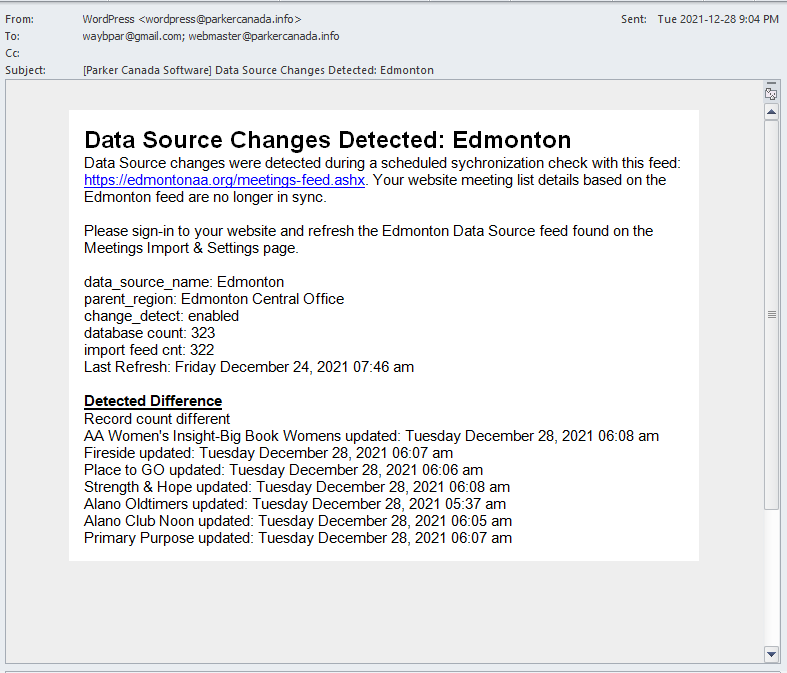 data source.
TSML Version
Latest (default)
Wordpress Version
Latest (default)
Answer by @kiyote33
Change Detection is now a core feature, having merged in 3.13.