Theme & Plugin Compatibility
Conflicts and integrations with WP themes and other plugins.
8 questions — sourced from GitHub discussions & issues.
[Bug]:Timepicker error conflicts with ACF
Show question & answer
Question
Contact Details
Website With Issue
What happened?
When I updated the 12 Step Meeting List Plugin its conflicts with the js of ACF and timepicker of ACF shoing issues, instead of timepicker popup its showing select list in weird format like (10:mm tt). Please fix this or tell me any way to fix this issue.
What browsers are you seeing the problem on?
No response
Relevant log output/errors
No response
Answer by @joshreisner
created a PR to fix the issue: https://github.com/code4recovery/12-step-meeting-list/pull/1240/files
if you want to test this fix now you can change lines 20-25 of admin_meeting.php to
add_action('admin_enqueue_scripts', function () \{
	$screen = get_current_screen();
	if (is_object($screen) && $screen->post_type === 'tsml_meeting') \{
		tsml_assets();
	\}
\});
How do i put the meetings on the main menu?
Show question & answer
Question
Hello,
I am trying to figure out how to get the meetings page on the main menu. I am using DIVI for my theme and builder.
Thanks in advance.
Troy
Answer by @joshreisner
Hi Troy,
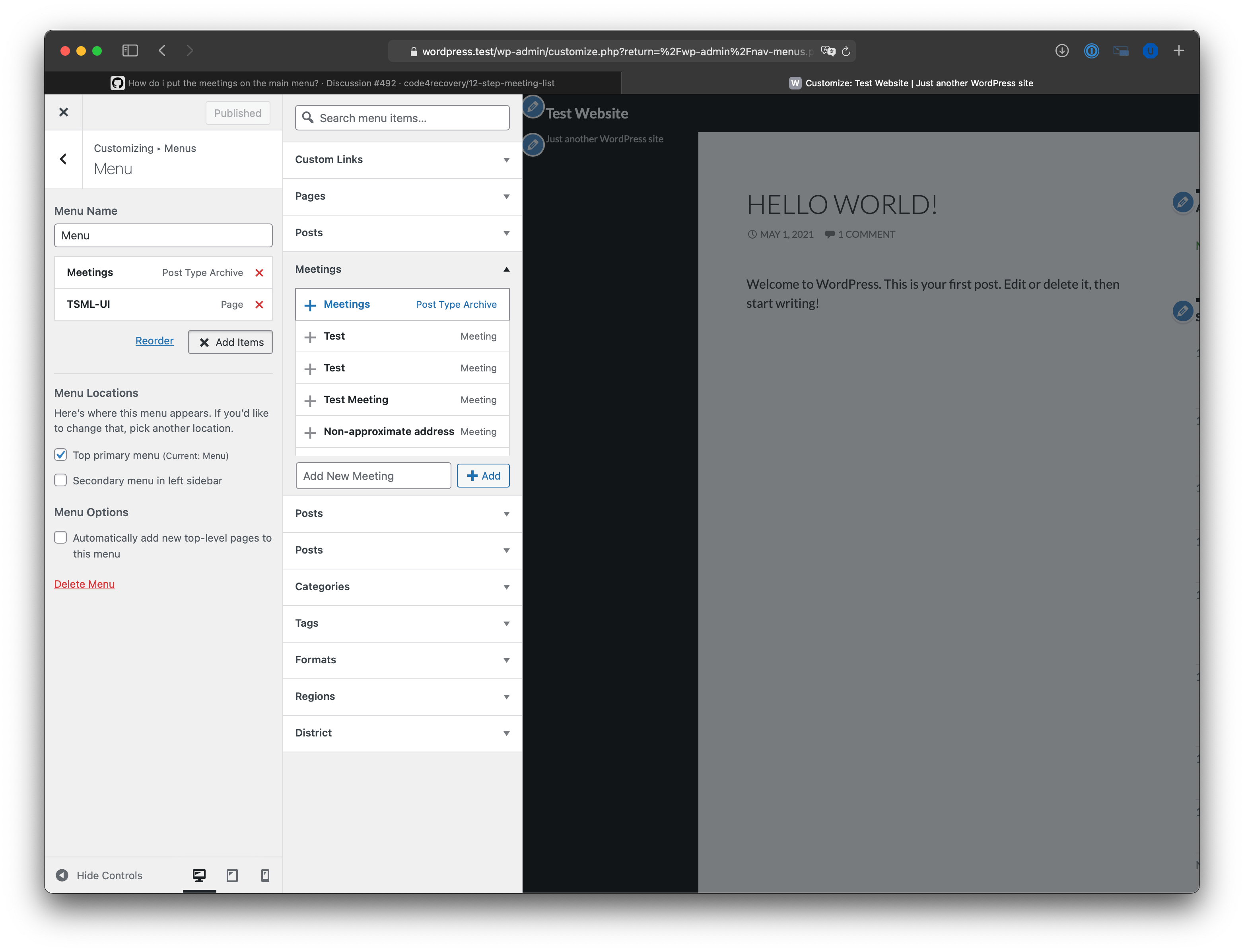
We don't offer support for specific themes, but generally speaking you can do it in Appearance > Menus or Appearance > Customize > Menus, the latter is shown here.
You can ususually add a new item, and select > Meetings > Post type archive, or you could add a custom link like /meetings (or whatever the proper link is in your case). You can get the link to your meetings page from Meetings > Import & Settings > Where's My Info?
Losing Meetings Page Link Each Night
Show question & answer
Question
Each night the link to our Meetings page is lost. This started with the latest update to the 12-step-meeting-list. Deactivating and reactivating the plugin seems to work, Resaving our permalinks also works. However this has had to be done each day since the latest update. I have attempted to deactivate other plugins I thought might be conflicting to no avail. We are on the latest version of WordPress and have all plugins up-to-date.
Answer by @joshreisner
@AkronAAIT fyi 3.14.15 is out now and should hopefully resolve the issue for you. while we never determined the cause, deploying it to the other affected site appears to have resolved it for them
WordPress caught an error with one of your plugins, 12 Step Meeting List.
Show question & answer
Question
On Oct 26 we got this error. It has not recurred so it may be a one-off thing. I wanted to forward this to you incase it's helpful : )
When seeking help with this issue, you may be asked for some of the following information: WordPress version 6.8.3 Active theme: Astra (version 4.11.10) Current plugin: 12 Step Meeting List (version 3.19.4) PHP version 8.2.29
Error Details
 An error of type E_ERROR was caused in line 78 of the file /nas/content/live/aavirginia/wp-content/plugins/12-step-meeting-list/includes/functions_email.php. Error message: Uncaught TypeError: implode(): Argument #2 ($array) must be of type ?array, string given in /nas/content/live/aavirginia/wp-content/plugins/12-step-meeting-list/includes/functions_email.php:78
 Stack trace:
 #0 /nas/content/live/aavirginia/wp-content/plugins/12-step-meeting-list/includes/functions_email.php(78): implode(', ', '')
 #1 /nas/content/live/aavirginia/wp-content/plugins/12-step-meeting-list/includes/save.php(394): tsml_email_meeting_change(Array, Object(WP_Post), Object(WP_Post))
 #2 /nas/content/live/aavirginia/wp-includes/class-wp-hook.php(324): \{closure\}(292773, Object(WP_Post), Object(WP_Post))
 #3 /nas/content/live/aavirginia/wp-includes/class-wp-hook.php(348): WP_Hook->apply_filters(NULL, Array)
 #4 /nas/content/live/aavirginia/wp-includes/plugin.php(517): WP_Hook->do_action(Array)
 #5 /nas/content/live/aavirginia/wp-includes/post.php(5079): do_action('post_updated', 292773, Object(WP_Post), Object(WP_Post))
 #6 /nas/content/live/aavirginia/wp-includes/post.php(5212): wp_insert_post(Array, false, true)
 #7 /nas/content/live/aavirginia/wp-admin/includes/post.php(453): wp_update_post(Array)
 #8 /nas/content/live/aavirginia/wp-admin/post.php(227): edit_post()
 #9 \{main\}
   thrown
Thank you!
Answer by @SIA-WEBSUP
Fixed in v3.19.8.
(see commit here)
want to display default to the current day of the week
Show question & answer
Question
I want the meetings list display to default to the current day of the week. It was functioning that way before the change. It is my fault that I didn't capture the link as it was.
I have listed what I have done below and I tried searching the wiki, and issues no luck. How can I best fix this? Is there a 'current day' parm? Many thanks in advance for your help.
Ayla J Web servant Anchorage area intergroup.
I just updated my site from divi to elemenator
and set the link https://anchorageaa.org/archives/meetings/?tsml-day=any
this did not work as I hope it displays all the meetings starting Monday not just the current day
then changed it to https://anchorageaa.org/archives/meetings The change was made on WED and now it always displays meetings for Wed
I have tried searching the documentation (and the code) and there doesn't seem to be a parm for current day.
I also have to manually refresh the page when I select another day of the week.
Answer
On my default dev site: ?post_type=tsml_meeting works.
I did append that to your domain ( to make https://anchorageaa.org/?post_type=tsml_meeting) and it still came up as Wednesday, so this doesn't appear to be a browser issue.
My first guess is to try clearing cache for the server, and refresh permalinks (Settings-->Permalinks-->Save Changes) and see if either of those steps help.
Meeting List plugin not working on WP 5.7.1
Show question & answer
Question
Describe the bug A clear and concise description of what the bug is.
To Reproduce Steps to reproduce the behavior:
- Go to 'https://meetings.aalakesumter.com/'
- Click on '....'
- Scroll down to '....'
- See error
Expected behavior Page should show meeting list
Screenshots If applicable, add screenshots to help explain your problem.
Desktop (please complete the following information):
- OS: Windows
- Browser Chrome
- Version [e.g. 22]
Smartphone (please complete the following information):
- Device: [e.g. iPhone6]
- OS: [e.g. iOS8.1]
- Browser [e.g. stock browser, safari]
- Version [e.g. 22]
Additional context This page was working fine until recently. Please advise as to repair steps.
Answer
I'm going to take a stab and guess that you have the Gutenberg plugin installed. We think that plugin may have a bug in it that is messing with TSML. We're monitoring the situation.
Disable Gutenberg plugin if you have it and see if your issues clear up.
BTW, I just looked at your site, and saw the meeting list displayed as it should, so I'm not sure if you already discovered that?
Please let me know what you find out.
see #331
[Bug]: 12 Step Meeting PDF Generator Broken as a result of recent changes in TSML
Show question & answer
Question
Contact Details
Website With Issue
What happened?
We use the "12 Step Meeting PDF Generator" WordPress plugin, from https://github.com/cdtoews/12-step-meeting-pdf, that works in concert with the 12 Step Meeting List.
Starting sometime recently, that PDF Generator plugin began throwing this error:
 Fatal error: Uncaught Error: Call to undefined function tsml_define_strings()
in /hermes/bosnaweb23a/b2708/ipg.yaiweb/york-pa-aa/york-pa-aa/wp-content/plugins/12-step-meeting-pdf-generator/includes/admin-gen.php on line 209

Call stack:

    tsmp_gen_page()
    wp-includes/class-wp-hook.php:303
    WP_Hook::apply_filters()
    wp-includes/class-wp-hook.php:327
    WP_Hook::do_action()
    wp-includes/plugin.php:470
    do_action()
    wp-admin/admin.php:259
    require_once()
    wp-admin/edit.php:10
I realize that another plugin breaking isn't your problem... but it looks like that plugin isn't actively being worked on, and it looks like it is tightly coupled to the tsml_define_strings() function in the TSML.
Do you have any advice on how to get help with this? I'm not sure what the relationship is between the PDF Generator Plugin and TSML, but perhaps if you know each other and talk, y'all could see if you could fix this? If not, I'll see if I can figure out how to get support for that plugin.
Thanks!!!
TSML Version
Latest (default)
Wordpress Version
Latest (default)
What browsers are you seeing the problem on?
No response
Relevant log output/errors
No response
Answer by @joshreisner
Hi @petermixt as for the original error, I've confirmed that yes we removed the tsml_define_strings function from our plugin as a part of code cleanup. It's unfortunate that 12 Step Meeting PDF Generator is calling this function without checking that it exists first.
In my testing it looks like this function call isn't necessary and the PDF works ok without it. So if you add the following code to your theme or child theme you should be good to go:
if (!function_exists('tsml_define_strings')) \{
  function tsml_define_strings()
  \{
  \}
\}
TSML Update 3.19 Breaks Enhanced Feedback
Show question & answer
Question
Enhanced Feedback plugin not working after update to TSML version 3.19. Rollback to version 3.18.5 and everything works as expected.
Answer by @joshreisner
looks like the feedback enhancement plugin's version of single-meetings.php is out of sync with TSML, especially these lines:
we removed the variables that it's checking here, so if you remove the if statement it should start working again.
but i'd recommend syncing the entire file. is this something you can take on?